How to Choose a Dash Cam (2026): Resolution, Parking Mode
The Rexing V1 1080p is the best budget dash cam — captures plates and color clearly, loop recording auto-overwrites old footage, and the compact profile stays below the rearview mirror sight line. The right starting point before adding GPS or parking mode.
How to Choose a Dash Cam (2026) Buying Guide
 Photo by Connor Scott McManus / Pexels
Quick verdict: For most drivers, a 2K front-only or 2K front+rear dash cam is the right choice. 1080p is adequate but 2K (2560x1440) captures plate numbers clearly at highway speeds.
Who This Guide Is For
This guide is for you if:
- You're a car owner who wants to maintain their vehicle better without becoming a mechanic
- You're confused by product options and want a clear decision framework
- You want to understand what actually matters for your use case vs. what's marketing
Skip this guide if:

- You're an experienced DIY mechanic — this covers beginner-to-intermediate maintenance
- You just want a product recommendation — see our auto comparison pages
Dash Cam Buying Guide: The One Accessory That Pays for Itself
The most underrated thing about dash cam footage in an insurance claim: the other driver's story changes the moment you say "I have it on video." Disputes about who ran the light, who was at fault in a parking lot, whether the road had ice — footage ends those arguments before they start. This guide covers everything you need to choose the right camera, configure it correctly, and install it so the cable isn't dangling across your dashboard.
Why You Need One: Real Scenarios That Change Outcomes
Insurance disputes: Without footage, fault determination in a he-said/she-said collision defaults to police report narratives and insurance adjuster judgment. With footage, it's objective. A 2K dash cam recording at 30 fps is sufficient to clearly show a vehicle's speed, the state of traffic signals, and lane positions at the moment of impact.
Parking lot hit-and-runs: The scenario most people don't think about until it happens to them. You return to a ding or dent with no note. Parking mode — available on most mid-range and premium dash cams — keeps the camera active while parked and records on motion detection. It's how drivers catch the car that backed into them while they were shopping.

Road rage documentation: If another driver is behaving dangerously — tailgating, brake checking, following aggressively — your dash cam records the plates and behavior. This footage is what law enforcement needs to act on a report.
Rideshare protection: Uber and Lyft drivers are increasingly installing three-channel cams (front + rear + interior cabin) to protect against false passenger complaints. The interior channel's wide-angle view is the evidence in a "driver behavior" dispute.
Resolution: What You Can Actually See
Resolution determines whether you can read a license plate clearly at 60 mph — the single most important real-world capability for insurance purposes.
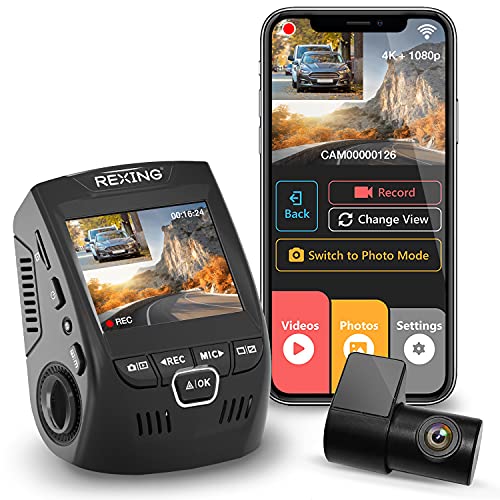
1080p (1920x1080): The entry level. Adequate for general recording and clearly shows collision impact. Plate readability at highway speed is marginal — plates are readable when the car is within 3–4 car lengths. Most budget cameras ($40–$80) record at 1080p. The Rexing V1 is the reference-tier 1080p camera.
2K (2560x1440): The sweet spot. Nearly double the pixel count of 1080p, which means dramatically better plate readability at distance. In 2K footage, plates are legible at 6–8 car lengths on a clear day. Night vision quality also improves significantly — sensor sensitivity scales with resolution in modern CMOS sensors. This is what most drivers should buy. The VIOFO A119 Mini 2 at 2K 60fps is the benchmark here.
4K (3840x2160): Overkill for most daily drivers but genuinely useful for rideshare drivers, commercial vehicles, and anyone who frequently files claims. The file sizes are much larger (requiring 256GB+ SD cards for continuous recording), the cameras cost more, and the processing demand reduces battery life. The Rexing V1P and Garmin Dash Cam 67W record at 4K with impressive detail and color accuracy.
Frame rate: 30fps is adequate for evidence purposes. 60fps records smoother motion and reads fast-moving plates more clearly, but requires more storage. The VIOFO A119 Mini 2's 2K 60fps is a meaningful advantage over 30fps cameras at the same resolution.
Front Only vs Front + Rear vs Three Channel
Front only: Records the road ahead. Captures rear-end collisions (the rear-ending vehicle is typically in your frame), red light runners, and most common driving incidents. The minimum useful configuration.
Front + rear (dual channel): Adds a rear-facing camera, usually mounted at the rear window or rear license plate. Captures what happens behind you: tailgaters, the car that follows you and then claims you brake-checked them, and any collision from behind. This is the recommended configuration for most drivers. The second camera typically records at lower resolution than the front (1080p rear on a 4K front is common).
Three channel (front + rear + interior): Required for rideshare drivers and useful for anyone transporting valuables. The interior camera is a wide-angle fisheye that covers the cabin. Note: in many states, recording audio inside a vehicle with passengers requires their consent. Check your state's laws before enabling audio recording in the cabin channel.
What does the rear camera footage actually look like when installed correctly? You're looking at a wide-angle view through the rear window. In daylight, following vehicles are clearly visible to 4–6 car lengths. At night, the footage is darker — this is where a rear camera with its own Sony STARVIS sensor makes a significant difference.
Parking Mode: How It Works and Why It Matters
Parking mode keeps the dash cam active and recording while the ignition is off. Without it, a parking lot hit-and-run that happens while you're inside a store leaves no footage.
Motion-triggered recording: The camera monitors via its motion sensor (or a low-resolution always-on frame). When it detects movement (a car passing, someone touching your vehicle), it buffers the previous 10–30 seconds and records the event. Better implementations use a dedicated impact sensor that triggers on G-force from a collision even if no motion is visually detected.
Power source — the critical issue: Parking mode requires constant power to the camera. There are three ways to provide it:
- Cigarette lighter / OBD: Only works if your car provides constant 12V power when off — most modern cars don't. Most plug-in power adapters only work with ignition on.
- Hardwire kit: Taps into your fuse box. Provides constant low-current power when the car is off, switches off automatically when the battery voltage drops below a safe threshold (typically 11.6–12V). This is the correct solution for parking mode. Hardwire kits cost $15–$25 and require routing a cable to the fuse box — a 30–60 minute installation that YouTube can walk you through in detail. Search "BlackboxMyCar hardwire dash cam installation" for a step-by-step guide.
- Internal battery: Some cameras (like the Nexar Beam) include a supercapacitor or small battery that allows brief parking mode recording without any hardwire. Coverage is limited (minutes, not hours) but captures immediate hit-and-run events.
Watch Before You Buy


“Rexing V1 Basic 1080p — $50 front-only, loop recording, G-sensor incident lock. The reference-tier entry-level dash cam. Compact, mounts cleanly behind the rearview mirror.”
See Today’s Price →What we like
- 2.4-inch LCD screen built into the camera
- 170-degree wide-angle lens
- F1.8 aperture with WDR and HDR for night driving
- G-sensor locks collision footage so loop recording cannot overwrite it
- 18-month warranty
Watch out for
- Its listing names no GPS, Wi-Fi or app, so speed and location are not recorded
Read Full Analysis
The Rexing V1 is the camera to recommend to someone who's never owned a dash cam and wants to see if it fits their life. 1080p at 30fps captures incident details clearly in daylight. The G-sensor automatically locks and protects collision footage from being overwritten. Loop recording is automatic — set it and forget it. Installation is a 20-minute cigarette lighter plug-in with basic cable routing. A no-commitment entry point that most drivers use for years.
“VIOFO A119 Mini 2 — 2K 60fps, Sony STARVIS 2 sensor, WiFi app, GPS. The community favorite for the price. Night vision that makes 1080p cameras look dark by comparison.”
See Today’s Price →What we like
- Starvis 2 sensor captures usable nighttime footage with enough detail for license plate identification — first-generation sensors at highway speeds in low light produce blurry unusable video
- 2K at 60fps records fast-moving vehicles with reduced motion blur compared to 1080p 30fps — the frame rate difference is measurable at highway speed when reviewing an incident
- GPS logging records speed, location coordinates, and driving data alongside video — critical for insurance disputes and documenting road conditions at time of incident
- Wi-Fi connectivity allows phone-based video review and camera configuration without removing the SD card from the mount
Watch out for
- Supercapacitor means no parking mode without hardwire kit
- WiFi app setup required for remote viewing
- 2K resolution smaller file sizes limit detail in still frames
Read Full Analysis
The VIOFO A119 Mini 2 is what the dash cam community recommends when you ask 'what should I actually buy?' The 2K 60fps resolution means plates are readable at 6+ car lengths in good light. The Sony STARVIS 2 sensor — the same sensor family used in premium cameras — delivers night footage that's genuinely useful rather than grainy. WiFi connects to the VIOFO app for quick clip downloads. GPS embeds your speed and location in the footage metadata. It competes directly with cameras costing twice as much.
“Rexing V1P 4K Dual Channel — 4K front, 1080p rear, front+rear coverage for $54.99. Both channels record simultaneously. Compact rear camera mounts at the rear window.”
See Today’s Price →What we like
- 4K front + 1080p rear simultaneously
- WiFi for mobile app
- Covers both front and rear incidents
- 170° dual wide-angle coverage
Watch out for
- Rear camera requires installation
- Higher price than single-camera units
- Files use more storage
Read Full Analysis
The Rexing V1P provides front and rear coverage at a price that makes dual-channel recording accessible. The 4K front camera captures plates with excellent detail; the 1080p rear camera documents what's behind you. Both channels record simultaneously on loop. The rear camera connects via a long pass-through cable that routes around the headliner — this is the installation that benefits most from a plastic pry tool and 45 minutes. Once done, you have a complete 360-degree coverage system for under $100.

“Nexar Beam GPS Dash Cam — built-in GPS, motion-activated parking mode with internal buffer, unlimited cloud storage included. The best parking mode experience for street parkers.”
See Today’s Price →What we like
- Free Nexar Classic subscription with unlimited cloud storage
- AI incident detection saves and backs up hard-braking and collision clips
- Streams live footage to your phone
- 32GB SD card included
Watch out for
- Needs a paired smartphone (iPhone 7 or later, or most Android phones) to work
- Parking-mode alerts arrive only once your phone reconnects
Read Full Analysis
The Nexar Beam's party trick is unlimited cloud storage — footage uploads automatically over your phone's hotspot or when connected to home WiFi. The built-in supercapacitor powers parking mode without a hardwire kit, buffering motion-triggered events for drivers who don't want to do fuse box work. GPS tracks your route and overlays speed data on footage. For urban drivers who park on streets and want hit-and-run protection without an installation appointment, the Nexar Beam is the right answer.

“Garmin Dash Cam 67W — ultra-wide 180-degree lens, voice control, Garmin Connect integration, automatic incident detection. The premium choice for Garmin ecosystem users.”
See Today’s Price →What we like
- Ultra-wide 180° field of view covers entire windshield
- 1440p Quad HD recording with voice control
- Automatic incident detection and cloud upload via Garmin Drive app
- Compact, discreet design with memory card included
Watch out for
- Requires Garmin Connect subscription for cloud features
- Premium price for a single-channel cam
Read Full Analysis
The Garmin Dash Cam 67W's 180-degree lens is its headline feature — it sees lane-wide, capturing incidents in adjacent lanes that narrow-FOV cameras miss. Voice commands ('OK Garmin, save video') work reliably. Garmin Drive app integration lets you review footage on your phone immediately. The incident detection algorithm automatically saves and sends clips to your phone when a collision is detected. It's a serious purchase, but the build quality, software ecosystem, and lens field of view justify the premium for frequent long-distance drivers.
Frequently Asked Questions
Is 1080p good enough for a dash cam?
What is parking mode on a dash cam?
Should I get a front-only or front-and-rear dash cam?
What SD card should I use in a dash cam?
Do I need to hardwire my dash cam?
Will a dash cam drain my car battery?
Is dash cam footage admissible in court?
What dash cam do rideshare drivers need?
How We Chose These Products
We evaluated dash cams across resolution, night vision quality, parking mode implementation, installation complexity, and real-world insurance claim utility — drawing on Vortex Radar and BlackboxMyCar channel reviews and community incident reports.
We compare each product’s Amazon listing, the manufacturer’s published specifications and Amazon customer ratings, shown with their review counts as Amazon’s data, and rank the products on how well they answer this page’s question. We do not test products in hand and we do not run our own analysis of review text. A publication or expert is named only where we cite its published findings about that product. No manufacturer paid for placement on this page.
A price appears only when Amazon’s API supplied it at a recent daily refresh, with the date and time beside it, and is withdrawn at 4 AM Central on the day after it turns 24 hours old; otherwise use “Check price on Amazon” for the live price. Read our full methodology →