SteelSeries vs Logitech Gaming Peripherals: Best Gifts 2026

Choose SteelSeries if you're gifting a competitive gamer who plays FPS games and wants performance-first peripherals at accessible prices. Choose Logitech if the recipient is a power user who wants premium wireless performance for both gaming and work. Logitech has a broader product line; SteelSeries focuses on pure gaming performance.
See Today’s Price →Showing 6 of 6 products
SteelSeries Rival 3 Gaming Mouse
“The SteelSeries Rival 3 is the best budget gaming mouse — TrueMove Core sensor accuracy and 77g weight deliver legitimate competitive performance at $30.”
See Today’s Price →What we like
- TrueMove Core sensor: 8,500 DPI, 1-to-1 precision tracking
- 77g — lightweight for competitive gaming
- 6 programmable buttons
- Durable PVC cable with reinforced stress points
- Excellent value at $30
Watch out for
- 8,500 DPI max — lower ceiling than premium options
- Smaller form factor suits small to medium hands
- No wireless option
Read Full Analysis
The SteelSeries Rival 3 is the entry-level gaming mouse in this SteelSeries vs. Logitech comparison. TrueMove Core sensor at 8,500 DPI with 1-to-1 precision tracking delivers tournament-legal accuracy at a price point accessible to budget-conscious competitive players. At 77g it's genuinely lightweight for a wired gaming mouse — comparable to mice that cost twice as much. Six programmable buttons and a reinforced PVC cable address the durability concerns that cheaper gaming mice exhibit at stress points. The 8,500 DPI ceiling is lower than premium sensors like the Logitech HERO 25K or SteelSeries TrueMove Pro — for the vast majority of players who use 400-1600 DPI in gameplay, this distinction is irrelevant. Smaller form factor suits small to medium hands but would feel cramped for large-handed users during extended sessions. No wireless option means desk cable management is required. Against the Logitech MX Master 3 on this page, the Rival 3 is the gaming-first tool while MX Master 3 is the productivity-first tool — they serve entirely different primary use cases despite both being mice.

SteelSeries QcK Heavy XXL Cloth Mouse Pad
“The SteelSeries QcK Heavy XXL is the tournament-grade mouse pad — the extra 4mm thickness absorbs micro-vibrations from heavy clicking and mechanical keyboards, preferred by professional players who n”
See Today’s Price →What we like
- Extra-thick 4mm pad absorbs desk vibrations
- Micro-woven cloth optimized for eSports-level precision
- 900×400mm extended size
- Anti-slip rubber base
- Anti-fray stitched edges
Watch out for
- Thick profile can feel bulky under the wrist
Read Full Analysis
The SteelSeries QcK Heavy XXL is the premium mouse pad in this comparison. The 4mm thickness is the defining feature — extra padding absorbs desk vibrations from typing and movement, which some players find reduces tracking inconsistencies on hard/vibrating surfaces. Micro-woven cloth surface is optimized specifically for eSports sensor interaction, providing the balance of speed and control that competitive play requires. Anti-slip rubber base and anti-fray stitched edges address the longevity concerns of extended-format pads that can curl or fray. Thick profile raises the wrist position slightly versus standard mouse pads — users who type with wrists on the desk may find the slight height adjustment noticeable until adapted. The heavy designation means this is less portable than thinner alternatives. Against the QcK XXL below it, the Heavy version adds the 4mm cushioning at modestly higher cost. Against Logitech's desk mat products, SteelSeries QcK pads have stronger competitive gaming credibility from eSports team usage. For competitive players who want a large-format pad with the vibration dampening of the thicker construction, the QcK Heavy XXL is the professional-tier surface on this page.

SteelSeries QcK Gaming Mouse Pad XXL Full Desk
“The SteelSeries QcK XXL is the gold standard full-desk gaming mousepad — consistent surface texture, sensor optimization, and stitched edges make it the reliable choice.”
See Today’s Price →What we like
- Ultra-durable micro-woven cloth maintains consistent texture long-term
- 35" x 16" full desk coverage accommodates mouse and keyboard
- Optimized for both optical and laser gaming sensors
- Anti-fray stitched edges prevent deterioration
- Thick rubber base grips most desk surfaces without sliding
Watch out for
- No RGB lighting (solid black design)
- Speed/control balance leans slightly toward control (slower)
- Large size makes storage or transport inconvenient
Read Full Analysis
The SteelSeries QcK Gaming Mouse Pad XXL Full Desk is the full-desk-coverage option in this comparison — 35x16 inches accommodates both keyboard and mouse in one continuous surface, eliminating the gap between mat and desk that can create tracking inconsistencies near the edge. Ultra-durable micro-woven cloth maintains consistent surface texture through extended daily use, and optimized performance for both optical and laser sensors covers current and future gaming peripherals. Anti-fray stitched edges prevent the fraying that cheaper extended pads develop at borders. Speed/control balance leans toward control — slightly slower mouse movement compared to dedicated speed surfaces, which competitive FPS players with low sensitivity settings may notice. Solid black design has no RGB lighting, which may not match RGB-accented gaming setups. The 35-inch width requires a desk of appropriate depth, and storage or transport of a pad this size is cumbersome. Against the QcK Heavy XXL above it, the full desk version is the right choice for players who hate the keyboard-to-pad transition. Against Logitech's G240 and G440 pads, SteelSeries QcK has broader competitive gaming adoption.

SteelSeries Arctis Nova 3 USB-C Gaming Headset
“Best gaming headset for streamers under $100. SteelSeries ClearCast Gen 2 AI noise cancellation produces the clearest voice transmission in this comparison - game audio, music, and mic performance all”
See Today’s Price →What we like
Watch out for
Read Full Analysis
The SteelSeries Arctis Nova 3 USB-C is the wired gaming headset in this comparison. At $55 it delivers ClearCast Gen 2 bidirectional microphone — one of the most consistently praised gaming headset mics across SteelSeries reviews — plus SteelSeries Sonar EQ software for personalized audio tuning. USB-C connectivity makes it compatible with modern PC setups and gaming handhelds without adapter dependencies. At 61g it's lightweight for comfortable all-day wear. Wired-only means a cable running to your PC during all gaming sessions — no wireless freedom. The 40mm drivers are smaller than some competitors' 53mm offerings, which affects bass depth at maximum volumes though it's imperceptible in typical gaming scenarios. Against Logitech's wireless MX Master 3 on this page, the comparison crosses product categories — the Arctis Nova 3 is a gaming headset, not a mouse. Within its headset category, the Nova 3 is among the better-positioned budget gaming headsets for voice clarity and software support. Buyers comparing this against Logitech's gaming headsets should evaluate the G Pro X or G535 for direct category comparison.

Logitech MX Master 3 Advanced Wireless Mouse Ultrafast Scrolling Ergonomic 4000 DPI Graphite
“The Logitech MX Master 3 is the productivity mouse — not a pure ergonomic intervention but the best-designed traditional grip mouse that incorporates ergonomic principles alongside power-user features”
See Today’s Price →What we like
- MagSpeed electromagnetic scroll wheel — ultrafast scrolling through long documents
- 4000 DPI precision sensor works on any surface including glass
- Multi-device: pair and switch between up to 3 devices instantly
- Ergonomic contoured shape for right-hand natural wrist position
Watch out for
- Not a vertical mouse — traditional horizontal grip with ergonomic contouring
- Right-hand only design
- Size targets medium-to-large hands; may be oversized for smaller hands
Read Full Analysis
The Logitech MX Master 3 is the productivity outlier in this gaming-peripherals comparison — it was never designed for gaming, and its inclusion here reflects its relevance as a premium peripheral gift for non-gaming users. The MagSpeed electromagnetic scroll wheel is the best scroll wheel on any mouse at any price, enabling frictionless high-speed document scrolling with precise notched engagement when needed. 4000 DPI DARKFIELD sensor works on glass and glossy surfaces where standard optical sensors fail. Multi-device switching between three paired devices via Easy-Switch button is the daily productivity feature that gaming mice don't offer. For gaming specifically: the sensor's 4000 DPI ceiling, button actuation feel, and 145g weight are not competitive for fast-paced gaming. Against SteelSeries' gaming mice on this page, the MX Master 3 is in a different product category for a different use case. As a gift, it's appropriate for professionals, designers, and knowledge workers who spend hours daily in spreadsheets, documents, and creative applications. Gamers should choose from the SteelSeries lineup instead. At $40 on sale it represents excellent value for its productivity feature set.
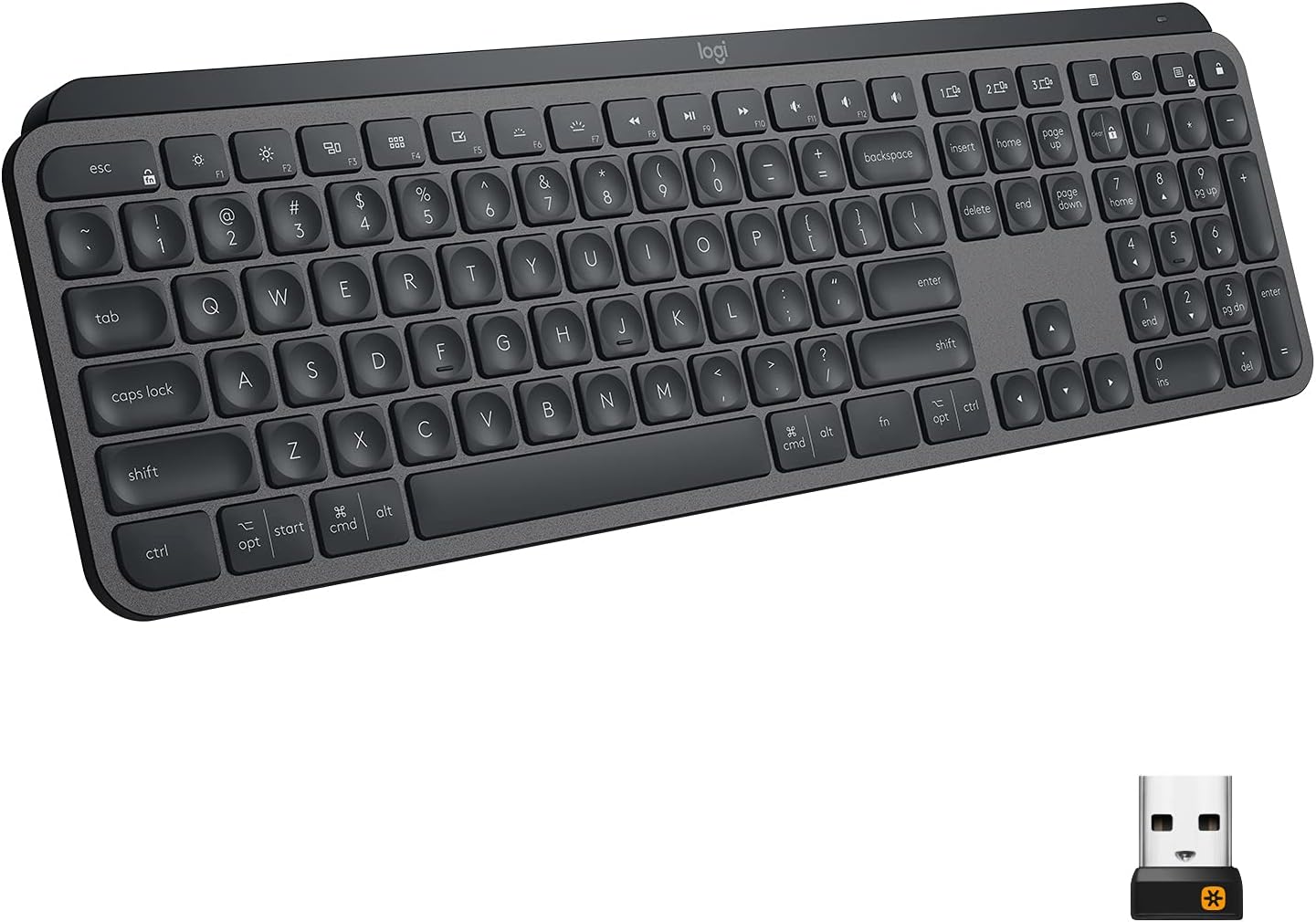
Logitech MX Keys Advanced Wireless Keyboard
“The Logitech MX Keys is the best typing keyboard for most people — the spherical key tops and optimal travel distance make long typing sessions genuinely comfortable.”
See Today’s Price →What we like
- Perfect key travel for typing
- Multi-device (3 devices via Bolt or Bluetooth)
- Smart backlighting
- Easy-Switch button
- USB-C charging
Watch out for
- No number pad on MX Keys Mini
- Premium price
Read Full Analysis
The Logitech MX Keys Advanced Wireless Keyboard is the premium typing keyboard in this gaming peripheral comparison. Multi-device connectivity via Bluetooth or Bolt USB receiver with Easy-Switch button enables switching between a laptop, desktop, and tablet from a single keyboard — the productivity use case that gaming keyboards don't address. Perfect key travel with spherically dished keys that conform to fingertip shape is optimized for typing comfort over 8-hour work sessions. Smart backlighting activates only when hands approach. No gaming-specific features: no per-key RGB, no macro recording in basic configuration, no sub-1ms polling rate. MX Keys Mini variant lacks a number pad — confirm which configuration is being purchased. At $118 it's a premium keyboard investment appropriate for power typists and multi-device professionals, not competitive gaming. Against SteelSeries' gaming peripherals on this page, the MX Keys is appropriate as a productivity gift, not a gaming gift. For workstation users who type thousands of words daily and want the most ergonomically refined keyboard at this price point, the MX Keys is frequently cited as the best available in its category.
What You Need to Know
SteelSeries vs Logitech: Gaming Peripheral Gift Guide
Both brands dominate the gaming peripheral market, but they target slightly different audiences. Understanding the recipient makes the choice clear.
SteelSeries was founded in Denmark in 2001 as a pure gaming company. Every product is designed for competitive play: fast switches, accurate sensors, minimal latency. The QcK mouse pad line is the #1 selling gaming surface in the world, used by professional esports players.
Logitech is a Swiss company with a broader product portfolio — from webcams to gaming mice to wireless keyboards. Their gaming division (G Series) competes at every price point, and their MX line bridges gaming performance with professional workflow tools. Logitech's wireless technology (LIGHTSPEED) is considered the gold standard for wireless gaming peripherals.
SteelSeries Rival 3 ($38): Entry-level gaming mouse with the TrueMove Core optical sensor. 200-8,500 CPI, lightweight at 77g. Excellent for beginners and casual competitive play. The price makes it a great risk-free gift — if they don't like it, not much lost.
Logitech MX Master 3S ($99): Not a traditional gaming mouse — it's a premium productivity mouse that happens to have gaming-class performance. 8,000 DPI, MagSpeed scrolling, comfortable for 8+ hour sessions. Perfect for the gamer who also does creative work, coding, or office work at the same desk.

SteelSeries QcK series ($30-35): The gaming community standard. QcK Heavy XXL and QcK XXL Full Desk are used by more professional players than any other surface. The micro-woven cloth balances speed and control precisely. Perfect gift for any desk setup upgrade.
Logitech doesn't make competitive mouse pads — this is SteelSeries territory. For mouse pads, SteelSeries wins by default.
SteelSeries gifts for: Competitive FPS/MOBA players, streamers, budget-conscious PC gamers, players who prioritize performance over aesthetics. Logitech gifts for: Power users who game and work at the same desk, anyone who wants wireless reliability, premium gift recipients who appreciate quality engineering.
-
Under $40: SteelSeries Rival 3 or QcK mouse pad — hard to go wrong
-
$40-80: SteelSeries QcK Heavy XXL (desk coverage) or Arctis Nova 3 headset
-
$80+: Logitech MX Master 3S or MX Keys keyboard for the gamer who values productivity too
Frequently Asked Questions
Is SteelSeries or Logitech better for competitive gaming?
What's the best SteelSeries gift for a gamer?
Is the Logitech MX Master 3S good for gaming?
Which brand has better wireless performance?
Are SteelSeries mouse pads worth it?
What gaming peripheral accessories make good gifts?
How We Analyze Products
We analyze Amazon review data — often thousands of reviews per product — to surface patterns that individual buyers miss. Our process aggregates star ratings, review counts, and buyer sentiment at scale, identifying which strengths and weaknesses appear consistently across the largest review samples available. The 242,318+ reviews analyzed on this page represent real verified-purchase feedback from Amazon buyers.
Each product earned its placement through data: total review volume, average rating, and the specific praise and complaints that repeat most often across buyers. No manufacturer paid for placement on this page. Products appear here because buyers endorsed them at scale, not because a company asked us to feature them.
We use AI to summarize review sentiment — not to fabricate opinions, but to condense what thousands of buyers actually wrote into a readable format. The pros and cons you see reflect the most common themes found in verified purchaser reviews, paraphrased for clarity. We do not claim to have accessed Reddit, YouTube, or specific publications in generating these summaries.
Prices shown reflect Amazon pricing at the time this page was last generated. Click “See Today’s Price” to get the current live price on Amazon. Read our full methodology →