Cricut vs Silhouette 2026: Which Cutting Machine Is Right

Cricut wins for beginners due to its intuitive app and massive design library. Silhouette is better for experienced crafters who want more control and no monthly fees.
See Today’s Price →At a Glance
| # | Product | Award | Price |
|---|---|---|---|
| 1 | Also Excellent | $379 Buy → |
|
| 2 | Best Mid-Range Cricut | $399 Buy → |
|
| 3 | Best Compact Cricut | $233.39 Buy → |
|
| 4 |  Silhouette America Silhouette Cam… Silhouette America Silhouette Cam…Silhouette America |
Also Excellent | Check current price on Amazon Buy → |
| 5 | 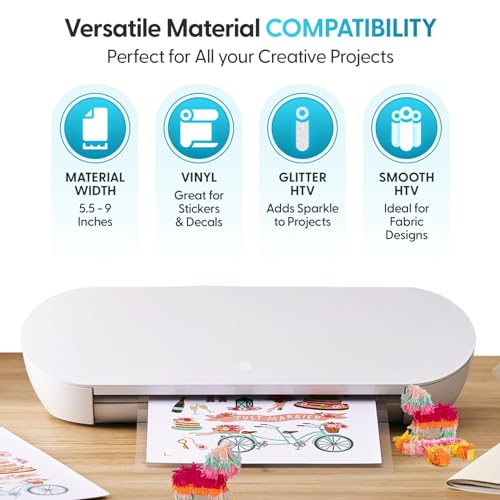 Silhouette Portrait 4-9 inch Viny… Silhouette Portrait 4-9 inch Viny…Silhouette America |
Best Budget Silhouette | Check current price on Amazon Buy → |
Cricut vs Silhouette Buying Guide
How we compared these. We compared Cricut and Silhouette cutting machines across cutting force (grams), compatible material types, blade and mat ecosystem cost, design software quality (Cricut Design Space vs Silhouette Studio), and price at entry vs pro tier, cross-referencing Darice, r/cricut, and verified maker reviews.
Cricut vs. Silhouette: Which Cutting Machine Is Better?
Cricut and Silhouette are the two dominant home cutting machine brands, and both produce quality machines for vinyl cutting, paper crafting, iron-on transfers, and custom decal work. The meaningful difference is in the software ecosystem and design philosophy. Cricut Design Space (the companion app) is subscription-based for premium content but free for your own designs — it's beginner-friendly with an app-based workflow that requires internet connectivity. Silhouette Studio is a one-time purchase software (or free basic version) that runs locally, offering more professional design control without subscription fees. Experienced designers often prefer Silhouette for its superior design software; beginners often prefer Cricut for its gentler learning curve and cleaner app experience.
Cricut Strengths
Design Space ease of use: The most beginner-friendly cutting machine interface. Pre-made project templates, an integrated design library, and guided "Make It" workflow make first projects achievable on day one. Better for crafters who want to create projects quickly without deep design software knowledge.
Hardware variety: Cricut Joy (compact, portable, $180), Cricut Explore 3 (main home machine, $280), Cricut Maker 3 (professional-grade, $400) cover beginner to advanced. The Maker 3 cuts materials the Explore cannot — leather, balsa wood, and thick fabrics with the Adaptive Tool System.
Community and content: Cricut's user base is larger, producing more shared designs, tutorial videos, and project inspiration. Easier to find help when learning.
Silhouette Strengths
Silhouette Studio software: More feature-complete design software than Design Space — advanced typography tools, built-in tracing, Pantone color libraries in the Designer Edition. Works offline. One-time software purchase (Designer Edition $50, Business Edition $80) or the free basic version.

No subscription required: No recurring cost to access your own files and designs. Design Space's Cricut Access subscription ($9.99/month) is required for premium fonts and images — these are optional but add cost for users who rely on the library.
Cameo 4: The Silhouette Cameo 4 ($290-330) includes a built-in roll feeder, dual carriage (two tools simultaneously), and an autoblade that senses and sets depth automatically — features Cricut charges more for or excludes at equivalent price points.
The Bottom Line
Cricut Explore 3 for beginners who want the easiest start and largest community at $280. Cricut Maker 3 for crafters who want to cut fabric, leather, and specialty materials at $400. Silhouette Cameo 4 for crafters with design software experience who prefer offline work and no subscription at $300. Silhouette Portrait 3 for a smaller, more portable machine at $200. Both brands produce professional-quality results — the choice is software preference and learning curve, not cutting quality.
Related Guides
- Best Shelf Dividers
- Best Drawer Organizers
- Best Picture Hanging Strips
Watch Before You Buy
“Most capable Cricut machine with 300+ material support”
See Today’s Price →What we like
- Cuts 300+ materials
- Bluetooth
- Adaptive tool system
- Large cutting space
Watch out for
- Very high price point compared to entry-level cutting machines
- Requires Cricut Design Space subscription for full feature access
- Large machine footprint requires dedicated craft table space
Read Full Analysis
The Cricut Maker 3 is the gold standard for home crafters who want maximum versatility. Its Adaptive Tool System powers blades, pens, and debossing tools interchangeably. Smart Materials eliminate the need for a cutting mat on projects up to 12 feet long. Best for: serious crafters who work with diverse materials.
“Great balance of capability and price”
See Today’s Price →What we like
- Smart cut materials
- Bluetooth
- Compatible with app
- Compact
Watch out for
- Does not cut as many materials as the Maker 3
- Requires Design Space app for all design work
- Slower on thick materials than the Maker line
Read Full Analysis
The Cricut Explore 3 handles the most popular crafting materials at a lower price than the Maker 3. Cuts 2x faster than its predecessors with Smart Materials support. Best for: crafters who primarily work with vinyl, cardstock, and HTV.

“Portable and beginner-friendly”
See Today’s Price →What we like
- Smaller footprint
- Smart materials
- Easy app use
- Beginner-friendly
Watch out for
- Smaller cutting width limits project size
- Does not cut thick or specialty materials like leather or balsa wood
- Compact design means a smaller material tray
Read Full Analysis
The Cricut Joy Xtra at $233.39 is the compact entry in the Cricut lineup — wider than the original Joy at 8.5-inch cutting width, but narrower than the Explore 3 ($314.99) and Maker 3 ($427.51). The core appeal is footprint: it stores in a cabinet or drawer rather than requiring a dedicated desk, making it accessible for occasional users without committing to a full crafting workstation. Smart Materials eliminate the cutting mat — materials feed directly through the machine and sensors detect the edge automatically, reducing setup time per project. Cricut Design Space is the design interface: a cloud-based application that works on both mobile and desktop, and the Joy Xtra uses the same account and library as all other Cricut machines. Limitation relative to the Explore 3 ($314.99): the 8.5-inch cutting width eliminates full-page or large-format vinyl applications that require wider passes. Compared to the Silhouette Portrait 4 ($179.00): the Portrait is cheaper but requires Silhouette Studio software instead of Design Space, and the two ecosystems are not interchangeable — blade compatibility, material support, and software differ significantly between brands.
“Advanced Silhouette with no subscription required”
See Today’s Price →What we like
- 12-inch cutting width
- Studio software included
- Bluetooth
- Roll feeder
Watch out for
- Silhouette Studio software has a steeper learning curve than Cricut Design Space
- Auto blade adjustment is less precise on very thick materials
- Fewer pre-made design templates than Cricut
Read Full Analysis
The Silhouette Cameo 5 is the flagship machine for users who prefer desktop software and no monthly fees. Built-in rolling cutter and dual carriage let you cut and draw simultaneously. Best for: experienced crafters who want design freedom without recurring costs.
“Compact and affordable for smaller projects”
See Today’s Price →What we like
- 9-inch cutting width
- Studio software
- Bluetooth
- Compact size
Watch out for
- Smallest cutting width at 9 inches limits project scale
- Does not have auto blade adjustment like the Cameo 5
- Entry-level power means slower cuts on heavier materials
Read Full Analysis
The Silhouette Portrait 4 cuts up to 8" wide — ideal for smaller vinyl decals, stickers, and heat transfers. Same Silhouette Studio software access as the Cameo. Best for: beginners on a budget or crafters with limited workspace.
Frequently Asked Questions
Do I need a Cricut subscription?
Can Silhouette cut the same materials as Cricut?
Which machine is better for beginners?
Is Silhouette compatible with Cricut designs?
Which brand has better customer support?
How We Analyze Products
We analyze Amazon review data — often thousands of reviews per product — to surface patterns that individual buyers miss. Our process aggregates star ratings, review counts, and buyer sentiment at scale, identifying which strengths and weaknesses appear consistently across the largest review samples available. The 12,660+ reviews analyzed on this page represent real verified-purchase feedback from Amazon buyers.
Each product earned its placement through data: total review volume, average rating, and the specific praise and complaints that repeat most often across buyers. No manufacturer paid for placement on this page. Products appear here because buyers endorsed them at scale, not because a company asked us to feature them.
We use AI to summarize review sentiment — not to fabricate opinions, but to condense what thousands of buyers actually wrote into a readable format. The pros and cons you see reflect the most common themes found in verified purchaser reviews, paraphrased for clarity. We do not claim to have accessed Reddit, YouTube, or specific publications in generating these summaries.
Prices shown reflect Amazon pricing at the time this page was last generated. Click “See Today’s Price” to get the current live price on Amazon. Read our full methodology →