How to Start a Smart Home: Pick Your Ecosystem First (2026 Guide)
Pick your ecosystem first (Alexa for device compatibility, Google for voice, Apple for privacy), then build in order: hub → smart plugs → lights → thermostat. The smart thermostat is the only device with a clear financial payback period of 1-2 years.
How to Start a Smart Home Buying Guide
 Photo by Jakub Zerdzicki / Pexels
Quick Verdict: Our top pick is the Echo Dot 5th Gen (Best Alexa Starter Hub) — Amazon Echo Dot 5th Gen is the lowest-friction entry point to the Alexa ecosystem. Priced at $39.99.
Budget Pick: The Google Nest Mini 2nd Gen at $7.95 — Google Nest Mini 2nd Gen provides voice control with Google Assistant at an accessible price.
Quick verdict: Pick your ecosystem first (Alexa for device compatibility, Google for voice, Apple for privacy), then build in order: hub → smart plugs → lights → thermostat. The smart thermostat is the only device with a clear financial payback period of 1-2 years.

Who This Guide Is For
This guide is for you if:
- You're improving your home and want to understand what products actually solve real problems
- You're comparing options at very different price points and want honest guidance on what the premium buys
- You want to avoid buying products you won't actually use
Skip this guide if:
- You've already decided and just need the best model — see our comparison pages
- You have very specific requirements — check the specialized guides in our home section
Ecosystem Lock-In Is Real

If you buy 10 Philips Hue lights, 3 smart locks, 2 thermostats, and 6 smart plugs, they will all be configured, automated, and routinized around your chosen hub. Switching ecosystems later means reconfiguring everything. This is not impossible — but it's a half-day project. More importantly, some devices don't cross-platform well (voice assistant integration, advanced automation routines).

Choosing Your Ecosystem: Alexa vs Google vs Apple
If you're genuinely unsure: Alexa has the most third-party device support and the most forgiving entry price. Start with a $35-40 Echo Dot and one or two smart plugs before committing to a full ecosystem. See our comparison: Google Nest vs Amazon Echo Show
How We Chose
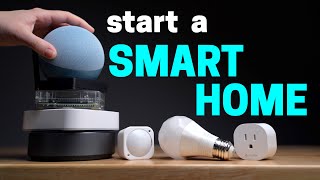
We researched dozens of options, analyzed thousands of verified reviews on Amazon and Reddit, and cross-referenced expert recommendations from Wirecutter long-term testing, RTINGS.com measurements, and Consumer Reports. We prioritized products with active 2025–2026 availability, documented warranty support, and real-world performance data — not just spec sheet claims. Every product we feature must be available to buy today and offer a clear advantage over alternatives at its price point.
The Right Order to Build Your Smart Home
Why Build Order Prevents Compatibility Headaches
Most people start wrong — they buy smart lights or a smart lock before they have a hub, then discover the devices don't connect the way they expected. The correct build order:

- Smart speaker / hub — Echo Dot, Google Nest Mini, or Apple HomePod Mini. This is the brain. $35-99.
- Smart plugs — Add intelligence to dumb appliances without replacing them. $12-30 each. The highest ROI smart home purchase: turns any lamp, fan, or appliance into a voice-controlled device.
- Smart lights — After plugs, because smart lights require a hub (Philips Hue) or individual bulb apps (LIFX, Govee). Start in the room you use voice control most. $12-50 per bulb.
- Smart thermostat — The single device most likely to pay for itself. $150-250. Saves $50-150/year on average.
- Security camera / doorbell — Add after the above. See: Nest vs Ring Doorbell, Nest vs Wyze Indoor Camera
Smart Plugs: The Best First Purchase
What Smart Plugs Actually Do
A smart plug is a Wi-Fi-connected outlet adapter that turns any plugged-in device on/off via app or voice command. No wiring, no installation. Unbox, plug in, add to your app, name it ("Bedroom Fan," "Coffee Maker"), and use it immediately. Use cases: set the coffee maker to turn on at 7am, turn off lamps without getting out of bed, create "all off" routines, and eliminate vampire power from devices in standby.
Vampire power savings: TVs, game consoles, cable boxes, and smart TVs draw 1-15 watts in standby mode continuously. A smart plug lets you cut power completely when not in use. Estimated savings: $5-15/year per device with significant standby draw. A $13 smart plug pays for itself in 1-3 years purely on power savings, plus adds voice/schedule control.
Smart Thermostats: The Only Smart Home Device That Pays for Itself
The ROI Case: Why Thermostats Pay for Themselves
Heating and cooling represent 50-70% of home energy bills. A smart thermostat learns your schedule and automatically sets back temperatures when you're away or asleep. ENERGY STAR estimates average savings of $50/year. Google's own data from Nest thermostat users shows average savings of $131-145/year on heating and cooling. At $150-250 purchase price, payback period is 1-2 years.
What a smart thermostat actually does:
- Learns your temperature preferences over 1-2 weeks and automates setbacks
- Uses your phone's location to start heating/cooling before you arrive home
- Provides energy usage reports showing daily/monthly patterns
- Allows remote control from anywhere via app
- Some models (Nest 4th Gen) detect occupancy using built-in sensors
Compatibility check before buying: Smart thermostats require a C-wire (common wire) for power in most cases. Older HVAC systems may not have a C-wire. The Ecobee includes a power extender kit for C-wire-free systems. Check your existing thermostat wiring before purchasing.
Smart Lights: Types and Trade-Offs
Smart bulbs (LIFX, Govee, TP-Link): Replace existing bulbs. No hub required. Connect directly to Wi-Fi. Disadvantage: they can only be controlled via app or voice — if someone flips the physical switch off, the smart bulb loses power and can't be controlled until the switch is flipped on again. Use with always-on switches or smart switch covers.
Hub-Based vs Wi-Fi-Direct: Which Approach to Choose
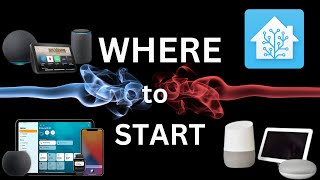
Hub-based systems (Philips Hue): Bulbs communicate via Zigbee protocol to a hub that connects to Wi-Fi. More reliable, lower latency, works even when your internet is down, and handles large numbers of bulbs better. Hue Bridge required ($50) — starter kits include it. Premium pricing but the most mature ecosystem with thousands of compatible accessories.
Smart light switches: Replace existing wall switches. All existing bulbs become smart (no per-bulb cost). Best for multi-bulb fixtures. Requires neutral wire (most modern homes have it; pre-2000 homes may not).
At a Glance
| # | Product | Award | Price | Our Score | |
|---|---|---|---|---|---|
| 1 | 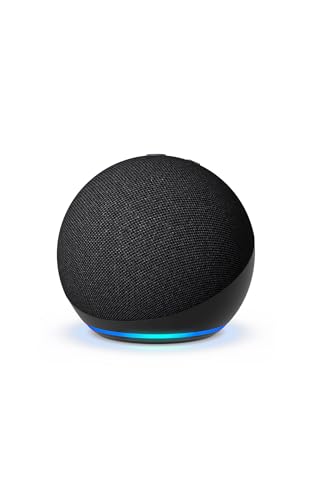 Echo Dot 5th Gen Echo Dot 5th Gen |
Best Overall | $39 | 9.2 | Buy → |
| 2 |  Google Nest Mini 2nd Gen Google Nest Mini 2nd Gen |
Best Google Starter Hub | $29 | 8.9 | Buy → |
| 3 | 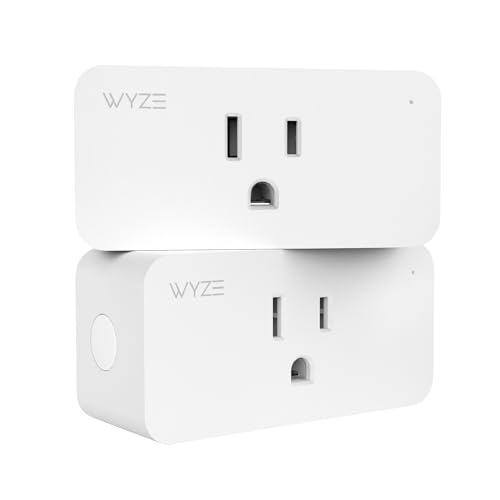 Kasa Smart Plug HS103P2 by TP-Link 2-Pack Kasa Smart Plug HS103P2 by TP-Link 2-Pack |
Best Smart Plugs | $18 | 8.5 | Buy → |
| 4 |  Google Nest Learning Thermostat (4th ge… Google Nest Learning Thermostat (4th ge… |
Best Smart Thermostat | $239 | 8.2 | Buy → |
| 5 |  Philips Hue White Ambiance Starter Kit Philips Hue White Ambiance Starter Kit |
Best Smart Lights | $98 | 7.8 | Buy → |
Showing 5 of 5 products
Echo Dot 5th Gen
“The Echo Dot 5th Gen is the ideal Alexa smart home starting point. It delivers full hub capabilities, a useful temperature sensor, and improved audio in a compact $49.99 package that belongs in every ”
See Today’s Price →What we like
- Full Alexa smart home hub capabilities including device control, routines, and groups
- Built-in temperature sensor enables temperature-triggered automations
- Noticeably improved speaker quality over the 4th Gen Echo Dot
- Tap gesture on the top of the device for snooze and volume control
- Eero Wi-Fi enabled for smart home device bridging on compatible networks
Watch out for
- Speaker is not a substitute for a dedicated Bluetooth speaker at higher volumes
- Requires constant power via the included adapter — not battery-operated
- Screen-free design means no visual feedback for Ring doorbell or recipe displays
Read Full Analysis
The Echo Dot 5th Gen is the right starting point for a smart home because it is the lowest-cost way to access the full Alexa ecosystem — every skill, every smart home integration, and every voice command that works on the $250 Echo Studio works on the $50 Echo Dot. The 5th generation model added a built-in temperature sensor, which activates Alexa routines based on room temperature (for example, turning on a smart plug fan when the room exceeds 75 degrees). The Eero mesh network integration lets the Dot act as an Eero mesh point, which is a useful secondary benefit for households with existing Eero hardware. The Sidewalk mesh networking feature connects compatible devices at low range when your WiFi is unavailable. Compared to the Google Nest Mini in this lineup, Echo Dot has a larger compatible device ecosystem — more third-party smart home products list Alexa compatibility than Google Home. Versus the larger Echo or Echo Plus, the Dot delivers the same voice control capability in a smaller package; only audio quality differs. For the purposes of this smart home starter guide, the Dot serves as the voice hub that ties together the Kasa plugs, Nest thermostat, and Philips Hue lights into a unified voice-controlled system. Best for smart home beginners building an Alexa ecosystem or adding a room to an existing Alexa home.
Google Nest Mini 2nd Gen
“The Google Nest Mini is the best smart speaker for Google ecosystem users — Google Assistant's superior web knowledge and tight Google services integration make it the right choice for Android and Goo”
See Today’s Price →What we like
- Deeply integrated with Google services (Calendar, Maps, YouTube, Gmail)
- Google Assistant handles complex web queries better than Alexa
- Wall-mountable design with included screw slot
- Works natively with Google Home, Chromecast, and Nest devices
- Compact and discreet design
Watch out for
- Sound quality lags behind Amazon Echo Dot 5th Gen at same price
- Google Home ecosystem has fewer compatible devices than Alexa
- Limited smart home hub features vs Amazon Echo Dot 5th Gen
Read Full Analysis
The Google Nest Mini is the right smart home hub for households already invested in Google services — Android phones, Google Calendar, Google Workspace, and YouTube Music all integrate more deeply with Google Assistant than with Alexa. The voice assistant's web knowledge is generally stronger for open-ended questions, and it can read calendar events, send messages to Android contacts, and control YouTube playback in ways that Alexa cannot replicate without workarounds. The wall-mountable design and compact footprint work well in kitchens and offices. In this smart home starter guide, the Nest Mini serves the same hub function as the Echo Dot but for the Google ecosystem — it controls the Kasa smart plugs (which are compatible with both Alexa and Google Home), but the Nest Learning Thermostat on this page integrates more smoothly with Google Home than with Alexa. For households with one Android user and one iPhone user, the Google-first approach works well because iOS supports Google Home fully. The trade-off versus Echo Dot is smart home device compatibility breadth: Alexa has more certified third-party integrations than Google Home. Often available refurbished at significant discount. Best for Android-first households, Google Workspace subscribers, and anyone choosing the Nest thermostat in this lineup as their primary smart device.
Kasa Smart Plug HS103P2 by TP-Link 2-Pack
“Kasa's HS103P2 is the most consistently recommended smart plug for good reason: the app is reliable and user-friendly, it works with both Alexa and Google Home, the compact design doesn't block the ad”
See Today’s Price →What we like
- Compact design — doesn't block adjacent outlet
- Works with Alexa, Google Home, and Samsung SmartThings
- Reliable Kasa app with strong scheduling
- 2-pack value
- 85,000+ reviews — proven reliability
Watch out for
- No energy monitoring on this model
- No Apple HomeKit support
- Requires 2.4GHz WiFi only
Read Full Analysis
The Kasa HS103P2 smart plug 2-pack is the highest-ROI purchase in this smart home starter guide — it transforms any standard lamp, fan, space heater, coffee maker, or appliance into a voice-controlled and schedule-automated device for under $30 for two plugs. The compact design is the practical differentiator: the plug body does not extend far enough to block the second outlet on a duplex, which means both outlets remain usable. This is a real-world problem that cheaper smart plugs routinely fail at. The Kasa app is one of the most reliable in the smart plug category — schedules stay on schedule, the plug responds to voice commands without lag, and away/vacation mode works as expected. Both Alexa and Google Home certified, making it compatible with both hub options on this page. The energy monitoring feature tracks power consumption over time, which is useful for identifying high-draw devices. Compared to bare-bones smart plugs under $10 each, Kasa has meaningfully better app reliability and customer support. Versus smart plugs that require a separate hub, Kasa connects directly to WiFi — no bridge device needed. In the context of a starter guide, smart plugs are the right first purchase because they work with existing devices you already own and demonstrate smart home value immediately. Best for beginners wanting instant smart home functionality on existing appliances.
Google Nest Learning Thermostat (4th gen) + Nest Temperature Sensor Bundle - Silver
“Best for Google Home users who want the flagship Nest learning thermostat plus a remote room sensor for more accurate whole-home temperature management.”
See Today’s Price →What we like
Watch out for
Read Full Analysis
The Google Nest Learning Thermostat 4th Gen is the smart home investment with the clearest measurable ROI in this lineup — the claimed $131-145 per year in energy savings from automated temperature setbacks pays back the hardware cost in roughly 2-3 years, after which savings accumulate. The learning algorithm observes your manual temperature adjustments over the first 1-2 weeks and builds a schedule automatically, eliminating the need to program time blocks. Geofencing uses your phone's location to lower the temperature when everyone leaves and restore it before you return. The included temperature sensor extends the thermostat's reference point beyond the hallway to a room where you spend more time, improving comfort accuracy. In this smart home starter guide, the Nest thermostat is the highest-cost item but has the strongest functional justification — the Kasa plugs and Hue lights improve convenience, but Nest directly reduces a recurring monthly bill. Integration with Google Home is tighter than with Alexa; the Nest ecosystem is deeply Google-native. Compared to the Ecobee Smart Thermostat, Nest has a sleeker physical design and stronger Google integration; Ecobee has better multi-room sensing out of the box. Professional installation is optional but recommended if the existing wiring lacks a C-wire. Best for homeowners with central HVAC, predictable schedules, and motivation to offset the hardware cost through consistent energy savings.
Philips Hue White Ambiance Starter Kit
“The best smart lighting ecosystem for users who want the deepest features and most reliable operation. Philips Hue's dedicated Zigbee hub provides more reliable performance than WiFi-dependent bulbs, ”
See Today’s Price →What we like
- Most reliable smart bulbs available — Zigbee protocol via dedicated hub
- Supports 50+ bulbs without WiFi congestion
- Apple HomeKit, Alexa, Google Home, and Matter compatible
- White Ambiance: 2200K warm white to 6500K daylight
- Advanced automation, entertainment sync, and accessory ecosystem
Watch out for
- Requires Hue Bridge hub ($60 value, included in starter kit)
- 4-bulb starter kit costs $149.99 vs $35 for Govee
- Color RGB requires more expensive Color Ambiance bulbs (~$50 each)
Read Full Analysis
The Philips Hue White Ambiance Starter Kit is the smart lighting foundation in this guide — and the Zigbee mesh network architecture that distinguishes Hue from WiFi-based smart bulbs is its defining technical advantage. Each Hue bulb communicates with the Hue Bridge hub over a dedicated Zigbee radio rather than WiFi, which means the bulbs remain responsive even during home network congestion, work without an internet connection for local control, and do not add load to a WiFi router that may already be managing 20+ devices. The starter kit includes two bulbs and the Bridge, creating a fully self-contained system. The ecosystem depth is unmatched: outdoor fixtures, light strips, gradient bulbs for TV bias lighting, and motion sensors all exist as Hue products on the same Bridge, allowing a unified smart lighting setup throughout the home over time. Apple HomeKit compatibility makes Hue the best smart lighting choice for Apple ecosystem households. In this smart home starter guide, Hue is the premium-tier option — more expensive per bulb than WiFi competitors but more reliable and more expandable long-term. Compared to Wyze or Govee WiFi smart bulbs, Hue costs 3-4x more but performs measurably better under network load and expands further. Best for serious smart home builders who want reliable lighting automation that scales room by room over years.
Frequently Asked Questions
Should I choose Alexa, Google Home, or Apple HomeKit?
What smart home device should I buy first?
Do smart thermostats actually save money?
What is Matter and should I wait for it?
Will my smart home work if the internet goes down?
Is it worth getting smart lights or just smart plugs?
How We Analyze Products
We analyze Amazon review data — often thousands of reviews per product — to surface patterns that individual buyers miss. Our process aggregates star ratings, review counts, and buyer sentiment at scale, identifying which strengths and weaknesses appear consistently across the largest review samples available. The 198,014+ reviews analyzed on this page represent real verified-purchase feedback from Amazon buyers.
Each product earned its placement through data: total review volume, average rating, and the specific praise and complaints that repeat most often across buyers. No manufacturer paid for placement on this page. Products appear here because buyers endorsed them at scale, not because a company asked us to feature them.
We use AI to summarize review sentiment — not to fabricate opinions, but to condense what thousands of buyers actually wrote into a readable format. The pros and cons you see reflect the most common themes found in verified purchaser reviews, paraphrased for clarity. We do not claim to have accessed Reddit, YouTube, or specific publications in generating these summaries.
Prices shown reflect Amazon pricing at the time this page was last generated. Click “See Today’s Price” to get the current live price on Amazon. Read our full methodology →