Home › Music › Best Audio Interface for Beginners (2026)
Best Audio Interface for Beginners (2026)
By MyAwesomeBuy Research Team · Updated April 8, 2026 · Our Methodology
No manufacturer paid for placement. Rankings based on verified buyer review data.
Quick Answer
The Focusrite Scarlett Solo 3rd Gen ($120) is our top pick — one mic input with a class-leading preamp, instrument input, and direct monitoring that eliminates latency. Upgrade option: Scarlett Solo 4th Gen ($200) with improved EIN specs and Air mode that emulates the ISA transformer character. Budget analog option: Behringer Xenyx 802 ($60) for multi-channel mixing without computer recording.
Focusrite Scarlett Solo 3rd Gen USB Audio Interface
$110
at Amazon
Best for: Beginners building a home recording setup with a proven interface
“The most beginner-friendly audio interface — Focusrite's GAIN halo lighting makes input level setting visual and intuitive. Scarlett interfaces consistently deliver better preamp quality than their pr”
#27 in Musical Instruments (See Top 100 in Musical Instruments) #1 in Computer Recording Audio Interfaces
Compatible Devices
Microphone, Instrument, Personal Computer, Headphones, Studio Monitors
Frequency Response
20 KHz
Number Of Channels
2
Supported Software
All audio recording software
Included Components
Scarlett Solo 3rd Gen, 1 x USB cable (Type C-A)
Maximum Sample Rate
192 KHz
Warranty Description
2 year warranty.
Connectivity Technology
USB
Item Dimensions D X W X H
1.71"D x 5.65"W x 3.77"H
Global Trade Identification Number
00815301005179
Also Excellent
Focusrite Scarlett Solo 4th Gen USB Audio Interface
$159
at Amazon
Best for: Podcasters and home studio musicians starting their first audio recording setup
“The best first audio interface for podcasters and home studio musicians — the Scarlett Solo 4th Gen is the industry default entry point for a reason.”
Quick Verdict: Our top pick is the Focusrite Scarlett Solo 3rd Gen USB Audio Interface (Best Overall) — Focusrite Scarlett Solo 3rd Gen USB Audio Interface: A top choice for beginners.. Priced at $110.
Great for: Home recording musicians who want to connect mics and instruments to a computer with low latency and clean preamps
Not ideal if: You only record vocals with a USB microphone — a USB mic bypasses the need for an interface entirely
Focusrite Scarlett Solo 3rd Gen USB Audio Interfac...
An audio interface is the hardware bridge between your microphone or instrument and your computer — it converts analog audio signals to digital (ADC) for recording and digital back to analog (DAC) for monitoring. For home recording, podcasting, or streaming, it's the foundation of your signal chain.
Why not just use a built-in laptop mic or headphone jack: laptop microphone preamps have 40-60dB of noise floor, making any recording sound hissy and unprofessional. The headphone output doesn't accept microphone-level signals. A dedicated audio interface provides clean, low-noise preamps and proper signal levels for all audio inputs.
The Biggest Mistake Beginners Make When Buying An Audio Interface
Preamp quality is the most important spec: the microphone preamp converts your mic's low-level signal into a line-level signal the interface can digitize. Cheap preamps add noise and frequency coloring. The Focusrite Scarlett series has class-leading preamps for the price — the 3rd Gen Scarlett Solo's preamp is comparable to dedicated rackmount preamps costing 3-4x as much.
XLR vs 1/4-inch inputs: XLR inputs accept balanced microphone signals (dynamic and condenser microphones). 1/4-inch instrument inputs (Hi-Z) accept electric guitar, bass, and keyboards. The Scarlett Solo provides one of each. The Behringer Xenyx 802 provides two XLR/line combo inputs and multiple stereo line inputs for mixing multiple sources simultaneously.
Common Mistakes to Avoid
Zero-latency monitoring: a major advantage of audio interfaces over built-in sound cards is direct monitoring — you hear the input signal in real-time without the 5-20ms delay (latency) that software processing introduces. The Scarlett Solo's direct monitoring mix knob blends the live input with computer playback, letting you perform to a backing track while monitoring yourself with zero delay.
Sample rate and bit depth: 44.1kHz/24-bit is the standard for music production. 48kHz is used for video production. The Scarlett Solo supports up to 192kHz/24-bit — far beyond what beginners need. For podcasting, 44.1kHz or 48kHz at 16-bit is sufficient.
Not sure which home recording gear to choose? See our home recording studio guide for help making the right call.
Yes, if you want professional-quality recordings. A built-in laptop sound card has high noise floor, low-quality preamps, and no XLR input for professional microphones. A dedicated audio interface (starting at $60-120) provides clean preamps, proper microphone connectivity, and zero-latency monitoring. If you're recording only voice for casual videos at 720p resolution or below, a USB microphone might be sufficient — but for music, podcasting, or streaming with quality audio, an interface is essential.
What microphone do I need with a Focusrite Scarlett Solo?
Any standard XLR microphone works with the Scarlett Solo. For vocals and acoustic instruments, popular beginner choices are the Audio-Technica AT2020 ($99), Rode NT1 ($200), or Shure SM7B ($399). For live performance-style cardioid dynamics (Shure SM58, $99), the Scarlett Solo provides 56dB of clean gain — sufficient for dynamic mics. The Scarlett Solo provides 48V phantom power for condenser microphones.
What DAW software do I use with a Focusrite interface?
The Scarlett Solo 3rd and 4th Gen include a free license for Ableton Live Lite (a scaled-down version of the industry-standard Ableton Live). Ableton Live Lite allows up to 8 audio tracks and supports all basic recording and production functions. Pro Tools First (free version), GarageBand (Mac only, free), and Audacity (free, Windows/Mac/Linux) are also popular options. All work with any class-compliant USB audio interface including the Scarlett Solo.
Can I use an audio interface without a microphone?
Yes — you can record guitar, bass, or keyboard directly through the 1/4-inch instrument input without a microphone. Many guitarists use a Scarlett Solo to record DI (direct input) guitar and apply amp simulation plugins (Neural DSP, Bias FX) in their DAW. This is a common and high-quality approach for home guitar recording that eliminates the need for a microphone or physical amplifier.
What is phantom power and do I need it?
Phantom power (+48V) is required by condenser microphones to operate — it powers the internal circuitry that makes condenser mics more sensitive than dynamic mics. The Scarlett Solo provides 48V phantom power via a button on the front panel. Dynamic microphones (Shure SM58, SM7B) do not require and are not damaged by phantom power. If you plan to use a condenser mic, confirm your interface provides phantom power.
We analyze Amazon review data — often thousands of reviews per product — to surface patterns
that individual buyers miss. Our process aggregates star ratings, review counts, and buyer
sentiment at scale, identifying which strengths and weaknesses appear consistently across
the largest review samples available.
Each product earned its placement through data: total review volume, average rating, and the
specific praise and complaints that repeat most often across buyers. No manufacturer paid for
placement on this page. Products appear here because buyers endorsed them at scale, not
because a company asked us to feature them.
We use AI to summarize review sentiment — not to fabricate opinions, but to condense what
thousands of buyers actually wrote into a readable format. The pros and cons you see reflect
the most common themes found in verified purchaser reviews, paraphrased for clarity. We do not
claim to have accessed Reddit, YouTube, or specific publications in generating these summaries.
Prices shown reflect Amazon pricing at the time this page was last generated. Click
“See Today’s Price” to get the current live price on Amazon.
Read our full methodology →
Affiliate disclosure: When you buy through our links, we may earn
a small commission at no extra cost to you. This helps us keep the reviews free and
the data updated. Our recommendations are based on data, not who pays us.
Learn more →
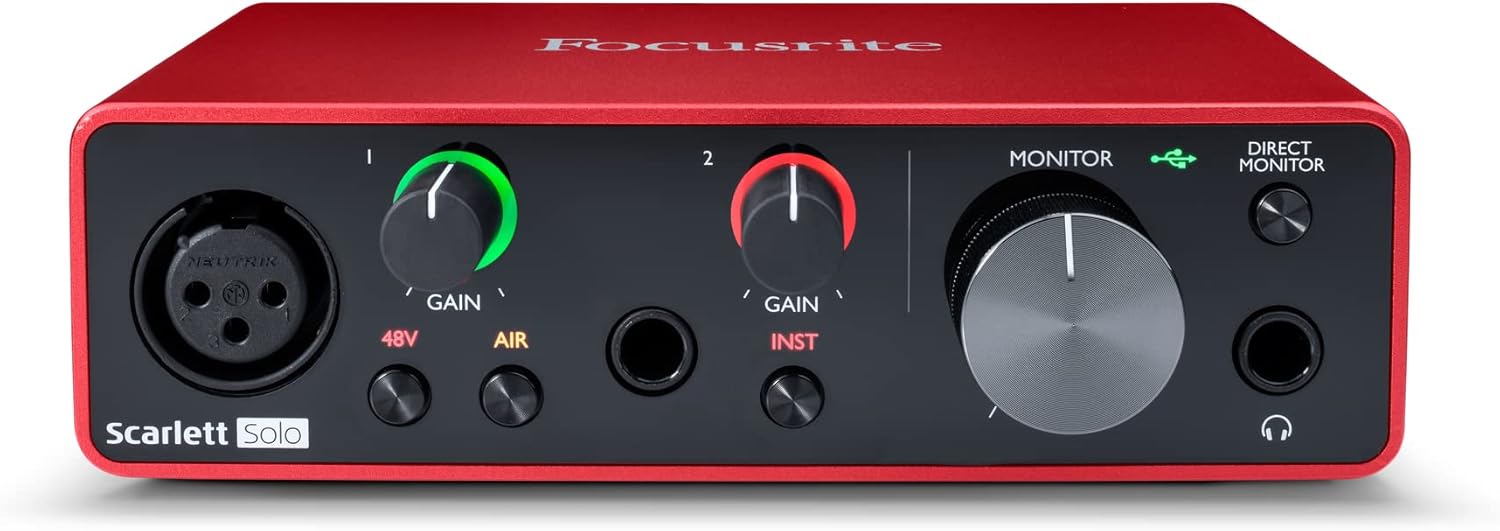
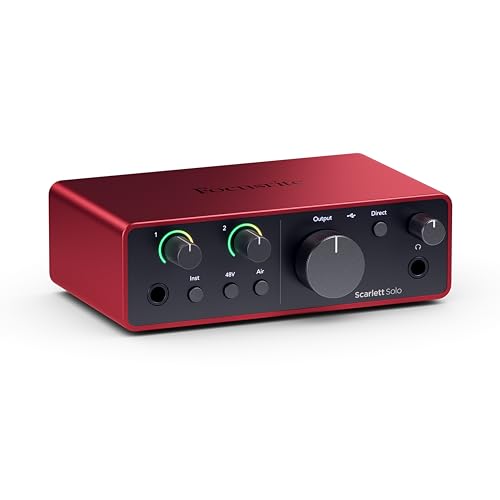


 Photo by www.kaboompics.com / Pexels