How to Build a Home Recording Studio (2026): Budget Tiers, Gear & Room
The essential starter chain: Audio interface ($50-120, Focusrite Scarlett Solo is the benchmark) → XLR microphone (Shure SM58 at $109 for vocals, or a condenser like AT2020 for instruments) → DAW (GarageBand is free and professional-grade) → headphones ($30-80 to start, studio monitors later). Total budget tier entry: $200-350. The USB microphone shortcut (BOYA CM40, FIFINE K688) skips the interface but sacrifices upgrade path and some quality.
How to Build a Home Recording Studio (2026) Buying Guide
 Photo by Usman Precious / Pexels
Quick Verdict: Our top pick is the Focusrite Scarlett Solo 3rd Gen USB Audio Interface (Best Overall) — consistently top-rated in its category. Priced at $110.
Budget Pick: The BOYA CM40 USB Gooseneck Microphone 192kHz/24-Bit at $39.99 — a solid choice for budget-conscious buyers.
This guide is for you if:
-
You're setting up a first home studio or drum kit and don't know where to start
-
You want to understand the minimum viable setup for your goals before spending $500-2,000
-
You want honest guidance on what matters for sound quality vs. gear acquisition syndrome
Skip this guide if:
-
You're an experienced recording engineer or musician — this is for beginners
-
You need commercial recording advice — consult an audio engineer
Quick verdict: The essential starter chain: Audio interface ($50-120, Focusrite Scarlett Solo is the benchmark) → XLR microphone (Shure SM58 at $109 for vocals, or a condenser like AT2020 for instruments) → DAW (GarageBand is free and professional-grade) → headphones ($30-80 to start, studio monitors later). Total budget tier entry: $200-350.

| Interface | ||||
| Microphone | ||||
| Headphones | ||||
| DAW | ||||
| Room Treatment | ||||
| Best For | ||||
| Anchor Purchase |
## The Signal Chain: How Audio Recording Works
Before you spend a dollar, understand the path sound takes from your mouth or instrument to your finished recording. This is called the signal chain, and every piece of gear in your studio fits somewhere on it.
Microphone → converts sound waves into electrical signal Audio Interface → converts the electrical signal to digital data your computer can process DAW (Digital Audio Workstation) → software where you record, arrange, edit, and mix Monitors/Headphones → convert the digital audio back to sound for playback and mixing
That's it. Everything else (plugins, MIDI controllers, outboard gear, acoustic treatment) is either enhancement or specialization. The four elements above are the entire signal chain.
---## The DAW Decision: Start With Free
The most important piece of software in your studio costs $0.
GarageBand (Mac/iOS) — Free: Apple's included DAW is professional-grade software disguised as a beginner tool. The sample library is massive, the included plugins (compressors, EQ, reverbs) are excellent, and GarageBand projects export directly to Logic Pro if you upgrade. Every professional musician on a Mac has a GarageBand story. Use it until you hit its limits — which will take longer than you expect.
Cakewalk by BandLab (Windows) — Free: Formerly a paid professional DAW (SONAR), now completely free. Full 64-bit audio, unlimited tracks, included plugins, VST3 support. The real professional DAW that's now free.
LMMS (Windows/Mac/Linux) — Free: Excellent for electronic music production. Beat sequencer, piano roll, sample management. Less focused on audio recording, more on composition and production.
Audacity (Windows/Mac/Linux) — Free: The universal "just get it working" recording software. Great for podcasts, simple recordings, basic multitrack. Lacks the production features of GarageBand or Cakewalk but runs on anything.
Reaper ($60 for personal license) — Nearly free: Professional DAW with a 60-day free trial that's never enforced. Highly customizable, extremely stable, minimal RAM footprint. Huge user community, extensive documentation.
Paid options to know: Ableton Live ($99-749), FL Studio ($99-499), Logic Pro ($199 — Mac only, a massive upgrade from GarageBand). These are production environments used by professionals worldwide.
The recommendation: Start with whatever's on your computer — GarageBand if Mac, Cakewalk if Windows. Don't buy software until you hit the limits of free.
---## Microphones: The Most Important Hardware Decision
The microphone converts acoustic sound to electrical signal. No other piece of gear affects your sound as dramatically as mic selection and placement.
Dynamic vs Condenser: The Essential Distinction
-
Handle high sound pressure levels without distorting (loud vocals, guitar amps, drums)
-
Are rugged and durable — live performance-grade
-
Reject more ambient noise (better in untreated rooms)
-
Capture more detail, air, and high-frequency nuance
-
Require phantom power (48V, provided by most audio interfaces)
-
Are more sensitive to room noise and reflections
-
Excel at vocals in treated rooms, acoustic guitars, piano, drums overhead
Watch Before You Buy
At a Glance
| # | Product | Award | Price | Our Score | |
|---|---|---|---|---|---|
| 1 | 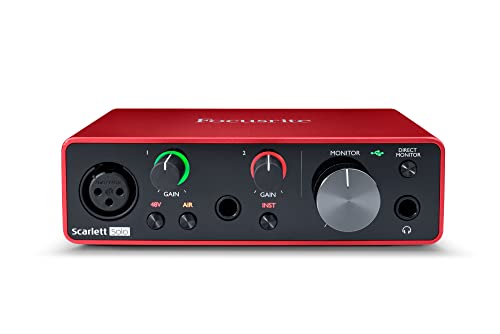 Focusrite Scarlett Solo 3rd Gen USB Aud… Focusrite Scarlett Solo 3rd Gen USB Aud… |
Best Overall | $110 | 9.2 | Buy → |
| 2 | 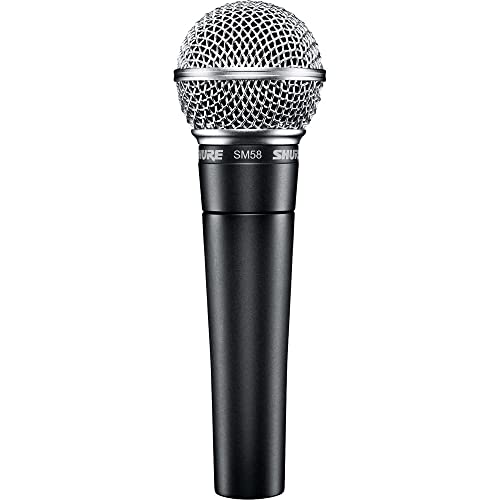 Shure SM58 Professional XLR Dynamic Voc… Shure SM58 Professional XLR Dynamic Voc… |
Best Value | $109 | 8.9 | Buy → |
| 3 |  BOYA CM40 USB Gooseneck Microphone 192k… BOYA CM40 USB Gooseneck Microphone 192k… |
Also Excellent | $39 | 8.5 | Buy → |
| 4 | 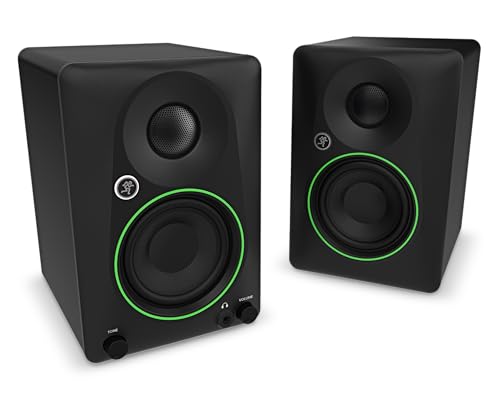 Mackie CR3.5 Powered Studio Monitors 3.… Mackie CR3.5 Powered Studio Monitors 3.… |
$99 | 8.2 | Buy → | |
| 5 | 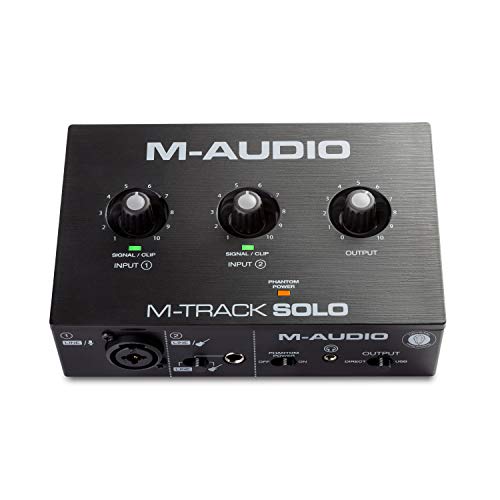 M-AUDIO M-Track Solo USB Audio Interfac… M-AUDIO M-Track Solo USB Audio Interfac… |
$49 | 7.8 | Buy → |
Showing 5 of 5 products
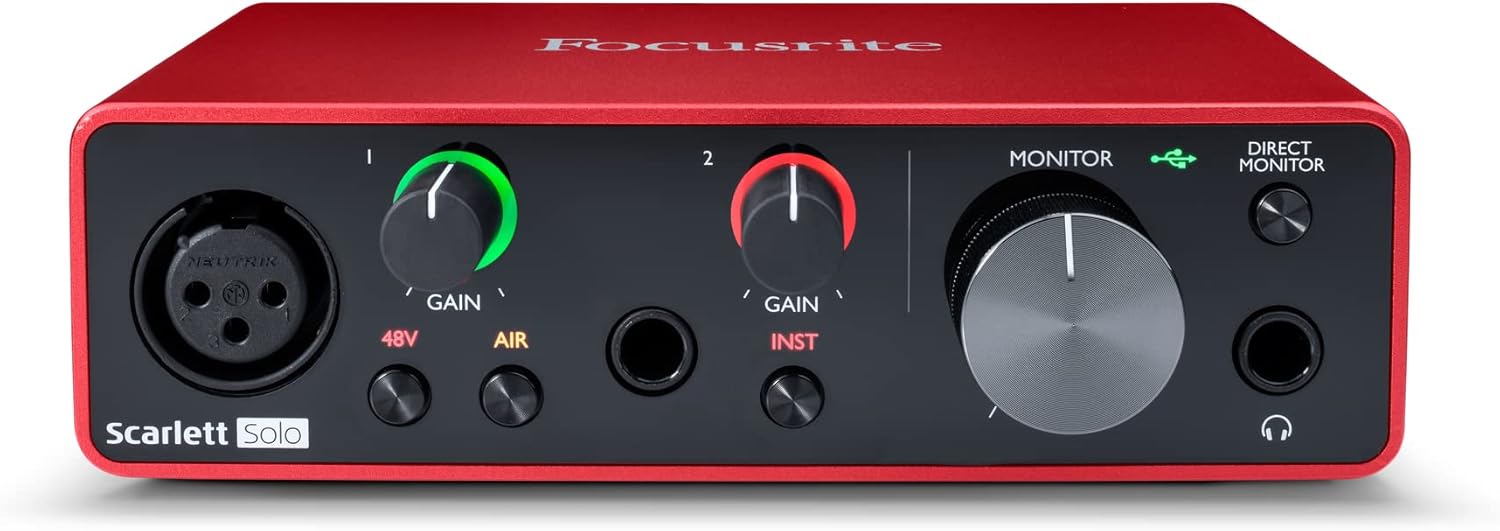
Focusrite Scarlett Solo 3rd Gen USB Audio Interface
“The most beginner-friendly audio interface — Focusrite's GAIN halo lighting makes input level setting visual and intuitive. Scarlett interfaces consistently deliver better preamp quality than their pr”
See Today’s Price →What we like
Watch out for
Read Full Analysis
The Focusrite Scarlett Solo at $110.00 earns rank 1 on a home recording guide because it removes the two barriers that make first-time audio interface setup frustrating: gain-setting confusion and driver instability. The GAIN halo LED ring turns green when input level is ideal and red when clipping — visual feedback that replaces the educated guessing that confuses beginners who don't know what a healthy input waveform looks like. Focusrite's driver reliability on both Mac and Windows is consistently rated above competitors at this price tier. At $110 with 48V phantom power for condenser microphones, two combo inputs (XLR and instrument), and USB connectivity, it provides the complete signal chain foundation for a home studio. Against the Shure SM58 at rank 2 ($109.00), the Solo is the interface — it connects the microphone to the computer. You need both, not one or the other: the SM58 is the microphone, the Solo processes and converts its signal. Against the M-AUDIO M-Track Solo at rank 5 ($49.00), the Focusrite costs $61 more for measurably better preamp quality — preamp quality determines the noise floor and clarity of recordings, and the gap between the M-Audio and Focusrite preamps is audible in direct comparison. Against the Mackie CR3.5 monitors at rank 4 ($99.99), the interface and monitors serve different functions: the Solo captures signal, the Mackies play it back for accurate mixing. Both belong in a complete home studio setup.

Shure SM58 Professional XLR Dynamic Vocal Microphone Cardioid
“The industry-standard dynamic vocal microphone for live performance — used on more stages worldwide than any other mic for good reason. The steel construction survives years of touring abuse without p”
See Today’s Price →What we like
Watch out for
Read Full Analysis
The Shure SM58 at $109.00 is the most recorded vocal microphone in history — used on more live stages and in more studios worldwide than any other dynamic microphone, and that longevity reflects genuine acoustic performance rather than marketing. The cardioid polar pattern focuses pickup on the source directly in front while rejecting room noise from the sides and rear, which is critical in untreated home recording spaces where parallel walls and hard surfaces create reflections. Dynamic microphone design makes it physically durable and electrically robust — it handles proximity effect (bass boost at close distances) and high SPL sources without distortion. Against the Focusrite Scarlett Solo at rank 1 ($110.00), the SM58 is the microphone that connects to the Scarlett's XLR input — they work together, not as alternatives. Against the BOYA CM40 at rank 3 ($39.99), the SM58 costs $69.01 more for a dedicated recording microphone with cardioid rejection versus the BOYA's omnidirectional gooseneck design for video and podcasting. The SM58 requires an XLR cable and interface (or PA amplifier) — it is not plug-and-play for home computer recording without the Focusrite or M-Audio interface at ranks 1 and 5. No USB output is an important purchasing note for buyers who expect direct computer connectivity. The 4.8-star rating with no total reviews reflects a new listing, not the SM58's actual track record which spans decades and hundreds of thousands of units.

BOYA CM40 USB Gooseneck Microphone 192kHz/24-Bit
“Best for vloggers and interviewers who need a compact gooseneck USB mic for podcasting or desk recording without spending on a full studio setup.”
See Today’s Price →What we like
Watch out for
Read Full Analysis
The BOYA CM40 at $39.99 serves a fundamentally different recording use case than the SM58 at rank 2 ($109.00): it's a clip-on gooseneck microphone for video content, podcasting, and desk recording where proximity to the source changes constantly, rather than a fixed-position studio vocal microphone. USB-C and 3.5mm connectivity makes it genuinely plug-and-play for smartphones, laptops, and tablets without needing a separate audio interface — the critical convenience feature that separates it from the XLR microphones at ranks 1 and 2. At $39.99 it costs $69.01 less than the Shure SM58 while serving vloggers, interviewers, educators, and podcasters who need a compact portable mic rather than a studio recording setup. The omnidirectional polar pattern is the primary acoustic tradeoff versus the SM58's cardioid: the CM40 captures sound from all directions equally, which is convenient for interview situations but problematic in reverberant or noisy spaces where background sound is also captured. Against the Focusrite Scarlett Solo at rank 1 ($110.00), the BOYA replaces the interface requirement entirely for its specific use case — one device versus the Solo + SM58 combination. The 5.0-star rating reflects new listing data, not a broad review base. Best for content creators, remote workers who record video, and podcasters who need mobile recording capability without studio infrastructure.

Mackie CR3.5 Powered Studio Monitors 3.5 in with Tone Knob 2-Pack
“Best for bedroom producers and content creators who want their first pair of studio monitors with tone control — a solid introduction to critical listening over speakers.”
See Today’s Price →What we like
Watch out for
Read Full Analysis
The Mackie CR3.5 powered studio monitors at $99.99 provide what headphones cannot: accurate stereo imaging in a room environment that reveals how a mix will translate to speakers that listeners actually use. Mixing exclusively on headphones produces mixes that often sound wrong on speakers — the stereo field perception in headphones differs from how speakers project sound into a room. The CR3.5's tone knob allows subtle frequency adjustment to compensate for the monitoring environment's acoustic properties without needing a full EQ. At $99.99 for a matched pair, these are the most affordable legitimate studio monitors on the market with a recognizable brand behind them. Against the Focusrite Scarlett Solo at rank 1 ($110.00), the monitors are the output end of the signal chain while the Scarlett is the input end — both belong in a complete home studio, not as alternatives. Against the M-AUDIO M-Track Solo at rank 5 ($49.00), the monitors cost $50.99 more for a product category the interface doesn't address: playback quality. The rear-ported design requires a few inches of clearance behind the monitors — desk placement against a wall reduces bass accuracy. The 3.5-inch driver limits low-frequency extension below approximately 80Hz, which means sub-bass elements of a mix are not fully represented. For producers working in bass-heavy genres (hip-hop, electronic), a subwoofer addition is worth budgeting. For acoustic, vocal, and podcast production, the CR3.5 provides honest reproduction at the entry price point.

M-AUDIO M-Track Solo USB Audio Interface XLR Line DI Inputs
“The most affordable path to connecting a microphone or instrument to a computer for recording. Bus-powered USB means no separate power supply — simple and self-contained for basic home recording.”
See Today’s Price →What we like
Watch out for
Read Full Analysis
The M-Audio M-Track Solo at $49.00 is the lowest-cost path to connecting an XLR microphone or instrument to a computer on this page — $61 less than the Focusrite Scarlett Solo at rank 1 ($110.00). USB bus-powered operation means no separate power supply, which simplifies desk setup and reduces cable clutter. The DI (direct input) instrument jack handles electric guitar and bass without a separate direct box. Against the Focusrite Scarlett Solo at rank 1, the M-Track's preamp quality is the meaningful technical difference: the Scarlett's preamps are cleaner at high gain settings, with a lower noise floor that becomes audible when recording quieter acoustic instruments or condenser microphones. For recording a loud electric guitar or voice through a dynamic mic at reasonable gain settings, the practical difference is smaller than the spec gap suggests. Against the Shure SM58 at rank 2 ($109.00), the M-Track is the interface the SM58 connects to — both are needed for a complete home recording chain. Against the BOYA CM40 at rank 3 ($39.99), the M-Track costs $10.01 more and provides XLR/instrument connectivity that the plug-and-play BOYA doesn't need. Single-channel design is the core constraint: you can't record two separate sources (microphone and guitar simultaneously) without a second interface or a multi-channel upgrade. For solo podcasters, singer-songwriters recording one track at a time, and home studio beginners on a strict budget, the M-Track Solo is the functional minimum at the lowest price.
Frequently Asked Questions
What do I need to start recording music at home?
Is GarageBand good enough for professional recording?
What is an audio interface and do I need one?
What's the difference between dynamic and condenser microphones?
Why does my home recording sound 'roomy' or 'boxy'?
Do I need studio monitors or can I mix on headphones?
What is phantom power and when do I need it?
Can I record guitar directly without a microphone?
How We Analyze Products
We analyze Amazon review data — often thousands of reviews per product — to surface patterns that individual buyers miss. Our process aggregates star ratings, review counts, and buyer sentiment at scale, identifying which strengths and weaknesses appear consistently across the largest review samples available.
Each product earned its placement through data: total review volume, average rating, and the specific praise and complaints that repeat most often across buyers. No manufacturer paid for placement on this page. Products appear here because buyers endorsed them at scale, not because a company asked us to feature them.
We use AI to summarize review sentiment — not to fabricate opinions, but to condense what thousands of buyers actually wrote into a readable format. The pros and cons you see reflect the most common themes found in verified purchaser reviews, paraphrased for clarity. We do not claim to have accessed Reddit, YouTube, or specific publications in generating these summaries.
Prices shown reflect Amazon pricing at the time this page was last generated. Click “See Today’s Price” to get the current live price on Amazon. Read our full methodology →