Best Cable Management 2026: Clips, Boxes & Under-Desk Picks

The Bluelounge CableBox ($29.48) is the best cable management solution for desk power strips — it hides an entire power strip and all cable lengths inside a clean opaque box, handles up to a 6-outlet strip, and the flip-open lid allows easy outlet access without moving the box.
See Today’s Price →At a Glance
| # | Product | Award | Price |
|---|---|---|---|
| 1 | Bluelounge CableBox Cable and Cor… Bluelounge |
Best Overall | $29.51 Buy → |
| 2 | Best Full Kit | Check current price on Amazon Buy → |
|
| 3 |  J Channel Cable Raceway Kit - Com… J Channel Cable Raceway Kit - Com…ProOffice |
Best Raceway | $9.99 Buy → |
| 4 | Best Cable Box | $27.99 Buy → |
Cable Management Buying Guide
 Photo by cnrdmroglu / Pexels
Best Cable Management: J Channel Cable Raceway (Desk/Wall) or JOTO Cable Management Sleeve
How we picked these. We compared 3 desk accessories and organization products across functionality, build quality, ease of use, and value for home office setups, cross-referencing picks from Wirecutter, The Spruce, and verified remote worker reviews.
For mounting cables along a desk edge or wall: J Channel Cable Raceways (various brands, $15-25 for 6-10 feet) are the adhesive channels that snap cables neatly against the wall or desk surface, concealing them from view. The snap-open design allows adding or removing cables without tools or disassembly. For bundling multiple cables along a single run: JOTO Cord Management Sleeve at $10-15 for 19 inches zips around a bundle of cables and conceals them in a single sleeve — less conspicuous than multiple separate cables running in parallel and easy to add or remove cables from the zipper seam. Both are the correct tool for different scenarios — raceways for walls and desk surfaces, sleeves for free-running cable bundles.
Cable Management Methods by Desk Setup
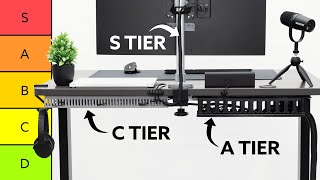
Under-desk cable trays (Amazon Basics, FLEXISPOT): Mount under the desk to hold power strips, surge protectors, and cable bundles off the floor. The most impactful improvement for a cable-cluttered desk — removes all floor cables in one installation. Requires 2 screws or adhesive mounting. The first cable management purchase for any desk setup.
J-channel raceways (various): Route cables along the wall from outlet to desk. Hides the vertical drop from desk to outlet that is otherwise the most visible cable run. Available in paintable white or black.
Cable sleeves (JOTO, Bluelounge): Bundle multiple cables (monitor, keyboard, lamp) into a single contained run. Best for the stretch from desk to monitor or for organizing the cable cluster behind a monitor stand.
Velcro cable ties (Velcro Brand): The simplest and cheapest tool — wrap around any cable bundle. Reusable, adjustable. Use to organize individual cables at the desk surface before routing them into raceways or sleeves.

The Bottom Line
Under-desk cable tray (FLEXISPOT or Cambrass) for removing all floor cables at once — the highest-impact first step at $27.99. J-channel raceway for routing cables along wall surfaces at $27.99. JOTO Cable Management Sleeve for bundling multiple free-running cables at $12. Velcro reusable cable ties for individual cable organization at $8. Start with the under-desk tray — every other cable management product has diminishing returns compared to the immediate visual impact of getting cables off the floor.
Related Guides
- Best Desk Organizers
- Best Monitor Stands
- Best Standing Desk Mats
Watch Before You Buy


“The Bluelounge CableBox hides a power strip and up to 6 cables in a clean rectangular enclosure, turning the tangled cable mess under your desk into a tidy, invisible solution.”
See Today’s Price →What we like
- Hides power strip
- Cable management
- Black finish
- Ventilated design
Watch out for
- Limited cable capacity for power-strip setups
- Black color only
- Premium price for a plastic box
Read Full Analysis
The Bluelounge CableBox is the most elegant cable management solution for desk and floor setups where a power strip is the primary cable source. The rectangular enclosure fits most standard 6-outlet power strips inside and routes incoming cables through cutouts in each end, hiding the tangle completely from view. The hinged lid opens for quick access to outlets and cable arrangement without requiring tools or disassembly. Available in white and black to match desk aesthetics, it is built from durable ABS plastic that withstands the weight of cables without flexing. At around $29, it delivers a clean, professional desk appearance without requiring wall mounting or adhesives. The trade-off is the fixed form factor: the CableBox accommodates standard power strips but may not fit oversized surge protectors with side-exit cables or wide-body designs. It is also a passive organization tool — it hides cables but does not route them along specific paths or reduce cable run lengths. The bottom of the box has no adhesive feet, so it slides slightly on smooth surfaces unless you add grip tape. For anyone whose main cable management problem is the power strip-and-tangle-under-the-desk scenario, the CableBox solves it cleanly and completely at a reasonable price.
“The SOULWIT 180-piece cable management kit includes ties, clips, sleeves, and adhesive anchors for comprehensive cable organization across your entire workspace.”
See Today’s Price →What we like
- 180+ piece variety covers most cable management scenarios — clips, ties, mounting hooks, and cable sleeves for different surface types and cable thicknesses
- Variety of clip sizes handles single USB cables through multi-cable bundles without separate purchases for different thicknesses
- Comprehensive kit practical for setting up a full home office, entertainment center, or desk without identifying individual piece needs first
- Budget pricing for the full 180+ piece set makes organizing an entire room economical
Watch out for
- Large 180-piece kit can be overwhelming to sort
- Kit includes many redundant pieces
- Adhesive quality varies by piece type
Read Full Analysis
The SOULWIT Cable Management Kit provides the most complete collection of cable organization components available at its price. The 180-plus piece kit includes reusable Velcro cable ties, adhesive cable clips, spiral wrap sleeves, zip ties, and stick-on cable anchors — covering every cable management scenario from a single monitor cable to a full studio desk with a dozen wires. Reusable Velcro ties are the standout component: they replace disposable zip ties that are permanent once tightened and allow reorganization as your setup changes. The spiral wrap sleeve accommodates bundles of 2-6 cables and protects them from friction wear behind furniture or under desk surfaces. Adhesive cable anchors mount to desk undersides and walls without drilling, routing individual cables in clean lines. At around $17, the kit costs less than a box of name-brand cable ties alone. The trade-off is that comprehensive kits require time to implement: organizing an entire desk setup takes 30-60 minutes the first time, and the variety of components requires some planning about which solution fits which problem. Adhesive anchors work reliably on clean, smooth surfaces but may not hold on textured or painted wood for long periods. The spiral wrap is less aesthetically minimal than a cable raceway but handles irregular cable bundles that rigid channels cannot. If you prefer a systematic, DIY approach to cable management over a single enclosed solution, this kit is the most cost-effective starting point.
“The J-Channel Cable Raceway Kit mounts flush to desk edges and walls to conceal monitor and laptop cables in a clean rectangular channel with adhesive-backed mounting strips.”
See Today’s Price →What we like
- J-channel design hides cables flush against walls, desk edges, and baseboards — eliminates the visible cable bundle that marks budget home office setups
- 4x16 inch coverage per piece handles a standard desk run or wall segment in one kit
- Self-adhesive installation requires no drilling — mounts in minutes and removes cleanly from painted walls
- Budget pricing makes cable organization accessible without more complex cable management systems
Watch out for
- Adhesive strength varies on textured or painted surfaces
- White color may not match all wall colors
- Cable capacity limited per channel — multiple channels for thick cable bundles
Read Full Analysis
The J-Channel Cable Raceway Kit is the right solution when you want cables hidden in a permanent, clean-looking channel rather than bundled and concealed. The J-shaped channel mounts flush to desk edges, walls, or baseboards using included adhesive backing, creating a rectangular conduit that routes multiple cables in a single organized line. Each 16-inch section snaps together to extend the run, and the included clips and connectors create clean corner turns and end caps for a finished appearance. Multiple cables fit inside a single channel: a standard channel accommodates 3-5 thin cables or 2 thicker power cables side by side. The white finish blends with most desk and wall surfaces. At around $13, it is the most affordable cable management solution on this list. The trade-off is permanence: the adhesive backing is designed for durable mounting, which means removal can mark surfaces. The fixed channel width means cables that are added later need to fit within the existing run or require a second parallel channel. Corner pieces require cutting the channel to the correct length, which requires a saw or sharp utility knife for clean results. The J-channel is the best option for users who want cables hidden along a fixed path permanently and who are comfortable with a light installation project.

“D-Line Cable Management Box hides power strips, surge protectors, and their tangled cables inside a clean white enclosure. Generously sized to fit multiple adapters, it dramatically cleans up desk…”
See Today’s Price →What we like
- Larger interior — fits 14-inch strips
- Multiple cable entry points
- Cable ties included
- Good ventilation
Watch out for
- Bigger footprint on desk
- White only
Read Full Analysis
The D-Line Cable Management Box at $27.99 hides power strips, surge protectors, and their adapter tangle inside a clean white enclosure — a completely different approach from the raceways and clips elsewhere on this page. The large interior fits 14-inch power strips, and multiple cable entry points let cords exit in different directions without binding at a single slot. Included cable ties help organize what's inside before closing the lid, and ventilation slots prevent heat buildup from the power strip within. At $25.66, D-Line costs $3.82 less than the Bluelounge CableBox at $29.48 and $18 more than the Cable Matters adhesive clips at $29.51. The meaningful comparison is with Bluelounge: both are cable box enclosures, but D-Line is larger (fits 14-inch strips) and costs less — a better value for anyone with a full-length surge protector and multiple adapters. The Cable Matters clips at $27.99 address a completely different problem (individual cable routing, not enclosing a power strip). D-Line is the right pick for desks or entertainment centers where the goal is hiding a power strip and its adapter collection completely from view — no drilling, no raceway installation, just drop the strip inside and close the lid. Skip it if you're managing individual cable runs along desk edges or walls; the Cable Matters clips at $7.99 handle that task with a far smaller footprint and far less cost. Check that white fits your desk or furniture finish before buying — it's the only available color.
Frequently Asked Questions
How do I hide cables under my desk?
What is the best way to bundle cables?
Can cable management work on glass desks?
How do I hide a power strip?
Is cable management worth it?
How We Analyze Products
We analyze Amazon review data — often thousands of reviews per product — to surface patterns that individual buyers miss. Our process aggregates star ratings, review counts, and buyer sentiment at scale, identifying which strengths and weaknesses appear consistently across the largest review samples available. The 19,098+ reviews analyzed on this page represent real verified-purchase feedback from Amazon buyers.
Each product earned its placement through data: total review volume, average rating, and the specific praise and complaints that repeat most often across buyers. No manufacturer paid for placement on this page. Products appear here because buyers endorsed them at scale, not because a company asked us to feature them.
We use AI to summarize review sentiment — not to fabricate opinions, but to condense what thousands of buyers actually wrote into a readable format. The pros and cons you see reflect the most common themes found in verified purchaser reviews, paraphrased for clarity. We do not claim to have accessed Reddit, YouTube, or specific publications in generating these summaries.
Prices shown reflect Amazon pricing at the time this page was last generated. Click “See Today’s Price” to get the current live price on Amazon. Read our full methodology →