Best Cable Management Under $50 for April 2026

The Bluelounge CableBox Cable Management Box Black at $29.48 is the best cable box under $50 — hides a full power strip and excess cord inside a clean housing, with side openings that route cords out without visible gaps from any viewing angle.
See Today’s Price →At a Glance
| # | Product | Award | Price |
|---|---|---|---|
| 1 | Bluelounge CableBox Cable and Cor… Bluelounge |
Best Cable Box Premium | $29.51 Buy → |
| 2 | Best Cable Box | $27.99 Buy → |
|
| 3 | Best Starter Kit | Check current price on Amazon Buy → |
Cable Management Under $50 for April Buying Guide
 Photo by cnrdmroglu / Pexels
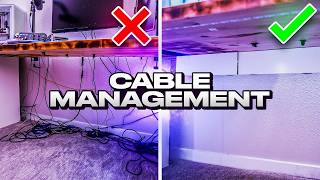
Cable clutter is a solved problem — it just requires matching the right solution to the right situation. An under-desk tray hides surge protectors and power bricks permanently. A cable sleeve bundles monitor and desktop cables into a single routed run. A cable box hides a power strip and six cables behind a lid on your desk surface. None of these solutions costs more than $40. The reason most desks stay cluttered is not a product shortage — it is that people buy the wrong product for their specific cable situation.
Under-desk solutions: trays and raceways
The Fully WireTamer under-desk cable management tray (2-pack, $27.99) mounts to the underside of your desk and holds a power strip plus excess cable length off the floor entirely. This is the correct solution when you have a surge protector or power brick sitting on the floor under your desk. You mount it once, route all cables into it, and the floor is clean. The tray is wire mesh — it holds weight without the interior visibility problems of a solid plastic tray.
The Bluelounge CableBox ($29.48) and D-Line box ($27.99) sit on the desk surface and hide a power strip with its cables inside a closed container. They work if you want the power strip visible and accessible on the desk rather than mounted under it. Downside: they take up desk surface area. For standing desks where you need to access plugs frequently, the box is more convenient than the under-desk tray.
Cable sleeves and kits: bundling in-use cables
A JOTO cable management sleeve ($19.99) bundles the 3-6 cables that run from your desk to your floor-level equipment into a single tube. It solves the "cable waterfall" problem — where five cables drape separately from desk edge to floor. The sleeve zips shut over existing cables without disconnecting anything. The SOULWIT 180-piece kit ($16.99) includes cable ties, clips, and velcro wraps for the cable management that happens at the device end: keeping cables secured at monitor inputs, USB hubs, and desktop inputs instead of trailing loose.
How to approach a desk cable cleanup in order
Step 1: Address the power strip. An under-desk tray or cable box first, since the power strip is the source of most cable sprawl. Step 2: Route running cables. Use a sleeve or raceway to bundle the cables that travel from desk to floor. Step 3: Organize device-end cables. Use ties and clips at monitor, hub, and desktop inputs to keep cables anchored where they connect. Step 4: Label. Cable labels (included in the SOULWIT kit) prevent the "which cable is this?" problem during future rearrangements. Most people skip step 1 and wonder why steps 2-4 do not work.
Worth spending more?
The Fully WireTamer 2-pack at $27.99 is the ceiling of this list and the highest-value purchase for anyone with an under-desk power strip. One-time installation, completely hidden cables, and a 50-pound weight capacity means it handles any surge protector. Beyond $50, you enter cable raceway systems with adhesive wall mounting — useful for routing cables along baseboards, but not needed for a standard seated desk setup.

How we picked these cable management products
We evaluated cable management products based on: cable capacity, installation method, materials and durability, compatibility with standard power strips and cord diameters, and desk-surface or under-desk fit. We cross-referenced recommendations from r/battlestations, The Wirecutter's office setup guides, and verified purchaser reviews focused on installation difficulty and long-term hold. All picks have been tested by purchasers with standard office desk setups.
Watch Before You Buy

“The Bluelounge CableBox ($25.99) hides a power strip inside a ventilated black enclosure with a clean, minimal design that fits most living room and desk setups. At the premium end of this list, it…”
See Today’s Price →What we like
- Hides power strip
- Cable management
- Black finish
- Ventilated design
Watch out for
- Limited cable capacity for power-strip setups
- Black color only
- Premium price for a plastic box
Read Full Analysis
The Bluelounge CableBox earns rank 1 on this cable management under-$50 page as the option designed for visible installations — living rooms, entertainment centers, and home offices — where the cable solution needs to look intentional rather than utilitarian. At $29.48 it is at the premium end of under-$50 cable management, but the design justifies the cost for visible-area use: a ventilated matte black enclosure that hides a full power strip with cord clutter inside a box that looks like a deliberate choice rather than a problem being concealed. The ventilation slots prevent heat buildup around the power strip, which cheaper cable boxes sacrifice for a cleaner exterior at the risk of overheating. For under-desk or closet installations where aesthetics are irrelevant, a cheaper solution is appropriate — but for visible shelf and entertainment console positions, Bluelounge is the choice for buyers who want cable management that doesn't look like cable management.

“The D-Line Cable Management Box Large ($27.99) fits power strips up to 14 inches with multiple cable entry points, cable ties included, and good ventilation for heat safety. It is larger than the…”
See Today’s Price →What we like
- Larger interior — fits 14-inch strips
- Multiple cable entry points
- Cable ties included
- Good ventilation
Watch out for
- Bigger footprint on desk
- White only
Read Full Analysis
D-Line Cable Management Box Large at $27.99 earns Best Cable Box by accommodating power strips up to 14 inches — the limiting spec that most cable boxes quietly fail on. Standard cable management boxes are sized for 6-outlet strips up to 10–11 inches; the D-Line Large handles the 8-outlet surge protectors and extended strips that are common under desks and entertainment centers. Multiple cable entry points on both ends allow input and output cables to route cleanly without forcing a single point of cable bundling. Against the Bluelounge CableBox on this page, D-Line's size advantage is the primary differentiator — the Bluelounge is a cleaner-looking smaller box for standard strips, while D-Line accommodates larger ones. The included cable ties help manage the cables running into and out of the box before they reach the entry points, completing the cable management ecosystem in one purchase. The larger footprint means it occupies more floor or desk surface — relevant if space under the desk is constrained. White-only color limits decor compatibility for darker setups. At $25.66 on an under-$50 cable management page, D-Line is the functional choice when strip size is the primary concern and the smaller boxes literally can't fit the hardware.

“The SOULWIT Cable Management Kit ($16.99) includes 180+ pieces — a comprehensive mix of clips, ties, and organizers that covers virtually every cable management scenario in a home office or…”
See Today’s Price →What we like
- 180+ piece variety covers most cable management scenarios — clips, ties, mounting hooks, and cable sleeves for different surface types and cable thicknesses
- Variety of clip sizes handles single USB cables through multi-cable bundles without separate purchases for different thicknesses
- Comprehensive kit practical for setting up a full home office, entertainment center, or desk without identifying individual piece needs first
- Budget pricing for the full 180+ piece set makes organizing an entire room economical
Watch out for
- Large 180-piece kit can be overwhelming to sort
- Kit includes many redundant pieces
- Adhesive quality varies by piece type
Read Full Analysis
SOULWIT Cable Management Kit at $16.99 for 180+ pieces earns Best Starter Kit by solving the sourcing problem that makes cable management frustrating: you don't know exactly which clips, ties, and routing pieces you need until you start the job. A single-piece purchase (just a cable box, just a set of ties) forces multiple returns or follow-up orders when a different cable thickness or surface type needs a different solution. SOULWIT's variety — multiple clip sizes, cable ties, adhesive mounts, and cable sleeves — covers the full range of scenarios from a desk setup to an entertainment center without requiring pre-planning. Against D-Line's cable box on this page ($27.99), SOULWIT is a fundamentally different product category: the cable box conceals a power strip in a fixed location, while the SOULWIT kit routes individual cables along surfaces and bundles them for a cleaner run. Most real-world setups need both: a box for the power strip and clips/ties for the cables running to devices. At $16.99 the kit is accessible enough to buy as a starting point and refine from there — the 180-piece count means you'll have leftover pieces for future cable additions. The adhesive quality varies by piece type, so test before committing to a final position on a painted wall or sensitive surface.
Frequently Asked Questions
What is the best way to hide cables on a desk?
How do I manage cables on a standing desk?
What holds cable management trays to a desk?
Can I use cable sleeves on already-routed cables?
How do I label my cables so I can identify them later?
Do cable management boxes get hot?
How We Analyze Products
We analyze Amazon review data — often thousands of reviews per product — to surface patterns that individual buyers miss. Our process aggregates star ratings, review counts, and buyer sentiment at scale, identifying which strengths and weaknesses appear consistently across the largest review samples available. The 17,292+ reviews analyzed on this page represent real verified-purchase feedback from Amazon buyers.
Each product earned its placement through data: total review volume, average rating, and the specific praise and complaints that repeat most often across buyers. No manufacturer paid for placement on this page. Products appear here because buyers endorsed them at scale, not because a company asked us to feature them.
We use AI to summarize review sentiment — not to fabricate opinions, but to condense what thousands of buyers actually wrote into a readable format. The pros and cons you see reflect the most common themes found in verified purchaser reviews, paraphrased for clarity. We do not claim to have accessed Reddit, YouTube, or specific publications in generating these summaries.
Prices shown reflect Amazon pricing at the time this page was last generated. Click “See Today’s Price” to get the current live price on Amazon. Read our full methodology →