Best LED Desk Lamps 2026: Dimmable, USB-C & Architect Style

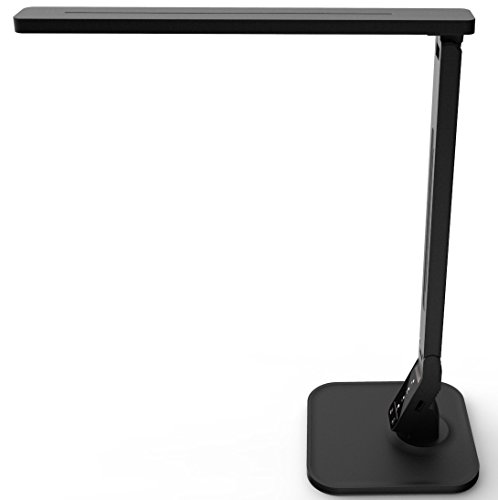
The TROND Desk Lamp is our pick: its light-guide panel gives flicker-free, anti-glare light in 3 color modes (6000K, 4500K, 3000K) and 7 brightness levels, it remembers your last setting, and its 16.1-inch gooseneck bends where you need it. Choose the Lampat Dimmable LED Desk Lamp if you want a USB charging port and a 1-hour auto-off timer.
See Today’s Price →Holiday shopping


At a Glance
| # | Product | Award | Price |
|---|---|---|---|
| 1 | Our Top Pick | $32.99 as of Nov 21, 3:41 PM CT details Buy → |
|
| 2 | Best with an Auto-Off Timer | $16.99 as of Nov 21, 3:41 PM CT details Buy → |
|
| 3 |  Honeywell H01 Pro LED Desk Lamp, … Honeywell |
Best for USB-C Charging | $37.99 as of Nov 21, 3:43 PM CT details Buy → |
| 4 | Best Architect-Style Clamp Lamp | $39.99 as of Nov 21, 3:41 PM CT details Buy → |
|
| 5 | Best for Wide Desk Coverage | $211.65 as of Nov 21, 3:41 PM CT details Buy → |
Related guides we’ve checked
 Best Clamp Desk Lamps Under $50 (2026)Top pick: Voncerus LED Desk Lamp with Clamp
 Best Under-Desk Footrests (2026): Foam Cushions and Adjustable RockersTop pick: ErgoFoam Foot Rest for Under Desk at Work
 Best Laptop Stands for Desk Under $50 (2026): 5 PicksTop pick: Rain Design mStand Laptop Stand
Gift shopping? Holiday Gift Guide 2026: checked picks for everyone on your list.
LED Desk Lamps Buying Guide
 Photo by RDNE Stock project / Pexels
Most of what separates LED desk lamps is the light itself - how many color temperatures and brightness steps it has and whether it flickers - plus how it mounts and whether it charges your phone. The TROND Desk Lamp is the pick for most desks: soft, flicker-free light from a light-guide panel, three color modes, seven brightness levels and a memory of your last setting, on a slim base with a bendable gooseneck.
Light: color, brightness and flicker
The TROND switches between 6000K for working, 4500K for reading and 3000K for relaxing, with 7 brightness levels, and its listing says the light-guide panel gives flicker-free, anti-glare light. The Lampat's 4 lighting modes are called Reading, Studying, Relaxation and Bedtime, with a 5-level dimmer. The Honeywell H01 Pro adjusts color and brightness steplessly from 3000K to 5500K, with full-spectrum LEDs of CRI 95 or higher and an RG0 blue-light rating. The BenQ e-Reading lamp pairs an ambient light sensor with 13 color temperatures from 2700K to 5700K, 23 brightness levels, a color rendering index above 95 and flicker-free certification to the IEEE 1789 standard. The LEPOWER is different: it takes a standard E26 bulb, so its light depends on the bulb you fit.
Arms, clamps and desk space
The TROND stands on a 0.63-inch-thin base with a gooseneck that reaches 16.1 inches. The Honeywell folds, with a head that tilts 0-180 degrees and swivels 0-90 degrees. The LEPOWER is the architect-style option: a metal shade and base, a swing arm and a C-clamp that grips desks up to 2 inches thick, or its thickened base if you would rather stand it. The BenQ's ball-joint swing arm holds its angle with torque springs and friction control.
Charging ports and timers
Two lamps here charge a phone: the Honeywell has USB-A and USB-C ports (5V/2.1A) for two devices at once, and the Lampat a 5V/1A USB port. The Lampat also has a 1-hour auto-off timer, handy beside a bed. The TROND, LEPOWER and BenQ list no charging port.
When a wide, auto-dimming lamp is worth it
The BenQ e-Reading Desk Lamp lights a 35.4 by 26.7-inch area at a minimum of 500 lux, which covers a keyboard, papers and the space under two monitors, and its ambient light sensor adjusts the brightness as the room changes. Its Screen Mode keeps the middle of the beam darker to cut glare on a monitor, and Paper Mode suits reading. It is the lamp for long days at a wide desk; for a laptop corner, the TROND or the Lampat is enough.
Which one to buy
Buy the TROND for soft, adjustable light on most desks. Choose the Lampat if you want a USB port and an auto-off timer, the Honeywell H01 Pro if you want USB-C charging and stepless color, the LEPOWER for a metal architect-style clamp lamp you fit with your own bulb, and the BenQ for lighting a wide desk evenly.

How we picked: we compared each product's own listing - what it is, what comes in the box, the specifications its maker states and the warranty - and ranked them on how well they answer this page's question. We have not tested these products in hand.
Watch Before You Buy


“TROND's gooseneck lamp lights through a light-guide panel for flicker-free, anti-glare light, with 3 color modes, 7 brightness levels and a memory function.”
See Today’s Price →What we like
- Light-guide panel for flicker-free, anti-glare light
- 3 color modes: 6000K, 4500K and 3000K
- 7 brightness levels set by swiping the dimmer
- Remembers your last setting
- Slim 0.63-inch base and a 16.1-inch gooseneck
Watch out for
- No USB charging port is listed
- Three fixed color modes rather than stepless color control
Read Full Analysis
TROND's desk lamp lights through a surface light source and a light-guide panel rather than a bare row of LEDs, which its listing says gives flicker-free, anti-glare light without ghosting. A long press on the power indicator switches between three color modes - 6000K for working, 4500K for reading and 3000K for relaxing - and swiping the dimmer groove steps through 7 brightness levels; the lamp remembers the last setting. The base is 0.63 inches thick and the gooseneck reaches 16.1 inches fully extended, so it fits a small desk and bends to where you work. The LEDs are rated for up to 40,000 hours. It has no charging port. Choose it over the Lampat if you want the light-guide panel and three color temperatures; choose the Lampat if you want a USB port and an auto-off timer.
Skip this if: You want the lamp to charge your phone - it has no USB port.
“Lampat's LED lamp has 4 lighting modes, a 5-level touch dimmer, a 1-hour auto-off timer and a 5V/1A USB port for charging a phone.”
See Today’s Price →What we like
- 4 lighting modes: Reading, Studying, Relaxation and Bedtime
- 5-level dimmer on a touch-sensitive panel
- 1-hour auto-off timer
- 5V/1A USB port charges a phone from the lamp
Watch out for
- USB port output is limited to 5V/1A
Read Full Analysis
Lampat's dimmable LED lamp is a simple, touch-controlled desk lamp with two conveniences the TROND does not list: a USB charging port and a 1-hour auto-off timer. Its 4 lighting modes are named for what you are doing - Reading, Studying, Relaxation and Bedtime - and a 5-level dimmer sets the brightness, all from a touch-sensitive panel. The timer makes it useful beside a bed or for a student who falls asleep over a book, and the port lets a phone charge from the lamp instead of a wall outlet; it is rated 5V/1A. Choose it over the TROND if you want the timer and the port; choose the TROND for its light-guide panel and memory function.
Skip this if: You want to fast-charge a phone - its USB port is rated 5V/1A.
“Honeywell's H01 Pro folds, adjusts color and brightness steplessly from 3000K to 5500K with CRI 95+ light, and charges two devices from USB-A and USB-C ports.”
See Today’s Price →What we like
- USB-A and USB-C charging ports (5V/2.1A) for two devices
- Color temperature and brightness adjust steplessly from 3000K to 5500K
- Full-spectrum LEDs with a CRI of 95 or higher
- RG0 blue-light rating with no noticeable flicker
- Folds; head tilts 0-180 degrees and swivels 0-90 degrees
Watch out for
- Stands on the desk; no clamp is listed
Read Full Analysis
Honeywell's H01 Pro is the pick here for charging over USB-C: its base has a USB-A and a USB-C port (5V/2.1A) to charge two devices at once. The light comes from 48 full-spectrum LEDs with a color rendering index of 95 or higher, which Honeywell says shows colors more accurately than the 80-90 CRI of most desk lamps, and color temperature and brightness adjust steplessly between 3000K and 5500K. The listing gives an RG0 blue-light rating and no noticeable flicker. The head tilts through 0-180 degrees and swivels 0-90 degrees, and the lamp folds compactly. It stands on the desk; no clamp is listed. Choose it over the Lampat if you want USB-C and stepless color; choose the Lampat if a 1-hour auto-off timer matters more.
Skip this if: You need a lamp that clamps to the desk edge - it stands on its base.

“LEPOWER's metal architect-style lamp clamps to a desk edge up to 2 inches thick or stands on its base, with a swing arm and an E26 bulb socket.”
See Today’s Price →What we like
- Metal shade and base
- Swing arm and an adjustable head
- C-clamp fits desk edges up to 2 inches thick
- Thickened base lets it stand without the clamp
- Takes a standard E26 bulb; on/off switch on the cord
Watch out for
- No built-in dimmer - brightness and color depend on the bulb you fit
- Its listing does not say whether a bulb is included
Read Full Analysis
LEPOWER's desk lamp is the architect-style pick: a metal shade and base, a swing arm and an adjustable head, plus a C-clamp that grips a desk edge up to 2 inches thick so the lamp takes no desk space at all. If you would rather stand it, the thickened base holds it upright on its own. It is a socket lamp rather than a built-in LED lamp: it takes a standard E26 bulb, and its listing does not say whether one is included, so fit an LED bulb of the brightness and color you want. The on/off switch sits on the cord, and no dimmer is listed. Choose it over the TROND if you want the clamp and the metal arm; choose the TROND if you want dimming and color modes without buying a bulb.
Skip this if: You want dimming and color modes built in - its light depends on the bulb you fit.

“BenQ's e-Reading lamp lights a 35.4 x 26.7-inch desk area, dims itself with an ambient light sensor and offers 13 color temperatures and 23 brightness levels.”
See Today’s Price →What we like
- Lights a 35.4 x 26.7-inch area at 500 lux or more
- Ambient light sensor adjusts brightness; Screen and Paper modes
- 13 color temperatures (2700K-5700K) and 23 brightness levels by knob
- Flicker-free certified to IEEE 1789 and rated RG0 for blue light
- Color rendering index above 95; ball-joint swing arm
Watch out for
- No charging port is listed
Read Full Analysis
BenQ's e-Reading Desk Lamp is the lamp for a wide desk. Its OVAL-Light design lights an area of 35.4 by 26.7 inches (90 by 68 cm) at a minimum of 500 lux, which covers a keyboard, papers and the space under two monitors. A built-in ambient light sensor adjusts the desk brightness as the room changes, and one touch switches between Screen Mode, which uses BenQ's ZONA-Light design to keep the middle darker and the sides brighter to cut screen glare, and Paper Mode for reading. Turn the knob instead and you get 13 color temperatures from 2700K to 5700K and 23 brightness levels. BenQ lists flicker-free certification to the IEEE 1789 standard, an RG0 rating for blue-light hazard and a color rendering index above 95. The ball-joint swing arm uses torque springs and friction control to hold its angle. It has no charging port. Choose it over the TROND if you work across a wide desk for hours; for a laptop corner, the TROND or the Lampat is enough lamp.
Skip this if: Your desk is a small laptop corner - it is built to light a 35-inch-wide area.
Frequently Asked Questions
What color temperature is best for a desk lamp?
What wattage do I need for a desk lamp?
Do LED desk lamps cause eye strain?
How wide should a desk lamp illuminate?
Can I charge my phone from a desk lamp?
How We Chose These Products
We compare each product’s Amazon listing, the manufacturer’s published specifications and Amazon customer ratings, shown with their review counts as Amazon’s data, and rank the products on how well they answer this page’s question. We do not test products in hand and we do not run our own analysis of review text. A publication or expert is named only where we cite its published findings about that product. No manufacturer paid for placement on this page.
A price appears only when Amazon’s API supplied it at a recent daily refresh, with the date and time beside it, and is withdrawn at 4 AM Central on the day after it turns 24 hours old; otherwise use “Check price on Amazon” for the live price. Read our full methodology →