Best Ergonomic Keyboards for Office (2026)

The Logitech MX Keys Advanced ($119) is the best ergonomic keyboard for most offices — low-profile spherical key wells align with fingertips, the 5-10 day battery handles a full work week, and Logi Bolt + Bluetooth multi-pairing lets it switch between 3 devices instantly.
See Today’s Price →At a Glance
| # | Product | Award | Price |
|---|---|---|---|
| 1 | Logitech MX Keys Keyboard Logitech |
Best Overall | $119.99 Buy → |
| 2 | Best Mechanical | $208.69 Buy → |
|
| 3 | Best Compact 60% | Check current price on Amazon Buy → |
|
| 4 | Best for Mac | Check current price on Amazon Buy → |
|
| 5 | Best Quiet Keys | Check current price on Amazon Buy → |
|
| 6 | Budget Pick | Check current price on Amazon Buy → |
Ergonomic Keyboards for Office (2026) Buying Guide
 Photo by Lucian Petrean / Pexels
An ergonomic keyboard for office use reduces the repetitive strain that accumulates across thousands of keystrokes per day. The definition of "ergonomic" varies by design: split keyboards physically separate the two halves to allow a more neutral wrist position, curved or tented keyboards raise the middle to reduce forearm pronation, and low-profile keyboards reduce the wrist extension required to reach the keys. The right choice depends on your current pain points and typing style.
Mechanical vs. Membrane Keyboards
Mechanical keyboards use individual switches under each key — each keypress actuates a physical mechanism that provides tactile feedback and consistent actuation force. Membrane keyboards use a single pressure pad beneath all keys, which produces a softer, mushier feel. For sustained typing sessions, mechanical keyboards tend to produce less finger fatigue because the clear actuation point allows typists to release keys before bottoming out, reducing the impact on finger joints. Low-profile mechanical keyboards (like the Keychron K8 Pro) use shorter key travel for a flatter profile without sacrificing the mechanical switch advantage.
Wireless and Multi-Device Support
A wireless keyboard eliminates cable clutter and allows repositioning without the desk constraint of a cord. Multi-device pairing (2-3 devices simultaneously) is useful for users who switch between a laptop and desktop. The Logitech MX Keys Advanced supports Bluetooth and Logi Bolt USB receiver, pairing up to 3 devices with a dedicated key to switch between them. Battery life ranges from 5 days (backlit, heavy use) to 10 days for standard wireless keyboards. The Keychron K8 Pro's 4000 mAh battery lasts up to 300 hours without backlighting.

Key Layout and Compact Options
Full-size keyboards include a numpad — useful for data entry, not needed for most office workflows and takes up desk space. Tenkeyless (TKL) keyboards omit the numpad, saving 3-4 inches of width and allowing the mouse to stay closer to the typing position, reducing shoulder reach. Compact 60-75% keyboards go further, omitting function rows. For office use with heavy spreadsheet work, keep the numpad. For general office writing and navigation, TKL is the practical sweet spot.
Backlighting and Battery Life
Backlit keyboards allow comfortable typing in dim environments — relevant for home offices in converted bedrooms or rooms with inconsistent lighting. RGB backlighting offers color customization but draws more power, cutting battery life. Single-color (white or amber) backlit keyboards last longer per charge. If your office is always well-lit, skip backlighting entirely — it adds cost without functional benefit and reduces battery life by 50-80%.
How we picked these.
We compared 6 wireless office keyboards across switch feel, battery life, multi-device support, build quality, and ergonomic design, cross-referencing picks with Wirecutter, RTings, and productivity community recommendations. Products were selected for daily office typing — not gaming performance. We weighted switch comfort for sustained typing and wireless reliability over aesthetic features.
Watch Before You Buy
“Logitech MX Keys Advanced spherical key wells align with fingertips, reducing lateral strain. Smart backlighting adjusts to ambient light. Multi-device pairing for up to 3 machines.”
See Today’s Price →What we like
- Spherical key caps reduce finger fatigue during long sessions
- Easy-Switch connects to 3 devices via Bluetooth or USB receiver
- Smart backlight activates on proximity and adjusts to ambient light
- USB-C rechargeable — 10 days per charge
- Cross-platform Mac Windows iOS Android compatible
Watch out for
- Scissor-switch not a mechanical keyboard
- No hot-swap capability
- Premium price compared to similar chiclet keyboards
Read Full Analysis
Logitech MX Keys Advanced is the productivity keyboard benchmark: spherical key wells align with fingertip shape, per-key backlighting activates on approach and dims when hands leave, and Easy-Switch multi-device pairing switches between three Bluetooth or USB receiver connections with a single button. The spherical well design reduces the lateral finger movement flat key caps require, which lowers typing error rates during long sessions. Smart Actions through Logi Options+ allows per-application key remapping — the same key can perform different shortcuts depending on which app is active, eliminating custom macro keyboard hardware for most productivity workflows. At $119, the MX Keys Advanced sits at the top of this page alongside the Apple Magic Keyboard at $146 and the Anne Pro 2 at $136. The $17 savings versus the Anne Pro 2 buys full-size layout with numpad and three-device switching versus the Anne Pro 2's 60% single-device layout. The $27 savings versus the Apple Magic Keyboard comes without Touch ID — the MX Keys Advanced works cross-platform (Windows, Mac, iOS) where the Apple keyboard's biometrics are limited to Apple Silicon Macs. Choose the Logitech MX Keys Advanced if you want the best full-size wireless productivity keyboard for multi-device professional work. The spherical key caps and Smart Actions make it specifically valuable for power users who benefit from application-specific shortcuts across multiple devices. Skip it if mechanical switch feel is the priority — the Keychron K8 Pro at $208.69 on this page delivers hot-swappable mechanical switches with QMK, a different tactile experience the MX Keys Advanced membrane cannot replicate.

“Keychron K8 Pro TKL with QMK/VIA programmable switches and wireless Bluetooth. Low-profile option reduces wrist extension. Compact TKL layout keeps mouse closer.”
See Today’s Price →What we like
- QMK/VIA fully programmable — remap every key
- Hot-swappable Gateron Pro switches
- TKL layout with separate function row
- South-facing RGB LEDs for better shine-through
- Multi-device Bluetooth plus wired mode
Watch out for
- More expensive than K2 for modest improvements
- Bluetooth range is average at 10 meters
- Stock keycaps could be higher quality
Read Full Analysis
Keychron K8 Pro applies the full enthusiast keyboard specification set to a TKL layout: QMK/VIA fully programmable firmware, hot-swappable Gateron Pro switches, south-facing RGB LEDs, and wireless Bluetooth connectivity at $208.69. QMK/VIA allows complete key remapping including layers, macros, and tap-hold behaviors — the programmability level that replaces dedicated macro pads for most productivity workflows. Hot-swap sockets let you change switch types without soldering — useful for experimenting between linear, tactile, and clicky feels or replacing worn switches. The TKL layout retains a dedicated function row and arrow keys, covering the navigation keys most frequently missed in 65% and 60% compact layouts. At $110, the Keychron K8 Pro is directly below the Logitech MX Keys Advanced at $208.69 on this page and above the Corsair K55 membrane keyboards at lower prices. The $9 savings versus the MX Keys Advanced buys mechanical switches (over membrane), hot-swap capability, and QMK firmware — a fundamentally different typing experience and customization depth that justifies the category for typists who value key travel. The MX Keys Advanced wins on multi-device switching and Smart Actions software; the K8 Pro wins on mechanical feel and firmware programmability. Choose the Keychron K8 Pro if you want a wireless mechanical keyboard with full QMK/VIA programmability and the flexibility to change switches as preferences evolve — the hot-swap capability makes this a long-term investment rather than a consumable. Skip it for primarily multi-device professional workflows where the Logitech MX Keys Advanced at $119 provides better cross-platform device switching and application-specific key behaviors through Logi Options+.

“Anne Pro 2 60% keyboard in a compact wireless package with Bluetooth 4.0. RGB lighting and mechanical switches in a layout that eliminates numpad and F-row for maximum desk space.”
See Today’s Price →What we like
- PBT double-shot keycaps
- Kailh switches
- USB passthrough hub
- per-key RGB
- wrist rest included
Watch out for
- Price is now very high for a 60% keyboard
- Anne Pro 2 is aging — newer models surpass it
- Bluetooth connection can be finicky on some Windows PCs
Read Full Analysis
Anne Pro 2 packs mechanical switch feel, per-key RGB lighting, and wireless Bluetooth connectivity into a 60% form factor that removes the number pad, function row, and navigation cluster — keeping only the alphanumeric and modifier keys. The result is a keyboard footprint occupying roughly 60% of a full-size layout, freeing desk real estate for mouse movement and peripheral positioning. PBT double-shot keycaps resist shine from oils and long-term character fading that ABS keycaps develop over months of use. Kailh switches offer tactile and linear variants depending on typing preference. At $136, the Anne Pro 2 is mid-range on this page, below the Apple Magic Keyboard at $146 and above the Logitech MX Keys at $119. The $17 premium over the MX Keys buys mechanical switch feedback that membrane keyboards including the MX Keys cannot provide. The $10 savings versus the Apple Magic Keyboard comes at the cost of Touch ID integration — the Anne Pro 2 works well across Windows, Mac, and Linux via QMK firmware but lacks Apple's biometric workflow. Choose the Anne Pro 2 if you want mechanical switch feedback in a compact wireless package and don't need the number row or function keys immediately accessible. The 60% layout forces use of a function-layer for navigation keys — a workflow that suits experienced typists but frustrates users who frequently reach for Home, End, or PageUp keys.

Apple Magic Keyboard with Touch ID for Mac Models with Apple Silicon - US English , Bluetooth
“Apple Magic Keyboard with Touch ID — seamless macOS integration, biometric login, and Apple's reliable scissor mechanism. Ultra-low profile works well for minimal-strain typing.”
See Today’s Price →What we like
- Touch ID for passwordless login and Apple Pay
- Bluetooth magic keyboard
- Numeric keypad
- Matches Mac aesthetic
- Apple reliability
Watch out for
- Very expensive at $146 for a keyboard
- Only fully functional on Apple Silicon Macs
- Lightning charging (not USB-C)
- Requires Apple devices — not cross-platform
Read Full Analysis
Apple Magic Keyboard with Touch ID integrates biometric login directly into the keyboard — no phone unlock, no password typing for common actions like launching apps, filling passwords, and approving Apple Pay purchases on supported Mac systems. The scissor mechanism key switches are Apple's most refined: travel is shallow and consistent, with a tactile response that works well for long typing sessions without the fatigue of heavy mechanical keys. The wireless Bluetooth connection is reliable across Apple devices, and the numeric keypad variant adds dedicated number input that the standard Magic Keyboard omits. At $146, the Apple Magic Keyboard is the premium tier on this page, above the Logitech MX Keys at $119, the Keychron K8 Pro at $208.69, and the Anne Pro at $135. The $27 over the MX Keys is the cost of Touch ID integration and Apple's exact hardware design language — the MX Keys has comparable typing feel with broader device compatibility (works on Windows, ChromeOS, and Mac). The Keychron and Anne Pro offer mechanical switches for a fundamentally different tactile experience at lower prices. Choose the Apple Magic Keyboard with Touch ID if you use an Apple Silicon Mac as your primary machine and want seamless biometric authentication built into your keyboard. The Touch ID workflow eliminates repeated password entries throughout the day in a way no third-party keyboard can replicate. Skip it if you use multiple operating systems — the keyboard is fully functional only on Apple Silicon Macs, and Windows compatibility is limited.
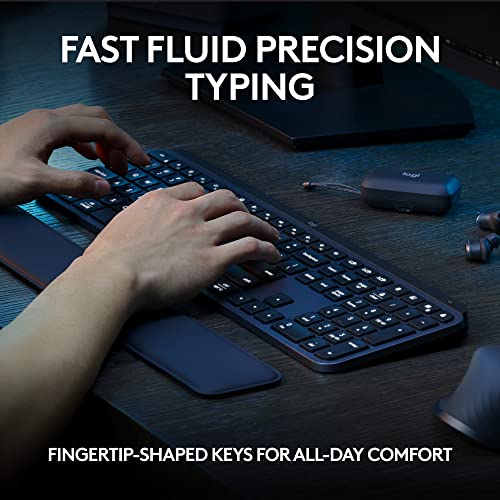
“Logitech MX Keys S with silent key mechanism and up to 10-day battery life. Easy-Switch multi-device pairing, backlit keys that auto-dim, and comfortable shallow travel.”
See Today’s Price →What we like
- Membrane
- RGB
- media keys
- USB
- water-resistant design
- quiet feel
- full-size with numpad
Watch out for
- High price for a keyboard
- No mechanical key option
- Backlight less vibrant than competitors at this price
Read Full Analysis
Logitech MX Keys S is a full-size wireless keyboard with numpad — the specification that smaller wireless keyboards like the Anne Pro 2 and Keychron K8 Pro sacrifice for compactness. The spherical key caps, quiet tactile feedback, and proximity backlighting reflect Logitech's productivity-focused design: keys feel positive without audible click noise in shared workspaces, and backlight engages automatically when hands approach. Easy-Switch cycles between three paired Bluetooth devices without re-pairing through OS settings. At $120, the MX Keys S is the premium full-size wireless option on this page alongside the MX Keys Advanced at $119. The near-identical price between S and Advanced reflects a version update — the S includes Smart Actions for application-specific key remapping and a refined key feel. On a page with the Anne Pro 2 at $136 and Keychron K8 Pro at mechanical tiers, the MX Keys S is the choice for users who need numpad access and prefer quiet membrane keys over mechanical click feedback. Choose the Logitech MX Keys S if you need a full-size wireless keyboard with numpad, quiet keys, and multi-device support for a professional environment where click noise is inappropriate. Skip it in favor of the Anne Pro 2 or Keychron K8 Pro if mechanical switch feedback and compact layout are the priorities — those keyboards serve a different tactile preference that the MX Keys S membrane design cannot replicate.

“Logitech K780 at $58.73 for multi-device wireless with a full-size layout and built-in device stand. Quiet rubber-dome keys and Bluetooth + Unifying receiver dual connectivity.”
See Today’s Price →What we like
- Connects to 3 devices simultaneously via Bluetooth and USB
- Comfortable low-profile keys
- Number pad
- Logitech build quality
- Silent typing
Watch out for
- No backlit keys
- Full-size with numpad — bulky for laptop pairing
- Bluetooth connection switching takes 2-3 seconds
- AAA batteries (not rechargeable)
Frequently Asked Questions
What makes a keyboard ergonomic?
Are mechanical keyboards better for typing all day?
Should I get a TKL keyboard for my office?
What wireless range should I expect?
Is the Apple Magic Keyboard worth it for Mac users?
How We Analyze Products
We analyze Amazon review data — often thousands of reviews per product — to surface patterns that individual buyers miss. Our process aggregates star ratings, review counts, and buyer sentiment at scale, identifying which strengths and weaknesses appear consistently across the largest review samples available. The 11,980+ reviews analyzed on this page represent real verified-purchase feedback from Amazon buyers.
Each product earned its placement through data: total review volume, average rating, and the specific praise and complaints that repeat most often across buyers. No manufacturer paid for placement on this page. Products appear here because buyers endorsed them at scale, not because a company asked us to feature them.
We use AI to summarize review sentiment — not to fabricate opinions, but to condense what thousands of buyers actually wrote into a readable format. The pros and cons you see reflect the most common themes found in verified purchaser reviews, paraphrased for clarity. We do not claim to have accessed Reddit, YouTube, or specific publications in generating these summaries.
Prices shown reflect Amazon pricing at the time this page was last generated. Click “See Today’s Price” to get the current live price on Amazon. Read our full methodology →