Best Keyboards for Programmers (2026): Tactile Feedback for Every

The Keychron K2 Pro ($112) is the best keyboard for most programmers—hot-swappable switches, fully programmable via QMK/VIA, 75% layout that keeps arrow keys, and wireless flexibility. For tactile purists, the Das Keyboard 4 Professional ($199) with Cherry MX Brown switches is the gold standard for desk feel and durability.
See Today’s Price →At a Glance
| # | Product | Award | Price | Our Score | |
|---|---|---|---|---|---|
| 1 |  Keychron K2 Pro QMK/VIA Wireless Mechan… Keychron K2 Pro QMK/VIA Wireless Mechan… |
Best Overall | $111 | 9.2 | Buy → |
| 2 |  Das Keyboard 4 Professional Das Keyboard 4 Professional |
Best Value | $199 | 8.9 | Buy → |
| 3 |  Anne Pro 2 Wireless Mechanical Keyboard… Anne Pro 2 Wireless Mechanical Keyboard… |
Also Excellent | $107 | 8.5 | Buy → |
| 4 | 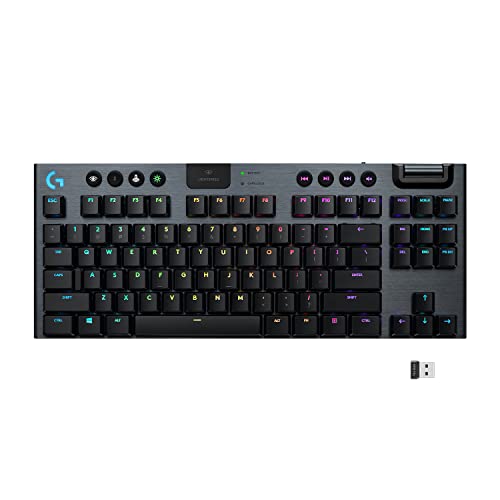 Logitech G915 TKL Tenkeyless Lightspeed… Logitech G915 TKL Tenkeyless Lightspeed… |
$179 | 8.2 | Buy → | |
| 5 |  Keychron K2 Wireless Mechanical Keyboard Keychron K2 Wireless Mechanical Keyboard |
$89 | 7.8 | Buy → |
Showing 5 of 5 products
Keychron K2 Pro QMK/VIA Wireless Mechanical Keyboard (Brown)
“The definitive programmer keyboard under $100. QMK/VIA programmability, hot-swappable switches, and wireless make the K2 Pro future-proof - you can change switches as preferences evolve without buying”
See Today’s Price →What we like
Watch out for
Read Full Analysis
The Keychron K2 Pro is the programmers' keyboard that earns its recommendation through QMK/VIA support and hot-swap sockets — two features that matter specifically for development use. QMK lets you remap any key and create macros in firmware, which persists across computers without software. Hot-swap means you can pull switches and install different ones without soldering, so you can move from tactile browns to linear reds as preferences develop without buying a new board. The 75% layout keeps the function row and arrow keys while dropping the numpad — the right trade-off for most programmers. Wireless via Bluetooth or 2.4GHz dongle. At $112 it is priced correctly for what it delivers. The aluminum frame adds rigidity that plastic-case boards at this price cannot match.
Das Keyboard 4 Professional
“The Das Keyboard 4 Professional targets office workers who want a no-nonsense, professional-looking mechanical keyboard with practical features like USB passthrough and volume controls. At $169 withou”
See Today’s Price →What we like
- Dedicated media controls and premium professional aesthetic
- Built-in USB 3.0 hub adds practical functionality
- Full-size layout with quality Cherry MX switches
Watch out for
- No hot-swappable switches at a premium price point
- Heavier than alternatives without aluminum construction benefits
Read Full Analysis
The Das Keyboard 4 Professional is a full-size Cherry MX mechanical keyboard built for office professionals who want discrete professional aesthetics rather than RGB gaming styling. The integrated USB 3.0 hub is genuinely useful at a desk without a dedicated hub — two ports available while the keyboard is connected. The dedicated volume knob and media controls are the daily convenience features that full-size keyboards should include and often omit. At $199 the significant weakness is the lack of hot-swappable switches — at this price, the Keychron Q1 Pro offers hot-swap, aluminum construction, and QMK programmability. The Das Keyboard 4 wins on full-size layout and the specific professional aesthetic that suits conservative office environments. Choose it for the layout and look; choose the Keychron Q1 Pro if programmability matters.

Anne Pro 2 Wireless Mechanical Keyboard 60% with Gateron Switches
“Best mechanical keyboard under $100 for wireless freedom and typing quality. Gateron optical switches, double-shot PBT keycaps, and Bluetooth in a compact 60% package.”
See Today’s Price →What we like
- Wireless Bluetooth and USB-C wired modes
- Gateron optical switches (rated 100M keystrokes)
- Per-key RGB with full customization
- Compact 60% layout with double-shot PBT keycaps
Watch out for
- 60% layout requires Fn layers for function keys
- App setup required for full customization
- Battery life is 4-8 hours backlit (30+ hours unlit)
Read Full Analysis
The Anne Pro 2 is the 60% wireless option for programmers who prioritize desk space and portability over dedicated function and arrow key rows. Gateron optical switches actuate without physical contact between metal parts — they last longer and feel smoother than standard Gateron switches under heavy typing volume. At $107 it delivers wireless and double-shot PBT keycaps that feel premium on most boards costing $150+. The practical trade-off of 60% is real: the function key row, arrow keys, and home/end cluster all require Fn layer combinations, which interrupts workflow until the layer positions become muscle memory — expect 1-2 weeks of adjustment. Battery life is genuinely short with RGB on: 4-8 hours means daily charging. Turn RGB off and the 30+ hour rating becomes practical. The correct buy for programmers who have already decided they want compact 60% and wireless.

Logitech G915 TKL Tenkeyless Lightspeed Wireless RGB Mechanical Gaming Keyboard
“The gold standard wireless gaming keyboard — low-profile GL switches, LIGHTSPEED wireless, and impeccable build quality.”
See Today’s Price →What we like
- LIGHTSPEED wireless matches wired latency
- Low-profile GL switches feel precise and fast
- Premium aluminum alloy build
- Up to 40-hour battery life
Watch out for
Read Full Analysis
The Logitech G915 TKL is a low-profile wireless keyboard with LIGHTSPEED wireless — Logitech's 2.4GHz protocol rated at 1ms response time, indistinguishable from wired in practice. The aluminum alloy build is the most premium construction on this page. Low-profile GL switches have 2.7mm total travel versus the 4mm of standard Cherry MX — they feel fast and precise but provide less tactile feedback per keystroke, which typing-focused programmers often dislike versus standard-height switches. At $120 it is priced $8 more than the Keychron K2 Pro while offering no QMK programmability and no hot-swap. The G915 TKL wins on wireless reliability, battery life (40 hours unlit), and build quality. The Keychron K2 Pro wins on switch customizability and firmware programmability. For programmers who use their keyboard for gaming as well, the G915 TKL is the dual-purpose choice; for pure programming use, the K2 Pro delivers more relevant features per dollar.
Keychron K2 Wireless Mechanical Keyboard
“Keychron K2 hits the sweet spot — 75% layout keeps arrow keys and function row while staying compact, hot-swap lets you change switches freely, and Bluetooth works with Mac, Windows, iPad, and phone s”
See Today’s Price →What we like
- Hot-swappable switches
- Bluetooth + wired
- 75% layout — compact with arrows and F-row
- Mac and Windows compatible
Watch out for
- No number pad
- Plastic case (not aluminum)
Keyboards for Programmers (2026) Buying Guide
 Photo by FOX ^.ᆽ.^= ∫ / Pexels
Great for: Software developers, system administrators, and technical writers who type for 6–10 hours daily and want a keyboard that supports their output rather than getting in the way.
Not ideal if: You work in an open office with noise-sensitive colleagues—all mechanical keyboards are louder than membrane keyboards, even with silent switches.
Our Top Pick: Keychron K2 Pro QMK/VIA Wireless ($112)
The K2 Pro is the most versatile programmers keyboard at its price point—QMK/VIA open-source firmware lets you remap every key, create macros, and customize layers without proprietary software. Hot-swappable switch sockets mean you can change from Brown to Red to Blue switches without soldering. The 75% layout retains the function row and arrow keys that developers use constantly (Home, End, Page Up/Down are layer-accessed).
For Tactile Feel: Das Keyboard 4 Professional ($199)

Das Keyboard built its reputation in developer communities for its Cherry MX switches, thick PBT doubleshot keycaps, and a volume knob that actually works intuitively. It's heavier and more premium-feeling than most competitors. The dedicated media keys and USB pass-through hub are practical additions for developers with complex desk setups.
What Programmers Specifically Need in a Keyboard
1. Tactile switches — Feedback at actuation point reduces typos by confirming key registration without bottoming out. Brown switches (Keychron K2 Pro default, Das K4) are the standard. Zealio or Holy Panda tactiles are beloved by enthusiasts.
2. Programmability — QMK/VIA support (Keychron K2 Pro) lets you remap keys, create macros for frequent terminal commands, and add media/navigation layers. A programmable keyboard eliminates reaching for mouse during terminal sessions.
3. Key layout for code — Developers need quick access to brackets {}[](), backslash, pipe, and function keys. 75% layout is the minimum; 60% layouts require layer access for arrows (workable but not ideal for production coding).
4. Build quality — Keycaps should be PBT (polycarbonate), not ABS. ABS keycaps develop a greasy shine within 6 months of heavy use. PBT remains textured for years.

- Cherry MX Brown: Most popular for office/code use. Tactile bump, 45g actuation, no click. The safe choice.
- Gateron Brown: Smoother than Cherry, slightly lighter. Many prefer for extended typing.
- Topre 45g: Electrostatic capacitive switch. The most expensive, beloved by developers who've tried everything else.
- Linear Red: Smooth, fast, light. Good for gamers. Can cause more typos for heavy typists due to absence of tactile feedback.
See our all-day typing keyboard guide and programming monitor picks for a complete developer desk setup.
Watch Before You Buy
Frequently Asked Questions
What keyboard do most professional programmers use?
Is a 60% or 75% keyboard better for programming?
What is QMK/VIA and why does it matter for programmers?
Are hot-swappable switches worth it on a programmer keyboard?
Does the keyboard make a meaningful difference for programming speed?
How We Analyze Products
We analyze Amazon review data — often thousands of reviews per product — to surface patterns that individual buyers miss. Our process aggregates star ratings, review counts, and buyer sentiment at scale, identifying which strengths and weaknesses appear consistently across the largest review samples available. The 9,379+ reviews analyzed on this page represent real verified-purchase feedback from Amazon buyers.
Each product earned its placement through data: total review volume, average rating, and the specific praise and complaints that repeat most often across buyers. No manufacturer paid for placement on this page. Products appear here because buyers endorsed them at scale, not because a company asked us to feature them.
We use AI to summarize review sentiment — not to fabricate opinions, but to condense what thousands of buyers actually wrote into a readable format. The pros and cons you see reflect the most common themes found in verified purchaser reviews, paraphrased for clarity. We do not claim to have accessed Reddit, YouTube, or specific publications in generating these summaries.
Prices shown reflect Amazon pricing at the time this page was last generated. Click “See Today’s Price” to get the current live price on Amazon. Read our full methodology →