Best Monitor Risers 2026: Raise Your Screen, Improve Your Posture
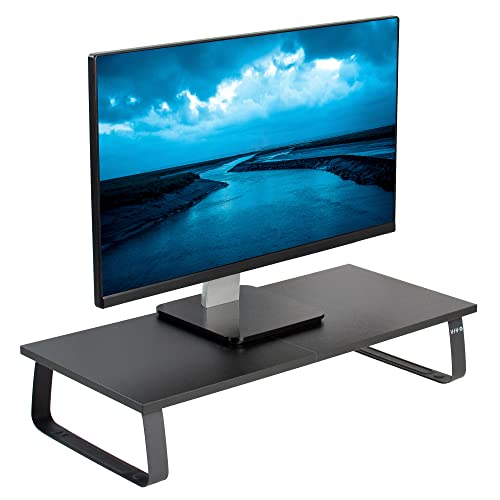
The VIVO Monitor and Laptop Desktop Riser is the best monitor stand — raises screen 5 inches for ergonomic eye level, fits up to 27-inch displays, under $35.
See Today’s Price →At a Glance
Monitor Risers Buying Guide
 Photo by Minh Phuc / Pexels
Most mesh and basic monitor risers are fixed at 4–6 inches above the desk surface. Adjustable risers (3M MS85B) allow fine-tuning from 1.7 to 5.5 inches to match your specific seated eye level. For the correct monitor position, your eyes should align with the top third of the screen when seated in your normal posture. Measure before assuming a fixed-height riser will work for your setup.
Standard risers (21–22 inches) handle a single 24–27-inch monitor. Wider risers (VIVO at 24 inches) can support two smaller monitors or one large ultrawide monitor. Verify the width of your monitor's base against the riser platform.
Standard monitors weigh 8–15 pounds. Ultrawide monitors or dual-monitor setups can exceed 20 pounds. VIVO and 3M rate their risers for 22–33 pounds respectively. Verify weight capacity before placing heavy equipment on any riser.
Integrated drawers (Simple Houseware, Halter) provide hidden storage beneath the monitor for cables, notepads, or small items. Open shelves are useful for frequently-accessed items (speakers, webcam). Choose based on whether you want hidden or accessible storage in the under-monitor space.
A monitor riser only addresses vertical positioning. For complete ergonomic setup, you also need: monitor arm (if tilt/swivel adjustment is needed), chair at proper height (thighs parallel to floor), keyboard at elbow height (may require a keyboard tray), and monitor at arm's length from face. A riser alone improves posture for most setups but is not a complete ergonomic solution.
For a detailed head-to-head, see our Benq Vs Dell Monitor comparison.
For a detailed head-to-head, see our Dell Vs Lg Monitor comparison.
Watch Before You Buy


“VIVO Monitor Stand handles dual-monitor setups with a 24-inch platform, includes a USB hub for added connectivity, and features an organizer shelf beneath the surface.”
See Today’s Price →What we like
- 24-inch width fits monitor and laptop side by side
- VIVO brand reliability
- Elevated position for ergonomic neck alignment
- Under-stand storage
- Budget price
Watch out for
- Fixed height at approximately 5 inches — no adjustment range for users whose chair height, eye level, or monitor size requires a different riser elevation than the standard 5 inches
- Flat base footprint takes approximately 24x10 inches of desk space — a monitor arm mount reclaims the same surface area for $40–50 more while also allowing height and tilt adjustment
- Open shelf below the riser is narrower than the monitor placed on top — creates a top-heavy appearance and limits the size of accessories or cables stored underneath
Read Full Analysis
VIVO Monitor and Laptop Stand is the most functional monitor riser in this roundup. The 24-inch wide platform accommodates a single large monitor, two smaller monitors side-by-side, or a monitor plus open laptop. The integrated organizer section below the riser surface provides a shelf with openings for routing cables or placing small items. VIVO builds their products to standard ergonomic specifications—the riser height positions most monitors appropriately for standard desk-and-chair combinations. The construction is sturdy steel with a protective finish that resists scratches. It is the best-value option that handles dual-monitor configurations. The product includes rubber feet to prevent sliding and protect desk surfaces. For home office setups with multiple displays or those who need an organized under-monitor storage area, VIVO is the practical top choice.

“Halter Mesh Monitor Stand comes as a 2-pack—both monitors raised consistently, creating a clean symmetrical setup for dual-monitor workspaces.”
See Today’s Price →What we like
- Budget price
- Includes drawer for supplies
- Mesh ventilation aesthetic
- Halter brand
- Elevates monitor for ergonomic positioning
Watch out for
- Drawer small capacity
- Monitor weight capacity limited at budget price
- Mesh wobbles slightly under heavy monitors
Read Full Analysis
Halter Mesh Monitor Stand comes in a 2-pack, making it the natural choice for dual-monitor setups where you want both screens at the same height without paying for a wider single riser. Each stand includes a pull-out drawer, which doubles the storage compared to single-stand options. The mesh construction is compatible with the aesthetic of mesh desk organizers for a coordinated look. Each stand handles monitors or laptops up to 22 pounds. At around $36 for both, the per-stand cost is excellent compared to buying two separate risers. The trade-off is that the stands are fixed height and narrower than VIVO's unified platform—they work best for monitors with narrow bases. For dual-monitor users who want symmetrical positioning and matched aesthetics, the Halter 2-pack is the most economical solution.

“3M Adjustable Monitor Stand is the only height-adjustable option in this group—dial in your exact eye level from 1.7 to 5.5 inches for precision ergonomic positioning.”
See Today’s Price →What we like
- Adjustable 1.7 to 5.5-inch height range
- 3M brand quality
- Black finish
- Easy height adjustment
- Suitable for multiple monitor sizes
Watch out for
- Premium price for a monitor stand
- Height adjustment mechanism adds complexity vs simple risers
- 3M brand premium for a platform stand
Read Full Analysis
3M Adjustable Monitor Stand is the choice for buyers who need precise monitor height adjustment rather than a fixed-height riser. The height adjusts from 1.7 to 5.5 inches in small increments, allowing fine-tuning for ergonomic precision. This is valuable in shared workspaces where different users have different seated eye levels, or for users who are between standard riser heights. The 3M brand brings enterprise-level quality—this stand is designed for commercial office environments where it must perform reliably over years of use. The sleek, minimal design is professional-looking in any workspace. It is the highest-priced option here. The premium is justified for users who genuinely need adjustable height; for those who find a fixed 5-inch riser suitable, VIVO or Simple Houseware provide better value. A strong investment for ergonomically precise workstation setups.

“WALI dual monitor stand at $29.98 supports two screens side-by-side at the same height. Free-standing design needs no clamp, and the cable management channel keeps cords routed behind the arm.”
See Today’s Price →What we like
- Independent gas-spring arms - run one screen portrait and one landscape
- Fits 13-32 inch screens, up to 22 lb per arm
- VESA 75 and 100 mounting
- Full-motion tilt, swivel and height
- Cable channel keeps runs off the desk
Watch out for
- A dual clamp needs real depth at the back of the desk - measure first
- Integrated USB hub is USB-A only
- 22 lb per arm can be tight for a large 32-inch panel - check weight, not diagonal
Read Full Analysis
Buyers who come to a monitor riser page expecting a simple platform under a single screen will find WALI's $33 dual monitor stand in a different category entirely — it mounts two monitors on gas spring arms that clamp to the desk edge, eliminating the riser concept for two-screen setups. For anyone upgrading from a single-monitor riser to a dual setup, the WALI removes both monitors from the desk surface and gives each independent positioning across height, tilt, and swivel. The gas spring arms hold monitors at any set height without locking mechanisms, so repositioning is frictionless. The clamp mount requires a desk edge of 0.4 to 3.9 inches thick; most standard desks fit within this range. Single-monitor users and anyone with a glass or thin-edge desk should look at the conventional risers on this list; the WALI is the right choice specifically when adding a second screen is already planned or in place.
Frequently Asked Questions
How high should my monitor be?
Can a monitor riser hold a laptop and a monitor?
Is a monitor riser better than a monitor arm?
Will a monitor riser damage my desk surface?
Can I put my keyboard under the monitor riser?
How We Chose These Products
We compare each product’s Amazon listing, the manufacturer’s published specifications and Amazon customer ratings, shown with their review counts as Amazon’s data, and rank the products on how well they answer this page’s question. We do not test products in hand and we do not run our own analysis of review text. A publication or expert is named only where we cite its published findings about that product. No manufacturer paid for placement on this page.
A price appears only when Amazon’s API supplied it at a recent daily refresh, with the date and time beside it, and is withdrawn at 4 AM Central on the day after it turns 24 hours old; otherwise use “Check price on Amazon” for the live price. Read our full methodology →