Best Under-Desk Keyboard Trays 2026

The VIVO Under Desk Keyboard Tray at $59 is the best value pick — 27x11 in platform, no-drill clamp mount, and a full tilt range for standard home office use. The Mount-It at $77 adds a smoother slide-out mechanism and accommodates thicker desk tops. For clinical-grade adjustability, the Ergotron Neo-Flex Arm at $102 provides full 3D positioning appropriate for ergonomic rehabilitation setups or users with repetitive strain conditions.
See Today’s Price →At a Glance


Showing 3 of 3 products
VIVO Under Desk Keyboard Mouse Platform Tray Ergonomic Adjustable
“VIVO's under-desk keyboard platform is the budget ergonomic upgrade for desk workers who have repetitive strain issues — the adjustable negative tilt positions the keyboard to reduce wrist extension t”
See Today’s Price →What we like
Watch out for
Read Full Analysis
The VIVO Under Desk Keyboard Mouse Platform Tray mounts via a clamp mechanism that fits desks up to 1.25 inches thick — no drilling required. The platform measures 27x11 inches and accommodates full-size keyboards with a number pad plus a mouse pad. The height adjusts from -3 to +3 inches below desk level and the tilt adjusts from -15 to +15 degrees. At $59, it is the most affordable of the three options while still providing a full adjustment range. Best for home office users and students who want ergonomic keyboard positioning without permanently modifying their desk.

Mount-It Clamp-On Under Desk Keyboard Tray No Drill Slide Out 27x11
“Mount-It's clamp-on keyboard tray is the renter's ergonomic solution — no drilling means the tray can be installed and removed without damaging the desk, making it ideal for leased offices and shared ”
See Today’s Price →What we like
Watch out for
Read Full Analysis
The Mount-It Clamp-On Under Desk Keyboard Tray provides a 27x11 inch platform with a smooth ball-bearing slide mechanism that extends fully for use and retracts under the desk when not needed. The no-drill clamp installation accommodates desks from 0.5 to 1.5 inches thick. The tilt adjustment is tool-free — a single lever unlocks and re-locks the angle. At $77, it sits between the VIVO and Ergotron options. The slide mechanism quality and the wider desk thickness range make it a step up from the entry-level bracket. Best for office workers at standing desks or fixed-height desks who switch frequently between using and retracting the keyboard platform.

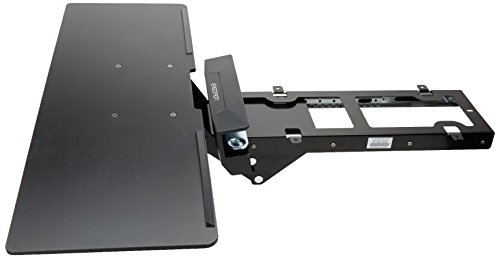
Ergotron Neo-Flex Under Desk Keyboard Arm Adjustable Height Ergonomic
“Ergotron Neo-Flex is the commercial-grade keyboard arm for users with serious repetitive strain concerns — the Ergotron engineering quality and long warranty justify the premium for people whose keybo”
See Today’s Price →What we like
Watch out for
Read Full Analysis
The Ergotron Neo-Flex Under Desk Keyboard Arm goes beyond simple tilt and height adjustment to provide a fully articulating arm that positions the keyboard platform in three dimensions — in/out, left/right, and height. This makes it appropriate for ergonomic workstation setups where the keyboard must be positioned precisely for injury prevention or rehabilitation. Ergotron is the established name in monitor and keyboard arm ergonomics — their arms are used in clinical and enterprise settings. At $102, it costs significantly more than the other options but provides a level of adjustability that a fixed tray cannot match. Best for users with repetitive strain injuries, ergonomic requirements from an occupational therapist, or those who frequently change their seated position throughout the day.
Under-Desk Keyboard Trays Buying Guide
 Photo by Pew Nguyen / Pexels
How to Choose an Under-Desk Keyboard Tray
Keyboard positioning is one of the most overlooked ergonomic adjustments in a home office. Most desks are 29-30 inches high — a height designed for writing by hand, not for keyboard use. Typing with the keyboard at desk height typically causes the shoulders to rise and the wrists to angle upward (wrist extension), both of which increase the risk of repetitive strain injury over hours of daily use.
An under-desk keyboard tray lowers the keyboard to elbow level or slightly below, allowing the upper arms to hang relaxed, elbows at roughly 90-100 degrees, and wrists flat or slightly angled down (negative tilt). This posture reduces tendon loading in the wrists and forearms and decreases the shoulder elevation that causes neck and upper back fatigue.

All three keyboard trays here use a clamp installation — no drilling or desk modification required. Clamp mounts grip the underside edge of the desk and tighten via a bolt. They are reversible, which is essential for rented spaces, shared offices, or users who move frequently.
Drilled installations are more permanent and generally support heavier weight, but for a keyboard platform that holds only a keyboard and mouse pad (under 5 lbs), a clamp mount is more than adequate.

Clamp mounts have a maximum desk thickness they can accommodate. Most are rated for desks 0.5 to 1.5 inches thick, which covers the majority of home office desks. Standing desks with laminated top frames sometimes reach 1.75-2 inches — check the desk edge thickness before purchasing. Tempered glass desks are incompatible with clamp mounts.
A full-size keyboard with a number pad is typically 17-18 inches wide. A 27-inch wide keyboard platform provides 9+ inches of mouse space to the right of the keyboard — enough for a full-size mouse pad and comfortable cursor movement. If you use a tenkeyless (TKL) keyboard without a number pad, the same platform provides even more mouse space.
The slide that extends and retracts the keyboard platform under the desk should move smoothly under the weight of your keyboard and arms. Cheaper slides use basic roller mechanisms that can bind or feel sticky. Higher-quality slides use ball bearings and handle 20+ lbs without binding. The Mount-It and Ergotron options use better slide mechanisms than budget-tier alternatives.
Ergonomic research supports keyboard use at neutral or slightly negative tilt — the back of the keyboard lower than the front, angling the keys toward the user. This keeps wrists in a neutral or slightly extended position rather than flexed upward. Most keyboard trays allow both positive and negative tilt; use the setting that keeps your wrists flattest during normal typing.
Frequently Asked Questions
Will a keyboard tray fit my standing desk?
Can I use a keyboard tray with a glass desk?
How much weight can a keyboard tray hold?
What is the correct height for a keyboard tray?
Do I need a wrist rest with an under-desk keyboard tray?
How We Analyze Products
We analyze Amazon review data — often thousands of reviews per product — to surface patterns that individual buyers miss. Our process aggregates star ratings, review counts, and buyer sentiment at scale, identifying which strengths and weaknesses appear consistently across the largest review samples available.
Each product earned its placement through data: total review volume, average rating, and the specific praise and complaints that repeat most often across buyers. No manufacturer paid for placement on this page. Products appear here because buyers endorsed them at scale, not because a company asked us to feature them.
We use AI to summarize review sentiment — not to fabricate opinions, but to condense what thousands of buyers actually wrote into a readable format. The pros and cons you see reflect the most common themes found in verified purchaser reviews, paraphrased for clarity. We do not claim to have accessed Reddit, YouTube, or specific publications in generating these summaries.
Prices shown reflect Amazon pricing at the time this page was last generated. Click “See Today’s Price” to get the current live price on Amazon. Read our full methodology →