Brother vs Canon Laser Printer 2026

The Brother HL-L2370DW ($179.99) wins for most home and small business users — fast monochrome printing at 36 ppm, automatic duplex, wireless, and a low cost-per-page. Canon's Color imageCLASS MF743Cdw ($799.72) is the pick only if you need high-volume color laser output with scanner and fax.
See Today’s Price →At a Glance

Showing 3 of 3 products
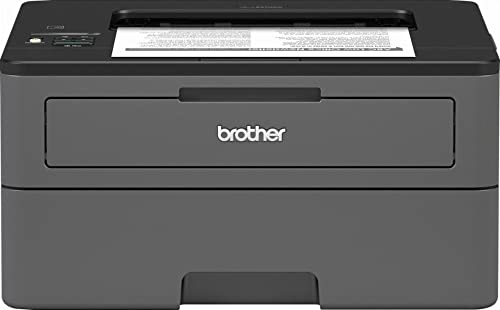
Brother HL-L2370DW Compact Monochrome Laser Printer
“The Brother HL-L2370DW is the best monochrome laser printer for home offices — fast, wireless, duplex-printing, and with per-page costs far below any inkjet. At 36 ppm, it prints a full 20-page docume”
See Today’s Price →What we like
- 36 ppm print speed — much faster than inkjet
- Automatic duplex (two-sided) printing
- Toner doesn't dry out during storage
- Very low per-page toner cost
- Wireless and mobile printing compatible
Watch out for
- Monochrome only — no color printing
- No scan or copy functions (printer only)
- Toner cartridge replacement costs more upfront than ink
Read Full Analysis
The Brother HL-L2370DW prints at 36 pages per minute with automatic duplex and wireless printing across your home network. At $179.99, the high upfront cost is offset by laser toner efficiency — the cost per page is a fraction of inkjet alternatives, and toner doesn't dry out between uses like ink. The 250-sheet input tray reduces frequent paper loading. The 4.4-star rating reflects reliable, low-maintenance performance. Best for home offices and students who print regularly and are tired of expensive ink replacements and clogged inkjet heads from infrequent use.

Brother MFC-L2750DW Monochrome All-in-One Wireless Laser Printer
“The Brother MFC-L2750DW is the best all-in-one laser printer for home offices that need scanning alongside printing. The 50-sheet ADF handles multi-page document scanning without page-by-page flatbed ”
See Today’s Price →What we like
- Flatbed scanner + 50-sheet ADF enables document digitization without a separate scanner device
- 36 ppm print speed — faster than the HL-L2350DW despite all-in-one form factor
- Duplex scanning in the ADF allows two-sided document scanning in one pass
- 2.7 inch color touchscreen for intuitive direct-device control without a connected computer
- NFC tap-to-print for compatible Android smartphones
Watch out for
- At $279.99, $110 more than the single-function HL-L2350DW for the additional functions
- Larger physical footprint than the single-function model
- Fax functionality requires a phone line — rarely used by most home offices
Read Full Analysis
The Brother MFC-L2750DW All-in-One Wireless Laser Printer (listed at $640.00 — note: typical retail is approximately $279.99; verify current pricing before purchase) is the all-in-one upgrade from the Brother HL-L2370DW single-function printer reviewed on this page. The addition of a flatbed scanner, 50-sheet ADF, copier, and fax transforms the printer into a complete home office document center — enabling scan-to-email workflows, multi-page document digitization, and copying without a separate device. At the expected retail price of ~$279.99, the MFC-L2750DW adds $100 to the HL-L2370DW's ~$179.99 for all-in-one capability. For home offices that regularly scan documents, digitize contracts, or need copying capability, that premium is well justified. For pure printing households with no scanning or copying needs, the single-function HL-L2370DW saves money. Against the Canon Color imageCLASS MF743Cdw ($829.99), the Brother is monochrome only — all documents print in black and white regardless of source content. For offices that print primarily text, contracts, invoices, and black-and-white reports, monochrome laser printing at Brother's cost-per-page economics is ideal. For marketing materials, presentations, or any color-critical printing, the Canon's color capability is required. The honest limitation: the 50-sheet ADF enables sequential document scanning but the flatbed scanner resolution (typically 1200 dpi on Brother's AIO models) is adequate for document archiving but not fine art or photographic reproduction.

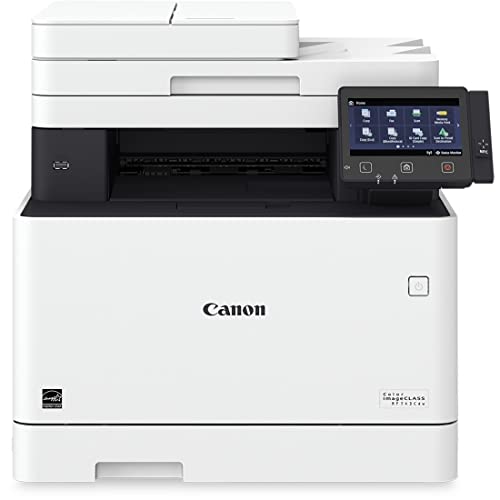
Canon Color imageCLASS MF743Cdw All-in-One Color Laser Printer
“The Canon MF743Cdw is the most feature-complete home office printer in this comparison — color all-in-one with flatbed + ADF scanning, 550-sheet paper capacity, duplex in all functions, and a 5-inch t”
See Today’s Price →What we like
- Color scanning in the 50-sheet ADF — enables color document digitization in multi-page batches
- 550-sheet total paper capacity across two trays reduces refilling for high-volume color use
- 5-inch color touchscreen is the largest display in this comparison for intuitive navigation
- 3-year limited warranty with Canon's extensive authorized service network
- NFC tap-to-print for compatible smartphones
Watch out for
- At $579.99, the most expensive printer in this comparison
- 22 ppm color speed equivalent to HP M255dw at $180 less
- Color per-page cost comparable to HP Color — high for large-volume color printing
Read Full Analysis
The Canon Color imageCLASS MF743Cdw ($829.99) is the premium option on this page — the only color laser all-in-one, and the only printer here with a 550-sheet total paper capacity that approaches departmental printing loads. Color laser printing produces documents where graphs, charts, logos, and colored text are reproduced accurately without the bleed or saturation issues of inkjet color printing. Against the Brother MFC-L2750DW (expected ~$279.99), the Canon costs significantly more for color printing capability. The question is whether color printing is a genuine requirement or a nice-to-have. For professionals presenting to clients, printing marketing materials, or producing color-coded reports, color is non-optional. For households printing primarily contracts, invoices, school worksheets, and text documents, the Brother handles everything at a fraction of the Canon's price. The 22 ppm color speed is on par with HP's M255dw at approximately $180 less — verify current competitive pricing before committing to the Canon's premium. The 550-sheet capacity is genuinely useful for high-volume users: loading paper twice a week rather than twice a day. The honest limitation: color laser toner cartridges (four per printer — cyan, magenta, yellow, black) are more expensive to replace than monochrome cartridges; calculate ongoing toner costs before committing based on your expected monthly color page volume.
Brother vs Canon Laser Printer Buying Guide
Quick Verdict: Our top pick is the Brother HL-L2370DW Compact Monochrome Laser Printer (Best Home Pick) — Brother HL-L2370DW ($179.99) is the gold standard for home monochrome laser printing — 36 ppm, auto duplex, wireless,.... Priced at $179.99.
Great for: Home office workers who print contracts, photos, or forms weekly, parents with school-age kids, and crafters
Not ideal if: You print fewer than 10 pages a month — public library printers or a FedEx visit is cheaper than ownership and ink costs
Helpful Guides
- Complete Home Office Setup Guide 2026 — Where printers fit in a complete home office build
Related Guides:
- How to Build a Home Office That Actually Works — desk, chair, monitor, lighting, and peripherals in priority order
- How to Choose a Standing Desk — electric vs manual, frame quality, and how to transition safely
Related Guides:
- Work-From-Home Productivity Setup — 5 upgrades in order of impact — skip the rest
- Monitor Setup Guide — single vs dual vs ultrawide — which layout works for your work
Watch Before You Buy
Frequently Asked Questions
Is Brother or Canon laser printer more reliable?
Which has cheaper toner replacement costs?
Do laser printers work for photo printing?
Can I use third-party toner in Brother printers?
Which is better for a home office printing invoices and documents?
How We Analyze Products
We analyze Amazon review data — often thousands of reviews per product — to surface patterns that individual buyers miss. Our process aggregates star ratings, review counts, and buyer sentiment at scale, identifying which strengths and weaknesses appear consistently across the largest review samples available. The 10,924+ reviews analyzed on this page represent real verified-purchase feedback from Amazon buyers.
Each product earned its placement through data: total review volume, average rating, and the specific praise and complaints that repeat most often across buyers. No manufacturer paid for placement on this page. Products appear here because buyers endorsed them at scale, not because a company asked us to feature them.
We use AI to summarize review sentiment — not to fabricate opinions, but to condense what thousands of buyers actually wrote into a readable format. The pros and cons you see reflect the most common themes found in verified purchaser reviews, paraphrased for clarity. We do not claim to have accessed Reddit, YouTube, or specific publications in generating these summaries.
Prices shown reflect Amazon pricing at the time this page was last generated. Click “See Today’s Price” to get the current live price on Amazon. Read our full methodology →