How to Set Up an Ergonomic Desk: Complete 2026 Guide
Get your monitor at eye level first (monitor arm, $80-150). Adjust chair so elbows are at desk height. Add lumbar support. These three steps fix 80% of desk ergonomics problems before buying any expensive equipment.
How to Set Up an Ergonomic Desk Buying Guide
 Photo by Alpha En / Pexels
Great for: Remote workers needing a dedicated workspace, students who study at home, and anyone working from a kitchen table
Not ideal if: You only use a computer occasionally — a well-placed kitchen table or breakfast bar covers occasional use
- You are trying to how to set up an ergonomic desk: complete 2026 guide and want clear, practical guidance
- You have done basic research and want a definitive guide that explains the tradeoffs
- You want to make the right decision the first time without having to research it again
- You have already made your decision and are looking for specific product recommendations
- You need highly specialized advice for professional or commercial applications
Quick Verdict: Our top pick is the Herman Miller Aeron Ergonomic Chair (Size B) (Best Chair (Used/Premium)) — Herman Miller Aeron is the benchmark ergonomic chair with PostureFit SL lumbar support, 8Z Pellicle mesh, and 12-year.... Priced at $675.
Budget Pick: The BenQ ScreenBar Monitor Light Standard at $92.65 — BenQ ScreenBar mounts directly on the monitor and angles light onto the desk at 500 lux without screen glare.
Quick Comparison
| Component | Non-Negotiable Spec | Budget Option | Mid-Range | Premium |
|---|---|---|---|---|
| Chair | Lumbar support, seat depth adjust, armrests at desk height | IKEA Markus ($230) | Branch Ergonomic ($350) | Herman Miller Aeron ($1,400+) |
| Monitor | Eye level at top of screen, 20-28" viewing distance | 24" 1080p IPS ($130-180) | 27" 1440p IPS ($280-350) | 27" 4K or 34" Ultrawide ($500+) |
| Monitor Arm | VESA-compatible, holds monitor height at eye level | Amazon Basics arm ($35) | Fully Jarvis arm ($60) | Ergotron LX ($180) |
| Keyboard | Negative tilt preferred; wrists flat while typing | Any keyboard you type on ($20+) | Mechanical tkl + wrist rest ($80-120) | Split ergonomic (Kinesis, ZSA) ($300+) |
| Mouse | Neutral wrist position; no ulnar deviation | Any wireless mouse ($25+) | MX Master 3 ($100) | Vertical or trackball ($60-120) |
| Lighting | No glare on screen; bias lighting reduces eye strain | Desk lamp ($20-30) | Elgato Key Light Air ($100) | Key Light + bias LEDs ($200+) |
| Desk Height | Elbows at 90° when typing; 28-30" for most people | Adjustable-leg IKEA desk ($100-200) | Fixed electric ($300-500) | Full sit-stand electric ($500-1,500+) |
| Priority Order | Chair first → Monitor at eye level → Lighting → Everything else. Back pain from a bad chair compounds daily. |
The Geometry First: Get This Right Before Buying Anything
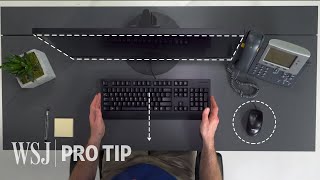
Step 1: Chair Height
Sit in your chair with feet flat on the floor. Your thighs should be parallel to the floor (or slightly angled downward toward knees). Hips slightly higher than knees is optimal -- reduces lumbar disc pressure. If your feet can't reach the floor at correct thigh position, use a footrest ($25-40).
Step 2: Desk / Keyboard Height

With arms relaxed at your sides, your elbows should be at desk height. Shoulders should be relaxed, not elevated. If your desk is too high (most are), a keyboard tray drops the typing surface 2-4 inches. Alternatively, raise your chair and use a footrest.
Step 3: Monitor Position
Top of monitor screen at or slightly below eye level. Your neck should be roughly neutral (horizontal gaze) not tilted down (forward head posture) or up. Monitor 20-28 inches from eyes (arm's length is a good heuristic). Tilt monitor 10-20 degrees back from vertical. A monitor arm ($80-220) is the most efficient way to hit all these targets -- more adjustable than any monitor stand.
Step 4: Lumbar Support
The lumbar spine has a natural inward curve. Sitting unsupported for 8 hours reverses this curve, stretching spinal ligaments and compressing discs. A good chair's lumbar support maintains this curve. If your chair lacks lumbar support, a $30-50 lumbar pillow placed at the small of your back is highly effective.
The Budget-Tier Setups
$200 Setup (Correct Geometry with Modest Equipment)
- Used task chair from Facebook Marketplace or local office liquidation ($40-80) -- a used Steelcase Leap or HM Aeron at this price point frequently appears in office liquidations
- Monitor arm or stand ($30-60) to achieve eye-level position
- Lumbar pillow ($25-40) if chair lacks built-in lumbar
- Keyboard and mouse at elbow height (may need $25 tray or riser)
$800 Setup (New Equipment, All Problems Solved)
- Herman Miller Aeron (new) or Steelcase Leap ($650-1,500 new) OR Branch Ergonomic Chair ($499) as best-value new option with 10-year warranty
- Ergotron LX Dual Monitor Arm ($215) -- the definitive monitor arm
- BenQ ScreenBar or Yeelight bar ($45-95) for glare-free desk illumination
$1,500 Setup (Standing Desk + Everything)
- VIVO Electric Standing Desk ($300) or FlexiSpot E7 ($400) for sit-stand capability
- Herman Miller Aeron used ($400-600) or new Steelcase Gesture ($900+)
- Ergotron LX Arm ($215)
- Anti-fatigue mat ($80-150) for standing periods
The Standing Desk Reality Check
Standing desks don't eliminate back pain -- standing for 8 hours causes as many problems as sitting for 8 hours (varicose veins, foot pain, fatigue). The benefit is posture variation: alternating between sitting and standing every 30-60 minutes prevents the static loading that causes pain. A sit-stand routine (45 min sitting, 15 min standing) is the evidence-based approach.
Electric desks vs manual cranks: electric desks ($300-600) make standing transitions frictionless enough that you actually do them. Manual crank desks ($200-300) require enough effort that most people stop using the standing function within 2 weeks.
Lighting: The Overlooked Factor
Poor lighting causes eye strain, which causes headaches, which causes forward head posture as you squint at the screen. Two rules: no light source directly behind the monitor (causes contrast glare), and supplemental task lighting that illuminates the desk without hitting the screen. The BenQ ScreenBar ($95) mounts on the monitor and lights the desk at 500+ lux without screen glare. Highly recommended for darker offices.
Explore Our Comparison Pages

- Best Ergonomic Office Chairs 2026 -- Full comparison including used market
- Best Standing Desks 2026 -- Electric picks by budget
- Best Monitor Arms 2026 -- Single, dual, and ultra-wide options
- Best Desk Lamps 2026 -- Task lighting picks
- Herman Miller vs Steelcase -- Which is worth the price?
- Office Chair Guide -- Used Aeron vs new budget chairs
At a Glance
| # | Product | Award | Price | Our Score | |
|---|---|---|---|---|---|
| 1 |  Herman Miller Aeron Ergonomic Chair (Si… Herman Miller Aeron Ergonomic Chair (Si… |
Best Overall | $675 | 9.2 | Buy → |
| 2 |  VIVO Electric 48x30 Standing Desk, Memo… VIVO Electric 48x30 Standing Desk, Memo… |
Best Electric Standing Desk | $299 | 8.9 | Buy → |
| 3 | 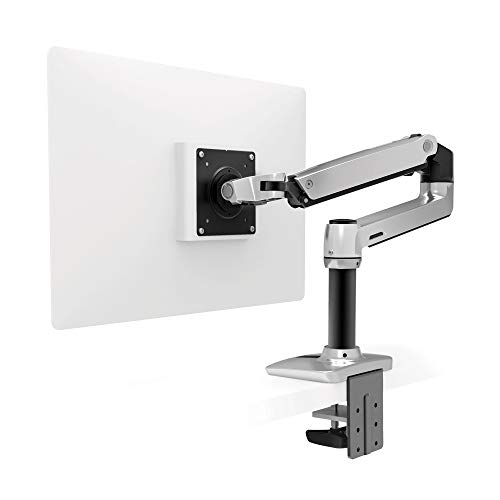 Ergotron LX Desk Monitor Arm — Single… Ergotron LX Desk Monitor Arm — Single… |
Best Monitor Arm | $159 | 8.5 | Buy → |
| 4 | 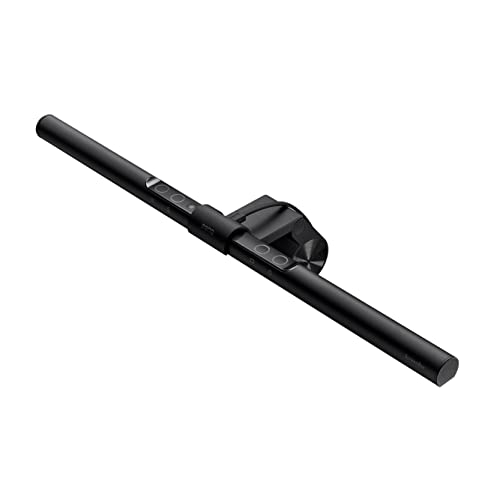 BenQ ScreenBar Monitor Light Standard BenQ ScreenBar Monitor Light Standard |
Best Desk Light | $109 | 8.2 | Buy → |
Showing 4 of 4 products
Herman Miller Aeron Ergonomic Chair (Size B)
“The Herman Miller Aeron remains the benchmark ergonomic office chair. PostureFit SL, 8Z Pellicle mesh, 12-year warranty, and the most clinically-informed lumbar support design in consumer seating just”
See Today’s Price →What we like
- PostureFit SL supports both the sacrum and lumbar simultaneously — the most clinically complete lumbar support available in a consumer chair
- 8Z Pellicle mesh has 8 zones of varying tension matching the body's pressure distribution for all-day breathable comfort
- 12-year warranty is the industry standard for premium ergonomic chairs — reflects expected lifespan
- Tilt limiter allows setting preferred recline range — maintains correct posture without constant conscious effort
- Trusted by Fortune 500 companies and ergonomists as the benchmark chair for knowledge worker environments
Watch out for
- At $1,395, the highest price in this comparison — premium requires justification by daily use volume
- No headrest included at base configuration — add-on at additional cost
- Mesh feel is firm — users accustomed to cushioned chairs may need adjustment period
Read Full Analysis
The Herman Miller Aeron on this ergonomic desk setup guide represents the chair component of a complete workstation — the piece of equipment that affects back health more than any other single purchase. The PostureFit SL lumbar mechanism supports both the sacrum and the lumbar simultaneously, which is the clinical distinction that separates the Aeron from chairs with a single lumbar pad: sacral support prevents the pelvis from tilting backward, which is the upstream cause of lumbar slumping that a lumbar pad alone cannot correct. The 8Z Pellicle mesh varies tension across eight zones, providing less resistance where the body is narrower (ribs) and more where pressure accumulates (lumbar, ischial tuberosities). In a complete ergonomic desk setup, the chair is the foundation — getting the monitor height, keyboard position, and arm height right requires a stable, adjustable seat as the starting point. The Aeron provides the seat height, seat depth, arm height, and lumbar adjustment necessary to align everything else in the setup correctly. At $675 for the Size B (this listing reflects a refurbished or discounted configuration; new Aeron lists at $1,395), it is the most significant single investment in a home office workstation. The 12-year warranty covers the full chair including mesh and mechanisms. For knowledge workers building a complete ergonomic setup who plan to use it 6+ hours daily for 10+ years, the Aeron is the anchor piece the rest of the setup is built around.

VIVO Electric 48x30 Standing Desk, Memory Height Adjustment, Black Top/Black Frame
“VIVO's Electric Standing Desk delivers core electric desk functionality at a very competitive price. The 48x30 surface covers most workstation needs, the memory controller stores height presets, and t”
See Today’s Price →What we like
- Very competitive price for a full electric desk
- 48x30 surface with memory height controller
- 220-lb weight capacity
- Smooth and quiet motor operation
- Good assembly instructions
Watch out for
- More wobble at standing height than Flexispot E7 Pro
- 2-stage legs less stable than 3-stage
- Shorter warranty than premium models
Read Full Analysis
The VIVO Electric 48x30 standing desk is the budget entry into electric sit-stand desks for an ergonomic setup — at $195, it provides the core functionality (electric height adjustment, memory presets) at a price that justifies the upgrade from a fixed-height desk. The 48x30 surface accommodates a single-monitor workstation with keyboard, mouse, and modest desk accessories. The 220 lb weight capacity covers standard ergonomic setups. The main engineering trade-off at this price is frame stability: the two-stage leg design is less stable at maximum standing height than three-stage frames used in premium desks — if you plan to stand at the maximum height setting with a heavy monitor setup, expect more wobble than the Flexispot E7 Pro or Uplift V2 provide. For users whose standing height falls in the middle of the adjustment range, the stability difference is minimal. As the desk component of an ergonomic setup, the electric height adjustment allows the desk to change height with the chair when multiple users share the space or when you adjust your chair position over time. The memory presets eliminate manual re-measurement each time you transition between sitting and standing.

Ergotron LX Desk Monitor Arm — Single, Matte Black
“The Ergotron LX is the definitive monitor arm — no arm at any price matches its combination of smooth adjustment, build quality, and long-term reliability.”
See Today’s Price →What we like
- CF-motion technology delivers buttery-smooth, fingertip-force adjustment
- 34 lb weight capacity handles ultrawide and large gaming monitors
- Full range of motion: 13 inches height, 360° rotation, +75°/-5° tilt
- Integrated cable management channels hide all cables cleanly
- Both desk clamp and grommet mount hardware included
- Rock-solid hold — zero creep or drift after positioning
Watch out for
- Premium price — significantly more expensive than budget alternatives
- Overkill for lightweight 24-inch monitors that don't need 34 lb capacity
- Initial setup and tension calibration takes 15–20 minutes
Read Full Analysis
In an ergonomic desk setup, the monitor arm is the component that makes precise monitor positioning possible — and precise positioning is what prevents the neck strain, eye fatigue, and shoulder tension that fixed-height monitor stands cause. The ergonomic standard is monitor top at eye level, screen distance at arm's length, and 0-15 degree downward tilt. Fixed stands position the monitor at the manufacturer's default; the Ergotron LX positions it at your measured ideal. The CF-motion friction joint holds the monitor at any position within its range without drift — the arm stays exactly where you put it. In a sit-stand desk setup, the arm allows the monitor to be repositioned vertically when transitioning between sitting and standing height without adjusting the monitor stand. The 34 lb capacity covers virtually all monitors including large ultrawide panels. At $215, it is the most expensive monitor arm from a mainstream brand, but it is also the arm that ergonomists consistently recommend because it holds position reliably for years without requiring re-tensioning. Budget arms typically need tensioning adjustment within 6-12 months of daily repositioning. In a complete ergonomic setup where the chair and desk represent $500-2,000 investments, spending $215 on an arm that positions the monitor correctly is the defensible choice.

BenQ ScreenBar Monitor Light Standard
“The original BenQ ScreenBar remains the benchmark — auto-dimming, asymmetric lens, and proven reliability that's improved thousands of desk setups since 2018.”
See Today’s Price →What we like
- Proven BenQ auto-dimming
- Touch controls on bar
- Asymmetric no-glare
- Wide compatibility
Watch out for
- No desk controller — reach to bar to adjust
- No ambient lighting
Frequently Asked Questions
What is the most important ergonomic upgrade I can make?
Is a standing desk worth it?
Is a Herman Miller Aeron worth $1,400?
Do I need an ergonomic keyboard and mouse?
How often should I take breaks from sitting?
How We Analyze Products
We analyze Amazon review data — often thousands of reviews per product — to surface patterns that individual buyers miss. Our process aggregates star ratings, review counts, and buyer sentiment at scale, identifying which strengths and weaknesses appear consistently across the largest review samples available. The 23,553+ reviews analyzed on this page represent real verified-purchase feedback from Amazon buyers.
Each product earned its placement through data: total review volume, average rating, and the specific praise and complaints that repeat most often across buyers. No manufacturer paid for placement on this page. Products appear here because buyers endorsed them at scale, not because a company asked us to feature them.
We use AI to summarize review sentiment — not to fabricate opinions, but to condense what thousands of buyers actually wrote into a readable format. The pros and cons you see reflect the most common themes found in verified purchaser reviews, paraphrased for clarity. We do not claim to have accessed Reddit, YouTube, or specific publications in generating these summaries.
Prices shown reflect Amazon pricing at the time this page was last generated. Click “See Today’s Price” to get the current live price on Amazon. Read our full methodology →