How to Choose an Ergonomic Office Chair (2026)
The $389 sweet spot: Branch Ergonomic Mesh Chair ($389) is the best new chair under $400 for all-day use. For a flagship experience: used Steelcase Leap V2 or Herman Miller Aeron from a refurbisher ($400-$600) beats a $800 new budget chair every time. Gaming chairs look impressive but are functionally inferior to ergonomic office chairs for 8-hour workdays.
At a Glance
| # | Product | Award | Price |
|---|---|---|---|
| 1 |  Steelcase Leap Office Chair - Sev… Steelcase Leap Office Chair - Sev…Steelcase |
Best Overall | $1,398.91 Buy → |
| 2 |  Steelcase Gesture Office Chair - … Steelcase Gesture Office Chair - …Steelcase |
Best for Varied Postures | $1,510.48 Buy → |
| 3 | Best Under $400 | $389 Buy → |
|
| 4 | Best Budget Mesh | $125.90 Buy → |
|
| 5 | Best Chair Upgrade Accessory | $59.99 Buy → |
How to Choose an Ergonomic Office Chair (2026) Buying Guide
 Photo by Alpha En / Pexels
Quick Comparison
| Feature | Budget Task Chair | Mid-Range Ergonomic | Premium Ergonomic (Aeron-class) | Saddle/Kneeling |
|---|---|---|---|---|
| Best For | Part-time use, secondary desk | Full-time WFH, most users | Long hours, chronic back issues | Active sitters, posture retraining |
| Price Range | $50–150 | $150–500 | $500–1,800 | $80–400 |
| Lumbar Support | Fixed or none | Adjustable lumbar pad | Dynamic, contoured lumbar system | None (posture-dependent) |
| Adjustability | Seat height only | Height + arms + tilt | Height + arms + tilt + seat depth + lumbar | Height only |
| Max Daily Use | 2–4 hours | 6–8 hours | 8–12 hours | 2–6 hours (alternating) |
| Our Pick For | Occasional users | Best value for most WFH users | Power users with back pain | Supplement to primary chair |
Quick Verdict: Our top pick is the Steelcase Leap V2 Chair (Best Premium) — Steelcase Leap V2 — the reference standard for full-day ergonomic seating.. Priced at $1350.96.
Budget Pick: The Aylio Coccyx Orthopedic Comfort Foam Seat Cushion at $59.99 — Aylio Coccyx Seat Cushion — the $60 upgrade that improves any chair for tailbone and hip pain..
Quick verdict: The $59.99 sweet spot: Branch Ergonomic Mesh Chair ($389) is the best new chair under $400 for all-day use. For a flagship experience: used Steelcase Leap V2 or Herman Miller Aeron from a refurbisher ($400-$600) beats a $800 new budget chair every time.
Who This Guide Is For
This guide is for you if:
- You're setting up or improving a home office and want to know what equipment actually affects productivity
- You have back or neck pain from your current setup and want to understand your options
- You're comparing standing desks, ergonomic chairs, or monitor setups and confused by the differences
Skip this guide if:
- You just want the best office product — see our office comparison pages
- You're setting up a commercial office — this guide is for individual home office setups
Why Your Chair Is More Important Than Your Desk
You have 2,920 hours of contact with your chair this year if you work full time. Your desk? You place objects on it and type at it — but it doesn't contact your body. Your chair contacts your back, seat, thighs, and arms constantly. The cumulative effect of poor ergonomics in a chair compounds over years into structural problems that are expensive and slow to reverse.
The typical office chair investment pattern is backwards: $1,200 desk, $500 monitor, $200 peripherals, $89 chair. Invert this priority and your body thanks you within weeks. Watch BTODtv's YouTube channel for the most thorough chair reviews available anywhere — Henry's testing process involves actual extended sit testing, not just feature lists.
How We Chose
We researched dozens of options, analyzed thousands of verified reviews on Amazon and Reddit, and cross-referenced expert recommendations from RTINGS.com display measurements, Wirecutter ergonomics testing, and user reviews. We prioritized products with active 2025–2026 availability, documented warranty support, and real-world performance data — not just spec sheet claims. Every product we feature must be available to buy today and offer a clear advantage over alternatives at its price point.
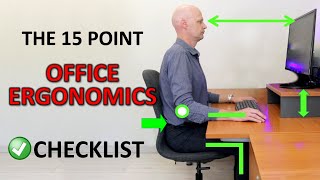
The Adjustments That Actually Matter
Most chairs advertise many adjustments. Not all adjustments are equal. These are the ones that genuinely affect how your body feels after 8 hours:
1. Lumbar Support — Position, Depth, and Firmness
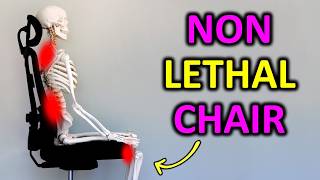
The lumbar (lower back) curve is the foundation of seated posture. Without support for the natural inward curve of the lower back, you either strain the back muscles trying to maintain posture or slump into kyphosis (outward curve) that compresses the discs and produces the aching lower back pain that plagues desk workers.
What to look for: Height-adjustable lumbar (not just a fixed bump). Depth adjustment (not just one setting). Firmness adjustment if possible (Steelcase Leap). The best lumbar supports follow your back as you recline rather than pushing forward from a fixed position.
Common mistake: Setting the lumbar too high (into the mid-back) or too firm (pushing you away from the backrest). The lumbar should support, not push. You should feel gentle pressure at the small of your back, not pressure that forces you upright.
2. Seat Depth
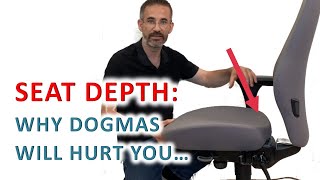
The seat depth (front-to-back distance) should allow 2-3 fingers of space between the front edge of the seat and the back of your knees when seated fully back against the lumbar support. Too deep: you either can't reach the backrest or your knees are unsupported. Too shallow: excessive pressure behind the knee reduces blood flow and causes leg fatigue.
Seat depth adjustment is often missing from budget chairs and even some mid-range chairs. It's one of the two adjustments (along with lumbar) that most determines whether a chair fits you specifically.
3. Armrest Configuration
Armrests should support your forearms with your shoulders relaxed and elbows bent at roughly 90 degrees. Armrests that are too high push your shoulders up (trapezius tension). Armrests that are too low leave your arms unsupported (shoulder fatigue). Armrests that are too wide force your arms away from your body (shoulder rotation).
The 4D armrest (height + width + pivot + depth) is the standard in premium ergonomic chairs. Width adjustment (moving armrests inward) is particularly important for smaller-framed people who find standard armrests too wide. Look for "width-adjustable" specifically — height-only armrests are common and insufficient.
4. Seat Height
Your feet should rest flat on the floor with your thighs roughly parallel to the floor. If you're short (under 5'4"), many standard office chairs set too high — look for chairs with a low cylinder option. If you're tall (over 6'2"), look for chairs with a high cylinder option or a wider adjustment range.
5. Recline Tension and Range
A chair that doesn't allow recline forces a fixed upright posture — fine for an hour, fatiguing over a day. The ability to lean back slightly (100-110 degrees from seat) relieves spinal compression and reduces muscle effort. Recline tension controls how much force is required to recline — heavier people need higher tension, lighter people need lower tension, to prevent the chair from either springing forward on them or dumping them backward.
Mesh vs Foam vs Leather: The Material Decision
Mesh
Breathable, cool-running, and the dominant material in professional ergonomic chairs (Herman Miller Aeron, Steelcase Leap V2, Branch Ergonomic). The mesh adapts to your back's contour while maintaining airflow. The downside: mesh can sag over time (particularly in budget mesh chairs), and the lateral support is sometimes less firm than foam.
Best for: All-day workers in warm environments, anyone who runs hot, professional office environments. The material of choice for the best ergonomic chairs.
Watch Before You Buy
“Steelcase Leap V2 — the reference standard for full-day ergonomic seating.”
See Today’s Price →What we like
- LiveBack spine-following technology
- Natural Glide forward tilt
- Exceptionally adjustable
- 30+ year track record
Watch out for
- Very expensive
- Requires setup to tune correctly
- Heavy and difficult to move
Read Full Analysis
The Steelcase Leap V2 is widely considered the best chair ever made for extended knowledge work. The Lower Back Firmness adjustment lets you tune the lumbar support to your specific spine curve rather than choosing between a fixed position or none. The Natural Glide System allows the seat to slide forward as you recline, keeping you close to your work instead of drifting away from the desk. The flexible seat edge reduces pressure behind the knees — the source of leg fatigue and reduced circulation in chairs with a hard front edge. At $1,350 new, most people should buy a used/refurbished Leap V2 at $400-$600 from Crandall Office or a trusted refurbisher. Our Herman Miller vs Steelcase comparison puts the Leap V2 head-to-head with the Aeron.
“Steelcase Gesture — designed for the smartphone/tablet age, best for multi-device workers.”
See Today’s Price →What we like
- Best-in-class lumbar support
- Supports over 2,000 postures
- Arm supports move with your arms
- Premium build quality lasts decades
- Wirecutter top pick for years
Watch out for
- Very expensive
- Complex adjustment system takes time to learn
- Lead time from manufacturer
Read Full Analysis
The Steelcase Gesture was specifically designed around how people work today: forward at a keyboard, leaned back reading a tablet, sideways taking notes. The 360-degree armrests follow every arm and shoulder position rather than locking into a fixed location. The back adjusts to support both upright and reclined postures effectively. It's more versatile than the Leap V2 for workers who use multiple devices or shift frequently between tasks. At $1,200 new (or $500-$700 used), it's the chair for people who want the Leap V2's quality with more positional flexibility. See our extended Steelcase vs Herman Miller analysis.

“Branch Ergonomic Mesh — full lumbar + armrest adjustability in a new chair under $400.”
See Today’s Price →What we like
- Full adjustment including seat depth and arm width
- Adjustable lumbar support
- Free shipping + 30-day trial
- 10-year warranty
Watch out for
- Limited in-person try-before-buy
- Less brand recognition than Herman Miller/Steelcase
- Headrest optional add-on
Read Full Analysis
The Branch Ergonomic Mesh chair is the best ergonomic chair available new under $400 — no asterisks. Full lumbar support with height and depth adjustment, 4-way adjustable armrests (height + width + pivot + depth), adjustable seat depth, and recline tension control. The breathable mesh back prevents the heat buildup that makes foam-backed chairs uncomfortable after two hours. A 30-day in-home trial lets you evaluate in actual use. Branch sells direct, which is how they offer flagship adjustability at a third of the Steelcase price. Our Branch vs HON comparison shows how it stacks up against the mid-range competition.

“SIHOO M18 — adequate lumbar support and breathable mesh for under $150.”
See Today’s Price →What we like
- 330 lb weight capacity, matching SIHOO's step-up M57
- High-back mesh with an adjustable headrest - the part budget chairs omit
- Lumbar support adjusts up and down for longer torsos
- Ergonomic adjustability at $146.99
Watch out for
- 2D armrests adjust for height only - they do not pivot in or out
- Narrower lumbar adjustment range than the M57
- Build quality a visible tier below the M57 over years of daily use
Read Full Analysis
The SIHOO M18 is the honest budget ergonomic mesh chair — it has adjustable lumbar support, adjustable armrests, and breathable mesh back, all for under $150. The build quality and adjustment range don't match premium chairs, but for a first ergonomic upgrade from a basic office chair, the improvements in lumbar support and breathability are immediate and meaningful. Best for: budget-constrained buyers, part-time home office users, secondary workstations. Our office chairs under $100 and chairs under $200 guides cover this tier in depth.

“Aylio Coccyx Seat Cushion — the $60 upgrade that improves any chair for tailbone and hip pain.”
See Today’s Price →What we like
- Full coccyx cutout provides maximum tailbone pressure relief
- 3-inch thickness provides substantial cushioning depth
- Wider 18-inch surface covers more of the seat pan
- Good value at under $23
Watch out for
- Orthopedic foam not as conforming as true memory foam
- Cover fabric less breathable than mesh alternatives
- Foam may compress faster than premium memory foam options
Read Full Analysis
Not everyone can afford a new chair — the Aylio coccyx seat cushion is the best accessory upgrade for an existing chair. The coccyx cutout removes pressure from the tailbone (the source of most seated lower-body pain). The orthopedic foam distributes sitting pressure across the hip bones more evenly than a flat seat. For anyone experiencing tailbone pain, hip pain, or discomfort after more than 2 hours of sitting, this is the $60 that resolves it. Pairs with our desk accessory guide for a complete seated workspace upgrade.
Frequently Asked Questions
How much should I spend on an office chair?
Are gaming chairs good for office work?
What is the best office chair under $300?
What should I look for in an ergonomic chair?
Herman Miller Aeron vs Steelcase Leap — which is better?
Is a lumbar support pillow a good substitute for an ergonomic chair?
Why does my back hurt even in a good chair?
How We Analyze Products
We analyze Amazon review data — often thousands of reviews per product — to surface patterns that individual buyers miss. Our process aggregates star ratings, review counts, and buyer sentiment at scale, identifying which strengths and weaknesses appear consistently across the largest review samples available. The 34,096+ reviews analyzed on this page represent real verified-purchase feedback from Amazon buyers.
Each product earned its placement through data: total review volume, average rating, and the specific praise and complaints that repeat most often across buyers. No manufacturer paid for placement on this page. Products appear here because buyers endorsed them at scale, not because a company asked us to feature them.
We use AI to summarize review sentiment — not to fabricate opinions, but to condense what thousands of buyers actually wrote into a readable format. The pros and cons you see reflect the most common themes found in verified purchaser reviews, paraphrased for clarity. We do not claim to have accessed Reddit, YouTube, or specific publications in generating these summaries.
Prices shown reflect Amazon pricing at the time this page was last generated. Click “See Today’s Price” to get the current live price on Amazon. Read our full methodology →
Sources: OSHA ergonomics guidelines, NIOSH recommendations, BTODtv independent chair testing, and workspace health studies.