How to Choose a Webcam for Video Calls and Streaming (2026)
For standard video calls (Zoom, Teams, Google Meet), a 1080p/30fps webcam with autofocus is all you need — resolution above 1080p doesn't transmit over most video platforms. The Logitech C920 ($117.99) remains the video call benchmark. For streaming or YouTube, go 1080p/60fps minimum. Only 4K if you need ultra-wide field of view or crop flexibility during recordings.
At a Glance
| # | Product | Award | Price |
|---|---|---|---|
| 1 | Also Excellent | $81.95 Buy → |
|
| 2 | 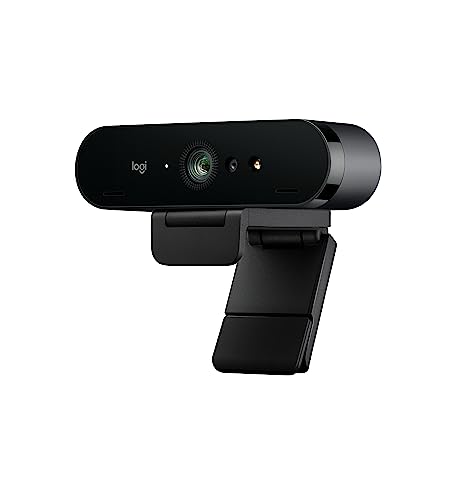 Logitech 4k Webcam Logitech 4k WebcamLogitech |
Our Top Pick | Check current price on Amazon Buy → |
| 3 | Worth Considering | $47.99 Buy → |
How to Choose a Webcam for Video Calls and Streaming (2026) Buying Guide
 Photo by Mizuno K / Pexels
Webcam marketing has successfully convinced buyers that 4K at $250 is necessary for video calls where the platform limits transmission to 720p. Understanding what specifications actually matter for your use case — and what the platforms themselves cap — prevents significant overspending.
Resolution: What You Actually Need
Video call platforms and their actual resolution limits: Zoom transmits at 720p (HD) by default; 1080p requires a Zoom Business or Pro subscription plus a compatible webcam and sufficient upload bandwidth. Microsoft Teams defaults to 720p, caps at 1080p for premium plans. Google Meet: 720p standard, 1080p in some configurations. The practical conclusion: a 4K webcam transmitting over Zoom shows as 720p on the other end. You're paying for resolution that evaporates at the platform layer. When 4K matters: Recording locally for YouTube, podcasting with cropping/zoom, or streaming to a platform that accepts 4K output (Twitch 4K is rare). 4K is also useful if you want to crop heavily — a 4K source gives you a 1080p result after 4x crop. For remote work video calls, 1080p is the practical ceiling. For streaming: 1080p/60fps is the standard. 60fps (vs. 30fps) makes motion significantly smoother — visible in gaming streams and any content with fast movement.
Autofocus vs. Fixed Focus
Fixed-focus webcams (common in budget models under $40) set focus to a specific distance and can't adjust. Sit at the "wrong" distance and you're blurry. Autofocus tracks your face as you move — it continuously adjusts focus. For a fixed home office desk setup, fixed focus can work fine if you're always the same distance from the camera. For any variation in position, autofocus is worth the price premium. Logitech's face-tracking autofocus (C920, C922, C930e) is consistently rated more reliable than webcams using depth sensors or contrast-detection autofocus. The C920's autofocus has been the reference standard for over a decade.

Field of View: How Much of the Room You Capture
Field of view (FOV) is measured in degrees. Narrow (60-70°): frames your face tightly — good for solo video calls, less good if you occasionally need to show something on your desk. Standard (78-90°): the sweet spot for desk video calls — captures face plus shoulder area. Wide (100-120°): useful for showing a workspace, presenting materials on screen, or conference rooms with multiple people. Ultra-wide (120°+): distortion becomes noticeable at the edges; better suited to room cameras than desk webcams. Most remote workers want 78-90° — wide enough to look natural, not so wide that the background dominates.
Low-Light Performance
Low-light performance matters more than resolution for most home office users. A room lit primarily by a window will backlight the user's face; overhead fluorescent lighting creates unflattering harsh shadows. What to look for: f/2.0 or wider aperture lets in more light. "RightLight" (Logitech) or "Light Correction" technology adjusts exposure automatically. HDR capability balances bright backgrounds with face exposure. Alternatively: a $20 ring light placed at eye level eliminates 90% of low-light webcam problems regardless of camera quality.
Microphone: Built-in vs. Separate
All modern webcams include microphones, but the quality range is significant. Budget webcams: mono microphones that pick up keyboard clicks, fan noise, and room echo equally with your voice. Mid-range webcams (Logitech C920 and up): stereo microphones with noise reduction that adequately separate voice from background. But any dedicated USB microphone (Blue Snowball iCE at $50, Fifine K670 at $40) produces dramatically better audio than even the best webcam microphone. If audio quality matters — podcasts, streaming, meetings where you're presenting — budget $40-80 for a separate USB microphone and pair it with any 1080p webcam.
Common Mistakes
Buying a 4K webcam for Zoom calls — resolution caps at 720p or 1080p at the platform level; you're paying for a spec that can't transmit. Ignoring lighting — no webcam compensates for bad lighting. A $20 ring light improves any webcam's output more than upgrading from a $117.99 to a $200 camera in the same conditions. Expecting built-in audio to sound professional — a $40 USB mic will always outperform a webcam mic for voice clarity.
What We Recommend
Video calls (remote work): Logitech C920 ($70) — the 12-year benchmark that still tops most reviews for its reliability, autofocus, and value. Budget pick: Logitech C270 ($117.99) — 720p, adequate for Zoom at its platform default. Streaming/YouTube: Logitech C922 Pro ($117.99) or Elgato Facecam ($117.99) for 1080p/60fps with superior low-light. Conference room: Logitech MeetUp ($600) or Owl Labs Meeting Owl for 360° room capture. See our full best desk microphones and best chairs for working from home for the complete home office setup.
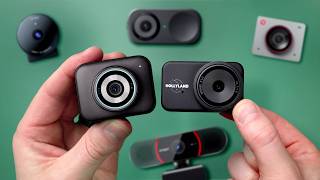
“The OKIOCAM S doubles as a document camera and webcam, letting you share physical papers or whiteboards in meetings as easily as your face. Its flexible arm and wide-angle lens make setup fast. A…”
See Today’s Price →Watch out for
- Assembly required — budget 30-60 minutes for initial setup
- Color and style options may be limited compared to premium furniture brands
“4K resolution for local recording, RightLight 3 HDR for extreme lighting, 5x zoom, works as ID card for Windows Hello, 90-degree wide field of view. 4.5 stars from 17,606 Amazon reviews signal…”
See Today’s Price →What we like
- 4K resolution for local recording, RightLight 3 HDR for extreme lighting, 5x zoom, works as ID card for Windows Hello, 90-degree wide field of view
Watch out for
- Expensive for Zoom-only use
- 4K benefit only realized in local recording
Read Full Analysis
4K resolution for local recording, RightLight 3 HDR for extreme lighting, 5x zoom, works as ID card for Windows Hello, 90-degree wide field of view Keep in mind: expensive for zoom-only use. 4K benefit only realized in local recording
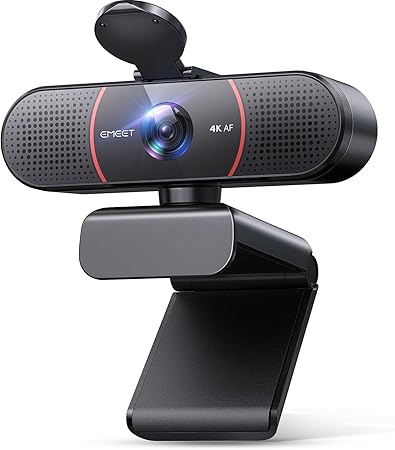
“The EMEET C960 packs 4K resolution into a compact, affordable webcam that punches well above its price. Auto-focus and built-in dual mics make it ready for video calls without additional…”
See Today’s Price →What we like
- True 4K resolution (3840x2160) at 30FPS for ultra-clear video conferencing
- PDAF autofocus technology with automatic light correction for sharp, clear video in varying conditions
- Dual omnidirectional microphones for crisp, natural audio capture
- USB plug-and-play with privacy shutter — no driver installation required
Watch out for
- Warranty terms not prominently disclosed — verify with seller before purchase
- Customer support responsiveness varies — read recent reviews before buying
Read Full Analysis
The EMEET C960 delivers 4K resolution at $47.99 — roughly $70 less than the Logitech Brio 4K ($120.49) in this comparison. PDAF autofocus tracks movement and refocuses without the manual adjustments fixed-focus budget webcams require. Dual omnidirectional microphones handle voice clearly in quiet to moderate ambient environments. The privacy shutter is a physical lens cover rather than a software toggle — more reliable for privacy-conscious users. At half the Logitech Brio's price, the C960 is the right pick for video call users who want 4K output without paying Logitech premium pricing. The trade-off is brand support depth: EMEET's customer service is thinner than Logitech's established enterprise network, which matters if something goes wrong after the return window.
Frequently Asked Questions
Does a 4K webcam make a difference for Zoom calls?
What is the best budget webcam for video calls?
Should I buy a separate microphone or use my webcam's built-in mic?
What webcam field of view is best for home office?
How do I improve webcam image quality without buying a new one?
What webcam do streamers use?
How We Analyze Products
We analyze Amazon review data — often thousands of reviews per product — to surface patterns that individual buyers miss. Our process aggregates star ratings, review counts, and buyer sentiment at scale, identifying which strengths and weaknesses appear consistently across the largest review samples available. The 24,378+ reviews analyzed on this page represent real verified-purchase feedback from Amazon buyers.
Each product earned its placement through data: total review volume, average rating, and the specific praise and complaints that repeat most often across buyers. No manufacturer paid for placement on this page. Products appear here because buyers endorsed them at scale, not because a company asked us to feature them.
We use AI to summarize review sentiment — not to fabricate opinions, but to condense what thousands of buyers actually wrote into a readable format. The pros and cons you see reflect the most common themes found in verified purchaser reviews, paraphrased for clarity. We do not claim to have accessed Reddit, YouTube, or specific publications in generating these summaries.
Prices shown reflect Amazon pricing at the time this page was last generated. Click “See Today’s Price” to get the current live price on Amazon. Read our full methodology →