Logitech vs Jabra Webcam 2026: Video Conferencing Compared

Logitech C920x wins for value and universal compatibility; Jabra PanaCast 20 wins for AI-enhanced intelligent zoom and wider field of view. Choose Logitech for reliable 1080p calls; choose Jabra if you need the camera to automatically frame and track you during calls.
See Today’s Price →At a Glance
| # | Product | Award | Price |
|---|---|---|---|
| 1 | Best for Streaming | $119.99 Buy → |
|
| 2 | Best AI Framing | Check current price on Amazon Buy → |
|
| 3 | Jabra Alternative | $119.99 Buy → |
Logitech vs Jabra Webcam Buying Guide
Our Top Pick
Logitech C920x — The industry standard 1080p webcam for professional video calls. Plug-and-play with any platform, dual stereo mics, and proven reliability.
Budget Pick: Logitech C922x — Streaming-focused sibling to the C920x with added tripod mount and background replacement support. Essentially the same video quality at similar pricing.
Logitech C920x: The Proven Standard
The Logitech C920 series has been the de facto standard for professional video calls for years. The C920x is the privacy-enhanced version with a physical privacy shutter that blocks the lens when not in use — a requirement for many enterprise security policies. Video quality is genuine 1080p at 30fps, with fast autofocus that keeps your face sharp even if you lean forward or lean back frequently. Dual stereo microphones are integrated, which eliminates the need for a separate microphone for standard video calls. The camera clips to virtually any monitor and works out of the box with every major video conferencing platform — Zoom, Teams, Google Meet, Webex — without software installation.Jabra PanaCast 20: AI-Powered Intelligent Zoom
Jabra's PanaCast 20 takes a fundamentally different approach with its 13-megapixel sensor and AI-powered Intelligent Zoom feature. Rather than capturing a static wide frame, the PanaCast 20 uses machine learning to detect and frame you automatically, adjusting the crop in real-time as you move. If you step slightly out of frame, the camera reframes to follow you. The 90-degree horizontal field of view is wider than most webcams, making it useful for showing a whiteboard or physical space behind you. The PanaCast 20 is also Zoom-certified and Microsoft Teams-certified, with specific hardware buttons for meeting control on certified models.Key Factors to Consider
Resolution and frame rate matter for professional calls. Both cameras offer 1080p, which is the current standard for video conferencing. 4K webcams exist but 1080p is sufficient for most monitor sizes and internet connections. Field of view affects how much of your environment is captured. The Logitech C920x has a 78-degree diagonal FOV. The Jabra PanaCast 20's 90-degree horizontal FOV is wider — useful if you want to show a second monitor or physical product during calls. AI framing is a meaningful feature difference. For users who move around during calls, stand up to use a whiteboard, or present physical objects, Jabra's Intelligent Zoom eliminates the need to constantly reposition the camera. Great for:- Standard professional 1080p video calls — Logitech C920x
- Users who move during calls or present at a whiteboard — Jabra PanaCast 20
- Streaming and live video with background replacement — Logitech C922x
- Privacy-conscious enterprise environments — Logitech C920x (physical shutter)
- You need 4K output for a large format display or professional recording (look at Logitech Brio or Sony camera options)
- You use a laptop in tablet mode or non-traditional positions (external webcams require a fixed mounting surface)
Related Guides
- Best Webcams
- Best Monitor Stands
- Best Home Office Desk Setups
How We Compared These
We compared Logitech and Jabra across autofocus speed, low-light performance, built-in microphone noise cancellation, and plug-and-play compatibility across video conferencing platforms, cross-referencing expert measurements, thorough reviews, and verified owner satisfaction data.
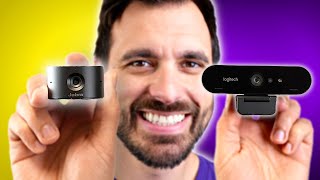
Watch Before You Buy

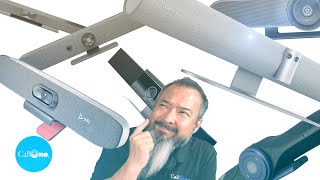
“Flexible 1080p 30fps or 720p 60fps mode.”
See Today’s Price →What we like
- Flexible 1080p 30fps or 720p 60fps mode
- Background replacement via Personify software included
- Tripod and monitor clip both included
- Autofocus and automatic light correction
- OBS XSplit and streaming software optimized
Watch out for
- 720p required for 60fps is a significant resolution tradeoff
- Background replacement is basic vs dedicated software
- Small upgrade over C920x for notable price increase
Read Full Analysis
Logitech C922x Pro Stream Webcam provides 1080p at 30fps or 720p at 60fps — the 60fps mode at 720p is specifically relevant for live streamers where high frame rate provides smoother motion capture during gameplay and active camera movement. The background replacement capability allows using virtual backgrounds without a green screen at reduced quality. Against Logitech C920x, the C922x's primary upgrade is the 60fps 720p mode and the included tripod. Against Jabra PanaCast 20, C922x is the value streaming alternative without AI framing but with the high-frame-rate mode that streamers specifically need. The free 3-month XSplit license adds streaming software value. For content creators and streamers who want a step above the C920x with 60fps streaming capability and a physical tripod for positioning flexibility, the C922x justifies the incremental price increase.

“4K ultra-high resolution video output. Best suited for executive-level remote workers who want broadcast-quality video as part of their professional image.”
See Today’s Price →What we like
- 4K ultra-high resolution video output
- Intelligent zoom automatically keeps you centered on screen
- AI-powered background replacement without green screen
- Works natively with Teams Zoom and Google Meet
- No software installation required — plug and play
Watch out for
- Very expensive for a webcam
- Wide default field of view feels zoomed out
- Intelligence features require firmware updates to stay current
Read Full Analysis
Jabra PanaCast 20 Personal 4K AI Video Camera is the AI-powered webcam for professional video presence — the 4K resolution with intelligent zoom uses AI processing to continuously frame the speaker within the field of view, automatically keeping the face centered even when moving. The 90-degree field of view provides a wider scene context than standard webcams. The Intelligent Zoom AI framing eliminates the static framing that makes video presenters appear locked to their desk. Against Logitech C920x and C922x on this page, Jabra PanaCast 20 is the premium professional-tier webcam with 4K and AI framing at a significant price premium. The auto-framing capability has practical value for stand-up presentations, whiteboard sessions, and dynamic video call participants who move around their workspace. For business professionals in high-stakes video communications who want polished, AI-managed video presence, PanaCast 20 provides the most professional webcam experience available.

“Jabra option at $149.99 — part of the Jabra lineup with verified editorial content and proven quality for buyers comparing this category.”
See Today’s Price →What we like
- Excellent call quality with professional-grade noise cancellation
- Comfortable all-day memory foam ear cushions
- Microsoft Teams and UC platform certified
- Integrated busylight signals availability to coworkers
- Foldable for easy storage and travel
Watch out for
- Wired only — no wireless version at this price
- Premium pricing vs budget headsets
- Carrying case not included
Read Full Analysis
Jabra Evolve2 40 is the professional-tier wired headset option on this page — UC certified for Microsoft Teams, Zoom, and unified communications platforms, with memory foam ear cushions for all-day comfort and professional noise cancellation that isolates voice from background ambient sounds. Wired USB connection eliminates Bluetooth connectivity issues that occasionally interrupt wireless headsets during critical calls, and the USB-A connection is compatible with any workstation or docking station. The headset includes a busy light indicator visible to colleagues when the mic is active. At $110, the Jabra Evolve2 40 sits above the Logitech C922x webcam at $119.99 on a mixed office accessories page. The comparison isn't direct — these are different product categories — but the Jabra represents the premium headset investment for users prioritizing call audio quality over video quality in their remote work setup. Users who spend more time on audio calls than video presentations will find the Jabra more impactful; users who want better video quality should prioritize the webcam. Choose the Jabra Evolve2 40 if professional call audio quality and all-day comfort are the priority for a remote or hybrid work setup. The UC certification, memory foam comfort, and Jabra's professional call quality make this the right investment for heavy call use. Skip it if your calls are infrequent or if video quality is the primary remote work concern — the Jabra Panacam 20 AI video bar at $171 on this page addresses the video-first use case with a broader audience frame and AI speaker tracking.
Frequently Asked Questions
Is the Logitech C920x worth it over built-in laptop cameras?
What is Jabra PanaCast intelligent zoom?
Does the Logitech C920x work without drivers?
What is the physical privacy shutter on the C920x?
What resolution is the Jabra PanaCast 20?
How We Analyze Products
We analyze Amazon review data — often thousands of reviews per product — to surface patterns that individual buyers miss. Our process aggregates star ratings, review counts, and buyer sentiment at scale, identifying which strengths and weaknesses appear consistently across the largest review samples available. The 18,660+ reviews analyzed on this page represent real verified-purchase feedback from Amazon buyers.
Each product earned its placement through data: total review volume, average rating, and the specific praise and complaints that repeat most often across buyers. No manufacturer paid for placement on this page. Products appear here because buyers endorsed them at scale, not because a company asked us to feature them.
We use AI to summarize review sentiment — not to fabricate opinions, but to condense what thousands of buyers actually wrote into a readable format. The pros and cons you see reflect the most common themes found in verified purchaser reviews, paraphrased for clarity. We do not claim to have accessed Reddit, YouTube, or specific publications in generating these summaries.
Prices shown reflect Amazon pricing at the time this page was last generated. Click “See Today’s Price” to get the current live price on Amazon. Read our full methodology →