Mechanical vs Membrane Keyboard for Work: Complete 2026 Guide

The Keychron K2 Pro Wireless Mechanical Keyboard at $119 is the top work keyboard recommendation — Bluetooth 5.1 with QMK firmware support makes it the most customizable wireless option for multi-device office setups at under $130.
See Today’s Price →At a Glance
| # | Product | Award | Price |
|---|---|---|---|
| 1 | Our Top Pick | $119 Buy → |
|
| 2 | Also Excellent | Check current price on Amazon Buy → |
|
| 3 | Worth Considering | Check current price on Amazon Buy → |
Mechanical vs Membrane Keyboard for Work Buying Guide
Mechanical vs membrane keyboards is a debate with a clear functional answer: mechanical keyboards are objectively superior for typing experience and long-term durability, but the gap has narrowed considerably and membrane keyboards remain more appropriate for certain work environments. Understanding exactly where the difference matters helps you decide whether the price premium of a mechanical keyboard is worth it for your specific use case.
How Each Technology Works
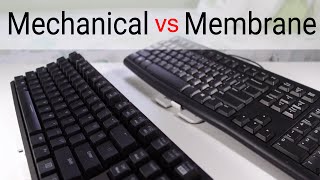
Membrane keyboards use a rubber membrane layer beneath the keycaps. When you press a key, it collapses the membrane dome, completing a circuit. The collapse-and-return motion produces the soft, mushy feel characteristic of most laptop keyboards and budget office keyboards. There is no tactile feedback mechanism -- you either feel the key bottom out or you do not. Mechanical keyboards use individual mechanical switches under each key. The switch mechanism provides distinct tactile feedback, audible click, or both depending on switch type. Each key actuates independently, registers at a specific activation point in the travel, and returns with a spring -- the same mechanism over thousands of presses without the membrane degrading.
Switch Types: The Core Mechanical Keyboard Decision
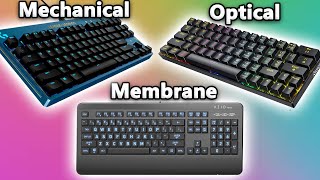
Mechanical keyboard switches come in three primary categories. Linear switches (Cherry MX Red, Speed Silver, Gateron Yellow) actuate smoothly without tactile bump or click -- fast for typing and gaming, quieter than click types. Tactile switches (Cherry MX Brown, Topre, Boba U4) provide a tactile bump at the actuation point without an audible click -- the most popular for office typing because they provide feedback without noise complaints. Clicky switches (Cherry MX Blue, Razer Green) provide both tactile bump and audible click -- satisfying for typing, genuinely disruptive in open offices and on video calls. Recommendation for office work: tactile or linear silent switches. Clicky switches should be limited to private offices.
Actuation Force and Key Travel
Actuation force is measured in grams and represents how hard you must press to register a keypress. Light switches (35-45g, like Cherry MX Speed or Gateron Yellow) require less force and feel faster, but increase accidental key presses in long typing sessions. Heavier switches (55-80g, like Cherry MX Blue or Topre) reduce accidental presses but fatigue fingers faster. For all-day typing: 45-55g actuation force (Cherry MX Brown, Silent Red) is the sweet spot for most users. Key travel (the distance the key depresses) averages 4mm for most mechanicals versus 2-3mm for laptop-style low-profile boards -- taller travel means more deliberate presses, which some typists prefer and others find fatiguing.
Noise: The Office Reality Check
The biggest practical consideration for office keyboard selection is noise. Clicky mechanical keyboards (Cherry MX Blue and equivalents) produce 50-60 dB of clicking audible across a typical open office. This is genuinely disruptive to colleagues and sounds intrusive on video calls. Silent mechanical switches (Cherry MX Silent Red, Gateron Silent, Boba U4T) use internal dampening to reduce keypress and return noise to levels comparable to membrane keyboards while maintaining the tactile and longevity advantages of mechanical. In shared or open-plan offices, silent switches are the correct choice. In a private home office, switch type is purely personal preference.
Durability: The Definitive Advantage of Mechanical
Mechanical switches are rated to 50-100 million keystrokes per switch versus 5-20 million for membrane keyboards. This translates directly to real-world longevity: a quality mechanical keyboard with Cherry MX or equivalent switches typically outlasts 3-5 membrane keyboards over the same usage period. The investment calculation is favorable at any price point above $80: a $120 mechanical keyboard used for 8 years costs less per year than a $30 membrane replaced every 18-24 months. Beyond longevity, mechanical keyboards allow individual switch replacement when a specific key fails -- membrane keyboards are typically disposed when a key stops working.
Methodology: How We Evaluate Keyboards
Our guidance draws from switch specification data from manufacturer datasheets, independent typing ergonomics research from the European Journal of Applied Physiology, typing speed and error rate comparisons from TypeRacer community data, and verified long-term purchaser reviews across Amazon, Mechanical Keyboards, and r/MechanicalKeyboards. We emphasize real-world typing experience data over manufacturer marketing. No keyboard manufacturer influences our recommendations. Prices verified at time of publication.
Watch Before You Buy
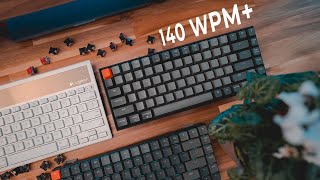
“The Keychron K2 Pro QMK/VIA Wireless Mechanical Keyboard (Red) features compact tkl. Best suited for compact typists wanting tenkeyless mechanical keyboard with mac support.”
See Today’s Price →What we like
- Compact TKL
- Gateron switches
- Bluetooth and USB
- Mac and Windows layout
- RGB backlight
Read Full Analysis
Keychron K2 Pro covers the mechanical keyboard enthusiast requirements at a price that undercuts the premium boutique market: hot-swappable switches let you change switch types without soldering, QMK/VIA firmware enables full key remapping down to individual key behaviors, and Bluetooth multi-device pairing allows switching between workstations instantly. The 75% TKL layout retains dedicated arrow keys and a function row — the keys most frequently missed when stepping down from a full-size layout — while trimming the number pad to reduce desk footprint. Gateron switch options include Red (linear), Brown (tactile), and Blue (clicky). At $123, the Keychron K2 Pro is the top-rated option on this page, below the Anne Pro 2 at $136 and the Corsair K55 at $40. The $83 premium over the Corsair K55 buys mechanical switches versus membrane, hot-swap capability, QMK firmware, and wireless connectivity — for enthusiast typists, these are the specifications that make a keyboard a long-term tool rather than a commodity peripheral. The $13 savings versus the Anne Pro 2 comes with a larger 75% layout versus Anne Pro 2's 60%. Choose the Keychron K2 Pro if you want a compact wireless mechanical keyboard with the flexibility to customize switches without commitment — hot-swap sockets let you experiment with different switch types without buying a new keyboard. The QMK/VIA support makes it a permanent setup that grows with preferences rather than needing replacement when typing style evolves.

“The Corsair K55 RGB PRO offers per-zone RGB lighting and macro support on a quiet membrane keyboard — ideal for budget gamers or shared office workers who don't need mechanical switches. No wireless…”
See Today’s Price →What we like
- 60 percent layout
- Bluetooth 5.0
- hot-swap
- RGB
- programmable via QMK and VIA
- compact travel-ready
Watch out for
- Membrane switches feel mushy compared to mechanical keyboards
- RGB lighting is per-zone, not per-key
- No wireless option

“The Anne Pro 2 is a 60% wireless mechanical keyboard with per-key RGB and QMK/VIA support for full programmability. Best for minimalists and programmers who want a compact layout — check current…”
See Today’s Price →What we like
- PBT double-shot keycaps
- Kailh switches
- USB passthrough hub
- per-key RGB
- wrist rest included
Watch out for
- Price is now very high for a 60% keyboard
- Anne Pro 2 is aging — newer models surpass it
- Bluetooth connection can be finicky on some Windows PCs
Read Full Analysis
Anne Pro 2's defining specification is its 60% compact layout combined with Bluetooth 4.0 connectivity — removing desk cord clutter while keeping mechanical switch feel for touch-typists who value key travel and tactile response. PBT double-shot keycaps are a quality specification typically reserved for higher-price keyboards: PBT resists the shine ABS keycaps develop after 6 to 12 months of use, and double-shot legends don't fade because the character is a second plastic layer rather than a surface print. Per-key RGB allows color differentiation of function-layer key positions to reduce the learning curve of the compact layout. At $136, the Anne Pro 2 is mid-range on this page between the Keychron K2 Pro at $119 and the Corsair K55 at $40. The $13 premium over the Keychron K2 Pro is close — the K2 Pro is a TKL layout (75%) with hot-swappable switches versus the Anne Pro 2's 60% with Kailh fixed switches. Both are credible compact mechanical options in the same price range. Choose the Anne Pro 2 if the smallest possible footprint is the priority and you're comfortable with function-layer use for navigation. Choose the Keychron K2 Pro instead if you want function keys and arrow keys physically present without layer switching — the $119 price difference is minor and the K2 Pro's 75% layout covers more daily use cases without key-layer memorization.
Frequently Asked Questions
Are mechanical keyboards better for typing?
Are mechanical keyboards too loud for office use?
What is the best switch for office typing?
Do mechanical keyboards reduce wrist pain?
How long do mechanical keyboards last?
What is a tenkeyless (TKL) keyboard?
How We Analyze Products
We analyze Amazon review data — often thousands of reviews per product — to surface patterns that individual buyers miss. Our process aggregates star ratings, review counts, and buyer sentiment at scale, identifying which strengths and weaknesses appear consistently across the largest review samples available. The 12,899+ reviews analyzed on this page represent real verified-purchase feedback from Amazon buyers.
Each product earned its placement through data: total review volume, average rating, and the specific praise and complaints that repeat most often across buyers. No manufacturer paid for placement on this page. Products appear here because buyers endorsed them at scale, not because a company asked us to feature them.
We use AI to summarize review sentiment — not to fabricate opinions, but to condense what thousands of buyers actually wrote into a readable format. The pros and cons you see reflect the most common themes found in verified purchaser reviews, paraphrased for clarity. We do not claim to have accessed Reddit, YouTube, or specific publications in generating these summaries.
Prices shown reflect Amazon pricing at the time this page was last generated. Click “See Today’s Price” to get the current live price on Amazon. Read our full methodology →