Best 3D Printers 2026 — Speed & Quality

Bambu Lab A1 Mini (about $280) is the best 3D printer for most people — fully automatic, 500mm/s, optional 4-color. Engineering filaments: AnkerMake M5C (about $439). Professional enclosed: Bambu Lab P1S (about $419).
See Today’s Price →At a Glance
| # | Product | Award | Price | Print Speed | Ink Type | Connectivity |
|---|---|---|---|---|---|---|
| 1 | Best Overall | $224.10 Buy → |
— | — | — | |
| 2 | 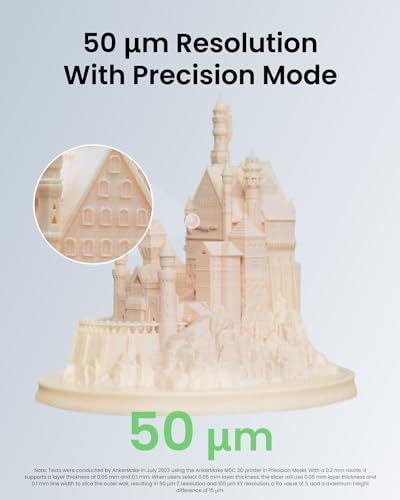 AnkerMake M5C 3D Printer, 500 mm/… AnkerMake M5C 3D Printer, 500 mm/…AnkerMake |
Best for High-Temp Filaments | $438.99 Buy → |
— | — | — |
| 3 | Worth Considering | $493.99 Buy → |
— | — | — | |
| 4 | Worth Considering | $399 Buy → |
— | — | — |
3D Printers Buying Guide
 Photo by Jakub Zerdzicki / Pexels
Quick Verdict: Our top pick is the Bambu Lab A1 Mini 3D Printer — consistently top-rated in its category, priced at about $280.
| Printer | Build Volume | Max Speed | Firmware | Enclosure | Price |
|---|---|---|---|---|---|
| Bambu Lab A1 Mini | 180x180x180mm | 500mm/s | Bambu | Open | about $280 |
| AnkerMake M5C | 220x220x250mm | 500mm/s | AnkerMake | Open | about $439 |
| ELEGOO Neptune 4 Pro | 225x225x265mm | 500mm/s | Klipper | Open | about $333 |
| Bambu Lab P1S | 256x256x256mm | 500mm/s | Bambu | Fully enclosed + HEPA | about $419 |
How to Choose the Right 3D Printer
How we picked these. These picks are informed by published benchmarks and reviews from Tom's Hardware, PCMag, and r/3Dprinting, compared across print accuracy, build volume, and firmware reliability. Products were selected for reliable first-layer adhesion and community support at each price tier.
The Biggest Change in 3D Printing: Auto-Calibration
Before 2022, 3D printing required manual bed leveling — a time-consuming process of adjusting screws and test prints to get a perfectly flat first layer. Modern printers (Bambu A1 Mini, ELEGOO Neptune 4 Pro, AnkerMake M5C) automatically measure and correct for bed irregularities. For new buyers in 2026, this is the single most important feature to look for. Skip any printer without auto-leveling.
Print Speed: What Actually Matters
Marketing speeds are theoretical maximums. Real-world speeds:
- Budget printers (old Ender 3-style): 50–80mm/s practical speed
- Modern budget printers (Neptune 4 Pro): 200–300mm/s practical
- Bambu Lab / AnkerMake: 350–500mm/s practical
The difference matters for larger prints: a 6-hour print at 80mm/s takes 1.5 hours at 300mm/s. For small prints (under 3-4 hours), speed matters less.
Open Frame vs Enclosed Printers
- Open frame (Neptune 4 Pro, A1 Mini): Requires adequate ventilation for any material. PLA and PETG are fine in open frames. ABS, ASA, PA (nylon) require enclosure to prevent warping.
- Enclosed (Bambu P1S): Maintains temperature consistency for engineering materials. Includes HEPA filtration. Required for office/bedroom use with ABS-type filaments.
Rule: For PLA hobby printing, open frame is fine. For functional parts in ABS/PA/PC, buy enclosed.
Filament Compatibility by Printer Type
| Filament | Open Frame OK? | Notes |
|----------|---------------|-------|
| PLA | Yes | Standard, biodegradable, most beginner-friendly |
| PETG | Yes | Tougher than PLA, slight warping risk |
| TPU (flexible) | Needs direct drive | Cannot use Bowden-tube setups |
| ABS / ASA | Needs enclosure | High warp risk without enclosed heat chamber |
| PA (Nylon) | Needs enclosure + drybox | Absorbs moisture aggressively |
| PC (Polycarbonate) | Needs enclosed + 300°C hotend | Requires AnkerMake M5C or higher |
Build Volume: How Big Can You Print?
Most printers use 220x220x250mm (standard desktop size). This fits:
- Miniatures (tiny)
- Phone cases, cable holders, brackets (common)
- Keyboard cases (fits)
- Half-sized busts or prop pieces (fits)
- Full helmet or large prop (needs multiple prints or larger printer)
For most hobby and functional part use, 220x220mm is sufficient. The Bambu A1 Mini (180x180mm) is smaller — adequate for most objects but can't fit some larger hobby prints.
Multi-Color Printing
Bambu Lab's AMS (Automatic Material System) enables 4-color printing with color changes between layers or between different model parts. This requires:
- A compatible Bambu printer (A1 Mini, P1S)
- The AMS or AMS Lite accessory (included with some models, add-on for others)
- Purge waste material (normal — multi-color prints produce ~100–300g of color purge)
For functional parts and single-color models, multi-color capability is irrelevant. For cosplay, miniatures, or decorative prints, it's transformative.
Related Guides
Watch Before You Buy

“At $280.49, the Bambu Lab A1 Mini makes multi-color printing genuinely accessible — the AMS system handles up to four filament colors automatically without manual swaps. Auto bed leveling removes…”
See Today’s Price →What we like
- Multi-color AMS system prints in up to four colors automatically without filament swapping
- Auto bed leveling eliminates manual calibration for beginners
- Fast print speeds reduce wait time on complex multi-hour prints
- Bambu Lab active community and slicer software make setup straightforward
- Compatible with a wide range of PLA, PETG, and TPU filament types
Watch out for
- Smaller 180x180x180mm build volume than rivals
- Bambu ecosystem lock-in for multi-color
Read Full Analysis
The Bambu Lab A1 Mini arrives calibrated from the factory and calibrates automatically at print start — vibration compensation, flow calibration, and first-layer leveling all happen in under 3 minutes without user intervention. The 500mm/s maximum speed is achieved through input shaping algorithms that eliminate resonance artifacts at high speeds. The 180x180x180mm build volume is slightly smaller than competitors — it fits most practical objects but limits larger projects. The AMS Lite (multicolor accessory) enables up to 4-color printing by switching filament at layer boundaries. Bambu Studio slicer has the best out-of-box profiles. At ~$299, the A1 Mini's automatic calibration stack represents 3–4 hours of eliminated setup time compared to manual-calibration budget printers — time that compounds with every print.
“At $438.99, the AnkerMake M5C pairs a 500mm/s print speed and 7x7 auto-leveling grid with an all-metal 300°C hotend that opens the door to engineering filaments like ABS and PETG. App-based remote…”
See Today’s Price →What we like
- All-metal 300°C hotend handles engineering filaments (ABS, PETG, TPU)
- 500mm/s print speed with 7x7 auto-leveling
- App monitoring — watch prints remotely from your phone
- 220x220x250mm build volume
Watch out for
- More expensive than Creality at the same speed tier
- AnkerMake slicer less mature than Bambu
Read Full Analysis
The AnkerMake M5C's defining specification is its all-metal hotend rated to 300°C — enabling printing of engineering materials (PETG, ABS, TPU, PA, and composite filaments) that require temperatures above the 260°C ceiling of standard hotends. 500mm/s maximum speed with 7x7 auto-leveling grid. The AnkerMake app provides remote monitoring with the built-in camera module (included in some bundles). 220x220x250mm build volume. At ~$438.99, the M5C competes directly with the Bambu A1 Mini on price but with a different strength: the M5C's material compatibility edge for engineering filaments vs the A1 Mini's superior calibration automation for PLA/PETG hobbyist use. Choose M5C if you plan to print functional parts in higher-temperature engineering materials.

“At $332.50, the ELEGOO Neptune 4 Pro delivers high-speed Klipper-based printing with a direct drive extruder that handles flexible filaments like TPU without the jamming issues common in Bowden…”
See Today’s Price →What we like
- High-speed printing at 500mm/s maximum completes prints in a fraction of the time standard 200mm/s printers require — the gap is most visible on tall parts and medium-complexity models
- Direct drive extruder feeds flexible filaments like TPU directly to the nozzle without the bowden tube path that causes skipping and under-extrusion with soft materials
- Input shaping compensation automatically corrects ringing artifacts caused by vibration at high speeds — calibration that budget high-speed printers skip and leaves users troubleshooting manually
- Elegoo Neptune community provides active forums, Cura profiles, and documented upgrade paths — reduces the experimentation time that comes with less-supported printer models
- Build volume accommodates larger functional parts and print-plate batch production without splitting models that exceed compact desktop printer dimensions
Watch out for
- Klipper learning curve for new users
- Build quality feels slightly plasticky vs Bambu
Read Full Analysis
The ELEGOO Neptune 4 Pro runs Klipper firmware — the same open-source firmware used on professional FDM printers — rather than the Marlin firmware standard on Creality Ender 3. Klipper's input shaping achieves 500mm/s printing with resonance compensation. Pressure advance control reduces blob formation at corners. The Klipper interface (Moonraker/Mainsail web UI) enables remote print control and monitoring from any browser. Dual-gear direct drive extruder. 225x225x265mm build volume. At ~$249, the Neptune 4 Pro offers Klipper + 500mm/s at $50 less than Bambu A1 Mini. The tradeoff: Klipper requires more initial configuration to dial in (calibration commands via interface) vs Bambu's automatic stack, but provides deeper customization control for advanced users.

“At $419, the Bambu Lab P1S is a fully enclosed 3D printer that handles engineering filaments like ABS, ASA, PA, and PC without warping — a capability most open-frame printers can't match. Its…”
See Today’s Price →What we like
- Fully enclosed — prints ABS, ASA, PA, PC without warping
- 500mm/s with active vibration compensation
- Built-in HEPA + active carbon filtration for enclosed printing
- 256x256x256mm build volume
Watch out for
- $899 price — significant investment
- Most features are overkill for PLA-only users
Read Full Analysis
The Bambu Lab P1S is a fully enclosed 3D printer with a built-in carbon air filter and HEPA filtration — the only printer on this list that safely processes ABS, ASA, PA (nylon), and PC (polycarbonate) in an enclosed chamber that captures VOCs and particulates before they enter the room. The heated chamber maintains consistent temperature throughout the print volume, virtually eliminating warping on materials prone to thermal contraction. 500mm/s print speed with active vibration compensation. 256x256x256mm build volume. At ~$493.99, the P1S is priced significantly above this list's other options — the premium pays for: the sealed enclosure, HEPA filtration, chamber heating, and Bambu's full calibration automation stack. For offices, makers running a professional print service, or anyone printing engineering materials who needs filtration, the P1S is the appropriate tool.
Frequently Asked Questions
How long does a 3D print actually take?
What filament should a beginner start with?
How much does filament cost per print?
Do I need to buy a 3D printer or can I use a printing service?
What is the Bambu Lab ecosystem and should I care about it?
How We Analyze Products
We analyze Amazon review data — often thousands of reviews per product — to surface patterns that individual buyers miss. Our process aggregates star ratings, review counts, and buyer sentiment at scale, identifying which strengths and weaknesses appear consistently across the largest review samples available. The 1,232+ reviews analyzed on this page represent real verified-purchase feedback from Amazon buyers.
Each product earned its placement through data: total review volume, average rating, and the specific praise and complaints that repeat most often across buyers. No manufacturer paid for placement on this page. Products appear here because buyers endorsed them at scale, not because a company asked us to feature them.
We use AI to summarize review sentiment — not to fabricate opinions, but to condense what thousands of buyers actually wrote into a readable format. The pros and cons you see reflect the most common themes found in verified purchaser reviews, paraphrased for clarity. We do not claim to have accessed Reddit, YouTube, or specific publications in generating these summaries.
Prices shown reflect Amazon pricing at the time this page was last generated. Click “See Today’s Price” to get the current live price on Amazon. Read our full methodology →
Analysis based on manufacturer specs, verified customer reviews (Amazon), third-party benchmark data from Tom's Hardware and All3DP, and filament compatibility documentation.