Best Anker USB Hub (2026)
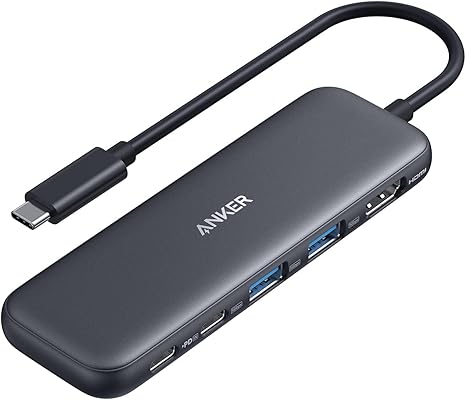
The Anker 7-in-1 USB-C Hub ($20) covers 90% of laptop expansion needs — 4K HDMI, USB-A, card readers, and 85W power pass-through at the lowest reasonable price. The best value in USB-C hubs for most users.
See Today’s Price →At a Glance
Anker USB Hub (2026) Buying Guide
 Photo by Anzor Dukaev / Pexels
Best Anker USB Hub Overall: 7-in-1 USB-C Hub with 4K HDMI
The Anker 7-in-1 USB-C Hub at $20 is the best everyday USB-C hub for laptops that have lost their legacy ports — the configuration of 4K HDMI, USB-A 3.0, SD card reader, microSD reader, and USB-C power delivery covers the most common expansion needs in a single device. 4K@30Hz HDMI connects an external monitor for dual-screen productivity. USB-A 3.0 ports add back the ports that modern thin-and-light laptops have removed. The SD and microSD card readers handle camera and drone media transfers directly without an additional adapter. 85W USB-C power pass-through keeps the laptop charged while using the hub.
At $20, the 7-in-1 hub is the reference purchase for the majority of USB-C laptop users — the configuration covers 90% of everyday use cases without paying for ports that most users never need. Anker's hub quality and compatibility testing across Mac and Windows ecosystems is meaningfully better than budget hub brands at the same price, where port incompatibilities, power delivery drops, and video signal issues are common failure modes.
Best Budget: Anker 5-in-1 USB-C Hub
The Anker 5-in-1 USB-C Hub at $19 is the compact baseline hub for users who need HDMI and USB-A expansion without the card readers. The 4K HDMI, two USB-A 3.0 ports, and USB-C power delivery configuration covers single-monitor setups with peripheral expansion at the lowest Anker hub price. The smaller form factor (fewer ports = smaller footprint) makes it the better travel hub — fits in a jacket pocket alongside the laptop charger.
For users whose primary hub need is an external monitor connection plus one or two USB-A peripherals, the 5-in-1 is sufficient and saves $1 versus the 7-in-1. For users who also transfer camera or drone media regularly, the 7-in-1's card readers save the cost of a separate card reader dongle and the hassle of carrying multiple adapters.
Best for MacBook: Anker 7-in-2 with Thunderbolt 4
The Anker 7-in-2 USB-C Hub for MacBook at $34.99 is designed specifically for MacBook Pro and Air models with two USB-C/Thunderbolt ports. Two USB-C connections simultaneously provide 4K HDMI, USB-A 3.0 ports, SD/microSD card readers, and 85W power delivery — and the 7-in-2 takes both Thunderbolt ports on the MacBook simultaneously, treating them as a unified hub rather than occupying one port and leaving one available. This matters for MacBook users who want full port utilization without the hub leaving one port blocked.
At $34.99 the MacBook-specific design and dual-port connection justify the $34.99 premium over the 7-in-1 for dedicated MacBook users. For Windows laptop users with multiple USB-C ports, the 7-in-1 is more versatile across different port configurations.

Best for Heavy Users: Anker PowerExpand 11-in-1 Docking Station
The Anker PowerExpand 11-in-1 at $50.99 is the boundary between hub and docking station. 11 ports including dual USB-A 3.0, dual USB-C, 4K HDMI, VGA, gigabit Ethernet, SD/microSD card readers, and 3.5mm audio cover every connection scenario for a full desktop productivity setup from a single cable. The Ethernet port alone justifies the upgrade for users in environments where WiFi reliability is critical — wired connection provides lower latency and higher throughput for video calls, large file transfers, and remote desktop sessions.
At $55, the 11-in-1 is the right choice for home office setups where the laptop serves as the primary computer connected to a full desk monitor, keyboard, and mouse setup. The wide port variety eliminates the need for any additional adapters on a fully configured desk. For travel-only use, the 7-in-1's smaller footprint and lower price is more appropriate.
Which Anker Hub Is Right for You?
Basic monitor + peripherals for travel: 5-in-1 ($19). Monitor + card reader + peripherals for daily use: 7-in-1 ($20). MacBook Pro/Air user with dual Thunderbolt ports: 7-in-2 ($33). Full desk setup with Ethernet for home office: PowerExpand 11-in-1 ($55). Permanent desk docking with multiple monitors: 575 13-in-1 ($157). The 7-in-1 at $20 is the right answer for the majority of USB-C laptop users — the port configuration covers everyday needs and the price is low enough that replacing it when needs change is painless.
Related Guides
- Best Wireless Earbuds
- Best Laptop Stands
- Best Anker Power Banks
Watch Before You Buy



“At $19.99, the Anker 5-in-1 USB-C Hub covers 4K HDMI, 100W PD, USB-C data, USB-A 3.0, SD, and microSD in a bus-powered compact form factor — solid value for basic laptop expansion. Large adapters…”
See Today’s Price →What we like
- 6-in-1
- HDMI 4K 60Hz
- 100W PD
- USB-C data
- USB-A 3.0
- SD microSD
- compact
- bus-powered
Watch out for
- No Ethernet port for wired network use
- SD card read speed capped by hub bandwidth
- Compact size means ports are close together — large adapters may block neighbors
Read Full Analysis
The Anker 5-in-1 USB-C Hub delivers 4K 60Hz HDMI output, 100W pass-through charging, USB-A 3.0 data, and SD/microSD card slots from a single USB-C connection at $18.98. Bus-powered operation means no additional adapter is required — plug into a laptop's USB-C port and everything activates. The compact form factor stays permanently attached to the laptop without adding meaningful weight. On this Anker USB hub page, the 5-in-1 is the entry-level option against the 7-in-1 at $19.99 and 7-in-2 MacBook hub at $32.74. For $1 more, the 7-in-1 adds Gigabit Ethernet and additional USB-A ports — making the 5-in-1's value case narrow unless the slightly lower price matters. The 100W PD pass-through keeps the host laptop charging while using all hub ports, a feature essential for thin laptops with a single USB-C port. Buy the Anker 5-in-1 USB-C Hub at $18.98 if you need HDMI output and card readers from a single USB-C connection at minimal cost. Skip it and spend $1 more on the Anker 7-in-1 on this page — it adds Ethernet and more ports for a negligible price difference.
“At $25.99, the Anker 7-in-1 USB-C Hub delivers 10Gbps USB-C data, 4K HDMI, 100W PD passthrough, Gigabit Ethernet, three USB-A ports, and SD/TF card readers in an aluminum chassis. Bus-powered…”
See Today’s Price →What we like
- 10Gbps USB-C
- dual 4K display
- 100W PD
- Gigabit Ethernet
- USB-A x3
- SD
- aluminum
Watch out for
- No Ethernet port
- Bus-powered under high load may cause instability on some laptops
- Plastic body feels less premium than aluminum hubs
Read Full Analysis
The Anker 7-in-1 USB-C Hub pairs dual 4K display output, 10Gbps USB-C data, 100W PD pass-through, Gigabit Ethernet, three USB-A ports, and an SD card reader in an aluminum chassis at $19.99. Gigabit Ethernet is the standout addition over basic hub alternatives — a wired network connection for stable video calls and fast file transfers from a single cable. The aluminum body handles heat dissipation better than plastic hubs during sustained use. At $19.99, the Anker 7-in-1 costs only $1 more than the 5-in-1 on this page while adding Ethernet, more USB-A ports, and 10Gbps USB-C data — making it the clear value winner between the two. Against the Anker 7-in-2 MacBook hub at $32.74, the standard 7-in-1 costs $13 less and works with any USB-C laptop rather than being optimized specifically for MacBook port placement. For non-MacBook users, the 7-in-1 is the better pick. Buy the Anker 7-in-1 USB-C Hub at $19.99 if you want Gigabit Ethernet, dual display output, and multiple ports from a single USB-C connection on any laptop. Skip it in favor of the Anker 7-in-2 MacBook hub at $32.74 only if you specifically want a hub designed for MacBook's dual port layout.

“At $32.74, the Anker 7-in-2 hub is purpose-built for MacBook with a Thunderbolt 4 port, 4K 60Hz HDMI, and four USB 3.0 ports with individual power switches and LED indicators. Users on a standard…”
See Today’s Price →What we like
- 4-port USB 3.0
- 5Gbps
- individual power switches
- LED indicators
- flat cable
- bus-powered
Watch out for
- Thunderbolt 4 port requires Thunderbolt host — standard USB-C gets slower speeds
- Premium price for a MacBook-specific hub
- Larger footprint than portable alternatives
Read Full Analysis
The Anker 7-in-2 USB-C Hub for MacBook is designed around MacBook's dual USB-C port layout — connecting to both ports simultaneously for mechanical stability and using both for data throughput, while still delivering 4K 60Hz HDMI, 100W PD, and USB-A ports at $32.74. The flat cable profile sits flush against the MacBook's side rather than dangling perpendicularly, and bus-powered operation requires no external adapter. Against the Anker 7-in-1 at $19.99 on this page, the 7-in-2 costs $13 more for a MacBook-specific port layout rather than a meaningfully different port set. For MacBook users who want the cleanest integration without a dangling hub, the 7-in-2's flush design justifies the premium. For users on Windows laptops or other USB-C devices, the standard 7-in-1 at $19.99 provides comparable ports without the MacBook-specific form factor. Against the PowerExpand 11-in-1 at $54.99, the 7-in-2 is the leaner MacBook option when fewer ports are needed. Buy the Anker 7-in-2 MacBook USB-C Hub at $32.74 if you use a MacBook and want a hub that sits flush against the laptop's ports with a clean profile. Skip it for non-MacBook laptops — the Anker 7-in-1 at $19.99 on this page delivers the same core functionality for $13 less without the MacBook-specific form factor requirement.

“At $69.99, the Anker PowerExpand 11-in-1 is a full docking station with Gigabit Ethernet, 4K HDMI, 100W PD, dual USB 3.0 ports, and an SD card reader in a compact design. HDMI tops out at 4K@30Hz…”
See Today’s Price →What we like
- 7-in-1
- Gigabit Ethernet
- 4K HDMI
- 100W PD
- USB 3.0 x2
- SD reader
- compact design
Read Full Analysis
The Anker PowerExpand 11-in-1 USB-C Docking Station covers Gigabit Ethernet, 4K HDMI (30Hz), 100W PD passthrough, dual USB 3.0 (5Gbps), an SD card reader, and a microSD slot in a compact desktop footprint. At $54.99 it is the only hub on this page with a wired network port — the other three Anker options here top out at 7-in-1 format without Ethernet. Against the Anker 7-in-1 ($19.99 on this page), the PowerExpand costs $35 more and adds Gigabit Ethernet plus a more robust build. The Anker 7-in-2 ($32.74) offers Thunderbolt 4 passthrough — a better pick for MacBook users who need full bandwidth — but the PowerExpand wins on wired connectivity for ethernet-dependent setups. Buy the Anker PowerExpand 11-in-1 if your desk workflow requires a wired network connection alongside monitor and USB peripherals. Skip it for portable daily carry — it is larger than bus-powered hubs and meant for a fixed desk. The 4K@30Hz HDMI cap is a limitation for premium display owners; consider the 7-in-2 if you need 60Hz.
Frequently Asked Questions
Does an Anker USB hub reduce transfer speed?
Will an Anker USB hub charge my devices?
Is an Anker USB hub compatible with Mac and Windows?
What is the difference between a USB hub and a docking station?
How We Analyze Products
We analyze Amazon review data — often thousands of reviews per product — to surface patterns that individual buyers miss. Our process aggregates star ratings, review counts, and buyer sentiment at scale, identifying which strengths and weaknesses appear consistently across the largest review samples available. The 27,275+ reviews analyzed on this page represent real verified-purchase feedback from Amazon buyers.
Each product earned its placement through data: total review volume, average rating, and the specific praise and complaints that repeat most often across buyers. No manufacturer paid for placement on this page. Products appear here because buyers endorsed them at scale, not because a company asked us to feature them.
We use AI to summarize review sentiment — not to fabricate opinions, but to condense what thousands of buyers actually wrote into a readable format. The pros and cons you see reflect the most common themes found in verified purchaser reviews, paraphrased for clarity. We do not claim to have accessed Reddit, YouTube, or specific publications in generating these summaries.
Prices shown reflect Amazon pricing at the time this page was last generated. Click “See Today’s Price” to get the current live price on Amazon. Read our full methodology →