Home › Tech › Best Budget Computer Monitors 2026: 24-Inch & IPS
Best Budget Computer Monitors 2026: 24-Inch & IPS
By MyAwesomeBuy Research Team · Updated April 8, 2026 · Our Methodology
3,532+ reviews analyzed
No manufacturer paid for placement. Rankings based on verified buyer review data.
Quick Answer
Best for gaming: Samsung Odyssey G3 27-inch at $217 — 165Hz, 1ms MPRT, FreeSync Premium, the standard budget gaming monitor. Best for office work: Samsung 27-inch FHD Curved at $164 — gently curved 100Hz display appropriate for document work and casual gaming. Best for screen real estate: Gigastone 32-inch FHD IPS at $199 — large display surface with IPS color accuracy for productivity and media.
“The G30D is Samsung's solid entry-level gaming option. The full ergonomic stand adjustment is a genuine surprise at $190 — most budget monitors only tilt. If you care about monitor positioning flexibi”
The Samsung 27-inch Odyssey G3 G30D delivers 165Hz refresh rate at 1080p resolution in a flat VA panel — the core spec combination that defines the budget gaming monitor category. The 1ms MPRT response time and VRR support (FreeSync Premium) reduce ghosting and screen tearing during fast gameplay. The VA panel provides better contrast and deeper blacks than IPS alternatives in this price range, though color accuracy is slightly lower. At $217, it provides the 165Hz gaming experience that would have cost $350+ two years ago. Best for PC gamers who want high refresh rate for competitive gaming without paying for 4K or 27-inch IPS pricing.
Full Specs & Measurements
Upc
887276836232
Asin
B0D5ZKSR9C
Brand
Samsung
Color
Black
Shape
Flat
Voltage
240 Volts
Brightness
250 cd/m2
Model Name
G30D
Resolution
FHD 1080p
Item Weight
9.7 Pounds
Screen Size
27 Inches
Aspect Ratio
16:9
Display Type
LED
Manufacturer
Samsung
Model Number
LS27DG302ENXZA
Refresh Rate
180 Hz
Adaptive Sync
FreeSync
Mounting Type
Wall Mount
Response Time
1 Milliseconds
Screen Finish
Glossy
Viewing Angle
178 Degrees
Warranty Type
1 Year Manufacturer Warranty
Built-In Media
DP Cable, HDMI Cable, Power Cable
Contrast Ratio
3000:1
Has Color Screen
Yes
Best Sellers Rank
#5,983 in Electronics (See Top 100 in Electronics) #202 in Computer Monitors
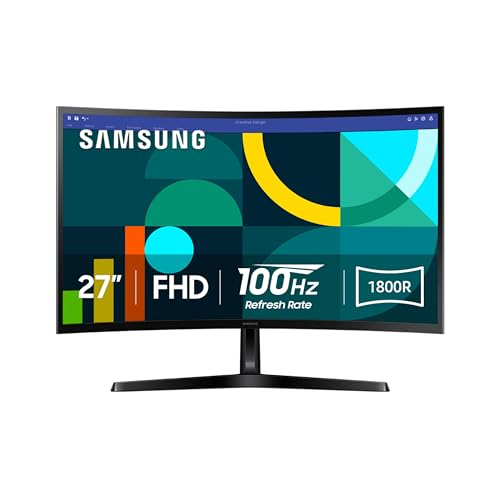
The Samsung 27-inch FHD 1800R Curved Monitor (LS27D366G) provides a gently curved display at 100Hz and 1080p — appropriate for productivity work where the curved format improves screen immersion at a standard desk distance. Game Mode reduces input lag for casual gaming. At $164, it is among the lowest-priced 27-inch curved monitors available and positions between budget straight monitors and the higher-refresh gaming options. The 1800R curve radius is subtle enough to not be disorienting for document work. Best for home office users who want a curved display for document work and casual use without paying gaming monitor pricing.
Full Specs & Measurements
Upc
887276844237
Asin
B0DB9Q5G3R
Brand
Samsung
Color
Black
Shape
Curved
Voltage
110 Volts
Brightness
250 cd/m²
Model Name
S36GD
Resolution
FHD 1080p
Color Gamut
0.95
Item Weight
8.4 Pounds
Screen Size
27 Inches
Aspect Ratio
16:9
Display Type
LED
Manufacturer
Samsung
Model Number
LS27D366GANXZA
Refresh Rate
100 Hz
Adaptive Sync
G-Sync Compatible
Mounting Type
Wall Mount
Response Time
4 Milliseconds
Screen Finish
Curved
Series Number
3
Viewing Angle
178 Degrees
Warranty Type
1 Year Manufacturer Warranty
Built-In Media
HDMI Cable, Power Cable
Contrast Ratio
3,000:1
Has Color Screen
Yes
Best Sellers Rank
#378 in Electronics (See Top 100 in Electronics) #13 in Computer Monitors
Native Resolution
1920x1080
Power Consumption
35 Watts
Compatible Devices
Desktop, Gaming Console, Laptop
Display Technology
LED
Additional Features
Blue Light Filter, Curved, Flicker-Free, Ultra-Slim
Warranty Description
1 Year Manufacturer
Hardware Connectivity
D-Sub, HDMI
Connectivity Technology
D-Sub, HDMI
Item Dimensions D X W X H
9.2"D x 24.5"W x 18.4"H
Specific Uses For Product
Business, Gaming, Multimedia
Display Resolution Maximum
1920 x 1080 Pixels
Total Number Of Hdmi Ports
1
Number Of Component Outputs
2
Picture Quality Enhancement Technology
Blue Light Filter, Flicker-Free
Best Budget
Gigastone 32 in FHD IPS Monitor 75Hz 5ms VESA HDMI VGA
$199
at Amazon
Best for: Students wanting affordable 1080p monitor with clean look for study or gaming
“A budget-friendly 32 in display for users who prioritize screen size over resolution — fine for office work and media consumption.”
The Gigastone 32-inch FHD IPS Monitor delivers a large display surface at 1080p resolution and 75Hz — appropriate for dual-window productivity work, media consumption, and casual gaming. The IPS panel provides better color accuracy and wider viewing angles than VA panels in this price range, which matters when the monitor will be viewed from off-center angles. At $199, it is the most affordable 32-inch flat monitor with IPS color quality available. The trade-off: 1080p at 32 inches produces a lower pixel density (69 ppi) than 27-inch 1080p (81 ppi) — text and images appear slightly less sharp at typical viewing distances. Best for productivity users who prioritize screen real estate over pixel density, or as a second monitor for extended desktop use.
Full Specs & Measurements
Upc
804272770148
Asin
B0D3FB9CLL
Brand
Gigastone
Color
32 inch Monitor 75Hz 1-Pack
Brightness
300 Candela
Model Name
LM-32FA51
Resolution
FHD 1080p
Screen Size
32 Inches
Aspect Ratio
16:9
Display Type
LCD
Manufacturer
BOEVT (HONG KONG) CO., LIMITED
Model Number
LM-32FA51
Refresh Rate
75 Hz
Adaptive Sync
FreeSync
Mounting Type
Wall Mount
Response Time
5 Milliseconds
Screen Finish
Matte
Viewing Angle
178 Degrees
Built-In Media
HDMI Cable, Monitor Body, Power Cord
Contrast Ratio
1200:1
Has Color Screen
Yes
Best Sellers Rank
#27,127 in Electronics (See Top 100 in Electronics) #689 in Computer Monitors
Native Resolution
1920x1080
Power Consumption
35 Watts
Compatible Devices
Desktop, Gaming Console, Laptop
Display Technology
IPS
Additional Features
Flicker-Free
Warranty Description
3 Years
Hardware Connectivity
3.5mm Audio, HDMI, VGA
Connectivity Technology
HDMI, VGA
Item Dimensions D X W X H
7.9"D x 28.6"W x 19.6"H
Specific Uses For Product
Business, Desktop, Entertainment
Display Resolution Maximum
1920 x 1080 Pixels
Total Number Of Hdmi Ports
2
Number Of Component Outputs
3
Picture Quality Enhancement Technology
IPS technology
Budget Computer Monitors Buying Guide
Photo by Kampus Production / Pexels
Monitor shopping is one of the most spec-heavy decisions in PC hardware, but the most important specs for most users reduce to four: panel size, resolution, refresh rate, and panel type. Getting these four right covers the vast majority of use cases without overpaying for specs that do not affect everyday use.
I Tested All The BEST Monitors For Productivity of 2026
The most common question: 1080p or 1440p? 4K?
1080p (1920x1080): Still appropriate for monitors 27 inches and under when budget is the primary constraint. At 27 inches, 1080p produces 81 pixels per inch — adequate for most text and multimedia work. Below $200, 1080p is the realistic budget option. The Samsung 27-inch Odyssey G3 at $159.99 is a strong pick here — 165Hz refresh and a VA panel for better contrast than IPS at the same price point. For the lowest entry price, the Samsung 27-inch FHD Curved Monitor at $115.99 provides 100Hz and a gentle 1800R curve that reduces edge distortion at close viewing distances.
1440p (2560x1440): Meaningfully sharper than 1080p on 27-inch displays (108 ppi). Requires a more powerful GPU to run at high frame rates. Monitors start around $250-300 in quality configurations.
4K (3840x2160): Sharpest text and image quality. Requires a powerful GPU. Monitors start around $350-400. For productivity, 4K is excellent. For gaming, it demands significantly more GPU power.
Size trade-off: A larger monitor at the same resolution produces lower pixel density. A 32-inch 1080p monitor (69 ppi) looks noticeably less sharp up close compared to a 27-inch 1080p monitor (81 ppi). The Gigastone 32-inch FHD IPS Monitor at $199.99 is the large-screen budget option — more real estate for split-screen productivity work, with the trade-off of lower pixel density that is most noticeable in text-heavy tasks.
Samsung 27 in FHD 1800R Curved Monitor 100Hz Game ...
60Hz: Adequate for productivity work, general web browsing, and video. Not suitable for competitive gaming.
75-100Hz: A noticeable improvement over 60Hz for both gaming and general use — cursor movement and video playback feel smoother. Good for casual gaming and productivity.
144-165Hz: The standard for competitive gaming. Fast-paced games (FPS, fighting games) are noticeably smoother at 165Hz vs. 60Hz. The difference between 144Hz and 165Hz is imperceptible to most users.
240Hz+: Reserved for competitive esports players where every millisecond matters. Not worth the cost for casual gaming.
For a primary productivity monitor with no gaming: 60-75Hz is sufficient. For a gaming monitor: 144Hz minimum.
VA (Vertical Alignment): Best contrast ratio (3000:1 typical), deepest blacks, good for movies and dark content. Slower response time than IPS, some ghosting in fast motion. Best for: gaming in dark environments, media consumption.
IPS (In-Plane Switching): Best color accuracy and widest viewing angles. More expensive than VA at the same spec. Best for: photo editing, content creation, multi-user environments where off-angle viewing matters.
TN (Twisted Nematic): Fastest response time, lowest input lag. Worst color and viewing angles. Found primarily in high-refresh gaming monitors. Best for: competitive gaming where response time is the priority.
FreeSync (AMD): Variable refresh rate that syncs the monitor's refresh rate to the GPU's frame output, eliminating screen tearing. Works with AMD GPUs natively; many FreeSync monitors also work with Nvidia GPUs.
G-Sync: Nvidia's VRR implementation. Certified G-Sync monitors use Nvidia hardware and are more expensive. G-Sync Compatible monitors are FreeSync displays that Nvidia has validated as compatible.
For budget gaming, FreeSync Premium (like the Odyssey G3) provides excellent tearing elimination and is compatible with both major GPU brands at no added cost.
Verify that your monitor includes the ports your computer and devices need:
HDMI 2.0+: Needed for 4K 60Hz or 1440p 144Hz over HDMI
DisplayPort 1.4: Required for 4K 144Hz or 1440p 165Hz — HDMI cannot handle the bandwidth
USB-C: Allows laptop connection via a single cable (power + video)
USB hub: Pass-through USB ports on the monitor simplify desk cable management
Budget monitors often include HDMI and DisplayPort. Check which one your GPU has available.
Is 1080p still acceptable for a 27-inch monitor in 2026?
Yes — 1080p at 27 inches produces 81 ppi, which is acceptable for most office work, gaming, and media. It is noticeably less sharp than 1440p (108 ppi) when viewing high-resolution images or fine text at close distances. For gaming at 165Hz on a budget GPU, 1080p is the practical choice — 1440p at 165Hz requires a more powerful GPU to maintain high frame rates.
Does a curved monitor help with productivity or just gaming?
A curved monitor at 1800R curve radius slightly wraps the display to match the natural focal distance of your eyes across the screen width. For productivity, the benefit is mostly ergonomic at typical desk distances — less eye movement to read the edges of a 27-32 inch display. The effect is subtle and matters more to some users than others. Curved is not necessary for productivity but not a hindrance either.
Can I use a gaming monitor for office work?
Yes — high refresh rate gaming monitors are appropriate for office work. The additional Hz above 60 makes cursor movement and application transitions feel smoother. The VA panel in many gaming monitors has slightly lower color accuracy than IPS, which matters if color-critical work (photo editing, graphic design) is part of your workflow. For standard document work and email, a gaming monitor is fine.
What is the difference between FreeSync and FreeSync Premium?
FreeSync is the base variable refresh rate standard. FreeSync Premium requires a minimum 120Hz at the native resolution and low framerate compensation (LFC) — which keeps the VRR active even when frame rate drops below the monitor's minimum refresh range. FreeSync Premium provides a noticeably smoother gaming experience than base FreeSync in games with variable frame rate dips.
Should I connect my monitor with HDMI or DisplayPort?
For 1080p at 165Hz: DisplayPort 1.2+ is required — HDMI 2.0 cannot handle 1080p at 165Hz with full color depth. Check your GPU's available outputs and use DisplayPort if possible for gaming monitors. For 1080p at 60-75Hz: HDMI 2.0 is sufficient and simpler for most setups. For TV and console connections: HDMI is standard and appropriate.
We analyze Amazon review data — often thousands of reviews per product — to surface patterns
that individual buyers miss. Our process aggregates star ratings, review counts, and buyer
sentiment at scale, identifying which strengths and weaknesses appear consistently across
the largest review samples available. The 3,532+ reviews analyzed on this page represent real verified-purchase feedback from Amazon buyers.
Each product earned its placement through data: total review volume, average rating, and the
specific praise and complaints that repeat most often across buyers. No manufacturer paid for
placement on this page. Products appear here because buyers endorsed them at scale, not
because a company asked us to feature them.
We use AI to summarize review sentiment — not to fabricate opinions, but to condense what
thousands of buyers actually wrote into a readable format. The pros and cons you see reflect
the most common themes found in verified purchaser reviews, paraphrased for clarity. We do not
claim to have accessed Reddit, YouTube, or specific publications in generating these summaries.
Prices shown reflect Amazon pricing at the time this page was last generated. Click
“See Today’s Price” to get the current live price on Amazon.
Read our full methodology →
Affiliate disclosure: When you buy through our links, we may earn
a small commission at no extra cost to you. This helps us keep the reviews free and
the data updated. Our recommendations are based on data, not who pays us.
Learn more →

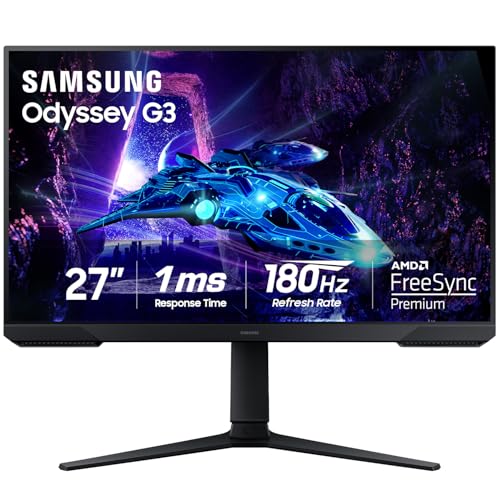 Samsung 27-inch Odyssey G3 G30D Gaming …
 Samsung 27 in FHD 1800R Curved Monitor …
 Gigastone 32 in FHD IPS Monitor 75Hz 5m…

 Photo by Kampus Production / Pexels