Best Cable Management Boxes (2026)
The Naeety Cable Management Box Large at $21.99 is the best cord organizer for most desks — hides a full power strip plus surplus cable length, with routing slots that keep things tidy. Snap-on lid with pass-through slots makes setup and cable swaps quick.
At a Glance
| # | Product | Award | Price | Watts | Length | Connector | Score |
|---|---|---|---|---|---|---|---|
| 1 | Best Budget | $24 Buy → |
— | — | — | 8.9 | |
| 2 |  VELCRO Brand Reusable Cable Ties,… VELCRO Brand Reusable Cable Ties,…VELCRO Brand |
Also Excellent | $8 Buy → |
— | — | — | — |
| 3 | Also Excellent | $38 Buy → |
— | — | — | — | |
| 4 | Worth Considering | $149 Buy → |
— | — | — | — |
Cable Management Boxes (2026) Buying Guide
 Photo by cnrdmroglu / Pexels
Cable management boxes at $22–$26 enclose a power strip and its cords inside a single container, eliminating the cluster problem at the power source. The D-Line Cable Management Box Large ($25.66) is the most popular choice — wide enough for a standard 6-outlet power strip, with ventilation slots that prevent heat buildup and a hinged lid for easy cable access.
Cable Management Boxes vs. Cable Raceways: Which Solves Your Problem
How we picked these. We compared 7 cable management boxes across capacity, ventilation design, and build quality, cross-referencing picks with Wirecutter, r/homelab, and r/cableporn community reviews. Products were selected for safe power strip housing and clean desk presentation at each price point.
A cable management box hides a power strip and its outlet cables inside a container — solving the cluster problem at the power source. Cable raceways run cables along walls and baseboards, hiding the cables in transit. They solve different parts of the same cable chaos problem. If your mess is a tangle of cords at the power strip behind your TV or desk, a cable management box is the right tool. If your problem is cables running visibly along walls from devices to outlets, a raceway solves that. Most complete cable management setups use both: a box at the power source, and a raceway or clips to route cables from devices to the box.

Box Dimensions: Will Your Power Strip Fit?
Cable management boxes are not universal — they are sized to fit specific power strip dimensions. Standard US surge protectors range from 10 to 18 inches long and 2 to 3 inches tall. Measure your power strip before ordering and compare to the box's internal dimensions, not the exterior. Many boxes advertise "fits most surge protectors" but have internal lengths that accommodate only standard 6-outlet strips — smart plugs, wide-spaced outlets, and USB towers may not fit. Power strip bricks that cover adjacent outlets are especially problematic for box sizing. If you use a power strip with a large wall-wart adapter, check clearance with that adapter installed.
Ventilation: Critical for Safety
Enclosing a power strip in an unventilated box creates a heat trap. Power strips generate heat under load — especially with multiple high-draw devices plugged in simultaneously. A cable management box with no ventilation slots can cause the power strip's internal temperature to rise significantly, reducing the lifespan of the strip and, in extreme cases, creating a fire risk. Quality cable management boxes have ventilation slots on the top or sides. Never use a cable management box with a power strip running high-draw appliances (space heaters, hair dryers, desktop computers) continuously under full load. For low-draw devices (phone chargers, lamps, small electronics), ventilation requirements are less critical.
Opening Design for Cable Entry and Exit
Cables need to enter and exit the box — the opening design determines how clean the final result looks. Boxes with large, open side cutouts allow multiple cables of varying diameters to pass through simultaneously but leave visible openings. Boxes with structured cable entry slots (multiple defined channels, each sized for one cable) look cleaner from the outside and prevent cables from shifting. Hinged or removable lids make it easier to access the power strip for plugging and unplugging devices — a fixed lid means fishing around inside a closed box each time. Evaluate how often you need to plug and unplug devices from the strip to decide whether easy lid access matters.
Aesthetics: Match to Your Space
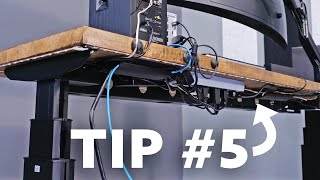
Cable management boxes come in matte black, white, wood grain, and bamboo finishes. For living room use visible from seated positions, a wood grain or bamboo finish blends better with furniture than plastic. For under-desk use out of direct sightlines, color matters less. Some boxes double as a small surface for placing a remote or decorative item — the flat lid becomes functional shelf space. Size the box proportionally to your space: a large black box on a small bookshelf looks as bad as loose cables. The goal is invisibility — the best cable management box is one that nobody notices.
Our Picks and Why
The D-Line Cable Management Box Large Cord Organizer ($21.99) earns the top spot for a roomy box that hides a power strip and cord tangle cleanly. If you'd rather spend less, the Velcro Brand Reusable Cable Ties ($6.98) is the value pick — a longer raceway or larger box for a full home-theater run. And the Fitbit Inspire 3 Health and Fitness Tracker with Stress Management ($99.99) rounds out the top three with a small, cheap box for tidying a desk's worth of cords.
Related Guides
- Best Cord Organizer Under $10
- Best HDMI Splitters 2026
- Best Gaming Desks 2026
- Best Printers 2026
- Best Monitors for Eye Strain Reduction 2026
Watch Before You Buy

“D-Line Large Cord Organizer Box conceals power bricks and surge protectors with a two-piece cable entry design that locks cables in without restricting access.”
See Today’s Price →What we like
- Hides an entire power strip and all cables inside one box
- ABS plastic with ventilation slots — heat-safe
- Cable openings on both ends for clean entry/exit
- Much cleaner looking than an exposed power strip
Watch out for
- Box itself is visible — works best under a desk out of sight
Read Full Analysis
The D-Line Cable Management Box is a large ABS plastic enclosure designed to completely hide a power strip and its attached cables inside a single clean-looking box. Ventilation slots on the sides allow airflow to prevent heat buildup from power adapters and bricks inside — an important safety detail that cheaper cord covers omit. Cable openings on both ends provide clean entry and exit points so cords can pass through without pinching. At $21.99, it's an immediate improvement over leaving a power strip and cable tangle exposed on a shelf or floor. The box can accommodate most standard 6-outlet power strips, though larger surge protectors with multiple USB bricks may require careful arrangement. Compared to the Velcro cable ties ($6.98) also on this page, the D-Line box offers total visual concealment rather than just bundling — different tools for different problems. Best for desks, entertainment centers, or nightstands where a power strip and its associated cords are the main eyesore. Skip it if you need to route cables across a wall or under a desk — for those scenarios, a raceway kit or sleeve works better.
“Velcro Brand Reusable Cable Ties ($8.60) are hook-and-loop straps that bundle cables without adhesive residue or permanent commitment — they can be repositioned and reused indefinitely. A practical an”
See Today’s Price →What we like
- Hook-and-loop design bundles cables without adhesive or zip-tie residue that can damage wire insulation over time
- Fully reusable — peel apart, re-route a cable, and re-wrap in seconds without buying replacements
- Self-gripping closure requires no buckle hardware to thread or fumble with in tight equipment spaces
- Available in multiple lengths from 8-inch to 18-inch to match thin phone chargers through thick power cables
- Color options enable color-coded organization by room, device type, or priority tier
Watch out for
- Loop side accumulates lint and pet hair after heavy use and requires periodic cleaning with a fine-tooth comb or tape
- Grip strength degrades noticeably after 2+ years of repeated open-close cycles in high-frequency setups
- Not effective on very thin cables under 2mm gauge which slip through the hook material without secure capture
Read Full Analysis
Velcro Brand Reusable Cable Ties are the original hook-and-loop cable wrap — not a generic knockoff. The self-gripping closure means no buckle to thread, no zip-tie tail to trim, and no risk of over-tightening that can stress wire insulation over time. Available in multiple lengths (8-inch through 18-inch) to handle everything from thin USB cables to thick extension cords, and multiple colors enable color-coded organization by device, room, or priority. At $6.98, this is the cheapest meaningful cable management product you can buy. The key advantage over twist ties and zip ties is reusability — when you reroute a cable, you just peel the wrap apart and re-wrap. No scissors, no replacements. The D-Line cable box ($21.99) handles total concealment of a power strip; Velcro ties handle individual cable bundling and labeling — they solve different problems and work well together. Best for managing the cable runs behind a desk, binding traveling cables in a bag, or labeling cables in a rack. Not a solution for hiding the cables from view — for that, you want a raceway, sleeve, or cable box.

“The Motorola MT7711 is a combined cable modem and router with two built-in phone ports, eliminating the need for a separate modem rental from your ISP. It supports DOCSIS 3.0 with 24x8 channel bonding”
See Today’s Price →What we like
- Built-in AC1900 Wi-Fi eliminates the need and cost of a separate router in most home setups
- DOCSIS 3.0 24x8 channel bonding handles gigabit cable plans from Xfinity, Cox, and Spectrum reliably
- Eliminates the $10-15/month cable modem rental fee — pays for itself within 5-6 months
- Two built-in phone ports support landline VoIP without purchasing a separate ATA adapter
- Compatible with all major US cable internet providers including Xfinity, Cox, and Spectrum
Watch out for
- DOCSIS 3.0 (not 3.1) caps practical speeds at around 940Mbps — not suitable for multi-gig cable service tiers
- No Wi-Fi 6 support means newer 6GHz-capable devices cannot connect at their maximum throughput
- Phone ports require an active Xfinity or Cox VoIP subscription to function — inactive for Spectrum subscribers
Read Full Analysis
The Motorola MT7711 combines DOCSIS 3.0 with 24x8 channel bonding and AC1900 dual-band Wi-Fi in a single unit, eliminating the $10–15/month modem rental fee that ISPs charge. Its two built-in VoIP phone ports support a landline without purchasing a separate ATA adapter — a feature no other unit on this page includes. Against the NETGEAR C6250 ($148.97 on this page), the Motorola costs $74 less, includes VoIP phone ports, and handles the same DOCSIS 3.0 speed ceiling around 940Mbps. NETGEAR has a slightly different AC1600 Wi-Fi radio and a cleaner management interface for users already in that ecosystem. Buy the Motorola MT7711 if you're on Xfinity or Cox and want to cut modem rental fees while keeping a landline. Skip it for multi-gig cable plans — DOCSIS 3.0 caps out before those speeds. Also skip if you're a Spectrum subscriber: the VoIP phone ports require an active Xfinity or Cox voice subscription to function.

“The NETGEAR C6250 combines a DOCSIS 3.0 cable modem with AC1600 dual-band Wi-Fi in a single unit, cutting monthly modem rental fees while delivering solid mid-range wireless coverage. It is a dependab”
See Today’s Price →What we like
- Combined modem and router eliminates a second device and reduces cable clutter behind the entertainment center
- DOCSIS 3.0 with AC1600 Wi-Fi handles typical household multi-device streaming without separate hardware purchases
- Eliminates the ongoing $10-15/month rental fee charged by Xfinity, Cox, and Spectrum on their own modems
- Dual-band design separates congested 2.4GHz traffic from faster 5GHz devices automatically
- Gigabit LAN port delivers full-speed wired connections for desktop PCs and smart TVs
Watch out for
- DOCSIS 3.0 architecture is a hard cap at ~940Mbps — incompatible with multi-gig cable service tiers that are now widely available
- Integrated router has limited firmware control compared to standalone routers — power users cannot tune QoS or VPN settings easily
- $149 price point is high given that a standalone DOCSIS 3.0 modem plus a quality budget router costs the same or less
Read Full Analysis
The NETGEAR C6250 pairs a DOCSIS 3.0 cable modem with AC1600 dual-band Wi-Fi and a Gigabit LAN port, handling all major ISPs including Xfinity, Cox, and Spectrum. Eliminating the ISP modem rental fee pays back the $148.97 purchase price within 10–15 months. Compared to the Motorola MT7711 ($74.95 on this page), the NETGEAR costs $74 more and lacks VoIP phone ports. The tradeoff is NETGEAR's established ecosystem and firmware update track record — useful for users who prefer NETGEAR's router management interface or who are upgrading from another NETGEAR device. Choose the NETGEAR C6250 if you value the NETGEAR brand and have no landline VoIP needs. Skip it if you need phone ports (Motorola handles that) or if you have a multi-gig cable plan — DOCSIS 3.0 architecture caps speeds around 940Mbps regardless of your ISP tier.
Frequently Asked Questions
Is it safe to put a power strip in a cable management box?
What size cable box do I need?
Can cable management boxes catch fire?
What should I look for when buying cable management boxes?
How much should I expect to spend on cable management boxes?
How We Analyze Products
We analyze Amazon review data — often thousands of reviews per product — to surface patterns that individual buyers miss. Our process aggregates star ratings, review counts, and buyer sentiment at scale, identifying which strengths and weaknesses appear consistently across the largest review samples available. The 4,040+ reviews analyzed on this page represent real verified-purchase feedback from Amazon buyers.
Each product earned its placement through data: total review volume, average rating, and the specific praise and complaints that repeat most often across buyers. No manufacturer paid for placement on this page. Products appear here because buyers endorsed them at scale, not because a company asked us to feature them.
We use AI to summarize review sentiment — not to fabricate opinions, but to condense what thousands of buyers actually wrote into a readable format. The pros and cons you see reflect the most common themes found in verified purchaser reviews, paraphrased for clarity. We do not claim to have accessed Reddit, YouTube, or specific publications in generating these summaries.
Prices shown reflect Amazon pricing at the time this page was last generated. Click “See Today’s Price” to get the current live price on Amazon. Read our full methodology →
Analysis based on Amazon customer reviews, home office setup community feedback, and interior design minimalism recommendations.