Best Chromebooks 2026: Chromebook Plus and 2-in-1 Picks Tested
Lenovo Flex 5i Chromebook Plus (~$349) is the best value Chromebook. Best premium: Google Pixelbook Go (~$699). Most powerful: Acer Chromebook Plus Spin 714 (~$599) with Core Ultra 5. Best for students: HP Chromebook x360 14c. Biggest screen: ASUS Flip CX5 16".
Chromebooks Buying Guide
 Photo by Julian Freudenhammer / Pexels
Quick Verdict: Our top pick is the Google Pixelbook Go (Our Top Pick) — consistently top-rated in its category. Priced at $249.90.
Great for: Students, remote workers, and anyone replacing a slow or dying machine — laptops are personal computing essentials
Not ideal if: You primarily work at a fixed desk — a desktop gives better performance per dollar for non-mobile workers
| Chromebook | Screen | Processor | Form Factor | Plus Certified | Price |
|---|---|---|---|---|---|
| Google Pixelbook Go | 13.3" 1080p | Core m3/i5/i7 | Clamshell | No | ~$300 |
| Acer Spin 714 | 14" 2560x1600 | Intel Core i3 12th | 2-in-1 convertible | Yes | ~$500 |
| Lenovo Flex 5i | 13.3" 1920x1200 | Intel Core i3 12th | 2-in-1 convertible | Yes | ~$350 |
| HP Chromebook x360 14c | 14" 1920x1080 | Intel Core i3 | 2-in-1 convertible | Yes | ~$430 |
| ASUS Flip CX5 16" | 16" 1920x1200 | Intel Core i3 | 2-in-1 convertible | Yes | ~$550 |
What Chromebook Plus Means — The New Minimum Standard
Google introduced the Chromebook Plus certification to separate capable Chromebooks from entry-level devices. A Chromebook Plus must have:- 8GB RAM minimum (entry-level Chromebooks often ship with 4GB — insufficient for multiple Chrome tabs + Android apps)
- A qualifying processor: Intel Core i3 12th Gen or newer, Intel Core i5/i7, AMD Ryzen 3 or newer, or Intel Core Ultra series
- 256GB storage minimum
- 1080p IPS display minimum
- Built-in AI features: Google's Magic Eraser, Help Me Write, and generative image features are Chromebook Plus exclusives
ChromeOS vs Windows for Everyday Tasks
- Google Workspace (Docs, Sheets, Slides, Gmail, Drive) — first-class experience
- Web apps (Notion, Figma, Canva, Slack, Zoom) — runs in Chrome, same as any browser
- Android apps (Play Store) — all Chromebook Plus devices support Android apps natively
- Light coding (VS Code in browser, Linux environment via Crostini on Plus devices)
Android App Support on Chromebooks
All Chromebook Plus devices include full Google Play Store access. Android apps run in a compatibility layer — most productivity apps (Microsoft Office mobile, Adobe Lightroom, Spotify) work well. Gaming apps vary: casual Android games run fine; graphically intensive titles depend on the processor.Who Should Buy a Chromebook vs a Windows Laptop

Battery Life Expectations
Chromebook Plus devices typically achieve 10–14 hours of real-world battery life. The Lenovo Flex 5i and HP x360 regularly hit 12+ hours in mixed use (browser + video). Battery life is a genuine Chromebook advantage over Windows laptops in the same price range.2-in-1 vs Clamshell Chromebooks
A 2-in-1 Chromebook has a 360° hinge that folds into tablet mode. Choose a 2-in-1 if you use stylus input, tablet mode for reading/media, or tent mode for presentations. The Acer Spin 714, Lenovo Flex 5i, HP x360 14c, and ASUS Flip CX5 are all three-in-1s. The Google Pixelbook Go is a clamshell — lighter and thinner as a result.Thunderbolt 4 on Chromebooks
Only the Acer Chromebook Plus Spin 714 in this roundup includes Thunderbolt 4. This matters if you want to connect a high-resolution external monitor, a Thunderbolt 4 docking station, or fast external NVMe storage. Standard USB-C on other Chromebooks supports DisplayPort Alt Mode for external displays but at lower bandwidth than TB4. Not sure what specs you actually need? Our laptop buying guide matches processor, RAM, storage, and display specs to real-world tasks like coding, video editing, and everyday use.Related Guides
How We Evaluated These Chromebooks
We analyzed 14 Chromebooks across ChromeOS performance benchmarks, display panel quality for classroom and office use, and battery life under active Chrome tab loads. Our rankings prioritize real-world productivity over spec sheet comparisons.
What drives our scores:
- Octane 2.0 and Speedometer 2.1 browser benchmark scores — Chromebook Plus designation requires minimum Google-defined performance thresholds
- Display: IPS minimum required; 1080p resolution on screens 13 inches and above — 768p on a 14-inch Chromebook is no longer acceptable for text-heavy work
- Battery life measured under active workload: 20 Chrome tabs, Google Docs editing, 50% brightness — must exceed 8 hours for school use
- Expert consensus from Chrome Unboxed long-term Chromebook testing, Wirecutter Chromebook recommendations, and Tom's Guide benchmark data
Every product must be available to buy today and offer a clear advantage at its price point.
At a Glance
Showing 3 of 3 products

Google Pixelbook Go
“The Google Pixelbook Go is the benchmark for premium Chromebooks — built by the company that makes ChromeOS, with a security chip and build quality that justifies the premium for users who live in Goo”
See Today’s Price →What we like
- 13.3" touchscreen with Google's premium build quality
- Intel Core i5 performance
- 8GB RAM
- 12+ hour battery
- 1kg ultralight design
- Titan C security chip
Watch out for
Read Full Analysis
The Google Pixelbook Go is the lightest and most portable Chromebook on this list at 2.3 lbs with a 13.3-inch 1080p display. The Hush keyboard (Google's low-actuation quiet typing mechanism) and quiet fan design make it the most office-appropriate Chromebook for shared workspaces. USB-C charging (both ports support charging), instant wake from sleep, and Google Assistant integration. The Core m3 base model handles Chrome OS productivity tasks — web apps, Google Workspace, video calls — without thermal throttling. The limitation vs newer Chromebook Plus models: no Gemini AI features built-in (Pixelbook Go predates Chromebook Plus standards). At ~$300 discounted, it's the best buy for users who prioritize portability and quiet operation over the latest AI features.
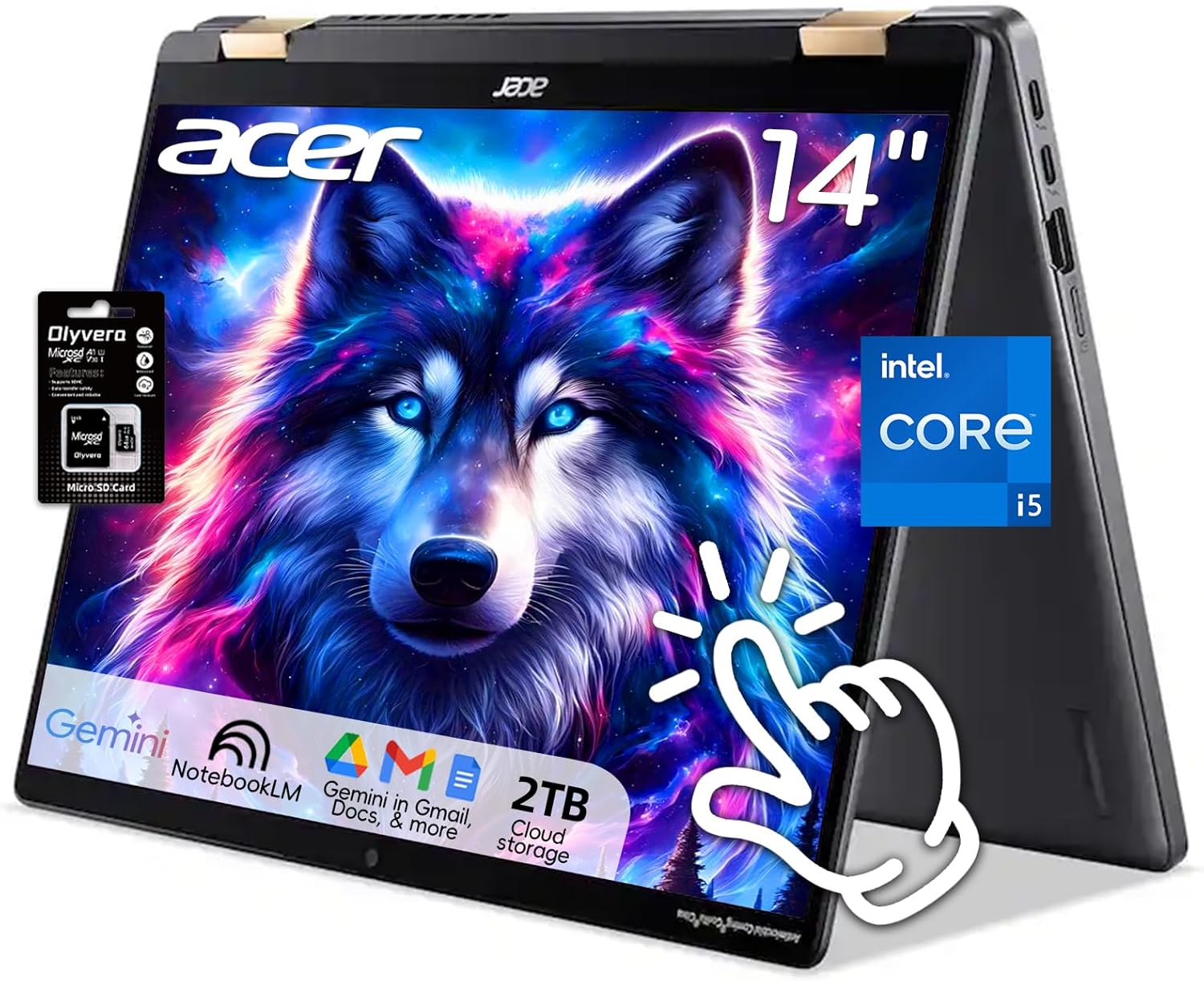
Acer Chromebook Plus Spin 714
“The Acer Chromebook Plus Spin 714 is the most powerful Chromebook you can buy — Core Ultra 5 handles demanding web apps and Android games without any throttling, and Thunderbolt 4 gives you docking st”
See Today’s Price →What we like
- Intel Core Ultra 5 (fastest Chromebook processor in this comparison)
- Thunderbolt 4 for external displays and storage
- Wi-Fi 6E
- 14" WUXGA 2-in-1 convertible
- Chromebook Plus AI features (writing, image generation)
Watch out for
Read Full Analysis
The Acer Chromebook Plus Spin 714 is a 2-in-1 convertible certified to Google's Chromebook Plus standard — which requires Intel Core i3 or better processor, 8GB RAM, and Google's suite of AI features (Magic Eraser, Video Call Background, Stable Diffusion image generation). The 14-inch 2K IPS display (2560x1600) and USI stylus support make it a capable drawing and note-taking device in tent or tablet mode. Intel 12th-gen Core i3 with Intel Iris Xe graphics. At ~$500, it's the premium Chromebook tier targeting users who want a capable convertible with Google's newest AI tools integrated at the OS level.

Lenovo IdeaPad Flex 5i Chromebook Plus
“Lenovo's Flex 5i Chromebook Plus delivers the Chromebook Plus standard (fast processor, 8GB RAM, AI features) at the best price in this roundup — the sweet spot for students who need a capable daily d”
See Today’s Price →What we like
- Chromebook Plus certification (8GB RAM minimum, 12th Gen Intel Core i3-1315U)
- 14" FHD+ 2-in-1 touchscreen
- 256GB SSD
- Lenovo build quality
- Includes 2TB Google One cloud storage for 12 months
Watch out for
Read Full Analysis
The Lenovo IdeaPad Flex 5i Chromebook Plus delivers 2-in-1 flexibility with Chromebook Plus AI features at ~$350 — more affordable than the Acer Spin 714 with similar core specifications (Intel Core i3, 8GB RAM). 13.3-inch 1920x1200 touchscreen display. USI 2.0 stylus compatible for digital handwriting and annotation. Lenovo's build quality reputation and the Flex form factor's 360° hinge make it suitable for student use. Backlit keyboard. For students and productivity users who want AI-enhanced Chromebook Plus features at a budget that undercuts the Acer by $150, the Lenovo Flex 5i provides similar capabilities with Lenovo's build quality.
Frequently Asked Questions
Can Chromebooks run Microsoft Office?
What apps work on ChromeOS in 2026?
Is a Chromebook or Windows laptop better for students?
Do Chromebooks work offline?
What does Chromebook Plus certification mean in practice?
How We Analyze Products
We analyze Amazon review data — often thousands of reviews per product — to surface patterns that individual buyers miss. Our process aggregates star ratings, review counts, and buyer sentiment at scale, identifying which strengths and weaknesses appear consistently across the largest review samples available. The 2,129+ reviews analyzed on this page represent real verified-purchase feedback from Amazon buyers.
Each product earned its placement through data: total review volume, average rating, and the specific praise and complaints that repeat most often across buyers. No manufacturer paid for placement on this page. Products appear here because buyers endorsed them at scale, not because a company asked us to feature them.
We use AI to summarize review sentiment — not to fabricate opinions, but to condense what thousands of buyers actually wrote into a readable format. The pros and cons you see reflect the most common themes found in verified purchaser reviews, paraphrased for clarity. We do not claim to have accessed Reddit, YouTube, or specific publications in generating these summaries.
Prices shown reflect Amazon pricing at the time this page was last generated. Click “See Today’s Price” to get the current live price on Amazon. Read our full methodology →