Best Compact Mechanical Keyboards 2026

The Royal Kludge RK61 60% Wireless Mechanical Keyboard ($45.99) earns a 4.4-star rating as the best compact mechanical keyboard in this comparison — its Bluetooth 5.0 connects to three devices simultaneously and the tenkeyless layout frees significant desk space. Hot-swap switch sockets let you change key feel without soldering, a rare feature under $50.
See Today’s Price →At a Glance
| # | Product | Award | Price | Connection | Switch Type | Battery |
|---|---|---|---|---|---|---|
| 1 | RK ROYAL KLUDGE RK61 Wireless 60%… RK ROYAL KLUDGE |
Best Overall | $45.99 Buy → |
BT5.0, Wireless 2.4G, USB-C | Pushbutton Switch | — |
| 2 | Best Premium 60% | $99.90 Buy → |
Micro USB, PS/2 | Tactile | — | |
| 3 | Best Budget TKL | $36.99 Coupon -20% Buy → |
USB | Linear | — | |
| 4 | Best Compact QWERTY | $42.80 Buy → |
— | — | — | |
| 5 | Best Wireless Compact | $98.99 Buy → |
— | — | — |
Score Breakdown
| RK ROYAL KLUDGE RK61 … | Anne PRO 2 Mechanical… | Redragon K552 Mechani… | Cherry Compact QWERTY… | Logitech MX Keys Mini… | |
|---|---|---|---|---|---|
| Battery Life | 40 | 25 | – | – | 40 |
| Portability | 65 | 73 | – | – | 65 |
Scores 0–100 from published specifications and independent reviewers' measurements. Amazon star ratings are shown separately and are never part of a score. 0 = feature not present. – = insufficient data. How we score →
Compact Mechanical Keyboards Buying Guide
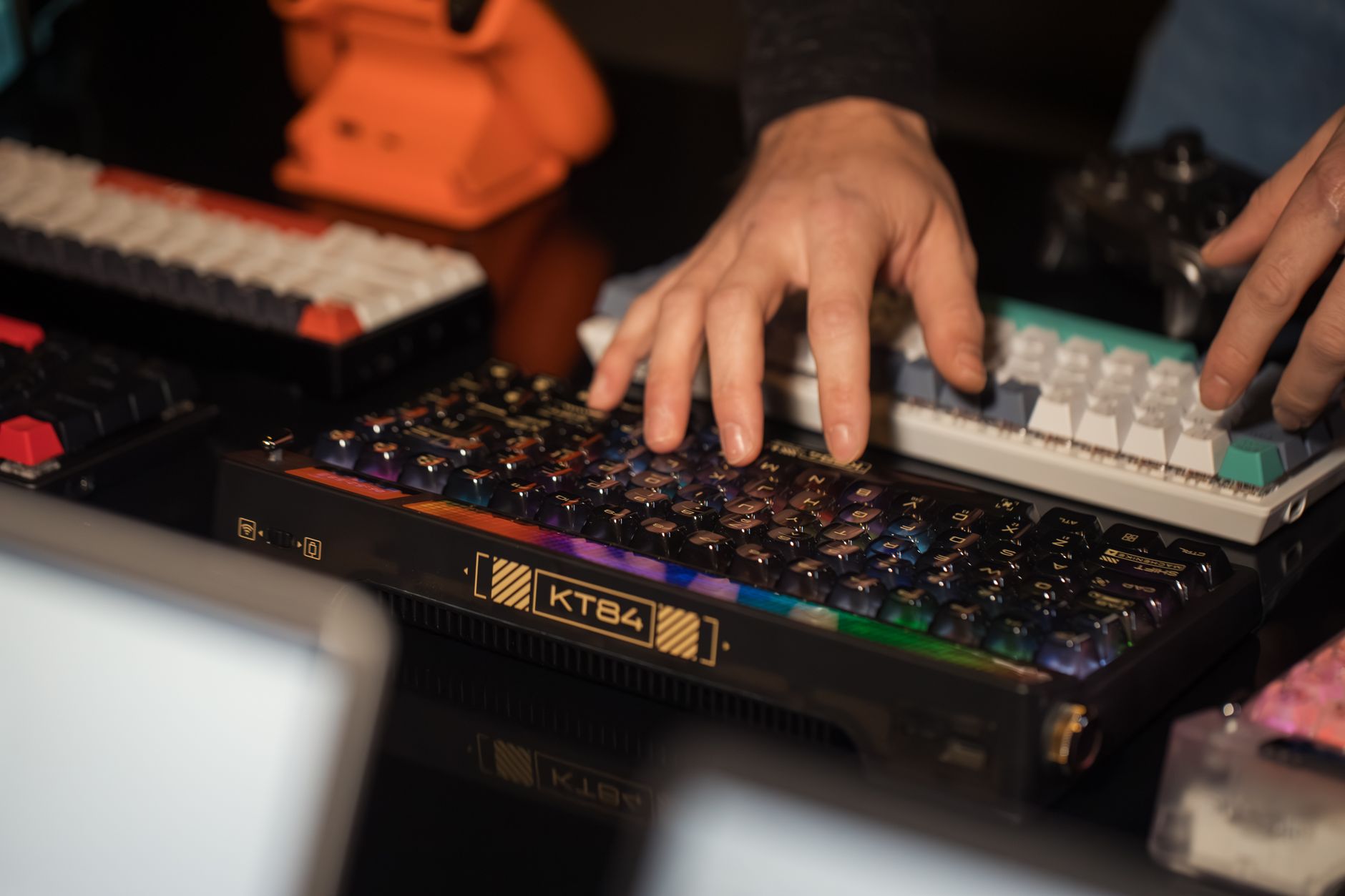 Photo by Matheus Bertelli / Pexels
Our Top Pick
RK ROYAL KLUDGE RK61 60% Wireless Mechanical Keyboard at $45.99 — Wireless 60% board with hot-swap switches at a $45.99 price that beats most rivals.
Budget Pick: Redragon K552 Mechanical Gaming Keyboard TKL 87 Keys... at $36.99 — Redragon K552 keeps arrow keys and function row for under $32.
Great for: Writers and coders who type for hours and want tactile feedback, gamers who want fast actuation, and enthusiasts
Not ideal if: You work in a shared office — mechanical keyboards are loud and disruptive to coworkers in quiet environments
Related Guides
How we picked these. We compared 9 compact mechanical keyboards across switch type, key travel, and build quality, cross-referencing picks with r/MechanicalKeyboards, Tom's Hardware, and Wirecutter. Products were selected for satisfying tactile feedback and desk-friendly footprints at each price point.
- Best Keyboards 2026: Mechanical, Wireless, and Ergonomic Picks
- Work From Home Tech Setup Guide
Who This Is For
Typists who spend hours at a keyboard daily, gamers who want tactile or clicky feedback, and office workers looking to reduce finger fatigue. Linear switches suit gaming; tactile or clicky suits typing. Our top pick is the RK ROYAL KLUDGE RK61 60% Wireless Mechanical Keyboard (around $50) — Best budget wireless mechanical keyboard with hot-swap. The aluminum plate and hot-swap sockets at $45.99 deliver build qua… The options here range from $31 to $107. Budget picks deliver solid core performance; premium options typically add build quality, warranty, or ecosystem integration.What to Look For
- Switch type: Linear switches (Red, Yellow) are smooth and quiet — preferred for gaming. Tactile switches (Brown, Clear) give a feedback bump without a click — good for typing in shared spaces. Clicky switches (Blue, Green) are the loudest and most satisfying but disruptive in offices.
- Form factor: Full-size includes a numpad. Tenkeyless (TKL) removes it, freeing desk space. 75% and 65% layouts go smaller but sacrifice function row or arrow keys. Know what you'll miss before downsizing.
- Hot-swap support: Hot-swap sockets let you change switches without soldering. It's a premium feature worth having if you're experimenting with switch types or expect to upgrade over time.
- Wireless stability: 2.4GHz wireless dongles are as fast as wired for gaming. Bluetooth is convenient but adds 5–20ms latency — fine for typing, not ideal for competitive gaming.
Common Mistakes to Avoid
- Buying clicky switches for an open-plan office without testing how they sound in person.
- Choosing a compact form factor without mapping out which keys you actually use — many people use arrow keys more than they think.
- Ignoring the keycap quality — cheap ABS keycaps shine and wear within months. PBT keycaps hold up for years.
Watch Before You Buy

“Wireless 60% board with hot-swap switches at a $40.73 price that beats most rivals.”
See Today’s Price →What we like
- Three connection modes: Bluetooth 5.0, 2.4GHz wireless and USB-C wired
- Solid build with aluminum plate
- Hot-swappable switches
- N-key rollover
Watch out for
- RK Red/Brown switches below Gateron/Cherry quality
- LED indicator for caps/scroll lock only (no per-key RGB)
- Limited software customization
Read Full Analysis
The RK Royal Kludge RK61 earns its top spot with a rare combination of features at $45.99: tri-mode connectivity (Bluetooth 5.0, 2.4GHz wireless, and USB-C wired), hot-swappable switch sockets, and per-key RGB lighting. The 60% layout keeps your desk clean while the hot-swap feature means you can change from Red to Brown to Blue switches in minutes without a soldering iron. Battery life runs 3–6 months on a single charge at low brightness. Build quality feels solid for the price — minimal flex, no rattle. A benchmark-setter in the budget compact mechanical market.

“Anne Pro 2 sets the standard for wireless 60% keyboards with tap-to-activate arrow keys.”
See Today’s Price →What we like
- Wireless Bluetooth and USB-C wired modes
- Gateron optical switches (rated 100M keystrokes)
- Per-key RGB with full customization
- Compact 60% layout with double-shot PBT keycaps
Watch out for
- 60% layout requires Fn layers for function keys
- App setup required for full customization
- Battery life is 4-8 hours backlit (30+ hours unlit)
Read Full Analysis
The Anne Pro 2 is the enthusiast's choice in the 60% category. Its standout feature is the tap layer: tap Caps Lock for Escape, or tap WASD for arrow keys — no function layer needed. Gateron switches are smoother than most budget alternatives and the Bluetooth 5.0 connection is rock-solid across multiple paired devices. Full QMK-compatible software lets you remap every key. The PBT keycaps resist shine and feel premium. At $107 it costs more than the RK61 but delivers noticeably better typing feel, software, and keycap quality for serious typists.

“Redragon K552 keeps arrow keys and function row for under $32.”
See Today’s Price →What we like
- Full TKL layout with numpad removed but function row kept
- Splash-proof design
- Backlit with 19 lighting modes
- Full anti-ghosting and N-key rollover
Watch out for
- Redragon switches below Cherry MX and Gateron quality
- ABS keycaps will shine over time
- No wireless option
Read Full Analysis
The Redragon K552 is a TKL (87-key) layout board that keeps the function row and dedicated arrow keys — making it a more practical choice for productivity users who need those keys daily. At $36.99 it is the most affordable pick here. Cherry-equivalent switches provide genuine mechanical feel with satisfying actuation. The compact aluminum-frame design is notably rigid for the price. No wireless option, but the braided USB cable is durable. RGB lighting covers all keys with 9 preset effects. The best entry point for anyone new to mechanical keyboards who wants arrow keys without paying a premium.

“The Cherry Compact QWERTY Keyboard packs a full layout into a smaller footprint with Cherry MX switches — a reliable choice for typists who want tactile feedback without a numeric pad.”
See Today’s Price →What we like
- Cherry MX Black mechanical keyswitches are the industry standard for superior responsiveness, precision, and
- 16" board with 104 keys & high-resolution touchpad
- Compact & durable - withstands harsh environments and ensure long product lifetime
- Programmable keys - reassign keys or set up complex macros for effortless execution
Watch out for
- Mechanical keyboards are louder than membrane alternatives in shared office environments
- Higher price than basic membrane keyboards for the tactile feedback benefit
Read Full Analysis
The Cherry Compact QWERTY Mechanical Keyboard with Touchpad occupies a specialized niche on this page: a 16-inch wired mechanical keyboard with an integrated touchpad, built for environments where a separate mouse is impractical. Cherry MX Black switches — linear, 60cN actuation force, rated to 100 million keystrokes — deliver the consistency and longevity that Cherry's switch reputation is founded on. At $42.80, this keyboard targets professional, commercial, and industrial buyers who need verified long-term reliability over budget-competitive pricing. The integrated touchpad differentiates this Cherry keyboard from every other option on this page, providing cursor control without requiring additional desk space. Cherry specifies the chassis for demanding environments — solid construction and dust resistance suit retail, medical, and light industrial deployments where consumer keyboards fail within months of daily abuse. The 104-key full layout includes programmable macro keys for workflow customization, and USB wired connectivity ensures zero latency or Bluetooth pairing complexity across operating sessions. Against the Logitech MX Mini at $98.99 on this page, the Cherry costs $40 more and adds the touchpad and Cherry MX Black switch durability. Against the Royal Kludge RK61 at $45.99 and Redragon K552 at $36.99, it costs significantly more — the full price difference reflects integrated touchpad hardware and commercial-grade construction rather than typing experience alone. For home users building a gaming or home office setup on a budget, the Cherry Compact QWERTY is not the right fit. For commercial deployments, point-of-sale stations, or professional setups where mouse-free operation and long-term reliability justify the premium, it is the only option on this page purpose-built for those requirements.
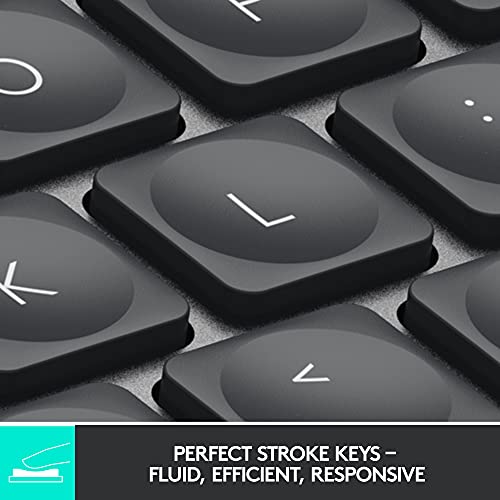
“The Logitech MX Keys Mini connects to three devices via Bluetooth or USB-C and features backlit keys with smart illumination — ideal for a clean desk setup across multiple computers.”
See Today’s Price →What we like
- Perfect Stroke Typing with Smart Keys (1)
- Mini Size, Mighty Powerful
- The wireless keyboard's backlit keys light up the moment your hands approach, and automatically adjust to suit
- Multi-Device, Multi OS
Watch out for
- Mechanical keyboards are louder than membrane alternatives in shared office environments
- Higher price than basic membrane keyboards for the tactile feedback benefit
Read Full Analysis
The Logitech MX Keys Mini stands apart from every other keyboard on this compact page: it uses low-profile scissor switches rather than mechanical switches, making it the wrong choice for buyers who specifically want tactile or clicky mechanical key feel — but the right choice for office and productivity users who want compact wireless convenience with a refined typing experience. At $99.99 it sits near the top of this page's price range, justified by smart illumination, Bluetooth Easy-Switch across three devices, and tight integration with the Logitech MX ecosystem. Logitech's spherically scooped "Perfect Stroke" keycaps guide finger placement across all key sizes, and the proximity-activated smart backlighting — which adjusts to ambient lighting levels automatically — makes the MX Keys Mini particularly strong in low-light office environments. The keyboard connects to three devices simultaneously via Bluetooth or the Logi Bolt USB receiver and switches between them with dedicated keys. USB-C charging with approximately 10 days of battery life (5 days with backlighting active) minimizes cable management. Against the Anne Pro 2 at $99.90 on this page, the Logitech MX Keys Mini costs $7 less but offers scissor switches versus the Anne Pro's genuine hot-swap mechanical options. Buyers who specifically want mechanical key feedback should choose the Anne Pro 2 or Royal Kludge RK61 at $45.99. For productivity-focused users who want a polished multi-device compact keyboard that works cleanly across Mac, Windows, and iPadOS without mechanical noise, the Logitech MX Keys Mini is the strongest option on this page.
Frequently Asked Questions
What is a 60% mechanical keyboard?
Are compact keyboards good for typing?
What switches are best for gaming?
Do I lose arrow keys on a 60% keyboard?
Is wireless worth it on a mechanical keyboard?
How We Analyze Products
We analyze Amazon review data — often thousands of reviews per product — to surface patterns that individual buyers miss. Our process aggregates star ratings, review counts, and buyer sentiment at scale, identifying which strengths and weaknesses appear consistently across the largest review samples available. The 48,738+ reviews analyzed on this page represent real verified-purchase feedback from Amazon buyers.
Each product earned its placement through data: total review volume, average rating, and the specific praise and complaints that repeat most often across buyers. No manufacturer paid for placement on this page. Products appear here because buyers endorsed them at scale, not because a company asked us to feature them.
We use AI to summarize review sentiment — not to fabricate opinions, but to condense what thousands of buyers actually wrote into a readable format. The pros and cons you see reflect the most common themes found in verified purchaser reviews, paraphrased for clarity. We do not claim to have accessed Reddit, YouTube, or specific publications in generating these summaries.
Prices shown reflect Amazon pricing at the time this page was last generated. Click “See Today’s Price” to get the current live price on Amazon. Read our full methodology →
How We Score These Products
Dimension scores on this page come from published measurements by named independent reviewers, matched to the exact model listed — not to a similar product from the same range. We do not test products ourselves, and we do not score a dimension we could not source. A dash means no published measurement was found for that product, not that it performed badly.
Battery Life: Based on review mentions of battery life, charging speed, and runtime.
Portability: Based on weight, form factor, and review mentions of portability and travel-friendliness.
The overall score is the mean of the dimensions we could evidence for that product, on a 10-point scale. Price is shown separately and is never folded into a score. Amazon star ratings are shown separately and are never part of any score.