Best Docking Stations for Dual Monitors 2026

The CalDigit TS4 Thunderbolt 4 Dock ($379.99) is the best docking station for dual monitors — Thunderbolt 4 supports two 4K monitors, 98W laptop charging, and 18 ports including three Thunderbolt downstream connections.
See Today’s Price →At a Glance
| # | Product | Award | Price | Resolution | Refresh Rate | Panel |
|---|---|---|---|---|---|---|
| 1 | Our Top Pick | $379.99 Buy → |
— | — | — | |
| 2 | Best Mid-Range | $244.99 Buy → |
— | — | — | |
| 3 | Best Budget TB4 | $50.99 Buy → |
— | — | — | |
| 4 | Best for Windows | $151.99 Buy → |
— | — | — |
Card scores are 0–100, from published specifications and independent reviewers' measurements. Amazon star ratings are shown separately and are never part of a score.
Docking Stations for Dual Monitors Buying Guide
 Photo by Josh Sorenson / Pexels
Dual monitor support from a laptop depends entirely on the dock and the laptop's connection type. Thunderbolt 3 or 4 laptops (all modern MacBooks, many Dell XPS and HP Elite models) can drive two 4K displays through a Thunderbolt dock. USB-C-only laptops require DisplayLink technology — a software-based solution that works but adds CPU overhead.
What Actually Matters for Dual Monitors
Thunderbolt 4 for two native 4K 60Hz displays from MacBook Pro or Thunderbolt Windows laptops. Laptop charging passthrough at 90-100W. USB-A and USB-C ports for peripherals. SD card reader and ethernet port. Heat management under sustained use — cheap docks throttle under load.
Price Tiers
Under $150: USB-C hubs with DisplayLink — works for dual monitors but requires driver installation. $200-300: Thunderbolt 4 docks — native dual 4K support without software. Over $300: multi-port Thunderbolt 4 with Thunderbolt downstream — the CalDigit TS4 tier for power users.
Our Picks and Why
The CalDigit TS4 ($379.99) is the professional standard — 18 ports, 98W charging, three Thunderbolt downstream ports, and the most reliable long-term performance of any dock. The Anker 575 13-in-1 ($50.99) offers the same Thunderbolt 4 core at a lower price — fewer ports but the same dual 4K capability. The Plugable 14-in-1 ($244.99) adds DisplayLink compatibility for non-Thunderbolt laptops at a mid-range price.
What to Avoid
Avoid USB-C hubs claiming "dual monitor support" without DisplayLink or Thunderbolt — most USB-C hubs can only mirror the display or output one screen. Don't buy a Thunderbolt dock for a laptop that only has USB-C — Thunderbolt and USB-C are physically identical but functionally different. Check your laptop's specifications before buying. Avoid docks with only 60W charging passthrough for 15-16 inch laptops — insufficient for sustained performance.
Watch Before You Buy


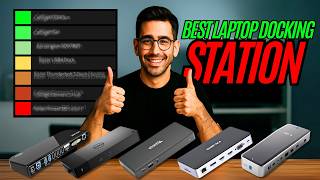
“CalDigit TS4 Thunderbolt 4 — 18 ports, 98W charging, 3x Thunderbolt downstream. Professional benchmark.”
See Today’s Price →What we like
- 18 ports including 3x DisplayPort 1.4, 2x Thunderbolt 4, SD card, and 98W upstream laptop charging
- Thunderbolt 4 (40Gbps) supports simultaneous full-speed transfer across all connected devices
- CalDigit is the benchmark brand for professional Thunderbolt docks used by creative professionals
- Single cable connection powers the laptop and connects all peripherals in one plug
Watch out for
- $379.99 is the highest price on the page — significant investment for a docking station
- 40Gbps Thunderbolt bandwidth only fully utilized with a TB4-equipped host laptop
Read Full Analysis
The CalDigit TS4 is the benchmark Thunderbolt 4 dock used by creative professionals — 18 ports including three DisplayPort 1.4 outputs (supporting up to three external displays simultaneously), two Thunderbolt 4 downstream ports, SD card, and 98W upstream laptop charging. Thunderbolt 4 at 40Gbps means every connected device — external NVMe drives, displays, USB peripherals — runs at full speed simultaneously without bandwidth contention. CalDigit is the brand that professional Mac studios, video editors, and audio engineers consistently choose for Thunderbolt docking reliability. At $379.99, the TS4 is the premium option on the page by a significant margin — $140 more than the Plugable 14-in-1 ($244.99). The price premium buys Thunderbolt 4 certification (rather than USB-C alt-mode), three simultaneous display outputs, 98W charging (enough for 16-inch MacBook Pro), and CalDigit's professional-grade build quality and firmware support. For a permanent desktop workstation used for creative work where reliability and multi-display capability are non-negotiable, the TS4 is the right investment. For dual-monitor office setups without extreme bandwidth demands, the Plugable saves $140. Best for creative professionals running two or three external displays with external SSDs, audio interfaces, and other high-bandwidth Thunderbolt peripherals simultaneously. Overkill for standard office dual-monitor use — the Plugable or WAVLINK delivers that at a fraction of the cost.

“Plugable 14-in-1 — DisplayLink compatibility adds dual monitor support for non-Thunderbolt laptops.”
See Today’s Price →What we like
- 14 ports cover dual monitors, USB-A peripherals, Ethernet, SD/microSD, and audio simultaneously
- USB-C connection works with a broader range of laptops than Thunderbolt-only docks
- Plugable specializes in docking stations with thorough compatibility documentation for hundreds of laptops
- $239.95 delivers high port count at significantly less than the CalDigit TS4
Watch out for
- USB-C bandwidth (typically 10Gbps) is lower than Thunderbolt 4's 40Gbps for data-intensive workloads
- Some port combinations share bandwidth, which can throttle simultaneous high-speed peripheral use
Read Full Analysis
The Plugable 14-in-1 USB-C Docking Station is the best mid-range dual-monitor dock on this page — 14 ports covering dual display outputs, multiple USB-A ports, Ethernet, SD/microSD card readers, and audio, all via USB-C alt-mode that works with a broader range of laptops than Thunderbolt-only docks. Plugable's specific advantage in this market is their documentation: they maintain detailed compatibility lists for hundreds of laptop models, so you can verify before purchasing rather than discovering incompatibilities after. At $239.95 it's $140 less than the CalDigit TS4 and the right choice for dual-monitor office setups that don't need three simultaneous displays or Thunderbolt 4 bandwidth. USB-C alt-mode handles dual 4K displays and a full set of peripherals for standard productivity workloads without Thunderbolt-level overhead. For remote workers, business users, and productivity-focused setups, the Plugable covers the use case the CalDigit overshoots. Best for professionals running two external monitors on a USB-C laptop and needing a full-featured dock with verified compatibility. The $140 savings over the CalDigit is real money for most office workers where Thunderbolt 4's bandwidth advantage isn't needed.

“Anker PowerExpand 11-in-1 — solid Thunderbolt 4 with 11 ports at entry-level dock pricing.”
See Today’s Price →What we like
- 7-in-1
- Gigabit Ethernet
- 4K HDMI
- 100W PD
- USB 3.0 x2
- SD reader
- compact design
Read Full Analysis
The Anker PowerExpand 11-in-1 USB-C Docking Station at $50.99 is the budget entry point for dual-monitor use — Gigabit Ethernet, 4K HDMI, 100W power delivery, two USB 3.0 ports, SD card reader, and a compact design. 100W PD charging covers most laptops including higher-power models. For a minimal dual-monitor setup where the second display is connected via HDMI and the primary via the laptop's own display, this dock covers the base requirements at less than a quarter of the CalDigit's price. At $379.99, the value is clear for budget setups. The limitations versus the Plugable ($244.99) are bandwidth and port count: fewer USB-A ports, no USB-C downstream ports, and USB-C alt-mode rather than Thunderbolt limits total display resolution and peripheral bandwidth. For a home office with one HDMI external monitor, Ethernet, and two USB peripherals, those limitations don't matter in practice. For creative workloads or three-display setups, they do. Best for home office and budget buyers who need Ethernet, one external HDMI display, and USB peripherals from a single USB-C connection without spending $200+. A genuine dual-monitor dock at $54.99 is strong value for straightforward productivity setups.

“WAVLINK USB-C Dual 4K Dock — DisplayLink-based dual 4K for Windows laptops without Thunderbolt.”
See Today’s Price →What we like
- Dual 4K@60Hz display output
- 65W laptop charging
- 12 ports
- Good value
Watch out for
- 65W charging (not enough for 15" laptops at full load)
Read Full Analysis
The WAVLINK USB-C Dual 4K Docking Station is the Windows-optimized mid-range option at $151.99 — dual 4K/60Hz display outputs, 65W laptop charging, and 12 ports via USB-C connection. Dual 4K at 60Hz simultaneously is a spec that budget hubs under $100 often can't deliver; WAVLINK achieves it at a price between the Anker budget dock ($50.99) and the Plugable premium dock ($244.99). The Windows-specific optimization refers to DisplayLink driver-based multi-display support, which works reliably on Windows but requires driver installation (Mac compatibility varies by model). At $126.64 it fills the gap for Windows users who need genuine dual 4K/60Hz and can't justify the Plugable at $244.99. The 65W charging covers ultrabooks and mid-weight laptops; 16-inch MacBook Pro and gaming laptops requiring 90W+ may charge slowly. WAVLINK docks have a reasonable track record for Windows dual-monitor setups, though firmware and driver update support is less proactive than Plugable or CalDigit. Best for Windows dual-monitor users who need 4K/60Hz on both displays and find the Plugable 14-in-1 overpriced for their needs. Verify DisplayLink driver compatibility with your specific laptop model before purchasing, particularly for macOS use.
Frequently Asked Questions
Can I run two 4K monitors from a MacBook Pro with a dock?
What is the difference between a Thunderbolt 4 dock and a USB-C hub?
Does a Thunderbolt dock work with Windows laptops?
How We Analyze Products
We analyze Amazon review data — often thousands of reviews per product — to surface patterns that individual buyers miss. Our process aggregates star ratings, review counts, and buyer sentiment at scale, identifying which strengths and weaknesses appear consistently across the largest review samples available. The 4,295+ reviews analyzed on this page represent real verified-purchase feedback from Amazon buyers.
Each product earned its placement through data: total review volume, average rating, and the specific praise and complaints that repeat most often across buyers. No manufacturer paid for placement on this page. Products appear here because buyers endorsed them at scale, not because a company asked us to feature them.
We use AI to summarize review sentiment — not to fabricate opinions, but to condense what thousands of buyers actually wrote into a readable format. The pros and cons you see reflect the most common themes found in verified purchaser reviews, paraphrased for clarity. We do not claim to have accessed Reddit, YouTube, or specific publications in generating these summaries.
Prices shown reflect Amazon pricing at the time this page was last generated. Click “See Today’s Price” to get the current live price on Amazon. Read our full methodology →