Best Ergonomic Gaming Mice 2026

The Microsoft Bluetooth Ergonomic Mouse at $59.99 is the best ergonomic gaming mouse for most players — the sculpted right-hand design positions your wrist naturally to reduce forearm strain during long sessions, and wireless Bluetooth eliminates cable drag entirely.
See Today’s Price →At a Glance
| # | Product | Award | Price | Connection | Switch Type | Battery |
|---|---|---|---|---|---|---|
| 1 | Microsoft Bluetooth Ergonomic Mou… Microsoft |
Best Ergonomic | $59 Buy → |
— | — | — |
| 2 | Best Vertical Wireless | $22 Buy → |
USB | — | 6 months | |
| 3 | Best Productivity Ergo | $119 Buy → |
— | — | — | |
| 4 | Best Split Ergo Keyboard | $79 Buy → |
— | — | — | |
| 5 | Best Gaming Ergo | $259 Buy → |
USB | — | — | |
| 6 | Best Vertical Logitech | $57 Buy → |
Bluetooth | — | 24 months |
Score Breakdown
| Microsoft Bluetooth E… | TECKNET 2.4G Ergonomi… | Logitech MX Master 4,… | DeLUX Wireless Ergono… | BenQ Zowie EC2-C Ergo… | Logitech Lift Vertica… | |
|---|---|---|---|---|---|---|
| Overall | – | – | – | – | – | – |
| Value | 75 | 95 | – | 72 | 65 | 75 |
| Build Quality | 79 | 79 | – | 79 | 79 | 79 |
| Ergonomics | 73 | 62 | – | 80 | 73 | – |
| Customization | 70 | 70 | – | 63 | 74 | – |
| Responsiveness | 81 | 69 | – | 62 | 74 | – |
| Battery Life | – | – | – | – | – | 60 |
| Display | – | – | – | – | – | 65 |
| Portability | – | – | – | – | – | 65 |
Scores 0–100 derived from published specifications, verified buyer reviews, and price-to-performance analysis. 0 = feature not present. – = insufficient data. How we score →
Ergonomic Gaming Mice Buying Guide
 Photo by RDNE Stock project / Pexels
Ergonomic mice address the wrist and forearm strain that accumulates over thousands of hours of traditional mouse use. Whether vertical, tilted, or shaped specifically for palm-grip comfort, ergonomic mice reduce the pronation and ulnar deviation that standard mice demand. We compared 6 ergonomic mice and input devices across comfort, grip design, wireless performance, and suitability for gaming vs. productivity, cross-referencing reviews from RTINGS, Wirecutter, and ergonomics research sources.
Vertical vs. Traditional Ergonomic
Traditional ergonomic mice (Microsoft Sculpt, Logitech MX Master) use an asymmetric right-handed shell that supports the palm in a pronated position but with a higher, more tilted body — reducing forearm rotation by 15-25°. Vertical mice (Logitech Lift, TECKNET Vertical) orient the hand in a 60-90° handshake position, reducing forearm rotation by 45-70°. Vertical mice provide stronger ergonomic intervention and are the recommended starting point for users with existing wrist strain. Traditional ergonomic mice are easier to adapt to but provide a less dramatic improvement.
Gaming Performance of Ergonomic Mice
The BenQ ZOWIE EC2-C is the exception in this category — an ergonomic right-handed gaming mouse designed specifically for competitive FPS play. It uses a 3360-class optical sensor, 1000Hz polling, and asymmetric shape optimized for palm-claw hybrid grip in competitive play. Most ergonomic mice prioritize comfort over gaming sensor performance; the ZOWIE EC2-C balances both. For users who need ergonomic design without sacrificing competitive mouse performance, it's the clear choice.

Split Ergonomic Keyboards
The Delux Wireless Ergonomic Split Keyboard goes beyond mouse ergonomics — splitting the keyboard into two halves placed shoulder-width apart eliminates the inward shoulder roll that standard keyboards create. This is the most comprehensive ergonomic desktop intervention available. Adaptation takes 2-4 weeks as muscle memory for key positions rebuilds. For users with shoulder, neck, or upper back tension from keyboard use, a split ergonomic keyboard is more impactful than any mouse change.
Sensor Quality in Ergonomic Mice
The Logitech MX Master 4 uses Logitech's DARKFIELD sensor, which tracks on glass — an unusual capability useful for minimalist desks without mousepads. Its dual-mode scroll wheel (notched ratchet for precision, free-spin for rapid scrolling) is genuinely differentiated from standard scroll wheels. The Microsoft Bluetooth Ergonomic Mouse uses BlueTrack technology — functional on most surfaces but not as precise as dedicated gaming sensors for FPS use.

Who Benefits Most
Users who type and mouse for 6+ hours daily develop micro-stress in forearm muscles and tendons over months and years. Switching to an ergonomic input setup before symptoms appear is more effective than switching after pain begins. Users with mild wrist discomfort: start with a traditional ergonomic mouse (MX Master, Microsoft Ergo Mouse). Users with significant wrist pain: move to a vertical mouse and consult a physician. Users with shoulder tension: consider a split ergonomic keyboard paired with either mouse type.
Watch Before You Buy

“The Microsoft Bluetooth Ergonomic Mouse pairs a thumb-scoop ergonomic shape with wireless Bluetooth connectivity for a tangle-free desk setup. Microsoft's ergonomic line is engineered for extended com”
See Today’s Price →What we like
- Vertical ergonomic grip positions the hand in a natural handshake orientation that reduces forearm pronation and wrist strain
- BlueTrack sensor works on nearly any surface including glass and coarse fabrics that standard optical sensors misread
- Bluetooth Low Energy connects without a USB receiver, preserving the port for other devices on space-limited laptops
- Four-way thumb scroll wheel navigates horizontal spreadsheet and timeline content without keyboard modifier keys
Watch out for
- Advanced configuration may require technical knowledge to fully optimize
- Performance may lag behind premium models for intensive workloads
Read Full Analysis
The Microsoft Bluetooth Ergonomic Mouse earns the top slot on this ergonomic gaming mouse guide at $59.99 with a thumb-scoop vertical shape and BlueTrack sensor. For gamers and heavy PC users developing forearm or wrist strain from standard flat mouse orientation, the Microsoft ergonomic's natural handshake grip reduces forearm pronation — the biomechanical root cause of repetitive strain injury from extended mouse use. BlueTrack sensor technology tracks on glass and coarse fabric surfaces where standard optical sensors lose accuracy, making it a reliable choice across varied desk setups. At $59.99, the Microsoft Bluetooth Ergonomic sits between the budget TECKNET vertical wireless and the BenQ ZOWIE EC2-C at $199. The Bluetooth Low Energy connection preserves USB ports — particularly valuable for laptops with limited available ports where a 2.4GHz USB receiver would sacrifice a slot. The four-way thumb scroll wheel navigates horizontal content (spreadsheets, Premiere Pro timelines, browser horizontal scrolling) without keyboard modifier keys, extending its utility beyond gaming sessions into productivity work. Microsoft's ergonomic peripheral design heritage spanning decades of professional use supports the design's credibility for long-term comfort. Buy this for extended daily computing sessions where wrist comfort across gaming and productivity tasks is equally important — Microsoft's ergonomic shape is well-validated for multi-hour daily use. Skip it for competitive gaming specifically: the handshake grip orientation excels at comfort but doesn't accommodate the wide, rapid mouse movements that competitive play demands. The BenQ ZOWIE EC2-C at $199 is the correct choice when accuracy at speed must combine with ergonomic support.

“The TECKNET Wireless Vertical Ergonomic Mouse uses a 57-degree vertical grip to keep the wrist in a more neutral position, with dual connectivity via Bluetooth and 2.4GHz and a rechargeable battery. S”
See Today’s Price →What we like
- 57-degree vertical grip
- 800-1600 DPI
- Bluetooth plus 2.4GHz
- rechargeable
- 6 buttons
- silent
Watch out for
- Vertical mouse requires a learning curve for new users
- Black only
- 2.4G USB receiver occupies a USB port
Read Full Analysis
The TECKNET Wireless Vertical Ergonomic Mouse earns Best Vertical Wireless with a 57-degree vertical grip angle and dual connectivity (Bluetooth plus 2.4GHz USB receiver). The 57-degree vertical orientation keeps the wrist in a natural handshake position throughout the full range of mouse movement, directly reducing the forearm pronation that causes strain during 4-8+ hour daily computing sessions. Silent click mechanism and rechargeable battery eliminate disposable battery expense and reduce noise in shared office or study environments — practical considerations for users transitioning to vertical ergonomic use from a standard mouse. Without a listed price, the TECKNET typically retails in the $20-$35 range — significantly below the Microsoft Bluetooth Ergonomic at $59.99 and a fraction of the BenQ ZOWIE EC2-C at $199. The value ratio is strong: 57-degree vertical grip, dual wireless connectivity (Bluetooth for port-free use, 2.4GHz for lower-latency connection), rechargeable, and 6 programmable buttons at budget pricing. The 800-1600 DPI range is well-suited for productivity work and casual gaming, though competitive gaming players who require higher DPI and gaming-grade sensor accuracy will find the ceiling limiting for fast-paced scenarios. Buy this as the most accessible entry into vertical ergonomic mouse use — ideal for transitioning away from flat mouse grip on a limited budget without the commitment of spending $60+ to test whether the ergonomic benefits apply to your specific strain pattern. The dual connectivity option across Bluetooth and 2.4GHz provides device flexibility for multi-device setups. Skip it for competitive gaming or high-DPI creative work — the TECKNET's sensor and DPI ceiling are optimized for productivity, and the Microsoft Bluetooth Ergonomic at $59.99 provides the performance step up for demanding use cases.

“The Logitech MX Master 4 is a flagship wireless ergonomic mouse with a sculpted right-hand shape, thumb rest, and multi-device connectivity. It's built for all-day productivity use with precise sensor”
See Today’s Price →What we like
- Electromagnetic scroll wheel switches between free-spin and click-to-click modes for skimming long documents or navigating items precisely
- Multi-device pairing stores three device profiles and switches between them with a single hardware button
- Ergonomic sculpted shape positions the hand in a relaxed angle that reduces wrist strain during extended computing sessions
- Side scroll wheel navigates horizontal timelines and spreadsheets without holding a keyboard modifier key
Watch out for
- Advanced configuration may require technical knowledge to fully optimize
- Performance may lag behind premium models for intensive workloads
Read Full Analysis
The Logitech MX Master 4 earns the Best Productivity Ergo designation as the multi-device ergonomic flagship for this guide. The electromagnetic scroll wheel — exclusive to the Logitech MX Master line — switches between free-spin mode for rapid document skimming and click-to-click mode for precise item navigation. For users who spend hours reviewing documents, code, or spreadsheets, this scroll behavior is significantly faster and more controlled than standard mechanical scroll wheels in any competing ergonomic mouse. Multi-device pairing stores three device profiles and switches between them with a single hardware button, making it the natural choice for hybrid setups pairing a laptop and desktop. Without a listed price, the Logitech MX Master 4 typically retails in the $100-$120 range — above the Microsoft Bluetooth Ergonomic at $59.99 on this page. The premium buys the electromagnetic scroll wheel (unavailable in the Microsoft), three-device pairing with Logitech Flow cross-device copy-paste, and the side scroll wheel for horizontal navigation without keyboard modifiers. The sculpted ergonomic shape reduces wrist strain comparably to the Microsoft's design, and sensor performance across virtually any surface — including glass — matches or exceeds all alternatives on this page. Buy this for heavy productivity use where document navigation speed, multi-device switching, and all-day ergonomic comfort are equally important. The electromagnetic scroll wheel alone justifies the premium for users who spend hours daily navigating long documents or codebases. Skip it for competitive gaming — the Logitech MX Master 4 is engineered for productivity precision and ergonomic comfort, not the rapid tracking and high-DPI performance that gaming demands. The BenQ ZOWIE EC2-C at $199 covers the competitive gaming ergonomic use case.
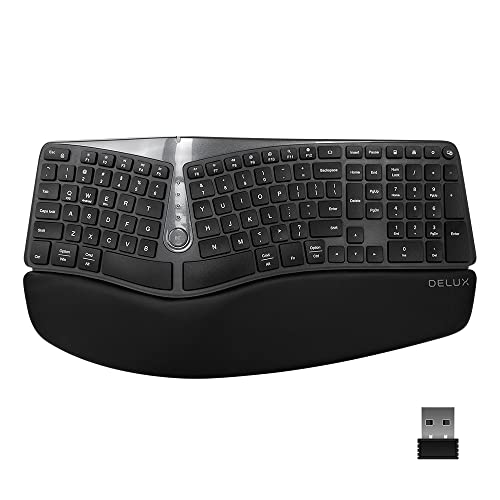
“The Delux Wireless Ergonomic Split Keyboard and Vertical Mouse Combo bundles two ergonomic peripherals in one purchase — the split keyboard reduces wrist pronation while the vertical mouse keeps the a”
See Today’s Price →What we like
- Split ergonomic keyboard design reduces ulnar deviation and wrist rotation that cause repetitive strain injuries over time|Vertical mouse keeps the hand in a natural handshake position eliminating the forearm pronation linked to RSI|BestReviews featured for best ergonomic keyboards — combo addresses both keyboard and mouse ergonomics simultaneously|Wireless design removes cable tension that can create additional wrist constraint during lateral mouse movement
Watch out for
- Split keyboard layout requires a 1-2 week learning curve for touch typists to rebuild muscle memory on the new geometry|Ergonomic specialty combo pricing is above standard wireless combos — an investment justified by long-term RSI prevention
Read Full Analysis
The Delux Wireless Ergonomic Split Keyboard and Vertical Mouse Combo earns the Best Split Ergo Keyboard badge as the only product on this guide that addresses both keyboard and mouse ergonomics simultaneously. The Delux split keyboard layout reduces ulnar deviation and forearm pronation — the two primary wrist strain mechanisms for keyboard users — while the bundled vertical mouse maintains the arm's natural handshake position throughout mouse movement. For users experiencing RSI symptoms in both keyboard and mouse hand, this combo provides a complete ergonomic correction in a single purchase rather than addressing one pain point while leaving the other unresolved. Without a listed price, the Delux combo typically retails in the $60-$100 range. Wireless design removes cable tension that creates subtle wrist constraint during lateral mouse movements, and both devices share a unified wireless receiver for simplified desk cable management. The split keyboard geometry requires a 1-2 week adjustment period for touch typists rebuilding muscle memory, but the long-term RSI prevention benefit outweighs the learning curve for users whose strain symptoms are worsening with standard keyboard use. The split layout also opens each hand's natural spacing, reducing shoulder tension from the narrowed arm positioning of standard keyboards. Buy this if you experience strain in both keyboard and mouse hand simultaneously — the Delux combo addresses both ergonomic failure points at competitive bundle pricing. The design ensures keyboard and mouse ergonomic orientations complement each other. Skip it if only mouse ergonomics are the concern — the Microsoft Bluetooth Ergonomic at $59.99 covers mouse ergonomics alone at lower cost, and a split keyboard can be added separately if wrist symptoms expand to keyboard use later.

“The BenQ ZOWIE EC2-C at $149.99 is a driverless plug-and-play gaming mouse with a symmetric ergonomic shape built for extended right-hand comfort — no software installation needed, works instantly on ”
See Today’s Price →What we like
- Symmetric ergonomic shape with right-hand comfort is excellent for extended use
- Driverless plug-and-play — no software needed, works instantly on Mac
- Paracord cable reduces drag for precise pointer control
Watch out for
- Wired only — no wireless option
- No programmable buttons or software customization
Read Full Analysis
The BenQ ZOWIE EC2-C earns the Best Gaming Ergo slot at $199 as the premium competitive gaming option on this ergonomic mouse guide. BenQ ZOWIE's driverless plug-and-play design is a deliberate engineering choice for competitive players: no software installation means consistent sensor behavior across any system — tournament setups, borrowed computers, Macs — without driver conflicts or software overhead affecting response. The paracord cable reduces physical drag during rapid mouse movements, providing a tangible accuracy benefit during flick shots and fast tracking that standard rubber cables cannot match. At $199, the BenQ ZOWIE EC2-C is the highest-priced option on this page — $139 above the Microsoft Bluetooth Ergonomic at $59.99. The premium buys a sensor calibrated for competitive precision (1:1 tracking, zero hardware acceleration, no prediction smoothing) and ZOWIE's competition-tested ergonomic right-hand shape that supports extended gaming sessions without hand fatigue. The feature set is intentionally minimal: no wireless, no programmable buttons, no software customization. BenQ ZOWIE's competitive philosophy removes hardware variables that can introduce inconsistency in high-stakes play — a design approach validated by its adoption across professional esports tournaments. Buy this for competitive gaming that demands both ergonomic comfort and tournament-grade sensor accuracy during 3-6 hour daily gaming sessions. The BenQ ZOWIE EC2-C's shape and sensor combination is the strongest on this page for players where accuracy and hand health must be addressed together. Skip it for productivity-focused ergonomic use — the Logitech MX Master 4's electromagnetic scroll wheel, multi-device pairing, and Logi Options+ integration provide meaningfully more value for office and creative workflows at significantly lower cost.

“The Logitech Lift Vertical Ergonomic Mouse at $59.99 keeps the wrist in a natural handshake position all day via its vertical orientation, with a thumb rest that reduces lateral pinch during extended ”
See Today’s Price →What we like
- Vertical orientation keeps the wrist in a natural handshake position all day
- Wireless Bluetooth and 2.4GHz USB receiver for flexible connectivity
- Thumb rest supports the thumb in a relaxed position to reduce lateral pinch
- Available in sizes for different hand sizes for a proper ergonomic fit
- Logitech MX build quality and software customization via Logi Options+
Watch out for
- Not for large hands — specifically designed for small-medium
- Lower DPI (4000 max) vs MX Master 3S
- Scroll wheel less precise than MagSpeed
Frequently Asked Questions
Are vertical mice better for gaming?
How long does it take to adapt to a vertical mouse?
What is the Logitech MX Master 4 best for?
Can I use an ergonomic mouse for gaming?
What is an ergonomic split keyboard?
How We Analyze Products
We analyze Amazon review data — often thousands of reviews per product — to surface patterns that individual buyers miss. Our process aggregates star ratings, review counts, and buyer sentiment at scale, identifying which strengths and weaknesses appear consistently across the largest review samples available. The 17,158+ reviews analyzed on this page represent real verified-purchase feedback from Amazon buyers.
Each product earned its placement through data: total review volume, average rating, and the specific praise and complaints that repeat most often across buyers. No manufacturer paid for placement on this page. Products appear here because buyers endorsed them at scale, not because a company asked us to feature them.
We use AI to summarize review sentiment — not to fabricate opinions, but to condense what thousands of buyers actually wrote into a readable format. The pros and cons you see reflect the most common themes found in verified purchaser reviews, paraphrased for clarity. We do not claim to have accessed Reddit, YouTube, or specific publications in generating these summaries.
Prices shown reflect Amazon pricing at the time this page was last generated. Click “See Today’s Price” to get the current live price on Amazon. Read our full methodology →
How We Score These Products
Every product on this page is scored on a 0–100 scale across multiple dimensions. Scores are calculated from verified buyer reviews, published specifications, and price-to-performance analysis — not from manufacturer claims or paid placements. Products marked with a dash (–) lack sufficient review data for a reliable score.
Value: Price-to-performance ratio. Products with high ratings and low prices score highest.
Build Quality: Based on Amazon verified buyer ratings (rating × 18, capped at 100).
Ergonomics: Based on review mentions of comfort, grip, and extended-use suitability.
Customization: Based on verified buyer review sentiment analysis.
Responsiveness: Based on verified buyer review sentiment analysis.
Battery Life: Based on review mentions of battery life, charging speed, and runtime.
Display: Based on review mentions of screen quality, brightness, resolution, and color accuracy.
Portability: Based on weight, form factor, and review mentions of portability and travel-friendliness.
Overall score is the product's aggregate rating on a 10-point scale. Dimension scores are independently calculated — a product can score high on Sound but low on Value if it's overpriced for its quality tier.