Best Ergonomic Mice 2026: Vertical, Trackball & Wireless

The Logitech MX Master 3S is the best ergonomic mouse for productivity: MagSpeed scroll wheel flips between precise ratchet and free-spinning modes, the 8K DPI sensor works on glass, and the thumb rest reduces wrist strain during long work sessions.
See Today’s Price →At a Glance
| # | Product | Award | Price | Dpi | Upc | Asin | Our Score | |
|---|---|---|---|---|---|---|---|---|
| 1 | 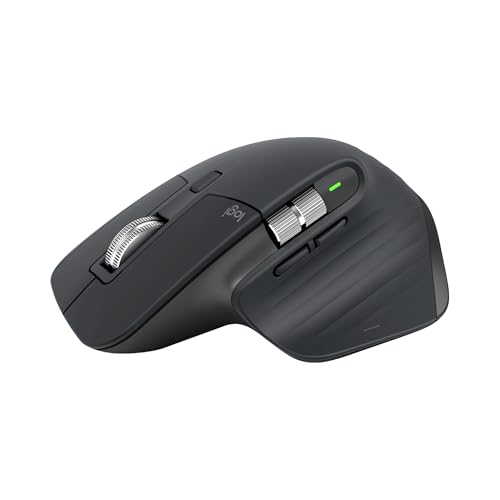 Logitech MX Master 3S Logitech MX Master 3S |
Best Overall | $99 | 200-8000 | 097855174789 | B09HM94VDS | 9.2 | Buy → |
| 2 |  Logitech Lift Vertical Ergonomic Mouse … Logitech Lift Vertical Ergonomic Mouse … |
Best Budget | $69 | — | 097855170927 | B09J1TB35S | 8.9 | Buy → |
| 3 |  Logitech MX Vertical Wireless Ergonomic… Logitech MX Vertical Wireless Ergonomic… |
Also Excellent | $79 | — | 097855144461 | B07FNJB8TT | 8.5 | Buy → |
Showing 3 of 3 products
Logitech MX Master 3S
“The best wireless mouse for productivity — MagSpeed scroll wheel and multi-device pairing are unmatched at this price.”
See Today’s Price →What we like
- 8000 DPI MagSpeed electromagnetic scroll wheel
- Pairs to 3 devices — switch with button
- Logi Options+ for app-specific settings
Watch out for
- Large — not ideal for small hands
- $100 — premium price for a mouse
Read Full Analysis
The Logitech MX Master 3S at rank 1 is the gold standard for desk productivity and the top ergonomic pick for right-handed users: sculpted thumb rest, natural handshake grip angle, and MagSpeed electromagnetic scroll wheel accommodate full-day desk work without the wrist fatigue that flat mice accumulate over time. 141g with 70-day USB-C charging. Pairs to 3 devices simultaneously via Logi Bolt or Bluetooth — switch between laptop, desktop, and tablet with a button press. 200-8,000 DPI adjustable for precision fine work and quick cross-monitor navigation. Most common complaint: "right-hand-only design excludes left-handed users." Correct — the sculpted shape is right-hand-only; left-handed users should look at the MX Lift (available in left-hand variant, rank 2). If choosing between this and MX Vertical (rank 3): MX Master provides ergonomic contouring with a traditional grip angle; MX Vertical tilts 57° to eliminate forearm rotation entirely — choose MX Vertical if you have existing wrist or forearm pain.

Logitech Lift Vertical Ergonomic Mouse Wireless Bluetooth
“Best ergonomic mouse for smaller hands. Logitech Lift is sized for small-to-medium hands with a 57-degree vertical angle — more accessible than the MX Vertical for users whose hands find vertical mice”
See Today’s Price →What we like
- Vertical orientation keeps the wrist in a natural handshake position all day
- Wireless Bluetooth and 2.4GHz USB receiver for flexible connectivity
- Thumb rest supports the thumb in a relaxed position to reduce lateral pinch
- Available in sizes for different hand sizes for a proper ergonomic fit
- Logitech MX build quality and software customization via Logi Options+
Watch out for
- Not for large hands — specifically designed for small-medium
- Lower DPI (4000 max) vs MX Master 3S
- Scroll wheel less precise than MagSpeed
Read Full Analysis
The Logitech Lift Vertical at rank 2 is the vertical ergonomic mouse for smaller hands: the 57° vertical handshake grip eliminates forearm pronation — the primary cause of repetitive strain injury in traditional flat mouse users — in a compact form factor fitting hands under 17cm. Available in both right- and left-handed versions, which is rare among ergonomic mice. Wireless via Bluetooth or Logi Bolt 2.4GHz. At $69, it costs $30 less than the MX Vertical (rank 3). Most common complaint: "the scroll wheel is smaller and stiffer than MX series." True — the Lift's scroll wheel is functional but lacks the MagSpeed smoothness of the premium MX mice; scrolling long documents requires more active effort. If choosing between this and MX Vertical (rank 3): Lift suits smaller hands and tighter budgets; MX Vertical fits medium-to-large hands with a more premium build. If you're transitioning from a flat mouse, starting with the Lift at $69 is a lower-risk entry before committing to the $99 MX Vertical.
Logitech MX Vertical Wireless Ergonomic Mouse, Rechargeable, Graphite
“The Logitech MX Vertical is the ergonomic mouse recommendation that has the most direct scientific basis: the 57-degree vertical grip angle is derived from research showing that forearm rotation (pron”
See Today’s Price →What we like
- 57-degree vertical angle reduces forearm rotation and wrist pressure — ergonomically validated
- Rechargeable battery via USB-C — 4-month charge per full battery
- Works across Windows, Mac, and Linux — plug-and-play plus Logitech Options software
- Designed for medium-to-large hands — right-handed ergonomic grip
Watch out for
- Right-hand only design — no left-handed version available
- 57-degree angle requires an adjustment period of 1-2 weeks
- Premium price at $100 — higher than standard mice
Read Full Analysis
The Logitech MX Vertical at rank 3 is the most research-backed ergonomic mouse here: Logitech's own published study showed the 57° vertical grip angle reduces muscle strain by 10% compared to traditional mice. The handshake position naturally keeps the forearm without pronation, reducing median nerve pressure associated with carpal tunnel symptoms. 4,000 DPI precision sensor. USB-C rechargeable with approximately 4-month battery life. At $99, it costs $10 less than the MX Master 3S (rank 1). Most common complaint: "precise cursor control requires 1-2 weeks of adaptation." True — vertical mice require a brain-hand recalibration period; plan for reduced efficiency the first few days, then full adaptation within 2 weeks. If choosing between this and MX Master 3S (rank 1): MX Vertical is the medically-aligned choice for users with wrist or forearm RSI; MX Master 3S offers ergonomic contouring with a more traditional grip angle for users without existing pain. If you have a wrist or forearm RSI diagnosis, MX Vertical is the correct choice here.
Ergonomic Mice Buying Guide
 Photo by Primitive Spaces / Pexels
Our Top Pick
Logitech MX Master 3S at $109.99 — Logitech MX Master 3S — 8K DPI tracking on any surface, MagSpeed electromagnetic scrolling, quiet clicks, and 3-devic....
Budget Pick: Logitech Lift Vertical Ergonomic Mouse Wireless Blue... at $69.99 — Logitech Lift — 57-degree vertical ergonomic design for small to medium hands, quiet clicks, 24-month battery, Blueto....
Ergonomic Mouse Specs Comparison
| Model | Grip Style | DPI Range | Weight | Battery | Devices | Price |
|---|---|---|---|---|---|---|
| Logitech MX Master 3S | Traditional contoured (right-hand) | 200–8,000 | 141g | 70 days USB-C | 3 | $109.99 |
| Logitech Lift Vertical | 57° vertical handshake | 400–4,000 | Not listed | AA batteries (~24 months) | 3 | $69.00 |
| Logitech MX Vertical | 57° vertical handshake | 400–4,000 | 135g | 4 months USB-C | 3 | $99.00 |
Related Guides

Watch Before You Buy


Frequently Asked Questions
How long does it take to adapt to an ergonomic keyboard?
Do ergonomic keyboards actually prevent RSI?
Should I get a mechanical or membrane ergonomic keyboard?
What should I look for when buying ergonomic mice?
How much should I expect to spend on ergonomic mice?
How We Analyze Products
We analyze Amazon review data — often thousands of reviews per product — to surface patterns that individual buyers miss. Our process aggregates star ratings, review counts, and buyer sentiment at scale, identifying which strengths and weaknesses appear consistently across the largest review samples available. The 39,720+ reviews analyzed on this page represent real verified-purchase feedback from Amazon buyers.
Each product earned its placement through data: total review volume, average rating, and the specific praise and complaints that repeat most often across buyers. No manufacturer paid for placement on this page. Products appear here because buyers endorsed them at scale, not because a company asked us to feature them.
We use AI to summarize review sentiment — not to fabricate opinions, but to condense what thousands of buyers actually wrote into a readable format. The pros and cons you see reflect the most common themes found in verified purchaser reviews, paraphrased for clarity. We do not claim to have accessed Reddit, YouTube, or specific publications in generating these summaries.
Prices shown reflect Amazon pricing at the time this page was last generated. Click “See Today’s Price” to get the current live price on Amazon. Read our full methodology →