Best Flash Drives (2026)
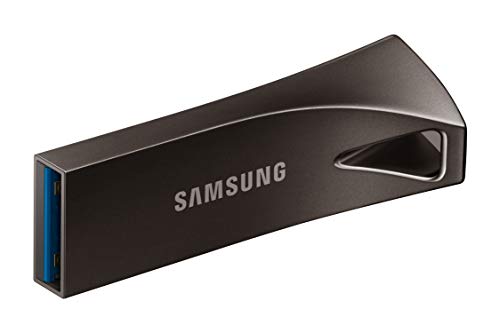
The Samsung BAR Plus 128GB is our pick: it plugs into the USB-A ports most computers still have, its metal body is listed as waterproof and shock-proof, and Samsung backs it with a 5-year limited warranty. Choose the SanDisk Extreme Fit if your laptop or tablet has only USB-C ports; it plugs straight in and can stay there.
See Today’s Price →At a Glance
Flash Drives (2026) Buying Guide
 Photo by www.kaboompics.com / Pexels
Best Flash Drive: Samsung BAR Plus (128GB)
How we picked these. Products were selected for fast, reliable file transfers with practical form factors at each price point.
The Samsung BAR Plus is the top pick for moving files between computers, backups and bootable installers. It plugs into the USB-A ports most computers still have and uses USB 3.1: its title quotes reads up to 400MB/s and Samsung's feature list says up to 300MB/s, against 60MB/s at most for a USB 2.0 drive. Its metal body has an integrated keyring and is listed as waterproof, shock-proof, temperature-proof, magnet-proof and X-ray-proof, with a 5-year limited warranty. Buy a known brand: counterfeit and poor-quality flash drives that lie about their capacity or fail early are common at the lowest price tier.
USB 2.0 vs. USB 3.0 vs. USB 3.1/3.2
USB 2.0 (max 60 MB/s): Most older flash drives are USB 2.0. Adequate for small files but noticeably slow for large transfers (video, backups). Still common but worth avoiding for any drive purchased new.
USB 3.0 (max 640 MB/s): Standard for mid-tier flash drives. Real-world speeds: 80-130 MB/s read, 15-50 MB/s write. Good for most use cases. Backward compatible with USB 2.0 ports (runs at 2.0 speeds in those ports).
USB 3.1/3.2 / USB-C (max 1,000+ MB/s): High-speed drives such as the Samsung BAR Plus and the SanDisk Extreme Fit, both quoted at up to 400MB/s reads. Best for large file transfers on modern computers with USB 3.1 ports. Higher cost per GB but meaningful for video editing and large backups.
Flash Drive vs. Cloud Storage
Flash drives are the right choice for: files too large for email, transferring between computers without internet access, offline backups, bootable operating system installations, and presenting files at locations without reliable internet. Cloud storage (Google Drive, Dropbox, iCloud) is better for collaboration, automatic sync, and anywhere-access. Flash drives fail — heat, water, and physical damage kill them. Never keep your only copy of important files on a flash drive without a separate backup.
The Bottom Line
Samsung BAR Plus for a rugged USB-A drive with a 5-year warranty. SanDisk Extreme Fit for laptops and tablets that have only USB-C ports. PNY Elite-X 512GB when you need the most room for video and backups. Avoid unbranded drives at unusually low prices — capacity fraud (drives that report false capacity but fail when filled) is common in unbranded flash drives sold on Amazon and other marketplaces.
Watch Before You Buy


“Samsung's BAR Plus 128GB: a USB 3.1 flash drive in a metal body with an integrated keyring, listed as waterproof, shock-proof and magnet-proof, with a 5-year limited warranty.”
See Today’s Price →What we like
- Read speeds quoted at up to 400MB/s in its title (Samsung's feature list says 300MB/s)
- Metal body with an integrated keyring
- Listed as waterproof, shock-proof, temperature-proof, magnet-proof and X-ray-proof
- 5-year limited warranty
Watch out for
- Its listing states no write speed
Read Full Analysis
The BAR Plus is the drive to clip onto your keys and stop worrying about. Its body is metal rather than plastic, with an integrated keyring loop, and Samsung lists it as waterproof, shock-proof, temperature-proof, magnet-proof and X-ray-proof, backed by a 5-year limited warranty. It plugs into the standard USB-A port that most desktops, older laptops, TVs and car stereos still have, and it uses USB 3.1: the title quotes reads up to 400MB/s, while Samsung's own feature list says up to 300MB/s and gives the example of a 3GB 4K video copied to a PC in about 10 seconds. Samsung says its firmware and components, including the NAND memory, are produced in-house. Its listing gives no write speed, so expect saving big files to the drive to take longer than reading them back. A laptop or tablet with only USB-C ports needs an adapter.
Skip this if: Your laptop or tablet has only USB-C ports

“SanDisk's Extreme Fit 128GB: a tiny USB-C drive made to stay plugged into a laptop or tablet, quoted at up to 400MB/s reads over USB 3.2 Gen 1.”
See Today’s Price →What we like
- Plugs straight into USB-C computers, tablets and other devices
- Read speeds quoted at up to 400MB/s over USB 3.2 Gen 1
- Tiny plug-and-stay body made to live in the port as extra storage
- SanDisk Memory Zone app for Windows or Mac file backups
Watch out for
- USB-C only: an older USB-A port needs an adapter
Read Full Analysis
The Extreme Fit is built for laptops and tablets that have only USB-C ports. It plugs straight into a USB-C port with no adapter and is small enough to leave there, which turns it into permanent extra storage for documents, photos and project files. SanDisk quotes read speeds up to 400MB/s over USB 3.2 Gen 1 for the 128GB to 1TB sizes, and its SanDisk Memory Zone app for Windows and Mac helps you organize files and back them up. The trade-off is the connector: it has no USB-A plug, so an older computer, a TV or a car stereo with only USB-A ports needs an adapter. Because it sits flush in the port, it suits a machine you keep it in more than a drive you pass around.
Skip this if: Your computer or TV has only USB-A ports

“PNY's Elite-X 512GB: a metal-bodied USB 3.2 Gen 1 drive with the most room on this page, rated for reads up to 220MB/s and writes up to 100MB/s.”
See Today’s Price →What we like
- 512GB of storage for video, photo libraries and computer backups
- States both speeds: reads up to 220MB/s and writes up to 100MB/s
- Durable metal housing
- Works with USB 3.2 Gen 1 and USB 3.0 PC and Mac computers, and with USB 2.0 ports at lower speed
Watch out for
- USB-A plug only: a USB-C-only laptop or tablet needs an adapter
- Reads top out at 220MB/s, below drives quoted at 400MB/s
Read Full Analysis
The Elite-X is the pick when space matters more than peak speed. This version holds 512GB, enough for a large photo library, hours of video or a full set of computer backups on one drive. PNY states both of its speeds, which many flash drive listings do not: reads up to 220MB/s and writes up to 100MB/s over USB 3.2 Gen 1, which PNY says is up to 30 times faster than its standard USB 2.0 drives. The housing is metal, and it works with most USB 3.2 Gen 1 and USB 3.0 PC and Mac laptops and desktops, falling back to USB 2.0 speed in older ports. It has a USB-A plug only, so a laptop or tablet with only USB-C ports needs an adapter.
Skip this if: You want the fastest transfers rather than the most storage
Frequently Asked Questions
Why is my flash drive slow even though it says USB 3.0?
Are flash drives good for long-term storage?
What size flash drive do I need?
What is the difference between USB-A, USB-C, and USB 3.0 flash drives?
How long do flash drives reliably store data without being plugged in?
How We Chose These Products
We evaluate read/write speed, build quality, capacity value, and warranty for different use cases.
We compare each product’s Amazon listing, the manufacturer’s published specifications and Amazon customer ratings, shown with their review counts as Amazon’s data, and rank the products on how well they answer this page’s question. We do not test products in hand and we do not run our own analysis of review text. A publication or expert is named only where we cite its published findings about that product. No manufacturer paid for placement on this page.
A price appears only when Amazon’s API supplied it at a recent daily refresh, with the date and time beside it, and is withdrawn at 4 AM Central on the day after it turns 24 hours old; otherwise use “Check price on Amazon” for the live price. Read our full methodology →