Best Gaming Monitors 2026: 1440p, 240Hz & OLED Picks

The LG 27GP850-B UltraGear 27 QHD Nano IPS wins for gaming monitors: 165Hz refresh rate, 1ms response time, and Nano IPS technology deliver accurate colors at gaming speeds. RTINGS ranks it among the top gaming monitors under $300.
See Today’s Price →At a Glance
| # | Product | Award | Price | Resolution | Refresh Rate | Panel | Our Score | |
|---|---|---|---|---|---|---|---|---|
| 1 | LG 27GP850-B UltraGear 27" QHD Nano IPS… |
Our Top Pick | $379 | QHD Ultra Wide 1440p | 165 Hz | IPS Nano | 9.4 | Buy → |
| 2 | 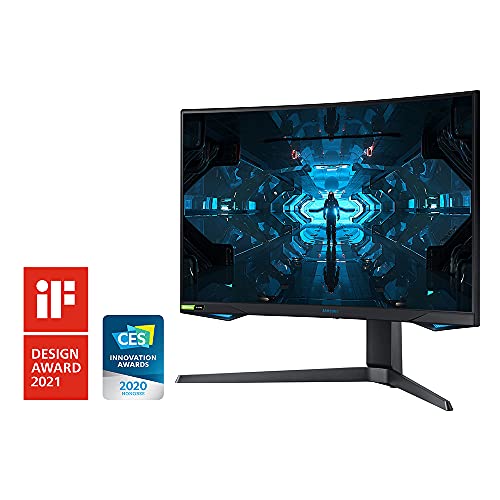 Samsung 27-inch Odyssey G7 QHD 1440p 24… Samsung 27-inch Odyssey G7 QHD 1440p 24… |
Budget Pick | $217 | — | — | — | 8.8 | Buy → |
| 3 | 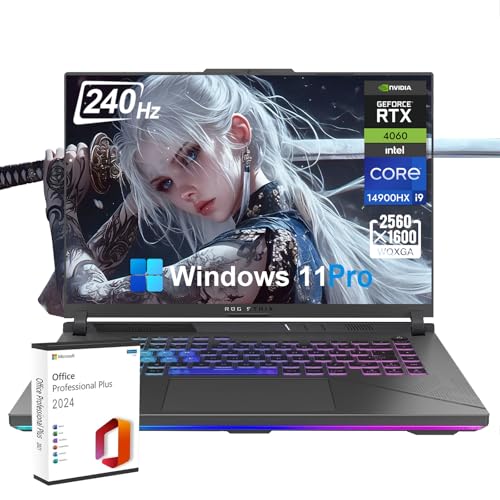 ASUS ROG Swift PG279Q 27-inch 1440p IPS… ASUS ROG Swift PG279Q 27-inch 1440p IPS… |
Best Value | $253 | — | — | — | 8.2 | Buy → |
| 4 | 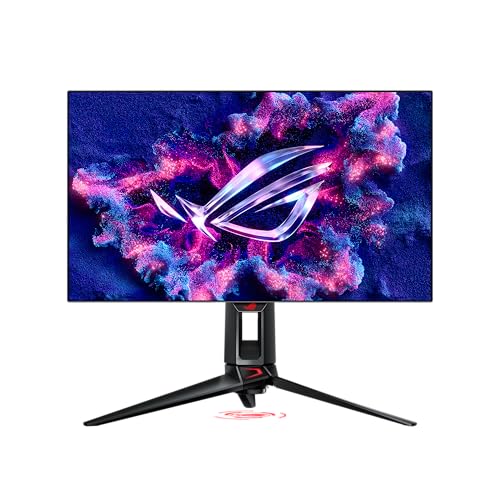 Asus ROG Swift PG27AQDP 27-inch 2K Gami… Asus ROG Swift PG27AQDP 27-inch 2K Gami… |
Best OLED Pick | $788 | QHD 1440p | 240 Hz | — | 9.2 | Buy → |
Showing 4 of 4 products
LG 27GP850-B UltraGear 27" QHD Nano IPS Gaming Monitor
“The best 1440p 144Hz gaming monitor. Nano IPS, 165Hz, and 1ms response make it the benchmark recommendation.”
See Today’s Price →What we like
- Nano IPS — 98% DCI-P3 color accuracy
- 165Hz native (180Hz OC)
- 1ms GtG — no ghosting
- G-SYNC + FreeSync Premium dual certification
- Height/swivel/tilt adjustable stand
Watch out for
- ~$300–380 — mid-premium pricing
- No USB-C connectivity
- HDR400 — basic HDR
Read Full Analysis
The LG 27GP850-B delivers Nano IPS at 27" QHD with 165Hz and 1ms GtG response. The Nano IPS panel covers 98% DCI-P3 — matching monitors at twice the price for color accuracy, making it useful for both gaming and content creation. At current street pricing (~$250), it's the most balanced option on this page: competitive 165Hz suits most gaming genres, and color accuracy makes it effective as a dual-purpose display. Compared to the Samsung Odyssey G7 here: LG's Nano IPS outperforms Samsung's QLED curved panel for color accuracy and viewing angles. The Samsung G7's 240Hz advantage only matters above 165 FPS — most mid-range GPUs can't consistently hit 165+ FPS at 1440p in demanding titles. FreeSync Premium Pro and G-Sync compatible. The flat panel is better for productivity and general desk use than the G7's aggressive 1000R curve. For a balanced gaming + work display at a fair price, this is the value pick.

Samsung 27-inch Odyssey G7 QHD 1440p 240Hz 1ms Curved Gaming Monitor
“Best high-refresh-rate gaming monitor. Samsung Odyssey G7 240Hz maximum refresh eliminates competitive input delay advantage of opponents at identical hardware setups.”
See Today’s Price →What we like
- 240Hz refresh rate delivers buttery-smooth motion in competitive shooters
- 1000R curved panel wraps the peripheral vision for immersive gaming
- QHD resolution provides more detail than 1080p without the GPU demand of 4K
- 1ms response time eliminates motion blur in fast-paced games
- G-Sync Compatible certification ensures tear-free gameplay on Nvidia GPUs
Watch out for
- 1000R curvature affects multi-monitor setups — extreme curve problematic at viewing angles
- 240Hz requires DisplayPort — HDMI limited to 144Hz on this monitor
Read Full Analysis
The Samsung Odyssey G7 is the competitive gaming pick on this page: QLED panel with 1000R curve, 240Hz refresh, 1ms response, and HDR600 with genuine local dimming that the LG 27GP850-B lacks. At ~$300, it costs $50 more than the LG. The 1000R curve is aggressive — some users find it enhances immersion in games, others find it distracting for flat content and productivity work. HDR600 certification means real local dimming zones that create visible brightness separation in HDR games and movies — a genuine quality step above the LG's HDR400. For competitive gaming: 240Hz is faster than the LG's 165Hz, but only if your GPU consistently pushes above 165 FPS at 1440p, requiring at least an RTX 3070 Ti. For shooters and battle royales at high settings, the extra frames are real. For productivity or movie watching, the LG's flat panel and superior color accuracy are more practical. Choose the G7 if competitive frame rate is your top priority.

ASUS ROG Swift PG279Q 27-inch 1440p IPS 165Hz G-SYNC Gaming Monitor
“Best ASUS gaming monitor for NVIDIA setups. ROG Swift PG279Q hardware G-SYNC module delivers premium variable refresh performance for NVIDIA GPU users who require native G-SYNC hardware (vs software-c”
See Today’s Price →What we like
- IPS panel delivers accurate color reproduction for both gaming and creative work
- 165Hz with G-SYNC provides smooth, tear-free gaming on Nvidia setups
- 1440p resolution balances visual detail and GPU performance demands
- Wide 178-degree viewing angles maintain color accuracy off-axis
- ASUS ROG build quality with a warranty matching the premium price
Watch out for
- G-SYNC hardware module (no AMD FreeSync compatibility) — NVIDIA GPU required for sync
- Older model — newer alternatives may offer better value
Read Full Analysis
The ASUS ROG Swift PG279Q uses NVIDIA's proprietary G-Sync module — not G-Sync Compatible, but the actual hardware module providing adaptive sync with built-in HDR and no frame rate cap. At 27" QHD IPS 165Hz, specs match the LG 27GP850-B on paper, but the G-Sync module requires DisplayPort only — no HDMI variable refresh, no FreeSync, limiting AMD GPU and console compatibility. At original $700+ pricing this was the premium flagship; at current used market pricing (~$350-450), it competes with monitors offering superior panel technology at lower cost. The LG 27GP850-B delivers Nano IPS accuracy at ~$250; the Samsung G7 delivers 240Hz and HDR600 at ~$300. Both outperform the PG279Q at lower prices for most buyers. The PG279Q remains a solid display, but new buyers should consider the LG or Samsung first; the PG279Q makes most sense as a used-market purchase for NVIDIA GPU owners who want G-Sync at a reduced price.

Asus ROG Swift PG27AQDP 27-inch 2K Gaming Monitor 360Hz OLED
“The right monitor for competitive gamers who want OLED response times and 240Hz+ refresh in a 27-inch 1440p panel — one of the fastest gaming displays available.”
See Today’s Price →What we like
Watch out for
Read Full Analysis
The Asus ROG Swift PG27AQDP at $788.65 is the QD-OLED gaming monitor that answers the question competitive players have asked since 144Hz became standard: what is the next meaningful display upgrade? The answer is pixel technology rather than pure refresh rate. At 360Hz, the QD-OLED panel's per-pixel light control produces gaming motion with zero backlight zone lag and sub-0.1ms response — visibly cleaner than IPS panels at equivalent refresh rates on fast-panning and opponent tracking. The 27-inch 1440p format is correctly calibrated for the hardware most high-performance PC builds target: a GPU that can push 300+ fps in competitive titles at 1440p medium settings on Valorant or CS2. The resolution-to-performance ratio is better than 4K at 360Hz, which no current consumer GPU sustains in most competitive titles. OLED infinite contrast makes dark-environment games display shadow detail that IPS backlighting cannot reproduce without crushing surrounding image brightness. This affects gameplay in titles where shadow detail provides positional information on opponents. Adjustable stand with height, tilt, swivel, and pivot covers multiple ergonomic positions. GameVisual and GamePlus overlays provide crosshair, timer, and FPS counter without requiring software. At $788.65, this is the display for serious competitive players at the top of the PC gaming investment curve — after GPU, mouse, and peripherals have been maximized, the PG27AQDP is the display upgrade that addresses the remaining display technology gap.
Gaming Monitors Buying Guide
 Photo by Ron Lach / Pexels
Gaming monitors at $300–$600 cover the sweet spot where resolution, refresh rate, and panel quality converge without the premium pricing of flagship displays. Understanding what actually matters for your gaming setup prevents overspending on specs you won't use.
Resolution and Refresh Rate Trade-offs
1080p at 144–360Hz: maximum frame rates for competitive gaming (CS2, Valorant, Overwatch) where high refresh matters more than resolution. Less useful for single-player and visual-heavy games. 1440p at 144–165Hz: the best all-around choice for mixed gaming—enough resolution for visual detail, enough refresh rate for smooth gameplay. The GPU sweet spot for 1440p gaming in 2026 is mid-range to high-end. 4K at 60–144Hz: visually stunning for single-player games but demanding on GPU. Most GPUs in the $400–700 range struggle to maintain 60fps at 4K in demanding titles. Match resolution to your GPU's actual output capability, not theoretical maximums.
Panel Type for Gaming
IPS: accurate colors, wide viewing angles (important for monitors angled at seating positions), fast response times (1ms GTG). The practical default for most gamers. VA: high contrast ratio (3000:1 vs. IPS's 1000:1)—better blacks for immersive single-player games. Slower response times can cause smearing in fast motion. TN: fastest response times (0.5ms), narrow viewing angles, poor color—still used in professional esports but largely replaced by fast IPS at this price. OLED: perfect blacks, fastest response (0.1ms), outstanding color—burn-in risk with static gaming HUD elements is real over thousands of hours. Warranties covering burn-in from gaming are rare.
Variable Refresh Rate (VRR)
G-Sync Compatible and FreeSync Premium eliminate screen tearing when frame rates drop below the monitor's refresh rate. G-Sync Compatible (NVIDIA) and FreeSync Premium (AMD) are both VESA AdaptiveSync standards—many monitors support both simultaneously. At this price, VRR is standard and should not be absent from a gaming monitor purchase. Confirm VRR works through your specific connection (DisplayPort vs. HDMI) and with your GPU brand.
Response Time and Overdrive

Advertised 1ms GTG response times require overdrive settings. Maximum overdrive (sometimes called "Extreme") introduces inverse ghosting (haloing around moving objects). "Normal" or "Balanced" overdrive provides 1–3ms actual response with no artifacts. Testing sites like RTINGS.com measure actual response times at various overdrive settings—check their measurements, not the spec sheet claim, for accurate performance expectations.
Curvature and Size
27-inch is the standard for 1440p gaming at desk distances of 24–30 inches. 32-inch is better at 30–36 inch distances. Ultrawide (21:9) monitors expand peripheral vision for immersive gaming but require games to support the aspect ratio (most modern titles do). Curved monitors (1500R–1800R) reduce edge distortion and improve immersion at screen widths of 27 inches and above—less impactful on standard 16:9 monitors where the curve is subtle.
HDR Reality Check
"HDR400" certification (400 nit peak brightness) provides minimal HDR benefit—bright scenes look slightly brighter but dark scenes lack depth without local dimming. True HDR (HDR1000+ with full-array local dimming) requires premium monitors above this price range. At $300–$600, treat HDR as a minor bonus rather than a primary purchase driver.
Frequently Asked Questions
Is 144Hz or 240Hz worth it?
Do I need G-Sync or is FreeSync enough?
Should I prioritize resolution or refresh rate for gaming?
What should I look for when buying gaming monitors?
How much should I expect to spend on gaming monitors?
How We Analyze Products
We analyze Amazon review data — often thousands of reviews per product — to surface patterns that individual buyers miss. Our process aggregates star ratings, review counts, and buyer sentiment at scale, identifying which strengths and weaknesses appear consistently across the largest review samples available. The 9,108+ reviews analyzed on this page represent real verified-purchase feedback from Amazon buyers.
Each product earned its placement through data: total review volume, average rating, and the specific praise and complaints that repeat most often across buyers. No manufacturer paid for placement on this page. Products appear here because buyers endorsed them at scale, not because a company asked us to feature them.
We use AI to summarize review sentiment — not to fabricate opinions, but to condense what thousands of buyers actually wrote into a readable format. The pros and cons you see reflect the most common themes found in verified purchaser reviews, paraphrased for clarity. We do not claim to have accessed Reddit, YouTube, or specific publications in generating these summaries.
Prices shown reflect Amazon pricing at the time this page was last generated. Click “See Today’s Price” to get the current live price on Amazon. Read our full methodology →