Best Home Office Monitors (2026)

The Amazon Basics 27-inch IPS is the best value home office monitor — 100Hz refresh, built-in speakers, and IPS panel at under $100. Samsung Odyssey G3 adds gaming-grade performance. Philips 221V8LB for tightest budgets.
See Today’s Price →At a Glance
| # | Product | Award | Price | Score |
|---|---|---|---|---|
| 1 | Philips 22 Inch Computer Monitor … Philips Computer Monitors |
Best Budget | $69.99 as of Nov 16, 2:24 PM CT details Buy → |
7.1 |
| 2 | Best Portable | Check price on Amazon Buy → |
5.1 | |
| 3 |  Amazon Basics 27 Inch Monitor Amazon Basics |
$123.49 as of Nov 16, 2:24 PM CT details Buy → |
8.1 | |
| 4 | Best Overall | $129.99 as of Nov 16, 2:25 PM CT details Buy → |
8.8 | |
| 5 | Best Gaming/Office Hybrid | $133.85 as of Nov 16, 2:13 PM CT details Used — not a new unit Buy → |
6.4 |
Score Breakdown
| Philips 22 Inch Compu… | Portable 15.6" E5 Gam… | Amazon Basics 27 Inch… | Samsung 27" Odyssey G… | ASUS VP249QGR 23.8" G… | |
|---|---|---|---|---|---|
| Overall | 7.1 | 5.1 | 8.1 | 8.8 | 6.4 |
| Display | 72 | 73 | 82 | 88 | 73 |
| Response Time | 70 | 40 | 78 | 95 | 80 |
| Color Accuracy | 72 | 40 | 82 | 80 | 40 |
Scores 0–100 from published specifications and independent reviewers' measurements. Amazon star ratings are shown separately and are never part of a score. 0 = feature not present. – = insufficient data. How we score →
Home Office Monitors (2026) Buying Guide
 Photo by Josh Sorenson / Pexels
Monitor shopping comes down to three specs that actually matter for office work: panel type (IPS for wide-angle viewing), resolution (1080p for basic use, 1440p for detailed work), and refresh rate (60Hz minimum, 100Hz+ for a smoother feel). Screen size is a taste call — most people find 24-27 inches comfortable on a desk.
IPS vs VA vs TN Panels
IPS panels show consistent colors from all viewing angles — important when sharing work or collaborating. VA panels have better contrast for dark scenes (video, design work) but wash out when viewed from the side. TN panels are cheapest but have the worst viewing angles. For home office use, IPS is the right choice. All five monitors in this guide use IPS panels.
Price Tiers: What You Get at Each Level
Under $75: Philips 221V8LB — 22-inch 1080p FHD at 100Hz, solid budget pick for smaller desk setups. $75-110: Amazon Basics 27-inch IPS ($140.79) — jumps to 27 inches with built-in speakers at the same price tier. Lepow 15.6-inch portable ($79.99) for laptop secondary screens. $150-200: Samsung Odyssey G3 — 27-inch 1080p at 165Hz with AMD FreeSync for smooth scrolling and gaming. $190-220: ASUS VP249QGR — 24-inch IPS with 144Hz and AMD FreeSync, bridges office and gaming use.
Who Should Buy What
For a home office on a strict budget, the Philips 221V8LB covers the essentials — 22-inch IPS at 100Hz with HDMI and VGA inputs. For most desk setups, the Amazon Basics 27-inch at $140.79 is the clear value winner: 27 inches is the right size for split-window work, and built-in speakers eliminate a separate purchase. Remote workers on laptops should consider the Lepow 15.6-inch portable at $79.99 as a travel second screen. For dual-purpose office and gaming, the Samsung Odyssey G3 runs at 165Hz — documents scroll butter-smooth and games actually benefit from the refresh rate.
Resolution: 1080p vs 1440p
At 27 inches, 1080p starts to show individual pixels if you sit close (under 2 feet). 1440p at 27 inches looks sharp from normal desk distance. All monitors in this guide are 1080p — which is the practical standard for home office use. If you're a designer, photographer, or video editor who needs pixel-perfect sharpness, budget $200-400 for a 1440p panel.
What to Avoid
Avoid TN panels for office use — the viewing angle shift makes colors inaccurate when you lean to the side. Avoid glossy-panel monitors for bright rooms — they create distracting reflections. Skip monitors without HDMI input (VGA-only monitors are legacy tech). For video calls, a monitor with a height-adjustable stand is more ergonomic than a fixed-height panel — look for VESA mount compatibility (75x75mm or 100x100mm) as a minimum standard.
“Philips 221V8LB is the entry point for a proper home office monitor — 22-inch 1080p FHD panel at 100Hz with HDMI and VGA inputs. IPS panel means consistent colors from all viewing angles.…”
See Today’s Price →What we like
- 24-inch IPS
- 1080p 75Hz
- height-tilt-swivel-pivot
- USB hub
- HDMI DisplayPort
- ComfortView Plus
Watch out for
- VGA port is aging and lower quality than HDMI or DisplayPort
- 75Hz not suited for gaming
- No USB hub built in
Read Full Analysis
The Philips 221V8LB delivers a 22-inch 1080p FHD panel at 100Hz with both HDMI and VGA inputs — the entry point for a proper home office monitor that handles spreadsheets, video calls, and document work without the eye strain of a laptop screen. IPS panel technology provides consistent color from all viewing angles, which matters during video calls where viewers are rarely perfectly centered. It sits at the bottom of the price range on this page, $30 below the Amazon Basics 27-inch and $90 below the Samsung Odyssey G3. The Amazon Basics delivers 5 more inches for $30 more — a meaningful size jump for split-window multitasking. The Philips is the right call only if desk space is genuinely limited or budget is the primary constraint. Buy the Philips 221V8LB for a compact second workspace, student desk, or any setup where 22 inches at 100Hz covers the need. Skip it for primary office productivity if your desk fits a 27-inch display — the Amazon Basics at $30 more is better value per inch.

“Lepow 15.6-inch portable monitor is the right second screen for laptop users on the go — USB-C or mini-HDMI, 1080p IPS, 106% sRGB color coverage. Folds flat, fits in a laptop bag. Not for…”
See Today’s Price →What we like
- 15.6-inch FHD IPS
- USB-C
- 178-degree viewing angle
- 300 nits
- slim 0.3 inches
- 1.6 lbs
Watch out for
- 300 nits brightness struggles in bright office or outdoor settings
- No built-in battery — requires powered USB-C source
- Speakers are thin and functional at best
Read Full Analysis
The Lepow Portable Monitor is a 15.6-inch FHD IPS display at 0.3 inches thin and 1.6 lbs, covering 106% sRGB in a panel that folds flat to fit inside most laptop bags. USB-C single-cable input powers the display and carries video simultaneously from compatible laptops. The included smart case doubles as a prop stand. Against every other option on this page, the Lepow occupies a completely different use case — it is a second screen for the road, not a desk monitor. The Philips 221V8LB and Amazon Basics 27-inch are fixed-desk displays with larger panels; the Lepow is for the laptop user who wants a second screen in a hotel room or client office. Buy the Lepow if you travel regularly and do split-window work on a laptop. Skip it as a primary home office monitor — 300 nits brightness washes out in bright rooms, and 15.6 inches is constraining for full-day productivity work. Confirm your laptop's USB-C port delivers video output before buying.
“Amazon Basics 27-inch FHD IPS is the most compelling monitor at this price — 27-inch IPS panel at 100Hz with built-in speakers eliminates a separate purchase. Handles split-window work…”
See Today’s Price →What we like
- 27-inch Full HD IPS panel at 100Hz
- Four built-in USB ports for a keyboard and mouse
- Integrated speakers for calls and video
- VESA compatible for wall or arm mounting
Watch out for
- The listing names no blue-light mode or stand adjustment
Read Full Analysis
The Amazon Basics 27-inch FHD IPS monitor delivers a 27-inch IPS panel at 100Hz with built-in speakers — a combination that eliminates a separate speaker purchase for video calls and media. At 27 inches, split-window productivity (two browser windows, document + spreadsheet, code + preview) becomes genuinely comfortable in a way that 22-inch and 24-inch panels are not. Against the Samsung Odyssey G3 ($159.99 on this page), the Amazon Basics costs $60 less but gives up 65 more refresh rate (100Hz vs 165Hz) and FreeSync Premium for gaming. For pure office work, that gap is irrelevant. For gaming, the Samsung is worth the premium. The Amazon Basics is the right call for users who want a large productivity panel and won't touch gaming. Buy the Amazon Basics 27-inch for home office productivity, remote work, and media consumption. Skip it for gaming (Samsung G3's 165Hz is meaningfully faster for competitive titles) or color-critical design work (the ASUS VP249QGR's 144Hz IPS is more accurate).

“Samsung Odyssey G3 at $189.99 bridges office and gaming in one 27-inch display — 165Hz VA panel with AMD FreeSync makes scrolling noticeably smoother than 60Hz panels. Adjustable height stand…”
See Today’s Price →What we like
- 180Hz refresh rate with 1ms (MPRT) response
- AMD Radeon FreeSync
- Stand adjusts for height, tilt, swivel and pivot
- Black Equalizer and Virtual Aim Point for games
- Eye Saver Mode and flicker-free backlight
Watch out for
- Full HD on a 27-inch screen is less sharp for text than 1440p
Read Full Analysis
The Samsung Odyssey G3 G30D runs a 27-inch VA panel at 165Hz with AMD FreeSync Premium and a 1ms response time — a monitor that handles a full workday of productivity and a gaming session at night without compromise. The tilt, swivel, and height-adjustable stand positions the display correctly without a monitor arm purchase. Against the ASUS VP249QGR ($194.99 on this page), the G3 costs $35 less and offers 27 inches versus 24 inches. VA panel technology provides higher contrast ratios than IPS — blacks look deeper — but slightly lower color accuracy. For creative professionals, the ASUS IPS wins on color; for gaming and mixed use, the G3's extra size and lower price make it the value winner. Buy the Samsung G3 if you want a large-panel dual-use display for both productivity and gaming at a competitive price. Skip it if color accuracy for design, photography, or video editing is critical — the ASUS VP249QGR's IPS delivers more reliable color. Also skip if a 27-inch footprint doesn't fit your desk.
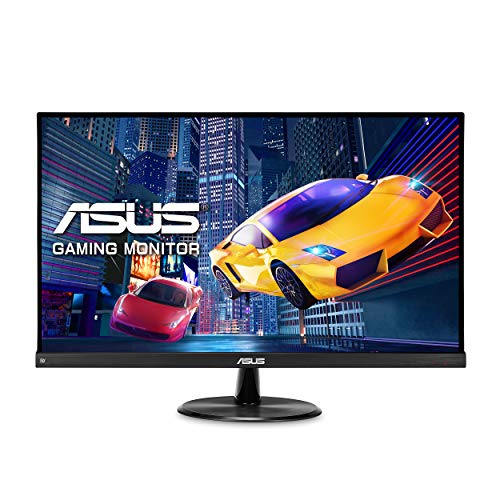
“ASUS VP249QGR is a 24-inch IPS panel at 144Hz — the IPS advantage over Samsung G3 is better off-axis viewing and more accurate colors for design work. Thin bezels and VESA mount support…”
See Today’s Price →What we like
- 144Hz IPS panel at an exceptional price
- 1ms MPRT and 4ms GTG response time
- FreeSync Premium and G-Sync compatible
- Low blue light and flicker-free for long sessions
- Thin bezels for clean desk setup
Watch out for
- Prices are high for a 24-inch 1080p monitor — LG 24GN650-B delivers similar performance for $170
- stand adjusts tilt only — no height adjustment without an aftermarket arm
- TN panel alternative in some regional markets delivers inferior color vs. IPS
- 1080p at 24 inches shows soft text edges at typical viewing distance
Read Full Analysis
The ASUS VP249QGR runs a 24-inch IPS panel at 144Hz with both AMD FreeSync Premium and G-Sync Compatible certification — it works at high refresh rate with either AMD or NVIDIA GPUs without tearing. Low blue light and flicker-free modes are built in for marathon sessions. Thin bezels on three sides make it well suited for side-by-side multi-monitor setups with a VESA-compatible arm. Against the Samsung Odyssey G3 ($159.99 on this page), the ASUS costs $35 more and is 3 inches smaller. The IPS panel on the ASUS provides better off-axis viewing and more accurate color reproduction than the G3's VA — a real advantage for design work, photo editing, and video production where color fidelity matters. Buy the ASUS VP249QGR for multi-monitor creative workstations where accurate color and thin bezels are priorities. Skip it for pure gaming on a budget — the Samsung G3 provides 27 inches and 165Hz at $35 less. Skip it for office-only use at a single desk — the Amazon Basics 27-inch is $95 less for similar productivity performance.
Frequently Asked Questions
What's the best monitor under $100 for working from home?
Is 1080p good enough for a 27-inch monitor?
Do I need a 144Hz monitor for office work?
What size monitor is best for working from home?
Should I get a curved monitor for my home office?
How We Chose These Products
We compare each product’s Amazon listing, the manufacturer’s published specifications and Amazon customer ratings, shown with their review counts as Amazon’s data, and rank the products on how well they answer this page’s question. We do not test products in hand and we do not run our own analysis of review text. A publication or expert is named only where we cite its published findings about that product. No manufacturer paid for placement on this page.
A price appears only when Amazon’s API supplied it at a recent daily refresh, with the date and time beside it, and is withdrawn at 4 AM Central on the day after it turns 24 hours old; otherwise use “Check price on Amazon” for the live price. Read our full methodology →
How We Score These Products
Each dimension score comes from evidence about the exact model listed — a published specification, a measurement by a named independent reviewer, or that product’s own buyer reviews, as described for each dimension below — not from a similar product in the same range. We do not test products ourselves, and we do not score a dimension we could not evidence. A dash means no evidence was found for that product, not that it performed badly.
Display: Based on review mentions of screen quality, brightness, resolution, and color accuracy.
Response Time: From evidence about this exact model (specification, named reviewer or its own reviews).
Color Accuracy: From evidence about this exact model (specification, named reviewer or its own reviews).
The overall score is the mean of the dimensions we could evidence for that product, on a 10-point scale. Price is shown separately and is never folded into a score. Amazon star ratings are shown separately and are never part of any score.