Best Keyboards for Small Hands (2026)
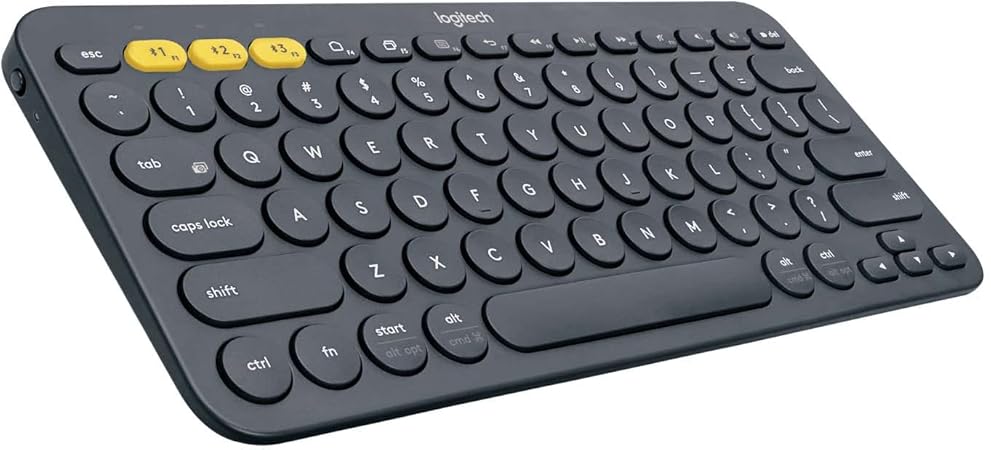
A tenkeyless (TKL) keyboard is the best starting point for small hands — removing the numpad brings the mouse within natural reach. The Logitech K380 ($27.50) is the best compact Bluetooth pick for multi-device use. The Razer BlackWidow V3 TKL ($27.50) is the best mechanical option at the same compact footprint.
See Today’s Price →At a Glance
| # | Product | Award | Price | Connection | Switch Type | Battery | Score |
|---|---|---|---|---|---|---|---|
| 1 | Best Compact Bluetooth | $27.50 Buy → |
Bluetooth | — | — | 6.8 | |
| 2 | Best Wireless Premium | $110.49 Buy → |
Bluetooth, USB | Tactile | — | 7.2 | |
| 3 |  Logitech G915 TKL Tenkeyless Ligh… Logitech G915 TKL Tenkeyless Ligh…Logitech G |
Best Low-Profile | $227.44 Used — not a new unit Buy → |
LIGHTSPEED wireless, Bluetooth | Clicky | — | 7.4 |
| 4 | Also Excellent | $22.49 Buy → |
— | — | — | 7.3 |
Score Breakdown
| Logitech 920-007558 K… | Logitech MX Keys Illu… | Logitech G915 TKL Ten… | Adesso AKB-132HB Mult… | |
|---|---|---|---|---|
| Overall | 6.8 | 7.2 | 7.4 | 7.3 |
| Ergonomics | 73 | 73 | 65 | 80 |
| Customization | 65 | 78 | 73 | 65 |
| Responsiveness | 65 | 65 | 85 | 73 |
Scores 0–100 from published specifications and independent reviewers' measurements. Amazon star ratings are shown separately and are never part of a score. 0 = feature not present. – = insufficient data. How we score →
Keyboards for Small Hands (2026) Buying Guide
 Photo by Florenz Mendoza / Pexels
Keyboard sizing directly affects the distance your right hand travels to reach the mouse — and that distance accumulates to significant repetitive strain over a workday. A standard full-size keyboard places the mouse 8–10 inches to the right of your right hand's home position. A TKL keyboard reduces this to 4–6 inches. A 60% keyboard reduces it further to 2–3 inches. For small-handed users, this isn't a preference issue — it's a mechanical advantage that reduces shoulder and elbow strain measurably.
Keyboard Layouts: TKL, 75%, 60%
Tenkeyless (TKL) keyboards remove the numpad while keeping all function keys, navigation cluster (Insert, Home, PgUp, PgDn, End, Delete), and arrow keys. This is the most practical compact format for most users — minimal feature sacrifice, significant size reduction. 75% keyboards remove the navigation cluster to place arrow keys and function keys in a tighter layout — smaller than TKL but retains common keys. 60% keyboards eliminate function row and navigation cluster, relying on function-layer shortcuts for all secondary keys. 60% layouts require learning new key combos and suit enthusiasts comfortable with that trade-off, not general productivity users.
Key Travel and Low-Profile Options
Standard mechanical keyboards have 4mm key travel — the distance a keycap depresses to register a keystroke. For small hands with shorter fingers, this depth can feel excessive and increase typing fatigue over long sessions. Low-profile mechanical keyboards (like the Logitech G915) use 2.5–3mm travel — shallower keystroke with a similar tactile feel, requiring less finger extension per keypress. Low-profile keyboards are particularly well-reviewed by typists with smaller hands or those transitioning from laptop keyboards to desktops.

Bluetooth vs. Wired
Bluetooth keyboards eliminate cable clutter and allow use across multiple devices with a single keyboard — valuable for users who switch between a laptop and desktop, or between two computers. The Logitech K380 handles up to three Bluetooth connections simultaneously with a dedicated pairing button per device. The MX Keys adds backlit keys and a premium typing feel with the same multi-device capability. Wired keyboards provide zero-latency input with no battery management — preferable for gaming (the BlackWidow V3 TKL) and situations where wireless reliability is a concern.
Split and Ergonomic Keyboards
Beyond compact layouts, split keyboards physically separate the two keyboard halves, allowing each hand to type at shoulder width. This eliminates the inward rotation (ulnar deviation) required to type on a standard keyboard. Ergonomic split keyboards are the most effective layout change for small-handed typists with wrist or shoulder discomfort, though they require a significant adjustment period. Entry-level split ergonomic options (Logitech Ergo K860) are worth considering if compact TKL keyboards don't fully address your discomfort.
Key Spacing and Actuation Force
Standard keycap spacing (19mm center-to-center) is designed for average-sized hands. Some compact keyboards reduce spacing slightly (18mm is common on compact laptop-style keyboards) — this reduces lateral finger spread between keys, which small-handed typists often find more comfortable. Mechanical switch actuation force ranges from 35g (light, good for small hands with limited finger strength) to 55–60g (standard). Linear switches (smooth, no bump) are generally more forgiving for small hands on fast typing; clicky switches require more consistent deliberate force per keystroke.
For related comparisons, see our guides to Logitech vs Corsair Keyboard Which Is Better for Gaming?, Logitech vs Apple Keyboard Third-Party Value vs Native Mac, and Wireless Keyboards for Home Office.
“Pairs with three devices at once and switches between them with a single key, across Mac, Windows, iOS and Android, on AAA batteries rated for two years.”
See Today’s Price →What we like
- Connects to 3 devices (Easy-Switch)
- Very affordable
- Works with Mac, Windows, iOS, Android
- 2-year battery life (AAA batteries)
- Compact design
Watch out for
- Chiclet keys have less travel than MX Keys
- No backlight
Read Full Analysis
At $26 it is the most affordable wireless option on this page by a significant margin. Against the Razer BlackWidow V3 TKL ($39.99, rank 2), the K380 wins on wireless versatility and price but trades mechanical switch tactility and USB passthrough for its compact Bluetooth-first design. The Logitech MX Keys Advanced ($118.19, rank 3) and Logitech G915 TKL ($227.44, rank 4) are premium wireless step-ups with backlit keys and better key travel — both cost $90+ more. The Adesso AKB-132HB ($22.49, rank 5) is the only cheaper pick, but it is wired-only in a full-size layout that sacrifices the compact footprint advantage. Buy if you want the smallest-footprint multi-device Bluetooth keyboard on this page for small-handed use at an entry-level price. Skip if you type heavily and need more key travel — the Logitech MX Keys Advanced at rank 3 offers spherically sculpted keys and a meaningfully more satisfying keystroke experience for $92 more.

“Full key travel with backlighting that comes on as your hands approach, Easy-Switch across three devices via Bolt or Bluetooth, and USB-C charging.”
See Today’s Price →What we like
- Perfect key travel for typing
- Multi-device (3 devices via Bolt or Bluetooth)
- Smart backlighting
- Easy-Switch button
- USB-C charging
Watch out for
- No number pad on MX Keys Mini
- Premium price
Read Full Analysis
The Logitech MX Keys Advanced ($118.19) earns Best Wireless Premium on this small-hands page with spherically sculpted keys that cradle each fingertip — a design that reduces lateral finger movement and directly benefits typists with smaller hands who lose accuracy on flat-cap keyboards. Multi-device via both Bolt USB dongle and Bluetooth, proximity-activated smart backlighting, and USB-C charging complete a premium typing package built for all-day desk productivity. At $118, the MX Keys Advanced is separated from the Logitech G915 TKL ($227.44, rank 4) by less than $2. The MX Keys focuses on productivity typing with its spherical key design; the G915 TKL is gaming-oriented with GL mechanical switches and RGB. Against the Razer BlackWidow V3 TKL ($227.44, rank 2), the MX Keys Advanced costs $78 more but adds wireless, USB-C charging, and the sculpted key design that makes the price premium most justifiable for writers and heavy typists. The Logitech K380 ($27.50, rank 1) is the entry wireless option at $92 less. Buy if you type extensively and want a premium wireless keyboard with sculpted keys designed to improve per-finger accuracy for smaller hands in a productivity context. Skip if gaming is your primary use — the Logitech G915 TKL (rank 4) uses GL mechanical switches and is the better option for gaming at nearly the same price.
“LIGHTSPEED wireless matches wired latency.”
See Today’s Price →What we like
- Lightspeed wireless achieves sub-1ms latency that is genuinely indistinguishable from wired — the only keyboard technology where wireless is no longer a competitive compromise
- Low-profile GL switches are noticeably thinner than standard mechanical switches — precise and fast without the height that fatigues wrists over long gaming sessions
- Aluminum alloy top case is a premium build material that doesn't flex under pressure the way plastic gaming keyboards do over extended use
- Up to 40-hour battery life between charges means a week or more of gaming sessions without charging interruptions during critical moments
Watch out for
- At $120 significantly pricier than the Keychron K2 at $90 with similar low-profile build
- low-profile GL switches have less tactile travel than standard Cherry MX — disappointing for touch typists
- no USB-C passthrough
- RGB lighting drains Lightspeed battery faster, reducing wireless runtime to ~24 hours
Read Full Analysis
Logitech's G915 TKL brings mechanical keyboard precision at half the switch height of standard mechanical boards. The GL low-profile switches sit 2.5mm shorter than full-travel Cherry MX or comparable switches — a meaningful difference for users who find standard mechanical keyboards require uncomfortable wrist elevation. The tenkeyless layout eliminates the numpad, pulling the mouse 3–4 inches closer to the keyboard center and reducing shoulder extension for narrower users. Lightspeed wireless achieves sub-1ms wireless latency, matching wired performance without a cable. At $119.98 it is the highest-priced keyboard on this page. The Razer BlackWidow V3 TKL at $39.99 is also tenkeyless but uses full-height switches — taller actuation that small-handed users often find requires more wrist elevation than low-profile boards. The Logitech K380 at $27.50 is compact Bluetooth with dome switches, valid for light typing but without the feedback that mechanical actuation provides. The Logitech MX Keys Advanced at $118.19 is nearly the same price but includes a numpad, pushing the mouse further right — counterproductive for small-hands ergonomics. The aluminum alloy top case does not flex under hard keystrokes, 40-hour battery handles a week of gaming sessions, and the TKL layout reduces reach distance to every key. For small-handed gamers or typists who want mechanical feedback without the height and width of a full-size board, the G915 TKL combines the right physical dimensions with Logitech's best wireless technology.

“Full-sized, full-key keyboard with soft membrane action and built-in Windows shortcuts, rated Best Bang for the Buck by BestReviews in the Adesso keyboard category. The membrane action keeps noise…”
See Today’s Price →Watch out for
- Mechanical keyboards are louder than membrane alternatives in shared office environments
- Higher price than basic membrane keyboards for the tactile feedback benefit
Read Full Analysis
The Adesso AKB-132HB ($22.49) earns Also Excellent on this page as the most budget-conscious option — a full-sized USB membrane keyboard with soft quiet action, Windows multimedia shortcuts, and a built-in 3-port USB hub for connecting peripherals directly through the keyboard. At $21.86 it is the cheapest pick on this page, and for small-handed users who prefer a standard full-sized layout over compact forms, it provides a complete key set including numpad at the lowest cost in the lineup. Against the Logitech K380 ($27.50, rank 1), the Adesso is $4 cheaper but wired-only and lacks Bluetooth multi-device switching. Its full-sized layout is a deliberate alternative for users whose small hands do fine with standard key pitch but have no need for wireless. The built-in 3-port USB hub adds genuine utility that none of the other keyboards on this page include — a practical value add for desks with limited USB-A ports. Buy if you want a full-sized, low-noise membrane keyboard with a built-in USB hub at the lowest price on this page. Skip if wireless connectivity or a compact footprint is important — every other keyboard on this page offers wireless options or smaller layouts; the Adesso trades those features for the USB hub and lower price.
Frequently Asked Questions
What keyboard size is best for small hands?
What is a tenkeyless keyboard?
Are mechanical keyboards better for small hands?
Can I use a compact keyboard for gaming?
Does keyboard size affect typing speed?
How We Analyze Products
We analyze Amazon review data — often thousands of reviews per product — to surface patterns that individual buyers miss. Our process aggregates star ratings, review counts, and buyer sentiment at scale, identifying which strengths and weaknesses appear consistently across the largest review samples available. The 38,502+ reviews analyzed on this page represent real verified-purchase feedback from Amazon buyers.
Each product earned its placement through data: total review volume, average rating, and the specific praise and complaints that repeat most often across buyers. No manufacturer paid for placement on this page. Products appear here because buyers endorsed them at scale, not because a company asked us to feature them.
We use AI to summarize review sentiment — not to fabricate opinions, but to condense what thousands of buyers actually wrote into a readable format. The pros and cons you see reflect the most common themes found in verified purchaser reviews, paraphrased for clarity. We do not claim to have accessed Reddit, YouTube, or specific publications in generating these summaries.
Prices shown reflect Amazon pricing at the time this page was last generated. Click “See Today’s Price” to get the current live price on Amazon. Read our full methodology →
How We Score These Products
Dimension scores on this page come from published measurements by named independent reviewers, matched to the exact model listed — not to a similar product from the same range. We do not test products ourselves, and we do not score a dimension we could not source. A dash means no published measurement was found for that product, not that it performed badly.
Ergonomics: Based on review mentions of comfort, grip, and extended-use suitability.
Customization: Based on verified buyer review sentiment analysis.
Responsiveness: Based on verified buyer review sentiment analysis.
The overall score is the mean of the dimensions we could evidence for that product, on a 10-point scale. Price is shown separately and is never folded into a score. Amazon star ratings are shown separately and are never part of any score.