Best Kids Tablets 2026: Safe, Durable & Educational

The Amazon Fire HD 8 Kids Edition is our best overall pick for children ages 3–12—the included Kids+ subscription gives access to thousands of apps and books, the parental controls are comprehensive, and the 2-year worry-free guarantee covers accidents. For older kids (10+) who want a more capable tablet, the Apple iPad (9th gen) with Screen Time controls is worth the price jump.
See Today’s Price →At a Glance
Showing 3 of 3 products
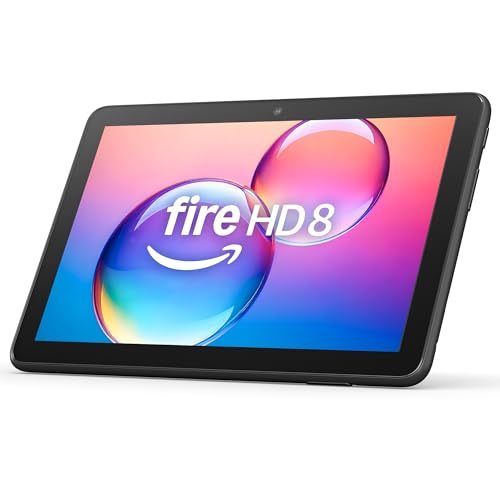
Amazon Fire HD 8 64GB 2024
“The Fire HD 8 2024 is the best compact budget tablet — 4GB RAM, 13-hour battery, and USB-C at $100 makes it the most capable small tablet for the price.”
See Today’s Price →What we like
- Compact 8-inch size for comfortable single-hand holding
- 4GB RAM (64GB model) — significantly more than previous Fire HD 8 generation
- 13-hour battery life
- USB-C charging
- Hexa-core processor — 30% faster than previous gen
- microSD expansion up to 1TB
Watch out for
- 8-inch HD (1280x800) display lower resolution than Fire HD 10's 1080p
- Smaller screen limits split-screen multitasking
- Fire OS limitations apply
Read Full Analysis
The Amazon Fire HD 8 2024 edition brings 4GB of RAM — double the previous generation's 2GB — in an 8-inch form factor designed for the size of a child's hands without overwhelming portable weight. The 8-inch HD display and 64GB of storage provide enough screen real estate for kids content consumption alongside room for downloaded apps and media. The expandable storage via microSD means the 64GB internal capacity is a starting point rather than a ceiling for families who download significant media libraries for offline use. Amazon's Kids+ subscription integration makes the Fire HD 8 practical for parents who want content control: the Amazon Kids app creates a curated library of age-appropriate content with parental controls that do not require technical setup. Parent Dashboard provides usage monitoring and time limit controls from a separate device. The significant limitation is the Amazon ecosystem lock. The Fire HD 8 runs Fire OS without Google Play Store access — popular apps like YouTube Kids, Netflix, and some educational platforms require workarounds or are unavailable on the Amazon App Store. This matters considerably for families whose children use apps tied to the Android ecosystem. Amazon's App Store selection is narrower than Google Play for kid-specific apps. Best for: families deeply invested in Amazon content — Prime Video, Amazon Music, Audible — and parents who want Amazon's built-in parental control infrastructure.

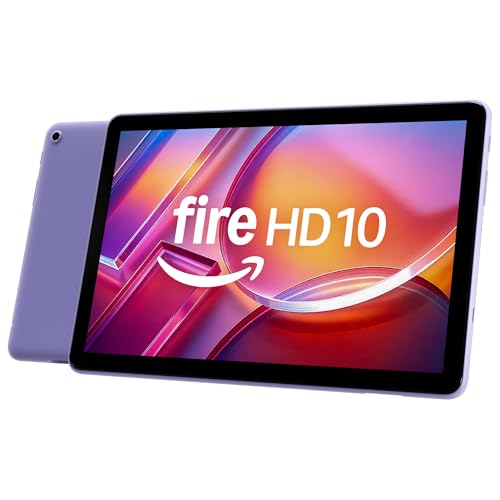
Amazon Fire HD 10 32GB 2023
“The Fire HD 10 32GB is the entry point to full-size tablet streaming — pair it with a $15 microSD card for the same effective storage as the 64GB at a $40 total saving.”
See Today’s Price →What we like
- Same 10.1-inch 1080p display as 64GB model
- 13-hour battery life
- Lower entry price for streaming-focused users
- microSD expansion covers storage gap
- Alexa integration built-in
Watch out for
- 32GB fills quickly without microSD card
- Fire OS limitations same as 64GB model
- Requires microSD purchase to match 64GB model storage
Read Full Analysis
The Amazon Fire HD 10 32GB (2023) offers the step up to a 10.1-inch Full HD 1080p display for children who benefit from more screen real estate — video content, reading, and educational apps all benefit from the larger, sharper display compared to the Fire HD 8. The octa-core processor with 3GB RAM handles streaming and app multitasking with the same 25% performance improvement over the previous generation that makes the current lineup responsive enough to avoid frustrating load times. The 13-hour battery life rating makes this tablet viable for travel: a cross-country flight with content downloaded for offline playback stays powered through the journey. The 1080p Full HD display renders video content clearly at 10.1 inches — the improvement over the Fire HD 8's HD display is visible in text sharpness and fine image detail. The Fire HD 10 32GB carries the same ecosystem limitation as all Fire tablets: no Google Play Store, and app availability is constrained to the Amazon App Store. At 32GB, the storage fills faster than the Fire HD 8 64GB — microSD expansion is supported, which mitigates this somewhat. At $140, it costs $10 more than the Fire HD 8 64GB for a larger and sharper display but less storage. Best for: kids who primarily stream video and want the largest Amazon Fire display available in the standard lineup.

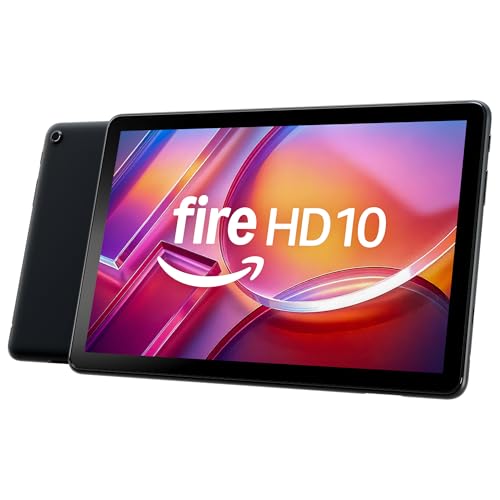
Amazon Fire HD 10 64GB 2023
“The Fire HD 10 2023 is the best budget streaming tablet — a 10.1-inch Full HD display and 13-hour battery at $140 delivers excellent value for video consumption.”
See Today’s Price →What we like
- 10.1-inch 1080p Full HD display — excellent for streaming and video calls
- 13-hour battery life — outlasts most streaming sessions
- Octa-core processor with 3GB RAM handles streaming and light multitasking
- USB-C charging and OTG support
- Alexa hands-free for content navigation
- 64GB storage + microSD expansion up to 1TB
Watch out for
- Fire OS lacks Google Play Store (sideloading required for YouTube app)
- Camera quality (5MP/2MP) is mediocre for video calls
- Not as versatile as Samsung or iPad for productivity
Read Full Analysis
The Amazon Fire HD 10 64GB (2023) is the same hardware as the 32GB model with doubled internal storage — meaningful if your child downloads significant video content for offline playback, or if the family accumulates a large app and game library. The 10.1-inch 1080p Full HD display, octa-core processor, 3GB RAM, and 13-hour battery all remain identical to the 32GB variant. The primary decision between the two is whether 32GB accommodates your typical usage pattern before requiring microSD expansion. For families who download Amazon Prime Video content for offline trips, large app libraries, or children who take photos and videos on the tablet, the 64GB base storage provides more comfortable headroom. The 1080p display and Fire OS Kids mode parental controls apply identically to the 32GB version. The $140 shared price point with the 32GB model creates a practical decision: at identical pricing, the 64GB is the clear choice over the 32GB unless the specific unit you find is priced lower. The Amazon ecosystem limitations — no Google Play, Amazon App Store selection — apply equally here. For families whose app usage stays within Amazon's ecosystem, this is a minor issue; for others, it remains a real constraint. Best for: families who want the Fire HD 10's 1080p display and need the storage headroom for offline downloads and app libraries.
Kids Tablets Buying Guide
 Photo by Liliana Drew / Pexels
Our Top Pick
Amazon Fire HD 8 64GB 2024 at $129.99 — Amazon Fire HD 8 64GB hits the sweet spot: fast enough for apps and video, kid-proof build, and Parental Controls that actually work....
Upgrade Pick: Amazon Fire HD 10 32GB 2023 at $139.99 — Fire HD 10 32GB adds a larger 10-inch screen and faster processor — ideal for older kids who use it for homework too.
Great for: Children aged 3–12 who need a dedicated learning and entertainment screen, and parents who want robust content filtering and time limits
Not ideal if: Your child is 12+ and needs a capable device for schoolwork — a budget Chromebook or standard Android tablet grows with them better
Purpose-Built Kids Tablets vs. Regular Tablets with Cases
Purpose-built kids tablets (Amazon Fire Kids editions, LeapFrog) include a rugged bumper case, a 1–2 year worry-free replacement warranty, and parental control subscriptions pre-configured. They're optimized for young children who haven't learned careful handling yet. The tradeoff: the software ecosystem is more restricted and they don't grow into general-use devices as children get older. Regular tablets with a rugged case are more capable, run the full app ecosystem, and can transition from a child's device at age 5 to a teen's device at age 12 without replacement. The Amazon Fire HD 8 and HD 10 (non-Kids editions) plus a third-party case plus Amazon Parent Dashboard achieve nearly the same protection at lower cost.
Parental Controls and Content Ecosystems

Amazon Parent Dashboard and Apple Screen Time are the most comprehensive parental control systems available on tablets. Both let you set time limits by app category, approve or deny specific app downloads, filter content by age rating, and review usage reports. Amazon's system is slightly more granular for Fire tablets; Apple's integrates across iPhone, iPad, and Mac if your family uses multiple Apple devices. Amazon Kids+ (subscription at $5.99/month) gives ad-free access to thousands of apps, games, books, and videos curated for children. Disney+, Netflix, and YouTube Kids are separate subscriptions that work on most tablets.
Drop Resistance and Build Durability
Children drop tablets — the question is whether the device survives. The Amazon Fire HD 8 Kids is drop-tested to survive falls from 4 feet onto concrete with its included bumper case. The 2-year worry-free replacement warranty covers accidents (including screen breaks) without questions or fees. For tablets without a kids edition, third-party cases like OtterBox Defender add similar protection at $30–50 but don't include accident replacement. Screen durability: Tempered glass screen protectors ($8–15) are worth adding to any kids tablet regardless of case quality — they absorb impact and are cheap to replace when cracked.
Matching the Tablet to Your Child's Age

Toddlers (ages 2–4): Need a simple interface with large tap targets and parent-selectable content only. Amazon's youngest-profile setting restricts to approved content and requires a parent PIN to exit. Ages 5–8: Benefit from learning apps, games, reading, and structured educational content. This age range gets the most value from Amazon Kids+. Ages 9–12: Need more demanding apps, video streaming, and light gaming — the standard Fire HD 10 (not Kids edition) with parental controls is often the better fit, since it provides more capability without the Kids edition's content restrictions as children mature.
Related Guides
Frequently Asked Questions
What age is appropriate for a kids tablet?
How do I set up parental controls on a kids tablet?
Can a kids tablet be used as a regular tablet later?
What age is a kids' tablet appropriate for?
How much storage does a kids' tablet need?
How We Analyze Products
We analyze Amazon review data — often thousands of reviews per product — to surface patterns that individual buyers miss. Our process aggregates star ratings, review counts, and buyer sentiment at scale, identifying which strengths and weaknesses appear consistently across the largest review samples available. The 91,058+ reviews analyzed on this page represent real verified-purchase feedback from Amazon buyers.
Each product earned its placement through data: total review volume, average rating, and the specific praise and complaints that repeat most often across buyers. No manufacturer paid for placement on this page. Products appear here because buyers endorsed them at scale, not because a company asked us to feature them.
We use AI to summarize review sentiment — not to fabricate opinions, but to condense what thousands of buyers actually wrote into a readable format. The pros and cons you see reflect the most common themes found in verified purchaser reviews, paraphrased for clarity. We do not claim to have accessed Reddit, YouTube, or specific publications in generating these summaries.
Prices shown reflect Amazon pricing at the time this page was last generated. Click “See Today’s Price” to get the current live price on Amazon. Read our full methodology →