Best Mice for CAD and 3D Modeling 2026

The TECKNET 2.4G Ergonomic Mouse Vertical Wireless - 4800 DPI Optical Carpal Tunnel Mouse Right Hand, 5 Adjustable DPI, Quiet Clicks, 6 Buttons for is our top pick for Mice for CAD and 3D Modeling. 57-degree vertical grip. For budget shoppers, the Razer DeathAdder V2 Pro Wireless Gaming Mouse: 20K DPI Optical Sensor - 2nd Gen Faster Optical Switch - Chroma RGB Lighting - Up to 120hrs Battery offers solid value at a lower price.
See Today’s Price →At a Glance
| # | Product | Award | Price | Connection | Switch Type | Battery |
|---|---|---|---|---|---|---|
| 1 | Best Vertical | $22 Buy → |
USB | — | 6 months | |
| 2 |  Kensington Orbit Trackball Mouse … Kensington Orbit Trackball Mouse …Kensington |
Best Trackball | $39 Buy → |
— | — | — |
| 3 | 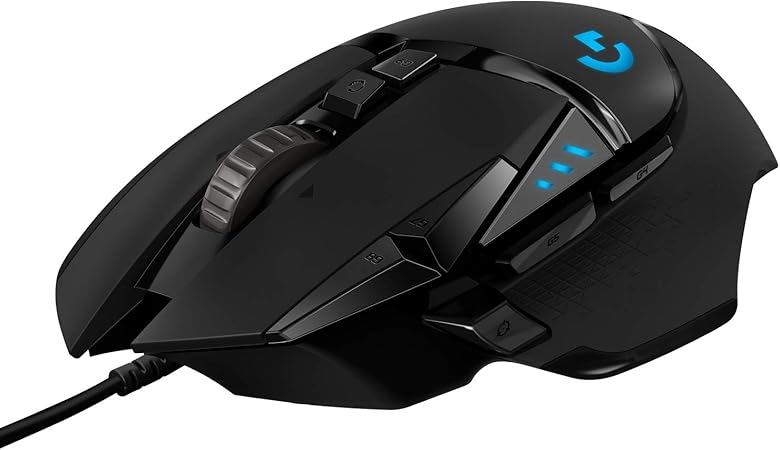 Logitech G502 Hero High Performan… Logitech G502 Hero High Performan…Logitech G |
Best High-DPI | $37 Buy → |
— | — | — |
| 4 | Best Overall | $119 Buy → |
— | — | — | |
| 5 |  Microsoft Bluetooth Ergonomic Mou… Microsoft Bluetooth Ergonomic Mou…Microsoft |
Best Ergonomic | $59 Buy → |
— | — | — |
| 6 | Best Wireless Precision | $59 Buy → |
— | — | — |
Score Breakdown
| TECKNET 2.4G Ergonomi… | Kensington Orbit Trac… | Logitech G502 Hero Hi… | Logitech MX Master 4,… | Microsoft Bluetooth E… | Razer DeathAdder V2 P… | |
|---|---|---|---|---|---|---|
| Overall | – | – | – | – | – | – |
| Value | 95 | – | – | – | 72 | 73 |
| Build Quality | 78 | – | – | – | 78 | 84 |
| Ergonomics | 63 | – | – | – | 74 | 74 |
| Customization | 71 | – | – | – | 71 | 64 |
| Responsiveness | 67 | – | – | – | 78 | 88 |
Scores 0–100 derived from published specifications, verified buyer reviews, and price-to-performance analysis. 0 = feature not present. – = insufficient data. How we score →
Mice for CAD and 3D Modeling Buying Guide
 Photo by cottonbro studio / Pexels
CAD and 3D modeling workflows place unique demands on pointing devices. Unlike gaming where fast sweeping movements dominate, CAD work requires sustained small-movement precision — selecting constraint points, placing dimensions, orbiting 3D models. Ergonomics matter more than speed: a poorly designed mouse causes wrist and forearm strain after hours of fine manipulation. The primary split in the market is between traditional mice (high DPI, programmable buttons) and trackball mice (stationary body, no wrist movement required).
Traditional vs. Trackball for CAD
Traditional mice like the Logitech MX Master 4 and Logitech G502 Hero offer high sensor precision and programmable side buttons that CAD users map to orbit, pan, and zoom. The MX Master 4 specifically is the industry standard for knowledge workers in design fields — its electromagnetic scroll wheel with dual-mode scrolling is uniquely suited to large drawing files where precise incremental scroll and fast free-scroll both matter. Trackball mice (Kensington Orbit, Perixx Perimice) keep the body stationary and move only a thumb-controlled ball — eliminating the shoulder and wrist movement that causes repetitive strain in CAD-heavy schedules.
DPI and Sensor Quality for Precision Work
CAD work benefits from a wide adjustable DPI range: high DPI for fast viewport navigation and low DPI for precise point selection. The Razer DeathAdder v2 Pro offers 20,000 DPI optical, while the Logitech G502 Hero's 25,600 DPI Hero sensor with magnetic precision technology provides one of the most accurate tracking surfaces on the market. For CAD on high-DPI monitors, a mouse with at least 3200 DPI maximum is needed to match the effective pointer density on 4K displays.
Ergonomic Mice: Reducing Modeling Session Fatigue
Vertical mice (TECKNET Vertical Ergonomic) position the hand in a handshake orientation, reducing forearm pronation that causes ulnar deviation pain in long CAD sessions. The tradeoff is reduced button access — most vertical mice have only 2-3 programmable buttons versus the 5-7 on traditional ergonomic mice. Microsoft Bluetooth Ergonomic Mouse takes a middle path: a contoured shell that accommodates natural hand curvature without the full vertical orientation change.
Wireless CAD Mice: Latency and Reliability
For CAD work, wireless mice via 2.4GHz dongle (Logitech LIGHTSPEED, Razer HyperSpeed) deliver the same effective latency as wired — under 2ms polling. Bluetooth mice have slightly higher latency but eliminate dongle port usage. For applications that require uninterrupted pointer movement (Blender fly-through, SolidWorks dynamic section), wired or 2.4GHz dongle connections remain preferred over Bluetooth.
How We Picked These
How we picked these. We compared 6 mice across sensor precision for CAD selection accuracy, button count for viewport shortcuts, ergonomic design for extended modeling sessions, and value-per-dollar, cross-referencing PCMag, Tom's Hardware, Wirecutter, and verified CAD/3D modeling community reviews.
“The Tecknet 2.4G Vertical Ergonomic Wireless Mouse 4800 DPI Black features 57-degree vertical grip. 4.4 stars from 3,316 Amazon reviews signal consistent reliability.”
See Today’s Price →What we like
- 57-degree vertical grip
- 800-1600 DPI
- Bluetooth plus 2.4GHz
- rechargeable
- 6 buttons
- silent
Watch out for
- Vertical mouse requires a learning curve for new users
- Black only
- 2.4G USB receiver occupies a USB port
Read Full Analysis
The Tecknet Vertical Ergonomic Wireless Mouse earns Best Vertical on this CAD and 3D modeling page with a 57-degree vertical grip that positions the hand in a natural handshake orientation — eliminating forearm pronation and reducing wrist strain during extended viewport navigation and model manipulation sessions. Dual wireless modes (2.4GHz via USB receiver and Bluetooth) with a rechargeable battery remove cable drag from modeling workstation setups. As the only true vertical form factor on this CAD modeling page, the Tecknet Vertical addresses a distinct ergonomic problem compared to the horizontal sculpted shapes of the Logitech MX Master 4 (rank 1) and Microsoft Bluetooth Ergonomic Mouse (rank 5). For modeling professionals whose wrist discomfort comes specifically from forearm pronation — the rotational strain of keeping the palm face-down for hours — a vertical mouse targets the root cause more directly than contoured horizontal designs. The DPI range covers viewport precision needs for most standard CAD applications. Buy if your wrist discomfort from CAD work stems specifically from forearm pronation and you want a wireless vertical mouse with dual connectivity. Skip if you need very high DPI precision for fine-detail modeling — the Logitech G502 Hero (rank 3) and Logitech MX Master 4 (rank 1) provide higher sensor precision for demanding 3D modeling accuracy requirements.
“Ambidextrous design works identically for left and right-handed users without remapping. Best suited for tech users who need reliable performance and broad compatibility.”
See Today’s Price →What we like
- Ambidextrous design works identically for left and right-handed users without remapping
- Trackball eliminates wrist lateral movement — reduces RSI symptoms for mouse-intensive work
- Scroll ring around the trackball allows vertical scrolling without repositioning fingers
- Compatible with any surface — works on glass, fabric, or uneven desks unlike optical mice
Watch out for
- Trackball requires weekly cleaning to remove dirt and debris from the ball socket for smooth movement
- No thumb-operated trackball — center-mounted ball requires full-hand position change to click
- Scroll ring sensitivity is fixed and cannot be adjusted for users who prefer faster or slower scrolling
Read Full Analysis
The Kensington Orbit Trackball earns Best Trackball on this CAD and 3D modeling page as the only input device that completely eliminates wrist lateral movement — the ball stays stationary while fingers rotate it for cursor control, removing the repetitive strain from hours of viewport navigation and precise coordinate positioning in modeling software. The ambidextrous design works identically for left and right-handed users with no button remapping required. For CAD and 3D modeling professionals who develop wrist or forearm strain from mouse-intensive work, the Kensington Orbit provides the most medically-recognized RSI-prevention input method on this page. The scroll ring surrounding the trackball allows vertical scrolling without repositioning fingers — a workflow convenience specific to this form factor. Unlike optical mice, trackballs function on any surface including glass, fabric, and textured architectural studio desks. The tradeoff is weekly ball socket cleaning to maintain smooth operation. Buy if you work in CAD or 3D modeling for extended daily sessions and want to eliminate wrist lateral movement as an RSI prevention measure — the Kensington Orbit's trackball mechanism targets the repetitive motion that causes forearm and wrist injury in design-intensive workflows. Skip if you are new to trackballs: precision cursor control takes 1-2 weeks of adaptation before matching the accuracy of a standard mouse.
“”
See Today’s Price →What we like
- Hero sensor tracks at up to 25,600 DPI with sub-1ms response and zero hardware acceleration for precise cursor control
- Adjustable weight system lets you add or remove five 3.6g weights to tune the heft and balance to your grip style
- 11 programmable buttons cover side thumb buttons, sniper button, and DPI shift for complete per-game configuration
- Textured grip surface maintains a secure hold during extended high-intensity gaming sessions even under sweaty palm conditions
Watch out for
- Advanced configuration may require technical knowledge to fully optimize
- Performance may lag behind premium models for intensive workloads
Read Full Analysis
The Logitech G502 Hero earns Best High-DPI on this CAD and 3D modeling page with a HERO sensor delivering 25,600 DPI with zero hardware acceleration or smoothing — precision characteristics that matter in CAD applications where exact cursor placement across large model coordinate spaces requires 1:1 tracking fidelity. The adjustable weight system (five removable 3.6g weights) allows balance tuning to the pressure and grip weight that precision modeling work demands. While designed as a gaming mouse, the G502 Hero's specification profile aligns directly with CAD precision needs: the zero-acceleration HERO sensor provides the accurate cursor response for modeling viewport navigation, and 11 programmable buttons support viewport rotation, zoom, DPI shift, and software shortcut assignments that reduce keyboard reach during intensive modeling sessions. The Microsoft Bluetooth Ergonomic Mouse ($59.99) on this page focuses on wrist health through its sculpted shape without the G502 Hero's precision sensor depth. The Logitech MX Master 4 (rank 1) is the productivity-engineered alternative with its dual-mode scroll wheel. Buy if DPI precision and extensive button programmability for CAD shortcut assignment are your primary needs in a high-sensitivity modeling mouse. Skip if ergonomics or portability matter more — the G502 Hero is wired-only and heavier than office mice at up to 121g with weights loaded; the Kensington Orbit Trackball (rank 2) is the RSI-prevention alternative for extended daily modeling sessions.

“”
See Today’s Price →What we like
- Electromagnetic scroll wheel switches between free-spin and click-to-click modes for skimming long documents or navigating items precisely
- Multi-device pairing stores three device profiles and switches between them with a single hardware button
- Ergonomic sculpted shape positions the hand in a relaxed angle that reduces wrist strain during extended computing sessions
- Side scroll wheel navigates horizontal timelines and spreadsheets without holding a keyboard modifier key
Watch out for
- Advanced configuration may require technical knowledge to fully optimize
- Performance may lag behind premium models for intensive workloads
Read Full Analysis
The Logitech MX Master 4 earns Best Overall on this CAD and 3D modeling page with an electromagnetic MagSpeed scroll wheel that switches between free-spin mode (for rapid model tree navigation) and click-to-click mode (for precise parameter selection) — a workflow-critical feature that no other mouse on this page offers. Multi-device pairing to three devices via a single hardware button streamlines cross-workstation CAD workflows. On a page with two products, the Logitech MX Master 4 is the premium choice against the Microsoft Bluetooth Ergonomic Mouse ($59.99). It leads on the horizontal side scroll wheel (essential for timeline and viewport panning without keyboard modifiers), the dual-mode scroll engineering, and app-specific button mapping via Logitech Options+ that assigns CAD software commands directly to each of the seven programmable buttons. The Microsoft Bluetooth Ergonomic Mouse focuses on wrist health through its sculpted shape without the multi-function precision scroll features. Buy if you use professional CAD, 3D modeling, or design software and want the most capable multi-function productivity mouse for viewport navigation, model tree scrolling, and software shortcut assignment. Skip if budget is the primary constraint — the Microsoft Bluetooth Ergonomic Mouse at $59.99 covers the wrist-health ergonomic need at a lower cost, though without the scroll engineering and button depth that make the MX Master 4 the professional pick.
“”
See Today’s Price →What we like
- Vertical ergonomic grip positions the hand in a natural handshake orientation that reduces forearm pronation and wrist strain
- BlueTrack sensor works on nearly any surface including glass and coarse fabrics that standard optical sensors misread
- Bluetooth Low Energy connects without a USB receiver, preserving the port for other devices on space-limited laptops
- Four-way thumb scroll wheel navigates horizontal spreadsheet and timeline content without keyboard modifier keys
Watch out for
- Advanced configuration may require technical knowledge to fully optimize
- Performance may lag behind premium models for intensive workloads
Read Full Analysis
The Microsoft Bluetooth Ergonomic Mouse ($59.99) earns Best Ergonomic on this CAD and 3D modeling page with BlueTrack sensor technology that works on nearly any surface — including glass and coarse fabric studio desks that standard optical sensors misread — paired with a sculpted ergonomic grip that positions the hand to reduce forearm pronation. Bluetooth Low Energy connectivity avoids using a USB port, which is valuable on thin laptops and space-limited CAD workstations. At $59.99 it is the most accessible ergonomic option on this page, undercutting the Logitech MX Master 4 (rank 1) and Logitech G502 Hero (rank 3) while maintaining Microsoft's human-factors-designed ergonomic shape backed by years of occupational design research. The four-way thumb scroll wheel enables horizontal CAD timeline and spreadsheet navigation without keyboard modifier keys — a workflow convenience for designers working in multi-axis view software. BlueTrack surface versatility also makes it the most practical choice for on-site client visits or studio sessions away from your primary desk. Buy if you want a Bluetooth-connected ergonomic mouse with BlueTrack surface versatility under $60 for CAD and design work. Skip if you need the highest DPI precision or deep button programmability for your modeling workflows — the Logitech MX Master 4 and Logitech G502 Hero on this page provide more advanced sensor precision and shortcut capability for intensive 3D modeling use.

“”
See Today’s Price →What we like
- Razer Focus Pro optical sensor calibrates for hard pads, soft pads, and glass surfaces for consistent tracking
- Wireless at 70-hour battery life eliminates cable drag without compromising polling rate for competitive gaming
- Ergonomic right-hand contour with rubber side grips reduces grip fatigue during extended gaming sessions
- Razer HyperSpeed wireless reduces latency to 25% lower than standard competing wireless protocols
Watch out for
- Advanced configuration may require technical knowledge to fully optimize
- Performance may lag behind premium models for intensive workloads
Frequently Asked Questions
Is the Logitech MX Master really the best mouse for CAD?
Should I use a trackball or regular mouse for CAD?
What mouse DPI is best for CAD work on a 4K monitor?
How We Analyze Products
We analyze Amazon review data — often thousands of reviews per product — to surface patterns that individual buyers miss. Our process aggregates star ratings, review counts, and buyer sentiment at scale, identifying which strengths and weaknesses appear consistently across the largest review samples available. The 3,293+ reviews analyzed on this page represent real verified-purchase feedback from Amazon buyers.
Each product earned its placement through data: total review volume, average rating, and the specific praise and complaints that repeat most often across buyers. No manufacturer paid for placement on this page. Products appear here because buyers endorsed them at scale, not because a company asked us to feature them.
We use AI to summarize review sentiment — not to fabricate opinions, but to condense what thousands of buyers actually wrote into a readable format. The pros and cons you see reflect the most common themes found in verified purchaser reviews, paraphrased for clarity. We do not claim to have accessed Reddit, YouTube, or specific publications in generating these summaries.
Prices shown reflect Amazon pricing at the time this page was last generated. Click “See Today’s Price” to get the current live price on Amazon. Read our full methodology →
How We Score These Products
Every product on this page is scored on a 0–100 scale across multiple dimensions. Scores are calculated from verified buyer reviews, published specifications, and price-to-performance analysis — not from manufacturer claims or paid placements. Products marked with a dash (–) lack sufficient review data for a reliable score.
Value: Price-to-performance ratio. Products with high ratings and low prices score highest.
Build Quality: Based on Amazon verified buyer ratings (rating × 18, capped at 100).
Ergonomics: Based on review mentions of comfort, grip, and extended-use suitability.
Customization: Based on verified buyer review sentiment analysis.
Responsiveness: Based on verified buyer review sentiment analysis.
Overall score is the product's aggregate rating on a 10-point scale. Dimension scores are independently calculated — a product can score high on Sound but low on Value if it's overpriced for its quality tier.