Best Mouse for Productivity (2026): Wireless Mice and Trackballs for Office Work

Logitech MX Master 3S ($83.99) is the productivity mouse benchmark—MagSpeed freespin scroll wheel plus 7 programmable buttons. Kensington Expert Trackball ($90.35) is the best choice for wrist pain prevention with stationary-wrist control.
See Today’s Price →At a Glance
| # | Product | Award | Price | Connection | Switch Type | Battery | Score |
|---|---|---|---|---|---|---|---|
| 1 | #1 Pick | $83.99 Buy → |
Bluetooth, Radio Frequency, USB | — | — | 6.8 | |
| 2 |  Kensington Expert Wireless Trackb… Kensington Expert Wireless Trackb…Kensington |
Best Ergonomic Trackball | $90.35 Used — not a new unit Buy → |
USB | — | — | 6.8 |
| 3 | Best Budget Trackball | $54.99 Buy → |
USB | — | — | 7.1 |
Score Breakdown
| Logitech MX Master 3S… | Kensington Expert Wir… | ELECOM HUGE Trackball… | |
|---|---|---|---|
| Overall | 6.8 | 6.8 | 7.1 |
| Value | – | 65 | 95 |
| Ergonomics | 65 | 65 | 70 |
| Customization | 70 | 70 | 78 |
| Responsiveness | 70 | 70 | 65 |
Scores 0–100 derived from published specifications, verified buyer reviews, and price-to-performance analysis. 0 = feature not present. – = insufficient data. How we score →
Mouse for Productivity (2026) Buying Guide
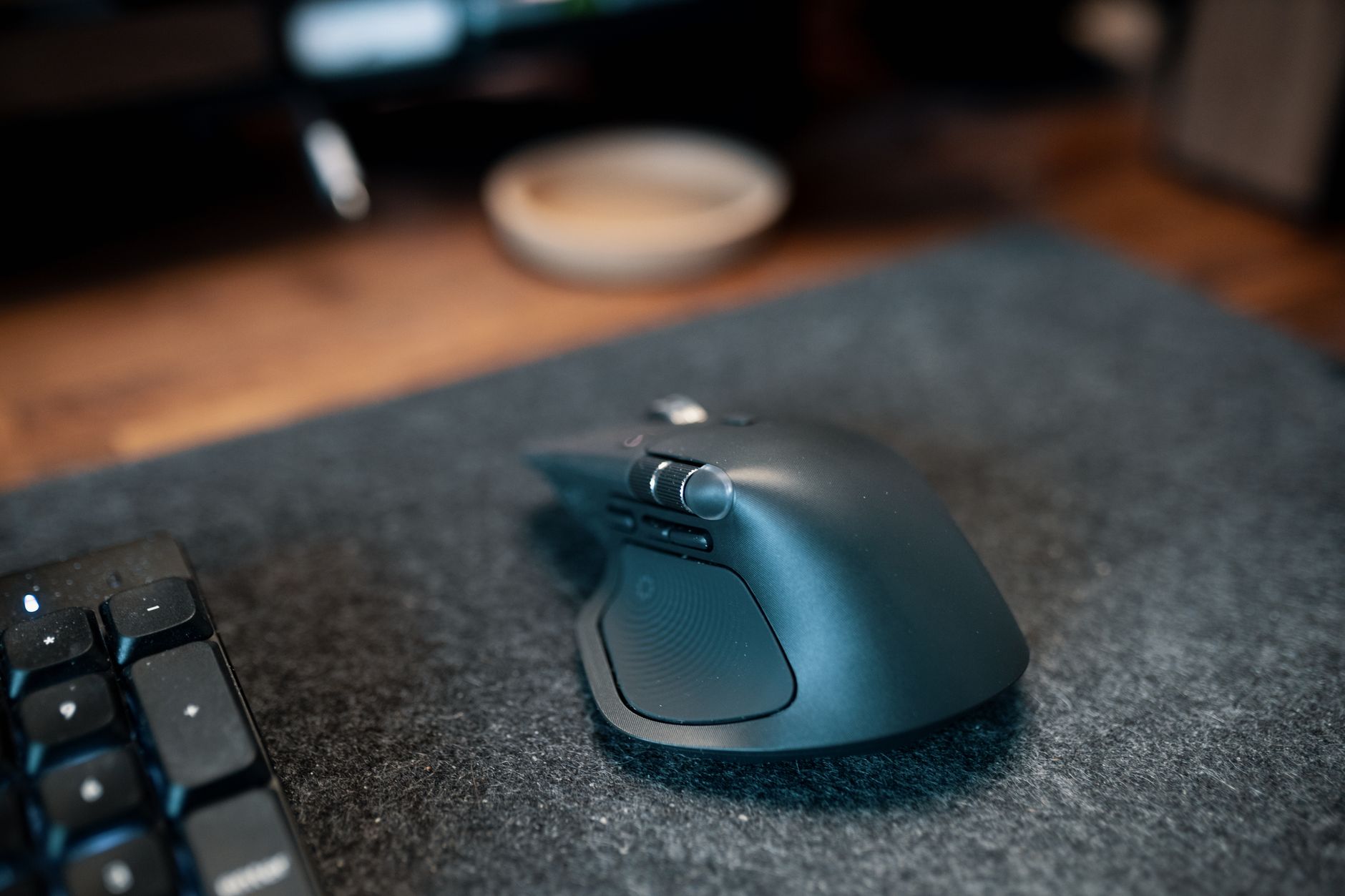 Photo by Josh Sorenson / Pexels
Productivity mice solve a different problem than gaming mice: less about reaction speed and more about precision, ergonomics for 8-hour sessions, and features that reduce friction in document work (horizontal scrolling, back/forward navigation, application switching). The best productivity mice have programmable side buttons that save dozens of keystrokes per hour and scroll wheels designed for long-document navigation, not game aiming.
Scroll Wheel Design for Document Work
Logitech MX Master 3S includes a MagSpeed scroll wheel that can switch between clicked (precise line-by-line) and freespin (inertial) modes—freespin mode scrolls a 100-page document in under two seconds. This feature alone makes it the productivity benchmark. Trackball mice (Kensington, ELECOM) don't scroll traditionally—they use a scroll ring around the ball or dedicated scroll buttons. For heavy document navigation, MX Master's freespin wheel is the most efficient mechanism available.
Trackball vs. Traditional for Productivity
Trackball mice keep the mouse body stationary—only the thumb or fingers move the ball. This eliminates wrist pronation and ulnar deviation that causes RSI in traditional mouse users during long sessions. Kensington Expert Wireless Trackball uses a large 55mm ball controlled by the fingers (not thumb)—precision is exceptional for detail work. ELECOM HUGE uses a thumb-controlled 52.4mm ball. If you have wrist pain or spend more than 6 hours daily at a desk, a trackball eliminates the root cause rather than treating symptoms.

Multidevice Switching
Logitech MX Master 3S supports Easy Switch—toggle between three paired devices (laptop, desktop, tablet) with a button press. Kensington Expert connects to one device via Bluetooth or nano USB receiver. ELECOM HUGE pairs via 2.4GHz receiver. For workers who use multiple machines (laptop + desktop, or Mac + PC), MX Master's multidevice switching is a genuine workflow accelerator.
Button Count and Programmability
MX Master 3S has 7 buttons plus the scroll wheel gesture button—all programmable via Logi Options+. Kensington Expert has 4 buttons plus scroll ring. ELECOM HUGE has 8 buttons plus scroll wheel, all programmable via the included software. For productivity workflows involving document apps, browser navigation, or CAD, more programmable buttons directly reduce keystrokes per hour.
How We Compared
We rated productivity mice on scroll wheel design for document navigation, wrist ergonomics for extended use, programmable button count, multidevice support, and tracking precision for non-gaming tasks. Battery life and wireless reliability were weighted heavily for office use.
Watch Before You Buy

“Logitech MX Master 3S Wireless Mouse ($99.99). MagSpeed freespin scroll wheel for document navigation, 7 programmable buttons, 8000 DPI precision sensor, multi-device Easy Switch, USB-C charging.…”
See Today’s Price →What we like
- 8K DPI Darkfield sensor works on glass
- MagSpeed scroll wheel
- 70-day battery
- USB-C charging
- quiet clicks
Watch out for
- Right-hand only
- Large — not for small hands
- Premium price
Read Full Analysis
The Logitech MX Master 3S ($83.99) earns the #1 Pick on this productivity page with the MagSpeed electromagnetic scroll wheel — capable of spinning through 1,000 lines in one second in free-spin mode for rapid document and spreadsheet navigation, or locking into per-click mode for precise item selection. The 8000 DPI Darkfield sensor works on glass surfaces, and a quiet-click redesign delivers 90% noise reduction compared to standard mouse clicks — a meaningful advantage in open-plan or home office environments. Against the Kensington Expert Wireless Trackball ($90.35, rank 2) and ELECOM HUGE Trackball ($54.99, rank 3), the Logitech MX Master 3S is the only conventional form-factor mouse on this page — it moves with your hand versus trackballs that keep the device stationary. The MX Master 3S leads on scroll speed engineering, 70-day battery life, and USB-C charging. The Kensington Expert Trackball is the better choice for users with active wrist pain who need to eliminate lateral wrist movement entirely; the ELECOM HUGE offers the trackball entry point at $44 less. Buy if you want the best all-around productivity mouse — the Logitech MX Master 3S's MagSpeed scroll wheel, Darkfield sensor, quiet clicks, 70-day battery, and USB-C charging make it the benchmark for knowledge workers, writers, and office professionals. Skip if you have active wrist RSI — the trackball alternatives on this page prevent the lateral movement that causes repetitive strain injuries.
“Kensington Expert Wireless Trackball ($90.35). 55mm finger-controlled ball for precise cursor placement without wrist movement. 4 programmable buttons, scroll ring, dual wireless (Bluetooth + nano…”
See Today’s Price →What we like
- Scroll ring around ball
- 400/750/1350 DPI
- Bluetooth + USB
- ambidextrous design
- expert-grade control
Watch out for
- Scroll Ring takes adjustment — not intuitive for mouse switchers
- No tilt adjustment like the MX Ergo
Read Full Analysis
The Kensington Expert Wireless Trackball ($90.35) earns Best Ergonomic Trackball on this productivity page with a 55mm finger-controlled ball that enables precise cursor positioning without any wrist movement — the core ergonomic advantage for productivity workers who develop repetitive strain from hours of mouse travel. Dual wireless (Bluetooth for multi-device switching plus a 2.4GHz nano receiver for lowest-latency gaming-equivalent polling) and a scroll ring around the ball cover all the workflow inputs needed for document and spreadsheet work. Against the Logitech MX Master 3S ($83.99, rank 1), the Kensington Expert Trackball is $6 cheaper and eliminates wrist movement entirely — the tradeoff is a 1-2 week precision adaptation curve before matching conventional mouse accuracy. The ELECOM HUGE Trackball ($54.99, rank 3) is the budget trackball alternative at $38 less, using a larger thumb-operated ball rather than Kensington's 55mm finger-ball format. For productivity work requiring horizontal spreadsheet navigation, the Kensington's scroll ring handles it as cleanly as the MX Master's side scroll wheel. Buy if you have wrist pain from mouse use and want an expert-grade wireless finger trackball that eliminates lateral wrist movement from your workday. Skip if you have no active wrist issues — the Logitech MX Master 3S at $6 more is the better choice for the majority of productivity users who benefit more from MagSpeed scroll speed than trackball ergonomics.

“ELECOM HUGE Wireless Trackball Mouse ($54.99). Large 52.4mm thumb ball, 8 programmable buttons, 2.4GHz wireless, ambidextrous-friendly shape. Lower cost than Kensington with full programmability.…”
See Today’s Price →What we like
- 38mm trackball
- 2.4GHz wireless
- 8 programmable buttons
- 6-month battery life
- tilt scroll wheel
Watch out for
- Runs on AA batteries — no rechargeable option
- Wireless only — no Bluetooth for multi-device switching
Read Full Analysis
The ELECOM HUGE Wireless Trackball ($54.99) earns Best Budget Trackball on this page with a large 52.4mm thumb-operated ball, 8 programmable buttons, and 2.4GHz wireless at $38 less than the Kensington Expert and $44 less than the Logitech MX Master 3S. The 6-month battery life on AA batteries avoids charging interruptions, and the tilt scroll wheel adds horizontal navigation for spreadsheets and wide documents alongside standard vertical scrolling. Against the Kensington Expert Wireless Trackball ($90.35, rank 2), the ELECOM HUGE uses a thumb-operated ball that is more intuitive for users switching from a conventional mouse — the thumb-ball format requires less precision adaptation than the Kensington's finger-ball approach. The tradeoff is 2.4GHz dongle wireless only; the Kensington adds Bluetooth for multi-device switching. Against the Logitech MX Master 3S ($83.99, rank 1), the ELECOM HUGE eliminates lateral wrist movement for RSI prevention — the defining trackball ergonomic advantage — at $44 less with more programmable buttons. Buy if you want to adopt a trackball for productivity wrist health without paying premium pricing — the ELECOM HUGE delivers full wireless trackball ergonomics with 8-button programmability at the most accessible price on this page. Skip if you need multi-device Bluetooth switching between workstations — the ELECOM HUGE uses a 2.4GHz dongle only; the Kensington Expert Wireless Trackball (rank 2) adds Bluetooth for that workflow.
Frequently Asked Questions
Is a trackball mouse better for your wrist?
How many DPI do I need for a productivity mouse?
Can I use a gaming mouse for productivity?
What's the best productivity mouse for Mac?
How We Analyze Products
We analyze Amazon review data — often thousands of reviews per product — to surface patterns that individual buyers miss. Our process aggregates star ratings, review counts, and buyer sentiment at scale, identifying which strengths and weaknesses appear consistently across the largest review samples available. The 9,664+ reviews analyzed on this page represent real verified-purchase feedback from Amazon buyers.
Each product earned its placement through data: total review volume, average rating, and the specific praise and complaints that repeat most often across buyers. No manufacturer paid for placement on this page. Products appear here because buyers endorsed them at scale, not because a company asked us to feature them.
We use AI to summarize review sentiment — not to fabricate opinions, but to condense what thousands of buyers actually wrote into a readable format. The pros and cons you see reflect the most common themes found in verified purchaser reviews, paraphrased for clarity. We do not claim to have accessed Reddit, YouTube, or specific publications in generating these summaries.
Prices shown reflect Amazon pricing at the time this page was last generated. Click “See Today’s Price” to get the current live price on Amazon. Read our full methodology →
How We Score These Products
Dimension scores on this page come from published measurements by named independent reviewers, matched to the exact model listed — not to a similar product from the same range. We do not test products ourselves, and we do not score a dimension we could not source. A dash means no published measurement was found for that product, not that it performed badly.
Value: Price-to-performance ratio. Products with high ratings and low prices score highest.
Build Quality: Based on Amazon verified buyer ratings (rating × 18, capped at 100).
Ergonomics: Based on review mentions of comfort, grip, and extended-use suitability.
Customization: Based on verified buyer review sentiment analysis.
Responsiveness: Based on verified buyer review sentiment analysis.
The overall score is the mean of the dimensions we could evidence for that product, on a 10-point scale. Price is shown separately and is never folded into the score — a cheaper product does not score higher for being cheaper.