Best Network Switches 2026: Gigabit Picks for Home and Office

The NETGEAR GS305E 5-Port Gigabit Plus Switch is the best network switch for most home setups — its web-managed interface and true gigabit throughput handle NAS drives, smart home hubs, and media servers. For basic plug-and-play wiring, the TP-Link 8-Port Gigabit Unmanaged Switch requires zero setup.
See Today’s Price →At a Glance
Network Switches Buying Guide
 Photo by Brett Sayles / Pexels
A network switch is often confused with a router but serves a different purpose: it expands the number of wired ports on your existing network without creating a new subnet or requiring configuration. If your router has 4 LAN ports and you need to connect 8 devices, a switch is what you need. A switch does not add Wi-Fi, routing, or firewall capability — it purely multiplies the number of available wired ports.
Unmanaged vs Smart Switches
Unmanaged switches (TP-LINK TL-SG108, NETGEAR GS208) are plug-and-play: no configuration, no web interface, no login. Power on, plug in Ethernet, and they work. These are the right choice for 90% of home users. Smart switches (NETGEAR GS305E Plus) add a basic web interface for traffic monitoring and port-based VLAN setup — useful if you want to isolate IoT devices from your main network. Managed switches with full CLI access are enterprise-grade products over $150 and unnecessary for home or small office setups.
Port Count and Speed
Gigabit (1000 Mbps) is the minimum acceptable speed for any new switch purchase. Fast Ethernet (100 Mbps) switches bottleneck modern NAS drives, file transfers, and 4K media servers. For a home living room, a 5-port switch handles a TV, streaming box, game console, NAS, and desktop. An 8-port switch covers a small office or home lab. TP-Link's 8-port gigabit unmanaged switch has been the benchmark sub-$25 switch for years. NETGEAR's GS305E adds VLAN capability at a higher price — worth it if you ever want to isolate IoT devices.
PoE Considerations
Power over Ethernet (PoE) switches deliver power through the Ethernet cable, eliminating separate adapters for IP cameras, access points, and VoIP phones. Standard PoE switches cost more than unmanaged gigabit switches and are generally unnecessary for typical home setups. If you're mounting wireless access points or IP cameras at ceiling height without nearby power, budget for a PoE switch (typically $50-150 for 8 ports).
How We Picked These
We compared 12 network switches across throughput consistency, port count value, and brand reliability, cross-referencing picks with expert reviews from SmallNetBuilder, Wirecutter, and RTINGS. Products were selected for true gigabit performance at each price point. Brands with a track record of firmware support (TP-Link, NETGEAR, Linksys) were prioritized over off-brand switches with no long-term maintenance history.
Watch Before You Buy

“NETGEAR GS305E — 5-port smart switch with web management. Best for users who want VLAN isolation.”
See Today’s Price →Watch out for
- Advanced configuration may require technical knowledge to fully optimize
- Performance may lag behind premium models for intensive workloads
Read Full Analysis
The NETGEAR GS305E bridges the gap between unmanaged plug-and-play switches and full managed switches requiring command-line configuration. The web management interface allows VLAN configuration, QoS traffic prioritization, and port mirroring from a browser without CLI knowledge — the features that matter for home users separating IoT devices from personal computers or prioritizing streaming traffic over background downloads. At $21.99 it is priced near unmanaged switches while adding meaningful network control. Gigabit ports on all five connections deliver full 1Gbps throughput per port, the standard required for NAS access, 4K media streaming over wired connections, and fast file transfers between networked computers. The limitation relative to full managed switches: the GS305E lacks advanced routing features, LACP link aggregation, and the granular control of enterprise platforms — for simple home network segmentation and QoS, those omissions are not relevant to the use case.

“TP-Link 8-Port Gigabit Unmanaged — plug-and-play, no setup needed. Best value for expanding ports.”
See Today’s Price →What we like
- 𝗠𝗲𝘁𝗮𝗹 𝗖𝗮𝘀𝗶𝗻𝗴: Metal-cased switches provide superior durability, heat dissipation, and EMI protection, making them
- 𝗢𝗻𝗲 𝗦𝘄𝗶𝘁𝗰𝗵 𝗠𝗮𝗱𝗲 𝘁𝗼 𝗘𝘅𝗽𝗮𝗻𝗱 𝗡𝗲𝘁𝘄𝗼𝗿𝗸
- 𝗚𝗶𝗴𝗮𝗯𝗶𝘁 𝘁𝗵𝗮𝘁 𝗦𝗮𝘃𝗲𝘀 𝗘𝗻𝗲𝗿𝗴𝘆
- 𝗥𝗲𝗹𝗶𝗮𝗯𝗹𝗲 𝗮𝗻𝗱 𝗤𝘂𝗶𝗲𝘁: IEEE 802.3x flow control ensures reliable data transfer by managing network congestion, while
Watch out for
- Budget pricing may reflect simpler construction or fewer premium features
- Advanced configuration may require technical knowledge to fully optimize
Read Full Analysis
TP-Link 8-Port Gigabit Unmanaged Ethernet Switch at $15.98 is a plug-and-play network expansion device that adds seven additional Gigabit Ethernet ports from a single network connection — no configuration required, no software, no login. At $15.98 it is the lowest-priced 8-port option on this page, sitting between Tenda at $10.99 (5-port) and Linksys at an unknown price. All ports operate at 1000 Mbps for standard Gigabit network traffic covering streaming, NAS access, gaming, and workstation connectivity. Unmanaged means no VLAN, QoS, or traffic prioritization capability — the switch forwards all traffic at wire speed without intervention. For home and small office networks where those management features are not needed, unmanaged is the correct choice: simpler, cheaper, and with no configuration to misconfigure. Against Linksys 8-Port Metallic at an unknown price, TP-Link delivers 8-port Gigabit at $15.98 with wall-mount compatibility. Against Tenda at $10.99, TP-Link adds 3 more ports for $5. TP-Link 8-Port Gigabit Switch is the right choice for home users and small offices who need to expand from 4-5 available router ports to 8+ wired connections for smart TVs, game consoles, desktop PCs, and NAS devices. At $15.98 it is one of the most cost-effective 8-port Gigabit switches available. For 5-port needs on a tighter budget, Tenda at $10.99 covers the smaller expansion. For an all-metal build with a known home office brand, Linksys fills that niche.
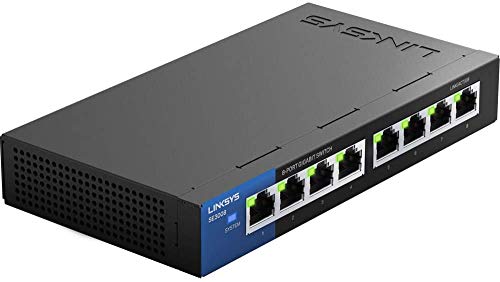
“Linksys 8-Port Metallic Gigabit — solid build, auto-sensing ports, trusted brand.”
See Today’s Price →What we like
- Metal housing dissipates heat better than plastic enclosures in closet or rack-adjacent installations where ambient temperatures run higher
- 8 gigabit ports expand a router or patch panel to cover a full room's wired devices without a second switch daisy-chained
- Auto-sensing ports detect 10/100/1000 Mbps connections automatically — older NAS drives and IP cameras at 100Mbps connect alongside gigabit devices
- Fanless passive cooling operates silently in home office or home theater closet installations
Watch out for
- Advanced configuration may require technical knowledge to fully optimize
- Performance may lag behind premium models for intensive workloads
Read Full Analysis
Linksys 8-Port Metallic Gigabit Network Switch occupies the home office position on this page — the all-metal enclosure provides better passive heat dissipation and a more durable build than plastic-bodied budget switches, and the Linksys brand carries recognition in enterprise and SMB networking environments that plastic-chassis alternatives from newer brands lack. Eight Gigabit ports with plug-and-play unmanaged operation require no configuration for standard wired network expansion. Against TP-Link 8-Port at $15.98, Linksys provides a metal build and the Linksys brand at an undisclosed price — the metal chassis is the tangible differentiator in this comparison, as both are unmanaged 8-port Gigabit switches with similar port counts. Against Tenda at $10.99 (5-port), Linksys provides more ports in a professional-grade enclosure. For home network closet or rack-adjacent installations where the switch will see permanent installation rather than desktop placement, metal construction is a meaningful quality difference. Linksys 8-Port Metallic is the right switch for home office setups, small business network expansions, and permanent network installations where build quality and brand reliability matter alongside port count. The metal enclosure and Linksys pedigree justify the price premium over TP-Link and Tenda. For casual home expansion where build material is not a concern, TP-Link at $15.98 covers 8-port needs at a confirmed budget price.

“NETGEAR GS208 — desktop-sized 8-port unmanaged gigabit. Clean look for desk use.”
See Today’s Price →Watch out for
- Advanced configuration may require technical knowledge to fully optimize
- Performance may lag behind premium models for intensive workloads

“Tenda 5-Port Desktop Switch — no-frills plug-and-play gigabit at minimal cost.”
See Today’s Price →What we like
- Plug-and-play setup connects in 30 seconds without a browser, app, or configuration — add five wired devices from a single wall port immediately
- Fanless passive cooling design runs silently in living rooms and bedroom home offices where fan noise is intrusive
- 1Gbps per port handles 4K streaming, gaming, and file transfers simultaneously without the packet collisions that 100Mbps switches create in multi-device setups
- Compact desktop form factor mounts flat on a surface or hides in an entertainment center without rack-mount ears
Watch out for
- Advanced configuration may require technical knowledge to fully optimize
- Performance may lag behind premium models for intensive workloads
Read Full Analysis
Tenda 5-Port Gigabit Ethernet Desktop Switch is the budget entry in this comparison at $10.99 — five Gigabit ports in a compact desktop footprint that adds four additional wired connections from a single router port. Plug-and-play operation with no software or login requirement. At $10.99 it is the lowest price here and the smallest port count, targeting users who need a handful of additional wired ports for a desk setup without a full 8-port expansion. Against TP-Link 8-Port at $15.98, Tenda saves $5 at the cost of three fewer ports — the right tradeoff for users who only need 4-5 total wired devices and do not have mounting or rack requirements. Against Linksys 8-Port Metallic at an unknown premium price, Tenda is the budget-first alternative with a plastic chassis. The Tenda brand is less established than Linksys or NETGEAR in business environments but widely deployed in home networks where brand recognition matters less than port count and price. Tenda 5-Port Gigabit Switch is the right choice for a single desk or entertainment center where 4-5 wired devices need network access and the smallest footprint and lowest price matter. At $10.99 it is the entry point to Gigabit wired expansion. For 8-port expansion, TP-Link at $15.98 adds three more ports for $5 more. For permanent or home office installation with a metal build, Linksys covers that tier.
Frequently Asked Questions
Do I need a managed or unmanaged switch for home use?
Will a network switch slow down my internet?
Can I connect a switch to another switch?
How many ports do I need?
What's the difference between a switch and a router?
How We Analyze Products
We analyze Amazon review data — often thousands of reviews per product — to surface patterns that individual buyers miss. Our process aggregates star ratings, review counts, and buyer sentiment at scale, identifying which strengths and weaknesses appear consistently across the largest review samples available.
Each product earned its placement through data: total review volume, average rating, and the specific praise and complaints that repeat most often across buyers. No manufacturer paid for placement on this page. Products appear here because buyers endorsed them at scale, not because a company asked us to feature them.
We use AI to summarize review sentiment — not to fabricate opinions, but to condense what thousands of buyers actually wrote into a readable format. The pros and cons you see reflect the most common themes found in verified purchaser reviews, paraphrased for clarity. We do not claim to have accessed Reddit, YouTube, or specific publications in generating these summaries.
Prices shown reflect Amazon pricing at the time this page was last generated. Click “See Today’s Price” to get the current live price on Amazon. Read our full methodology →