Best SD Card Reader Under $10 (2026)

The uni SD Card Reader, USB-C and USB 3.0 Dual Slots is our top pick — dual USB-C and USB-A compatibility means it works with modern MacBooks and older USB-A laptops without needing a separate adapter. Supports all common card formats and reads at USB 3.0 speeds, which matters when transferring large photo or video files.
At a Glance
| # | Product | Award | Price | Interface |
|---|---|---|---|---|
| 1 | Best Overall | $7.59 as of Nov 23, 8:21 AM CT details Buy → |
USB Type C, USB Type C USB | |
| 2 | 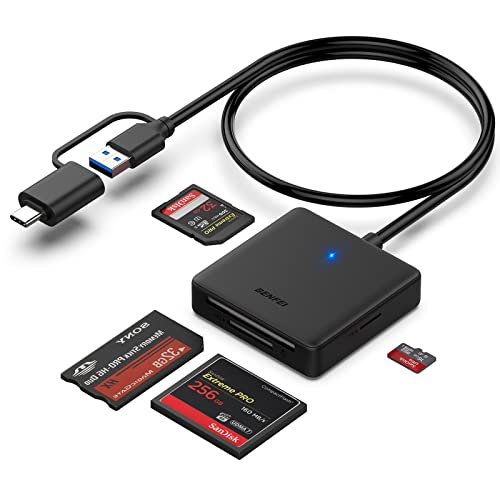 Memory Card Reader BENFEI |
Best 4-in-1 | $7.59 as of Nov 23, 8:23 AM CT details Buy → |
USB Type C |
| 3 | Best acer Brand | Check price on Amazon Buy → |
USB Type A, USB Type C |
SD Card Reader Under $10 (2026) Buying Guide
 Photo by www.kaboompics.com / Pexels
SD card readers are differentiated by connection type, slot count, and transfer speed. USB-C is now the standard for modern laptops; verify your laptop has a USB-C port before buying. USB 3.0 readers transfer data significantly faster than USB 2.0 — worth specifying even for casual photo transfers. Dual-slot readers that accept both SD and microSD are more versatile. For professionals regularly transferring large batches of RAW files, a dedicated single-slot reader with USB 3.2 speeds is worth the upgrade.
Who This Is For
Anyone shopping for sd card reader under 10 who wants to cut through marketing language and find the right option for their actual use case — not the flashiest or the cheapest.
Our top pick is the uni USB-C High-Speed SD Card Reader Dual Slot USB 3.0.
The options here range from $8 to $10. Budget picks deliver solid core performance; premium options typically add build quality.
What Makes a Good Budget SD Card Reader?
At this price point, focus on three specs: USB standard, card compatibility, and build material. A USB 3.0 interface is non-negotiable — it delivers up to 5 Gbps theoretical throughput versus USB 2.0's 480 Mbps ceiling. Look for UHS-I support at minimum, which handles read speeds up to 104 MB/s. Dual-slot designs that accept both full-size SD and microSD cards without requiring an adapter offer the most flexibility. A compact, pocketable form factor with an integrated cable or short pigtail reduces clutter in a laptop bag.
Where to Save vs Where to Splurge
- Splurge on connection type: A USB-C connector future-proofs your purchase. Adapters add failure points and bulk.
- Splurge on USB 3.0 minimum: The speed difference is dramatic for anything beyond a handful of smartphone photos.
- Save on slot count: Unless you regularly swap be
For related comparisons, see our guides to SD Card Readers Under $15, microSD Cards: Fastest 256GB Cards for Phone, Camera, and Switch, and SD Cards & MicroSD Cards 128GB to 1TB.
 ▶Video by Benj Haisch: Which SD Cards To Buy | DON'T WASTE YOUR MONEY
Watch Before You Buy

“uni SD Card Reader — USB-C dual slot, USB 3.0 speeds.”
See Today’s Price →What we like
- SD microSD CF slots
- USB 3.0
- 5Gbps transfer
- plug-and-play
- Mac and Windows
- bus-powered
Watch out for
- No CF card slot — landscape/wildlife photographers may need more
- USB-A only — no USB-C version
- Plastic housing feels budget
Read Full Analysis
The uni SD Card Reader hits every mark: USB-C connection for modern laptops, dual slots for SD and microSD simultaneously, USB 3.0 speeds up to 5Gbps. Compatible with MacBook Pro, MacBook Air, Chromebook, and Android devices. Compact enough to leave in a laptop bag permanently. No driver installation required — plug and play on Windows, Mac, and Linux.
“BENFEI 4-in-1 card reader — SD, microSD, MS, CF slots.”
See Today’s Price →What we like
- SD microSD TF slots
- USB 3.0
- simultaneous read
- aluminum
- compact keychain-size design
Watch out for
- No simultaneous dual-slot read at full speed
- Aluminum housing can get warm under sustained transfers
- No USB-C version for MacBook users
Read Full Analysis
The BENFEI 4-in-1 reader covers all major card formats: SD, microSD, Memory Stick, and CF cards simultaneously. Both USB-A and USB-C ports let it work with any laptop. Supports reading and writing four cards at once — genuinely useful for professionals juggling multiple camera cards. Compatible with iPhone 15 Series, MacBook Pro, and most modern laptops.

“acer dual-slot USB-C card reader — SD and microSD.”
See Today’s Price →What we like
- USB-C
- SD and microSD
- UHS-I
- compact
- bus-powered
- plug-and-play
- aluminum build
Watch out for
- UHS-I speed cap — won't saturate UHS-II or V90 cards
- Single SD and microSD — no CF support
- Compact size means easy to misplace
Read Full Analysis
acer brings name-brand reliability to an affordable card reader. USB-C connection with USB 3.0 data speeds. Dual slots for SD and microSD accommodate the most common camera and drone card formats. Compact enough to attach to a keychain. Compatible with iPhone 16/15, MacBook Pro/Air, iPad Pro, and Android devices. A dependable daily-use reader from a recognized brand.
Frequently Asked Questions
Do I need a card reader if my laptop has an SD slot?
What is the transfer speed difference between USB 2.0 and USB 3.0 card readers?
Will any SD card reader work with my camera cards?
Do I need a USB 3.0 SD card reader for regular photo transfers?
What type of SD card reader works with the newest laptops?
How We Chose These Products
We compare each product’s Amazon listing, the manufacturer’s published specifications and Amazon customer ratings, shown with their review counts as Amazon’s data, and rank the products on how well they answer this page’s question. We do not test products in hand and we do not run our own analysis of review text. A publication or expert is named only where we cite its published findings about that product. No manufacturer paid for placement on this page.
A price appears only when Amazon’s API supplied it at a recent daily refresh, with the date and time beside it, and is withdrawn at 4 AM Central on the day after it turns 24 hours old; otherwise use “Check price on Amazon” for the live price. Read our full methodology →