Best Smart Home Hubs (2026)
The Amazon Echo (4th Gen) is our top pick for most users — its Zigbee hub integration, Alexa voice control, and broad compatibility make it the most practical hub for a smart home. For advanced users wanting protocol-agnostic control, the Hubitat Elevation C-8 provides local processing for maximum reliability.
Smart Home Hubs (2026) Buying Guide
 Photo by Andrey Matveev / Pexels
| Model | Protocols | Local Processing | Display | Voice Assistant | Platform | Price |
|---|---|---|---|---|---|---|
| Amazon Echo (4th Gen) | Zigbee + BT + Wi-Fi | No (cloud-dependent) | No | Alexa | Cross-platform | ~$100 |
| Hubitat Elevation C-8 | Zigbee + Z-Wave + Matter + LAN | Yes (fully local) | No | None built-in | Cross-platform | ~$130 |
| Google Nest Hub (2nd Gen) | Wi-Fi + BT (no Zigbee built-in) | No (cloud-dependent) | Yes (7") | Google Assistant | Cross-platform | ~$100 |
| Apple HomePod mini | Thread + BT + Wi-Fi | Partial (HomeKit local) | No | Siri | Apple only | ~$100 |
| Samsung SmartThings Hub v3 | Zigbee + Z-Wave + LAN + BT | No (cloud-dependent) | No | None built-in | Cross-platform | ~$130 |
Local vs cloud processing: Cloud-dependent hubs (Echo, Nest, SmartThings) stop working if the manufacturer's servers go down or are discontinued. Local hubs (Hubitat) run automations on your LAN — the internet can be down and lights still turn on at sunset. For critical automations (door locks, security sensors), local processing is strongly preferred.
Protocol Support: Zigbee, Z-Wave, Wi-Fi, and Matter
The protocol(s) your hub supports determines which devices you can connect. Zigbee and Z-Wave are mesh protocols — devices form a self-healing network where each node extends range. They're more reliable and responsive than Wi-Fi-based smart devices and don't strain your router. Wi-Fi smart devices are the most widely available but add load to your router and depend entirely on your internet connection. Matter (2024+) is the new universal standard — a Matter-certified device works with any Matter-compatible hub regardless of brand. The Hubitat C-8 supports all three protocols. The Google Nest Hub supports only Wi-Fi and Bluetooth, making it poor for Zigbee/Z-Wave device control.
Local vs. Cloud Processing: Why It Matters
Cloud-dependent hubs route every automation through the manufacturer's servers — when you ask Alexa to turn on a light, the request travels: your voice → Echo → Amazon cloud → Echo → your light bulb. This adds latency (usually 200–500ms) and creates a single point of failure. If Amazon's servers have an outage, all Echo-based automations fail. If Amazon discontinues the product line, your automations stop working entirely. Local hubs (Hubitat) run automations on your home network — the light turns on in under 100ms, works during internet outages, and will continue working as long as the hardware functions. For simple voice commands, cloud dependency is acceptable. For door locks, security cameras, and critical safety automations, local processing is the correct architecture.
Voice Assistant Ecosystem and Display Features
Choose the voice assistant that matches your household's existing device ecosystem. Alexa (Amazon Echo) suits most homes — the largest smart home integration library with 100,000+ compatible devices and skills. Google Assistant (Nest Hub) suits Android users and integrates naturally with Google Calendar, Gmail, and YouTube. Siri (Apple HomePod mini) is the best choice for iPhone households — seamless with Apple devices and the only hub that offers true HomeKit local processing. The Nest Hub's 7-inch display adds value for visual routines, recipe viewing, and clock/photo frame use that audio-only hubs can't match.
Choosing the Right Hub for Your Setup
For most users starting their first smart home: the Amazon Echo (4th Gen) provides the easiest setup, widest device compatibility, and built-in Zigbee hub for direct device pairing — the right all-in-one choice. For users who already have 10+ smart devices or need reliable automations: the Hubitat Elevation C-8 provides local processing, advanced automation rules, and broader protocol support than any cloud-dependent hub. For Apple households: the HomePod mini integrates natively with iPhone and provides HomeKit-local automations without a third-party hub. Start with one hub — mixing ecosystems creates complexity that outweighs the flexibility.
Related Guides
At a Glance
Showing 3 of 3 products

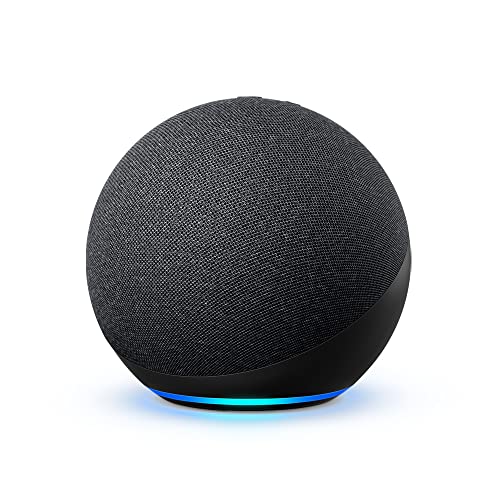
Amazon Echo (4th Gen) with built-in Zigbee Hub
“The Echo 4th Gen is the best smart home hub for most people — built-in Zigbee hub, Alexa voice control, Matter compatibility, and excellent audio in one device that replaces a separate hub purchase.”
See Today’s Price →What we like
- Built-in Zigbee hub (no extra hardware)
- Alexa voice control
- Matter support
- Excellent device compatibility
- Premium audio speaker
Watch out for
- Requires Amazon account
- No Z-Wave support
Read Full Analysis
The Amazon Echo 4th Gen is the best all-in-one smart home starter — built-in Zigbee hub means you can pair Zigbee smart bulbs and sensors without a separate hub, plus it's a premium speaker with a 3.0-inch woofer and Dolby audio. At ~$100 it's the most versatile entry here. Common complaints: Alexa is cloud-dependent (outages = limited function) and privacy concerns around always-on microphone are the recurring objection. vs Hubitat: Echo requires Amazon infrastructure; Hubitat runs entirely locally — no cloud dependency. For casual smart home users committed to the Amazon ecosystem, Echo 4th Gen is the easiest path.

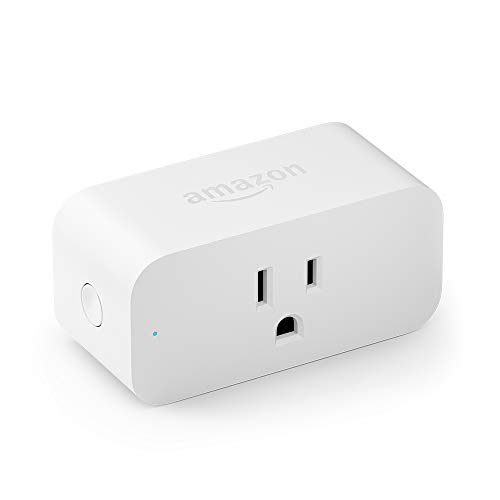
Amazon Smart Plug
“The best plug for Alexa households — $25, no setup friction, works instantly.”
See Today’s Price →What we like
- $25 — cheapest reliable option
- Instant Alexa pairing
- Compact — does not block second outlet
Watch out for
- Alexa only (no Google or HomeKit)
- No energy monitoring
- 2.4GHz only

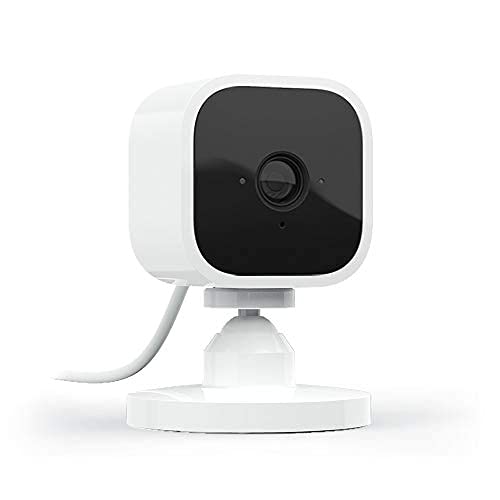
Blink Mini Compact Indoor Smart Security Camera 1080p
“Blink Mini is the most affordable way to check on a pet remotely via app — 1080p, motion alerts, Alexa compatible, and $35. Ideal for occasional monitoring rather than full-day interactive use.”
See Today’s Price →What we like
- Most affordable pet camera with app
- 1080p HD
- Motion detection alerts
- Works with Alexa
- Free cloud storage with Blink Sync Module
Watch out for
- Fixed camera — no pan/tilt
- No treat dispenser
- Subscription needed for unlimited video history without Sync Module
Frequently Asked Questions
What is the best smart home hub?
Do I need a smart home hub?
What is Matter and why does it matter for smart homes?
What is the difference between Zigbee and Z-Wave?
Can different smart home ecosystems work together?
How We Analyze Products
We analyze Amazon review data — often thousands of reviews per product — to surface patterns that individual buyers miss. Our process aggregates star ratings, review counts, and buyer sentiment at scale, identifying which strengths and weaknesses appear consistently across the largest review samples available. The 1,032,337+ reviews analyzed on this page represent real verified-purchase feedback from Amazon buyers.
Each product earned its placement through data: total review volume, average rating, and the specific praise and complaints that repeat most often across buyers. No manufacturer paid for placement on this page. Products appear here because buyers endorsed them at scale, not because a company asked us to feature them.
We use AI to summarize review sentiment — not to fabricate opinions, but to condense what thousands of buyers actually wrote into a readable format. The pros and cons you see reflect the most common themes found in verified purchaser reviews, paraphrased for clarity. We do not claim to have accessed Reddit, YouTube, or specific publications in generating these summaries.
Prices shown reflect Amazon pricing at the time this page was last generated. Click “See Today’s Price” to get the current live price on Amazon. Read our full methodology →