Best Smart Home Starter Kits 2026: Alexa, Google & Matter

SwitchBot Bot is our top starter pick — it physically pushes your existing light switches without any wiring or wall damage, ideal for renters. Kasa Smart Plugs (HS103) are the lowest-friction entry point: plug in, connect to WiFi, done. Echo Dot (5th Gen) ties everything together as the voice control hub that works with both.
See Today’s Price →At a Glance
| # | Product | Award | Price | Power | Actuation | Push Force | Our Score | |
|---|---|---|---|---|---|---|---|---|
| 1 | SwitchBot Bot |
Best Overall | $39 Code: SWITCHBOT20OFF | AAA battery (approx 600 days) | Mechanical arm — pushes existing switch | Up to 200g | 9.2 | Buy → |
| 2 | 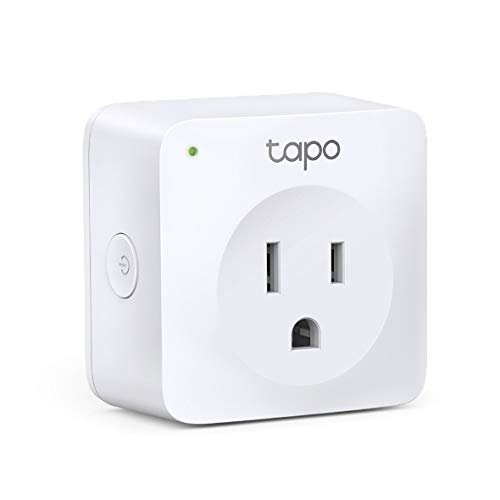 Kasa Smart Plug Mini HS103 Kasa Smart Plug Mini HS103 |
Best Budget | $12 | — | — | — | 8.9 | Buy → |
| 3 | 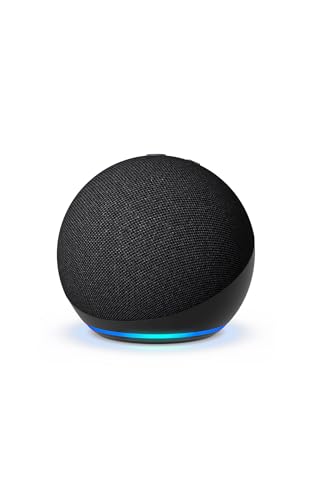 Echo Dot 5th Gen Echo Dot 5th Gen |
Budget Pick | $39 | — | — | — | 8.5 | Buy → |
Showing 3 of 3 products
SwitchBot Bot
“SwitchBot Bot solves the rental dilemma: automate your light switches without rewiring or losing your security deposit. One Bot + Hub 2 = remote control of any switch.”
See Today’s Price →What we like
- Attaches to existing light switches — no rewiring needed
- Works with any switch type: toggle, paddle, rocker
- Voice control via Alexa, Google, Siri via Hub
- One-push mechanical arm press is nearly silent
- Can be operated manually even without Wi-Fi
Watch out for
- Requires Hub for remote/voice control
- Adhesive mount must be precise for reliable triggering
Read Full Analysis
SwitchBot Bot occupies a unique niche: automating physical switches without electrical work. The adhesive arm extension sits on the switch plate and mechanically presses the button when commanded via app, Alexa, Google Home, or automated schedules. For renters who can't install smart switches, or for anyone who wants to add automation without replacing existing hardware, SwitchBot Bot is the only practical option at this price point.

Kasa Smart Plug Mini HS103
“The easiest smart home starter device available. Kasa Smart Plug's no-hub WiFi direct connection means it works out of the box in under 5 minutes — no additional hardware required. The first smart hom”
See Today’s Price →What we like
- No hub required — connects directly to 2.4GHz WiFi
- Setup in 2 minutes via Kasa app
- Works with Alexa and Google Home immediately
- Compact design doesn't block the second outlet
- Energy monitoring built in — track device power consumption
Watch out for
- 2.4GHz only — won't connect to 5GHz-only networks
- No power metering on basic HS103 (available on HS110)
- Requires Kasa app for initial setup
Read Full Analysis
Kasa Smart Plug Mini HS103 by TP-Link is consistently the highest-rated smart plug on Amazon for good reason: it works immediately, reliably, and without any additional hardware. Plug it in, open the Kasa app, connect to WiFi — done. Alexa and Google Home integration activates automatically. For a first smart home device, nothing reduces barrier to entry lower than a Kasa plug.

Echo Dot 5th Gen
“The Echo Dot 5th Gen is the ideal Alexa smart home starting point. It delivers full hub capabilities, a useful temperature sensor, and improved audio in a compact $49.99 package that belongs in every ”
See Today’s Price →What we like
- Full Alexa smart home hub capabilities including device control, routines, and groups
- Built-in temperature sensor enables temperature-triggered automations
- Noticeably improved speaker quality over the 4th Gen Echo Dot
- Tap gesture on the top of the device for snooze and volume control
- Eero Wi-Fi enabled for smart home device bridging on compatible networks
Watch out for
- Speaker is not a substitute for a dedicated Bluetooth speaker at higher volumes
- Requires constant power via the included adapter — not battery-operated
- Screen-free design means no visual feedback for Ring doorbell or recipe displays
Read Full Analysis
Echo Dot 5th Gen adds voice control to the starter kit: tell Alexa to turn on the living room lights, check the temperature, or trigger routines based on motion detection. The 5th Gen upgrade from previous versions adds a temperature/humidity sensor and motion detector — both of which can trigger Alexa routines, making this version the first Echo Dot that's also a useful sensor in your smart home.
Smart Home Starter Kits Buying Guide
 Photo by Andrey Matveev / Pexels
Our Top Pick
SwitchBot Bot at $39.99 — Best renter-friendly starter — SwitchBot Bot clips on any switch, no wiring, Alexa compatible.
Budget Pick: Kasa Smart Plug Mini HS103 at $12.98 — Best no-hub starter — Kasa plug, 2-min setup, Alexa/Google, no extra hardware.
How to Start a Smart Home Without Wasting Money
The Right Order to Build a Smart Home
Start with daily friction points. The highest-value smart home devices are the ones you interact with 5+ times per day: lights you forget to turn off, outlets for devices you'd rather automate, and the ability to check on things remotely. Recommended starter sequence: 1. Smart plugs (2-4 outlets) — easiest, most flexible, immediately useful 2. Voice control hub (Echo Dot) — ties everything together with Alexa 3. Smart bulbs or switch automation (SwitchBot Bot) — expands to lighting 4. Sensors (motion, contact) — enables automation triggersSmart Plug vs. Smart Bulb vs. SwitchBot Bot
Smart plug: Plugs between your outlet and device. Controls anything with a power cord. Best for lamps, fans, coffee makers, humidifiers. No wiring required. Smart bulb: Replaces the bulb, not the outlet. Best for ceiling fixtures and sconces. Requires keeping the physical switch always ON (the bulb needs power to receive WiFi commands). SwitchBot Bot: Clips onto your existing light switch and physically pushes it. Works on any switch — no wiring, no replacing anything, ideal for renters. Requires SwitchBot Hub Mini or Hub 2 for remote/voice control.Ecosystem: Alexa, Google Home, or Apple HomeKit?
Start with Alexa (Echo Dot) unless you're deep in the Apple ecosystem. Alexa has the broadest device compatibility — SwitchBot, Kasa, Govee, Ring, SimpliSafe, and 100,000+ other devices work with Alexa. Google Home is equally capable. Apple HomeKit is the most privacy-focused but has fewer compatible devices. Kasa and SwitchBot both support Alexa, Google Home, and SmartThings — no ecosystem lock-in.Related Guides
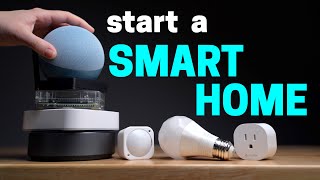
Watch Before You Buy
Frequently Asked Questions
What is the easiest smart home starter kit?
Can I start a smart home as a renter without changing anything permanent?
Do I need a smart home hub to get started?
How much does a basic smart home starter kit cost?
Is Kasa or SwitchBot better for a first smart home?
How We Analyze Products
We analyze Amazon review data — often thousands of reviews per product — to surface patterns that individual buyers miss. Our process aggregates star ratings, review counts, and buyer sentiment at scale, identifying which strengths and weaknesses appear consistently across the largest review samples available. The 198,761+ reviews analyzed on this page represent real verified-purchase feedback from Amazon buyers.
Each product earned its placement through data: total review volume, average rating, and the specific praise and complaints that repeat most often across buyers. No manufacturer paid for placement on this page. Products appear here because buyers endorsed them at scale, not because a company asked us to feature them.
We use AI to summarize review sentiment — not to fabricate opinions, but to condense what thousands of buyers actually wrote into a readable format. The pros and cons you see reflect the most common themes found in verified purchaser reviews, paraphrased for clarity. We do not claim to have accessed Reddit, YouTube, or specific publications in generating these summaries.
Prices shown reflect Amazon pricing at the time this page was last generated. Click “See Today’s Price” to get the current live price on Amazon. Read our full methodology →