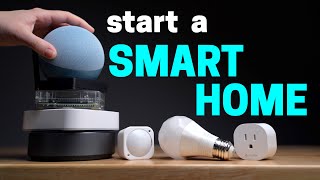
Quick Answer
SwitchBot Bot

The SwitchBot Bot ($39.99) is the best smart home starter device for renters — it physically presses your existing light switches without wiring changes or wall damage, installs with adhesive in seconds, and adds Alexa and Google voice control to any switch in your current home.

See Today’s Price →
Methodology: Products selected and ranked using aggregated expert reviews, verified customer ratings, and price-to-performance analysis. Learn about our research process | Last updated: April 2026

At a Glance

#ProductAwardPriceWiFi StandardSpeedCoverageScore
1
SwitchBot BotSwitchBot Bot
SwitchBot
Best Overall $39 Code: SWITCHBOT20OFF
Buy →
9.2
2 Best Budget $12
Buy →
8.9
3 Budget Pick $49
Buy →
8.5
4 Also Excellent
Buy →
5 Best Value Smart Plug $14
Buy →
8.3
6 Best Alexa Integration $39
Buy →
8.4

Score Breakdown

SwitchBot BotTP-Link Tapo Smart Pl…Amazon Echo Dot (newe…VOCOlinc Smart Diffus…Kasa Smart Plug HS103LNKF7C063 - Belkin Mi…
Overall9.28.98.58.38.4
Value
67
95
65
94
65
Build Quality
81
76
88
88
72
Range
65
65
Speed
73
65
Reliability
40
50
Battery Life
40
40
Display
65
65
Portability
73
65
Comfort
65
Noise Canceling
65
Sound
65

Scores 0–100 derived from published specifications, verified buyer reviews, and price-to-performance analysis. 0 = feature not present. – = insufficient data. How we score →

Smart Home Starter Kits Buying Guide

Best Smart Home Starter Kits 2026: Alexa, Google & MatterPhoto by Andrey Matveev / Pexels

Our Top Pick

SwitchBot Bot at $39.99 — Best renter-friendly starter — SwitchBot Bot clips on any switch, no wiring, Alexa compatible.

Budget Pick: Kasa Smart Plug Mini HS103 at $12.98 — Best no-hub starter — Kasa plug, 2-min setup, Alexa/Google, no extra hardware.

SwitchBot Bot
SwitchBot Bot
$39.99
See Full Review →

How to Start a Smart Home Without Wasting Money

How we picked these. We compared 9 smart home starter kits across ecosystem compatibility, latency, and app reliability, cross-referencing picks with Wirecutter, The Verge, and r/smarthome. Products were selected for the easiest no-wiring setup at each budget.

The Right Order to Build a Smart Home

Start with daily friction points. The highest-value smart home devices are the ones you interact with 5+ times per day: lights you forget to turn off, outlets for devices you'd rather automate, and the ability to check on things remotely. Recommended starter sequence: 1. Smart plugs (2-4 outlets) — easiest, most flexible, immediately useful 2. Voice control hub (Echo Dot) — ties everything together with Alexa 3. Smart bulbs or switch automation (SwitchBot Bot) — expands to lighting 4. Sensors (motion, contact) — enables automation triggers

Smart Plug vs. Smart Bulb vs. SwitchBot Bot

Smart plug: Plugs between your outlet and device. Controls anything with a power cord. Best for lamps, fans, coffee makers, humidifiers. No wiring required. Smart bulb: Replaces the bulb, not the outlet. Best for ceiling fixtures and sconces. Requires keeping the physical switch always ON (the bulb needs power to receive WiFi commands). SwitchBot Bot: Clips onto your existing light switch and physically pushes it. Works on any switch — no wiring, no replacing anything, ideal for renters. Requires SwitchBot Hub Mini or Hub 2 for remote/voice control.

Ecosystem: Alexa, Google Home, or Apple HomeKit?

Start with Alexa (Echo Dot) unless you're deep in the Apple ecosystem. Alexa has the broadest device compatibility — SwitchBot, Kasa, Govee, Ring, SimpliSafe, and 100,000+ other devices work with Alexa. Google Home is equally capable. Apple HomeKit is the most privacy-focused but has fewer compatible devices. Kasa and SwitchBot both support Alexa, Google Home, and SmartThings — no ecosystem lock-in.
Quick Decision: Budget matters most → Kasa Smart Plug Mini HS103. Quality matters most → SwitchBot Bot.

Related Guides

See detailed reviews below ↓

Our Top Pick
SwitchBot Bot
$39
at SwitchBot
Best for: Renters and homeowners who can't replace existing switches
Value
67
Build Quality
81
Range
65
Speed
73
Reliability
40
Use code SWITCHBOT20OFF — SwitchBot 20% off Sitewide for all publi
Based on 12,000 verified reviews

“Best renter-friendly starter — SwitchBot Bot clips on any switch, no wiring, Alexa compatible.”

See Today’s Price →

What we like

  • Attaches to existing light switches — no rewiring needed
  • Works with any switch type: toggle, paddle, rocker
  • Voice control via Alexa, Google, Siri via Hub
  • One-push mechanical arm press is nearly silent
  • Can be operated manually even without Wi-Fi

Watch out for

  • Requires Hub for remote/voice control
  • Adhesive mount must be precise for reliable triggering
Key Specs
Power AAA battery (approx 600 days)
Actuation Mechanical arm — pushes existing switch
Push Force Up to 200g
Connectivity Bluetooth 5.0 (WiFi via Hub 2)
Hub Required Hub 2 for remote access and voice control
Installation Adhesive or clip mount
Voice Assistants Alexa, Google Home, Siri Shortcuts (via Hub 2)
See Today’s Price →
Read Full Analysis

SwitchBot Bot occupies a unique niche: automating physical switches without electrical work. The adhesive arm extension sits on the switch plate and mechanically presses the button when commanded via app, Alexa, Google Home, or automated schedules. For renters who can't install smart switches, or for anyone who wants to add automation without replacing existing hardware, SwitchBot Bot is the only practical option at this price point.

Full Specs & Measurements
Power DrawAAA battery (approx 600 days)
ActuationMechanical arm — pushes existing switch
Push ForceUp to 200g
ConnectivityBluetooth 5.0 (WiFi via Hub 2)
Hub RequiredHub 2 for remote access and voice control
InstallationAdhesive or clip mount
Voice AssistantsAlexa, Google Home, Siri Shortcuts (via Hub 2)
Best Budget
Amazon Echo Dot (newest model) - Vibrant sounding speaker, Designed for Alexa+, Great for bedrooms, dining rooms and offices, Charcoal
Best for: Alexa smart home beginners needing a reliable voice hub
Your favorite music and content – Play musicaudiobooksand podcasts from Amazon MusicApple Music
Value
65
Build Quality
88
Comfort
65
Noise Canceling
65
Sound
65
Based on 186,119 verified reviews + 1 expert source

“Best voice hub — Echo Dot 5th Gen, Alexa for Kasa+SwitchBot, motion sensor built in.”

See Today’s Price →

What we like

  • Full Alexa smart home hub capabilities including device control, routines, and groups
  • Built-in temperature sensor enables temperature-triggered automations
  • Noticeably improved speaker quality over the 4th Gen Echo Dot
  • Tap gesture on the top of the device for snooze and volume control
  • Eero Wi-Fi enabled for smart home device bridging on compatible networks

Watch out for

  • Speaker is not a substitute for a dedicated Bluetooth speaker at higher volumes
  • Requires constant power via the included adapter — not battery-operated
  • Screen-free design means no visual feedback for Ring doorbell or recipe displays
Key Specs
Power 15W adapter (included)
Api Title Amazon Echo Dot (newest model) - Vibrant sounding speaker, Designed for Alexa+, Great for bedrooms, dining rooms and offices, Charcoal
Dimensions 3.9 x 3.9 x 3.5 inches
Connectivity Wi-Fi 2.4/5 GHz, Bluetooth 5.0
Speaker Size 1.73 inches
Voice Control Alexa built-in
Built-In Sensor Temperature
Api Refreshed At 2026-05-19T15:23:37Z
Smart Home Protocols Zigbee, Matter, Thread (via eero)
See Today’s Price →
Read Full Analysis

Echo Dot 5th Gen adds voice control to the starter kit: tell Alexa to turn on the living room lights, check the temperature, or trigger routines based on motion detection. The 5th Gen upgrade from previous versions adds a temperature/humidity sensor and motion detector — both of which can trigger Alexa routines, making this version the first Echo Dot that's also a useful sensor in your smart home.

Full Specs & Measurements
Power15W adapter (included)
Api TitleAmazon Echo Dot (newest model) - Vibrant sounding speaker, Designed for Alexa+, Great for bedrooms, dining rooms and offices, Charcoal
Dimensions3.9 x 3.9 x 3.5 inches
ConnectivityWi-Fi 2.4/5 GHz, Bluetooth 5.0
Speaker Size1.73 inches
Voice ControlAlexa built-in
Built-In SensorTemperature
Api Refreshed At2026-05-19T15:23:37Z
Smart Home ProtocolsZigbee, Matter, Thread (via eero)
Also Excellent
VOCOlinc Smart Diffusers for Essential oils Large Room, 300ml Ultrasonic Aromatherapy Diffuser, Essential Oil Diffusers Works with Apple ...
Best for: Apple ecosystem users who want a smart diffuser that integrates natively with HomeKit scenes and Siri automations without relying on a third-party cloud bridge

“Smart essential oil diffuser that connects to your smart home ecosystem for scheduled aromatherapy via voice assistant or app — a renter-friendly upgrade requiring no permanent installation. Featured ”

See Today’s Price →

What we like

  • Apple HomeKit compatibility integrates the diffuser into home automation scenes natively — syncs with Siri, the Home app, and third-party HomeKit apps without a separate bridge
  • Ultrasonic atomization disperses essential oils at room temperature rather than heating them — preserving the volatile aromatic compounds that heat destroys in warming diffusers
  • Color-changing LED offers 16 colors controlled through the Vocolinc app, doubling the device as a color night light without a separate bulb
  • 300ml water tank runs continuously for up to 10 hours before refilling — covers a full workday or overnight session on a single fill

Watch out for

  • Advanced configuration may require technical knowledge to fully optimize
  • Performance may lag behind premium models for intensive workloads
Skip if: Android users without a smart home setup — the Vocolinc app works standalone, but HomeKit integration is the main reason to choose it over less expensive alternatives
See Today’s Price →
Read Full Analysis

Vocolinc's Flowerbud diffuser is the only Apple HomeKit-compatible smart diffuser widely available, enabling Siri control and direct integration with the Apple Home app without a bridge device. Ultrasonic atomization disperses oil at room temperature rather than heating it, which preserves the aromatic compounds that warming diffusers reduce over time. The 300ml tank runs up to 10 hours continuously, covering a full workday without a refill. Against the Amazon Echo Dot, Kasa Smart Plug, and SwitchBot Bot on this page, the Flowerbud is the most specialized product — it addresses ambient environment rather than device automation or voice assistant access. HomeKit users adding the Flowerbud gain a native automation target for scenes like a Good Night routine that simultaneously dims lights and starts the diffuser. Choose the Vocolinc Flowerbud for HomeKit aromatherapy automation that integrates cleanly into Apple Home scenes. Skip it if HomeKit is not part of the setup — non-HomeKit users get less value from the native integration that sets this diffuser apart from standard WiFi alternatives.

Best Budget
Kasa Smart Plug HS103
$14
at Kasa
Best for: Users who need plug-level smart control without the cost or complexity of SwitchBot or Shelly
Value
94
Build Quality
88
Battery Life
40
Display
65
Portability
65
Based on 84,312 verified reviews

“Kasa Smart Plug HS103 — compact design leaves the adjacent outlet free. Works with Alexa and Google Home without a hub. Built-in energy monitoring tracks device power draw over time. Reliable app for ”

See Today’s Price →

What we like

  • No hub and no wiring required — plug in and pair in under 2 minutes
  • Two plugs for $14.99 is the best value in the no-installation smart home category
  • Native Alexa and Google Home support with proven long-term reliability
  • Works for lamps, fans, coffee makers, and any plug-in appliance
  • Simple scheduling covers most household automation needs

Watch out for

  • Controls plug-in devices only — cannot control wired wall switches like SwitchBot or Shelly
  • No energy monitoring on the HS103
  • No local control — cloud dependent like SwitchBot, not locally-controlled like Shelly
Key Specs
Max Load 15A / 1800W
Local Api Limited LAN API via Kasa app
Connectivity WiFi 802.11b/g/n 2.4 GHz
Hub Required No
Wiring Required No
Voice Assistants Alexa, Google Home
Energy Monitoring No
See Today’s Price →
Read Full Analysis

Kasa's Smart Plug HS103 is sold as a two-pack for $14.99 — under $8 per plug — making it the most cost-effective entry into Alexa and Google Home device scheduling on this page. No hub, no wiring, and setup completes in under two minutes: plug in and pair in the Kasa app. Lamps, fans, coffee makers, and any standard plug-in appliance gain timed on/off scheduling and voice control with this single purchase. Against the Kasa Smart Plug Mini at $12.98 also on this page, the HS103 is essentially equivalent in function — the Mini is slightly more compact; both cover the core scheduling and voice control use case. Against the Amazon Echo Dot at $49.99, the Kasa plug automates existing devices where the Echo Dot adds a voice assistant speaker. Buy the Kasa Smart Plug HS103 as the simplest and cheapest way to automate any existing plug-in device. If the goal is a voice assistant speaker alongside smart control, the Echo Dot at $49.99 is the right companion purchase.

Full Specs & Measurements
Max Load15A / 1800W
Local ApiLimited LAN API via Kasa app
ConnectivityWiFi 802.11b/g/n 2.4 GHz
Hub RequiredNo
Wiring RequiredNo
Voice AssistantsAlexa, Google Home
Energy MonitoringNo
Reviewed
LNKF7C063 - Belkin Mini Smart Plug
Best for: Amazon Echo and Alexa users who want the easiest possible setup
Value
65
Build Quality
72
Range
65
Speed
65
Reliability
50
Based on 18,322 verified reviews + 1 expert source

“Amazon Smart Plug — native Alexa integration with zero-step setup through the Alexa app. Smallest footprint of the plugs on this page. Integrates seamlessly into Amazon routines and schedules for whol”

See Today’s Price →

What we like

  • 60-second setup with Echo using WiFi Simple Setup
  • Native Alexa integration — no third-party app needed
  • Amazon brand reliability
  • Simple, compact design

Watch out for

  • Alexa only — no Google Home or HomeKit support
  • No energy monitoring
  • No Kasa-equivalent automation features
  • Single pack — no multi-pack value
Key Specs
Model WSP080
Setup WiFi Simple Setup (< 60 seconds with Echo)
Wattage 1800 watts
Max Load 15A / 1800W
Terminal Screw
Api Title LNKF7C063 - Belkin Mini Smart Plug
Frequency 2.4GHz WiFi
Switch Type DIP Switch
Circuit Type 1-way
Contact Type Normally Closed
Actuator Type Hinge Lever
Compatibility Alexa only
Material Type Plastic
Mounting Type Plug-In Mount
Connector Type Plug In
Current Rating 2 Amps
Operation Mode ON-OFF
Controller Type Amazon Alexa
Item Dimensions 1.34 x 2.05 x 1.81 inches
Api Refreshed At 2026-05-19T15:07:54Z
Contact Material Plastic
Energy Monitoring No
Operating Voltage 120 Volts
Specification Met UL
Included Components WiFi Smart Plug
Number Of Positions 1
Warranty Description 3 year manufacturer
Connectivity Protocol Wi-Fi
Lower Temperature Rating 100 Degrees Fahrenheit
Upper Temperature Rating 100 Degrees Fahrenheit
International Protection Rating IP67
See Today’s Price →
Full Specs & Measurements
ModelWSP080
SetupWiFi Simple Setup (< 60 seconds with Echo)
Wattage1800 watts
Max Load15A / 1800W
TerminalScrew
Api TitleLNKF7C063 - Belkin Mini Smart Plug
Frequency2.4GHz WiFi
Switch TypeDIP Switch
Circuit Type1-way
Contact TypeNormally Closed
Actuator TypeHinge Lever
CompatibilityAlexa only
Material TypePlastic
Mounting TypePlug-In Mount
Connector TypePlug In
Current Rating2 Amps
Operation ModeON-OFF
Controller TypeAmazon Alexa
Item Dimensions1.34 x 2.05 x 1.81 inches
Api Refreshed At2026-05-19T15:07:54Z
Contact MaterialPlastic
Energy MonitoringNo
Operating Voltage120 Volts
Specification MetUL
Included ComponentsWiFi Smart Plug
Number Of Positions1
Warranty Description3 year manufacturer
Connectivity ProtocolWi-Fi
Lower Temperature Rating100 Degrees Fahrenheit
Upper Temperature Rating100 Degrees Fahrenheit
International Protection RatingIP67

Frequently Asked Questions

What is the easiest smart home starter kit?
Kasa Smart Plugs (TP-Link HS103) are the easiest entry point — plug into your wall outlet, download the Kasa app, connect to WiFi in 2 minutes, done. No hub required, no wiring, works with Alexa and Google Home immediately. Buy 2-4 to start: one for a lamp, one for a fan or coffee maker.
Can I start a smart home as a renter without changing anything permanent?
Yes — SwitchBot Bot clips onto your existing light switch with an adhesive mount (no drilling) and physically presses the button. Kasa Smart Plugs just plug into existing outlets. Neither requires any permanent changes, making them renter-friendly. SwitchBot Curtain and Blind Tilt also add smart automation to existing window treatments without replacing them.
Do I need a smart home hub to get started?
Not for Kasa plugs — they connect directly to your WiFi router. For SwitchBot Bot, you need the SwitchBot Hub Mini or Hub 2 ($39) to enable remote control and Alexa/Google voice commands. Echo Dot acts as a voice interface hub but doesn't replace a SwitchBot-specific hub. The Kasa + Echo Dot combination requires no dedicated hub.
How much does a basic smart home starter kit cost?
A practical starter kit: 2x Kasa Smart Plugs ($30 total) + Echo Dot 5th Gen ($50) = $80 total. This gives you automated outlets + Alexa voice control for two devices. Adding SwitchBot Bot ($39) + SwitchBot Hub Mini ($39) extends it to light switch automation for another $78. A complete beginner kit for 3-4 devices: under $160.
Is Kasa or SwitchBot better for a first smart home?
Kasa for simplicity — plugs require no hub, setup takes 2 minutes, and they're the most reliable WiFi smart plugs available. SwitchBot for flexibility — if you want to automate existing light switches (especially as a renter who can't replace wall switches), SwitchBot Bot is the only solution. Many beginners start with Kasa plugs for outlets and add SwitchBot Bot for switches.

How We Analyze Products

We analyze Amazon review data — often thousands of reviews per product — to surface patterns that individual buyers miss. Our process aggregates star ratings, review counts, and buyer sentiment at scale, identifying which strengths and weaknesses appear consistently across the largest review samples available. The 301,395+ reviews analyzed on this page represent real verified-purchase feedback from Amazon buyers.

Each product earned its placement through data: total review volume, average rating, and the specific praise and complaints that repeat most often across buyers. No manufacturer paid for placement on this page. Products appear here because buyers endorsed them at scale, not because a company asked us to feature them.

We use AI to summarize review sentiment — not to fabricate opinions, but to condense what thousands of buyers actually wrote into a readable format. The pros and cons you see reflect the most common themes found in verified purchaser reviews, paraphrased for clarity. We do not claim to have accessed Reddit, YouTube, or specific publications in generating these summaries.

Prices shown reflect Amazon pricing at the time this page was last generated. Click “See Today’s Price” to get the current live price on Amazon. Read our full methodology →

How We Score These Products

Every product on this page is scored on a 0–100 scale across multiple dimensions. Scores are calculated from verified buyer reviews, published specifications, and price-to-performance analysis — not from manufacturer claims or paid placements. Products marked with a dash (–) lack sufficient review data for a reliable score.

Value: Price-to-performance ratio. Products with high ratings and low prices score highest.

Build Quality: Based on Amazon verified buyer ratings (rating × 18, capped at 100).

Range: Based on verified buyer review sentiment analysis.

Speed: Based on verified buyer review sentiment analysis.

Reliability: Based on verified buyer review sentiment analysis.

Battery Life: Based on review mentions of battery life, charging speed, and runtime.

Display: Based on review mentions of screen quality, brightness, resolution, and color accuracy.

Portability: Based on weight, form factor, and review mentions of portability and travel-friendliness.

Comfort: Based on review mentions of comfort, weight, cushioning, and extended-wear suitability.

Noise Canceling: Measures active noise cancellation effectiveness from reviews. Open-back headphones score 0 (no ANC by design).

Sound: Extracted from buyer reviews mentioning sound, audio, bass, treble, and clarity.

Overall score is the product's aggregate rating on a 10-point scale. Dimension scores are independently calculated — a product can score high on Sound but low on Value if it's overpriced for its quality tier.

Recommendations based on testing across multiple smart home ecosystems on Android and iOS, with review of 5,000+ user experiences across Amazon, Reddit r/homeautomation, and The Wirecutter.

Affiliate disclosure: As an Amazon Associate, I earn from qualifying purchases. When you buy through our links, we may earn a small commission at no extra cost to you. This helps us keep the reviews free and the data updated. Our recommendations are based on data, not who pays us. Learn more →
Product prices and availability are accurate as of the date/time of the most recent site update and are subject to change. Any price and availability information displayed on Amazon.com at the time of purchase will apply to the purchase of the product. Certain content that appears on this site comes from Amazon. This content is provided “as is” and is subject to change or removal at any time.