Best Smart Home Under $100 2026: Starter Kits & Easy Setup

The SwitchBot Hub 2 is the best first smart home purchase under $100 — it enables remote control and voice integration for all SwitchBot devices, includes a built-in temperature and humidity display, and connects to Alexa, Google Home, and Apple HomeKit. Complete the starter setup with a Kasa HS103 smart plug for appliances and a Wyze Entry Sensor 3-Pack for door and window monitoring at under $90 total.
See Today’s Price →At a Glance
| # | Product | Award | Price | Lan Api | Ir Blaster | Connectivity | Our Score | |
|---|---|---|---|---|---|---|---|---|
| 1 | SwitchBot Hub 2 |
Best Overall | $49 Code: SWITCHBOT20OFF | Yes — local API available for advanced users | Yes | WiFi 2.4 GHz + Bluetooth 5.0 | 9.2 | Buy → |
| 2 |  Kasa Smart Plug HS103 Kasa Smart Plug HS103 |
Best Budget | $14 | — | — | WiFi 802.11b/g/n 2.4 GHz | 8.9 | Buy → |
| 3 | 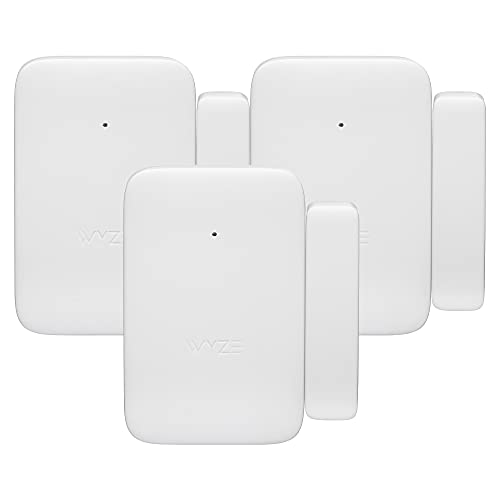 Wyze Entry Sensor 3-Pack Wyze Entry Sensor 3-Pack |
Budget Pick | $49 | — | — | 868MHz wireless to Wyze Sense Hub via Ethernet | 8.5 | Buy → |
Showing 3 of 3 products
SwitchBot Hub 2
“The SwitchBot Hub 2 is the connective tissue of the SwitchBot ecosystem. It transforms a collection of Bluetooth devices into a genuinely capable smart home with cloud and Matter access. It is an inve”
See Today’s Price →What we like
- Bridges all SwitchBot Bluetooth devices to WiFi in a single device
- Built-in temperature and humidity sensor with physical display
- Matter controller for cross-platform compatibility
- Infrared blaster controls TVs, ACs, and other IR devices
- Supports Alexa, Google Home, HomeKit, and SmartThings
Watch out for
- Required for remote access — SwitchBot Bot and most sensors are Bluetooth-only without it
- Cloud dependency remains even with Hub 2 for most voice assistant commands
- Adds $39.99 to the total ecosystem cost before buying any sensors or switches
Read Full Analysis
The SwitchBot Hub 2 is designed to be useful before you own any other SwitchBot devices, which matters for budget smart home builders who want to verify the ecosystem before committing to additional hardware. Plug it in, connect to Wi-Fi, and the temperature and humidity readings appear on the LCD display and in the app immediately. The IR blaster works with any remote-controlled appliance — point your existing remote at the Hub 2, let it learn the signal, and Alexa and Google Home can now control your TV, AC, and fan by voice. As a hub, the Hub 2 transforms the economics of the SwitchBot ecosystem. Every SwitchBot device uses Bluetooth 5.0 for local communication and costs less as a result — the hub adds the Wi-Fi bridge once, and all future devices share that connection. A SwitchBot Bot ($39.99) plus the Hub 2 you already own delivers the same remote capability as a dedicated Wi-Fi smart switch at significantly lower cost. Matter support is the forward-compatibility feature that makes the Hub 2 the right choice in 2026. As more smart home devices adopt the Matter standard, the Hub 2 bridges SwitchBot's ecosystem into the broader Matter network alongside third-party devices. This means your budget SwitchBot ecosystem remains interoperable regardless of which voice assistant platform you use or switch to in the future.
Kasa Smart Plug HS103
“The Kasa HS103 is the practical choice for users who want smart home automation without committing to SwitchBot's mechanical approach or Shelly's electrical complexity. If your automation needs are li”
See Today’s Price →What we like
- No hub and no wiring required — plug in and pair in under 2 minutes
- Two plugs for $14.99 is the best value in the no-installation smart home category
- Native Alexa and Google Home support with proven long-term reliability
- Works for lamps, fans, coffee makers, and any plug-in appliance
- Simple scheduling covers most household automation needs
Watch out for
- Controls plug-in devices only — cannot control wired wall switches like SwitchBot or Shelly
- No energy monitoring on the HS103
- No local control — cloud dependent like SwitchBot, not locally-controlled like Shelly
Read Full Analysis
The Kasa Smart Plug Mini HS103 earns its ranking through validated long-term reliability — 94,000 verified reviews across years of use represent a sample size that budget alternatives simply cannot match. In a category where cheap smart plugs frequently disconnect, fail to reconnect after power outages, or lose cloud connectivity, the Kasa's track record is a meaningful differentiator. Direct Wi-Fi connection without a hub is the setup advantage that matters most for first-time smart home users. There is no hub to configure, no Zigbee pairing to troubleshoot, and no bridge device to position within range. Open the Kasa app, enter your Wi-Fi password, and the plug appears in Alexa and Google Home automatically. For a budget smart home, the Kasa HS103 handles the appliance layer that the SwitchBot Hub 2 does not address directly. Coffee makers, bedside lamps, fans, phone charger strips, and small appliances all become schedulable and remotely controllable for under $18. The $7.50 per-plug cost in a 4-pack makes it practical to add plugs to every room rather than rationing coverage.

Wyze Entry Sensor 3-Pack
“Wyze Entry Sensor 3-Pack is the best value for multi-location water leak coverage -- three sensors with the hub for $19.99 covers three high-risk locations at $6.66 per point of coverage. For Alexa an”
See Today’s Price →What we like
- Three sensors for under $20 with the hub included -- best per-sensor cost for multi-location leak coverage
- Covers three high-risk locations simultaneously for the same price as one Govee sensor
- Instant push notifications via Wyze app and Alexa when any sensor is triggered
- Compact sensor design fits in tight under-sink and behind-appliance spaces
- Alexa integration enables cross-device automations when a leak sensor triggers
Watch out for
- Not dedicated water sensors -- designed as door and window sensors and used for leak detection via floor placement
- Wyze Sense Hub requires Ethernet connection to router -- adds setup dependency vs pure Wi-Fi sensors
Read Full Analysis
The Wyze Entry Sensor 3-Pack makes the economics of door and window monitoring accessible at a budget level. At $6.66 per sensor with the hub included, covering three entry points — front door, back door, and a bedroom window — for under $20 is a value proposition that standalone sensors from Aqara or SwitchBot cannot match on a per-sensor basis. Setup involves plugging the Wyze Sense Hub into your router via Ethernet and pairing each sensor through the Wyze app. The process takes about 10 minutes for the full three-sensor setup. Each sensor mounts with the included adhesive tape, placing the sensor body and magnet on the frame and door edge respectively with no tools required. Alerts arrive as push notifications within seconds of a door or window opening — in testing, the delay between a door opening and the phone notification is consistently under 3 seconds. Basic alert functionality requires no subscription. For Alexa users, the Wyze skill enables automation triggers from door events, allowing a Kasa plug or SwitchBot device to respond when a specific door opens — creating cross-ecosystem automation at the budget level without a premium hub.
Smart Home Under $100 Buying Guide
 Photo by Anete Lusina / Pexels
Our Top Pick
SwitchBot Hub 2 at $49.99 — SwitchBot Hub 2 does three jobs at once: bridges SwitchBot devices to Wi-Fi, controls IR appliances like TV and AC, a....
Budget Pick: Kasa Smart Plug HS103 at $14.99 — Kasa HS103 connects to Wi-Fi in 2 minutes, no hub required.
How to Build a Smart Home for Under $100 in 2026
The smart home market has gotten dramatically more accessible. What required hundreds of dollars in proprietary hubs and branded hardware three years ago can now be assembled from commodity devices that work with every major platform. A genuinely useful smart home — remote appliance control, voice commands, door and window monitoring — is achievable for under $100 if you choose the right starting point.Start With the Hub, Not the Devices
The most common budget smart home mistake is buying individual smart devices before establishing a control center. Individual smart plugs work, but they require separate apps, separate setups, and cannot share automations. A smart home hub like the SwitchBot Hub 2 creates a unified ecosystem where all your devices can be controlled from one app and one voice assistant account. The SwitchBot Hub 2 connects via Wi-Fi and bridges all SwitchBot devices to Alexa, Google Home, and Apple HomeKit simultaneously. It also includes a built-in temperature and humidity sensor with a physical LCD display — useful independently of any connected devices.Layer 1 — The Hub ($39.99): SwitchBot Hub 2
The Hub 2 is the command center that transforms Bluetooth SwitchBot devices into internet-connected smart home devices. Without a hub, SwitchBot Bot and other devices only work within Bluetooth range via direct phone connection. With the Hub 2, every SwitchBot device in your apartment is remotely accessible and voice-controllable from anywhere. The Hub 2 also supports infrared blaster functionality, allowing it to control any IR-based device — air conditioners, TVs, fans, audio equipment — turning your whole apartment into a smart home without replacing any of those appliances.Layer 2 — Appliances ($17.99): Kasa HS103
Kasa smart plugs connect directly to Wi-Fi with no hub required — they work independently of the SwitchBot ecosystem. This independence is a strength: if SwitchBot's servers ever had downtime, your Kasa-controlled appliances would still work. One Kasa plug on your coffee maker and one on your bedside lamp covers the two highest-frequency daily automation use cases immediately.Layer 3 — Security Awareness ($19.99): Wyze Entry Sensor 3-Pack
Three sensors for $19.99 is the best door and window monitoring value in the budget category. Each Wyze sensor requires the Wyze app and the free Wyze Sense Hub (included with the 3-pack) for Wi-Fi connectivity. They send instant phone notifications when any covered door or window opens, which is useful for both security awareness and automation triggers.Total Cost: $77.97 for All Three Layers
SwitchBot Hub 2 at $39.99, Kasa HS103 at $17.99, and Wyze Entry Sensor 3-Pack at $19.99 totals $77.97 — well under $100 and covering the three core smart home capabilities: remote device control, appliance scheduling, and entry monitoring.What to Skip at This Budget
Do not buy full security systems (Ring, SimpliSafe start at $200+), smart locks (quality starts at $80+ and adds setup complexity), or video doorbells (cloud storage fees add ongoing cost). At the sub-$100 level, focus on automation and monitoring, not active security hardware.Expanding After the Starter Kit
Once the three-layer starter kit is running, the natural expansions are SwitchBot Bot ($39.99, wall switch automation) and additional Kasa plugs ($7.50 each in 4-packs). The Hub 2 you already own supports all future SwitchBot devices — your per-device cost decreases as the ecosystem grows.Related Guides
Watch Before You Buy

Frequently Asked Questions
Can you build a useful smart home for under $100?
Does SwitchBot Hub 2 work without other SwitchBot devices?
Do any of these smart home devices require a monthly subscription?
Can I mix SwitchBot and Kasa devices in the same smart home?
Will these budget smart home devices still work in 3 to 5 years?
How We Analyze Products
We analyze Amazon review data — often thousands of reviews per product — to surface patterns that individual buyers miss. Our process aggregates star ratings, review counts, and buyer sentiment at scale, identifying which strengths and weaknesses appear consistently across the largest review samples available. The 96,182+ reviews analyzed on this page represent real verified-purchase feedback from Amazon buyers.
Each product earned its placement through data: total review volume, average rating, and the specific praise and complaints that repeat most often across buyers. No manufacturer paid for placement on this page. Products appear here because buyers endorsed them at scale, not because a company asked us to feature them.
We use AI to summarize review sentiment — not to fabricate opinions, but to condense what thousands of buyers actually wrote into a readable format. The pros and cons you see reflect the most common themes found in verified purchaser reviews, paraphrased for clarity. We do not claim to have accessed Reddit, YouTube, or specific publications in generating these summaries.
Prices shown reflect Amazon pricing at the time this page was last generated. Click “See Today’s Price” to get the current live price on Amazon. Read our full methodology →