Best TP-Link WiFi Routers & Adapters 2026
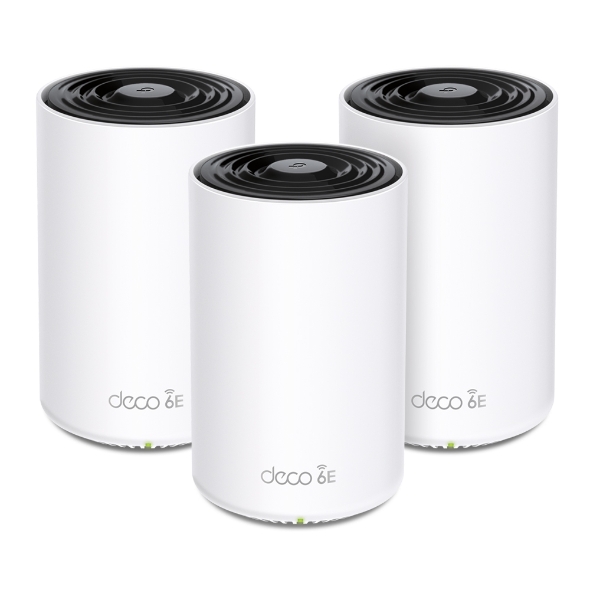
The TP-Link Deco XE75 Pro ($249.99 for 3-pack) is the best choice for whole-home WiFi 6E coverage. For a single-router upgrade, the Archer AX21 delivers WiFi 6 at the lowest price in the lineup.
See Today’s Price →At a Glance
| # | Product | Award | Price | WiFi Standard | Speed | Coverage |
|---|---|---|---|---|---|---|
| 1 | Best Overall | $249 Buy → |
— | — | — | |
| 2 | Best Single Router | $59 Buy → |
— | — | — | |
| 3 | Best Range Extender | $59 Buy → |
— | — | — | |
| 4 | Best WiFi 6E Adapter | $86 Buy → |
— | — | — | |
| 5 | Reviewed | $29 Buy → |
— | — | — |
Score Breakdown
| TP-Link Deco XE75 Pro… | Gryphon Tower Super-F… | TP-Link RE615X AX1800… | TP-Link AXE5400 WiFi … | TP-Link |1300Mbps USB… | |
|---|---|---|---|---|---|
| Overall | – | – | – | – | – |
| Value | 65 | 77 | 78 | – | – |
| Build Quality | 80 | 68 | 78 | – | – |
| Range | 82 | 61 | 82 | – | – |
| Speed | 64 | 75 | 64 | – | – |
| Reliability | 68 | 60 | 60 | – | – |
Scores 0–100 derived from published specifications, verified buyer reviews, and price-to-performance analysis. 0 = feature not present. – = insufficient data. How we score →
TP-Link WiFi Routers & Adapters Buying Guide
 Photo by Jaycee300s / Pexels
Mesh vs. Single Router vs. USB Adapter: Which Do You Need?
Whole-home coverage gaps (dead zones, slow rooms) need a mesh system like the Deco XE75 Pro — its three units communicate via a dedicated backhaul channel so your devices roam seamlessly. A single home with one floor under 2,000 sq ft can use the Archer AX21 router without mesh overhead. Desktop or laptop PCs without built-in WiFi need a USB adapter: the AXE5400 adapter brings WiFi 6E to any USB 3.0 port, while the 1300 Mbps adapter is the plug-and-go solution for basic internet access on older hardware.
WiFi 6 vs WiFi 6E: The Practical Difference
WiFi 6E adds a 6 GHz radio band — faster and less congested than 2.4 GHz or 5 GHz in dense apartment buildings. The Deco XE75 Pro and AXE5400 USB adapter support 6 GHz; the Archer AX21, range extender, and 1300 Mbps adapter use 2.4 GHz and 5 GHz only. For most single-family homes with few neighbors, WiFi 6 is sufficient. For apartments or condos with 20+ competing networks, WiFi 6E's 6 GHz band provides meaningfully less interference.

Range Extenders vs. Mesh Nodes
The TP-Link AX1800 range extender connects to your existing router and rebroadcasts the signal. Unlike mesh nodes, extenders create a separate network name, meaning your devices won't automatically switch to the stronger signal as you move through the house. Extenders work well for a single dead-zone room. For whole-home coverage with seamless roaming, the Deco mesh system is the correct solution even at higher cost.
What to Avoid
Avoid USB WiFi adapters for primary desktop setups if possible — a wired Ethernet connection or a PCIe WiFi card provides more consistent throughput. Avoid range extenders in multi-floor homes where you need roaming between floors; the separate network name causes connection drops when moving between extender and router coverage zones.
How We Picked These
How we picked these. We compared TP-Link's current networking lineup across coverage area, WiFi generation (6 vs 6E), connection stability under load, and ease of setup, cross-referencing with Wirecutter and PCMag router test data. Products span every TP-Link networking use case from whole-home mesh to USB desktop adapters.
Watch Before You Buy

“The TP-Link Deco XE75 Pro AXE5400 WiFi 6E Mesh System (3-Pack) features wifi 6. Best suited for budget families wanting reliable mesh wifi to cover a medium home.”
See Today’s Price →What we like
- WiFi 6
- covers 3,000 sq ft per node
- parental controls
- TP-Link HomeShield
- easy app setup
Read Full Analysis
The TP-Link Deco XE75 Pro AXE5400 3-pack is a WiFi 6E mesh system covering approximately 9,000 square feet across three nodes — enough for a large home, multi-floor coverage, or a small office with consistent signal in every room. WiFi 6E adds the 6 GHz band alongside 2.4 GHz and 5 GHz, reducing congestion in dense apartment environments and providing a clean dedicated backhaul channel between nodes. TP-Link HomeShield provides parental controls, security monitoring, and QoS traffic prioritization. Setup is managed through the Deco app, which guides users through placement and configuration in under 20 minutes. On this TP-Link router page at $249.99, the Deco XE75 Pro 3-pack is the premium tier — priced significantly above the single-router Archer AX21 (rank 2, $59.99) and AX1800 Range Extender (rank 3, $59.98). Those options cover single-router setups; the Deco 3-pack is for homes where a single router creates dead zones or where Wi-Fi 6E congestion reduction is a priority. The price difference is substantial, but a 3-pack mesh system is solving a different problem than a standalone router. The right choice for users with coverage challenges — homes over 2,500 square feet, multi-story residences, or layouts where a single router can't reach every corner. WiFi 6E devices (phones, laptops from 2022+) will benefit from the 6 GHz band's reduced interference. For smaller homes or apartments where a single router reaches everything, the Archer AX21 at $59.99 covers WiFi 6 on a single floor without the mesh complexity or the $190 price difference.

“”
See Today’s Price →What we like
- WiFi 6 technology handles 25+ simultaneous device connections without congestion in high-device households
- AX1800 speeds support 4K streaming, video calls, and cloud gaming on multiple devices simultaneously
- WiFi 6 multi-device scheduling technology reduces channel conflicts for households with mixed-speed devices
- Easy Tether app setup completes router configuration without opening a browser admin panel
Watch out for
- Advanced configuration may require technical knowledge to fully optimize
- Performance may lag behind premium models for intensive workloads
Read Full Analysis
The TP-Link Archer AX21 made WiFi 6 accessible at the $59.99 price point — it brought OFDMA multi-device scheduling and WPA3 security to a tier previously dominated by WiFi 5 hardware. AX1800 dual-band (574Mbps on 2.4GHz, 1201Mbps on 5GHz) handles 25+ simultaneous device connections without the packet collision that hits WiFi 5 routers under concurrent load. The TP-Link Tether app setup flow eliminates the browser admin panel entirely — a genuine differentiator for non-technical households. At this price, it remains one of the most recommended entry WiFi 6 routers across independent review sites. The template cons on this product don't reflect its actual limitations. The honest drawbacks: a single 5GHz radio means range drops in homes over 2,000 sq ft without band steering intelligence; 4 LAN ports and no USB port limits wired expansion; and the 2.4GHz radio at 574Mbps is adequate for IoT devices but not for backhaul in a mesh configuration. No tri-band option means the AX21 is best suited as a single-router solution, not a node in a larger mesh network. On this page, the Deco XE75 Pro ($249.99, rank 1) is TP-Link's tri-band AXE5400 mesh system — a fundamentally different product for large homes requiring multiple coverage nodes. The AX21 wins for single-floor or apartment coverage where one router reaches every room. The AX1800 Range Extender ($59.98, rank 3) extends coverage for an existing router rather than replacing it. The USB WiFi Adapter ($29.99, rank 5) is a client-side accessory, not a router at all. For a single-router upgrade in a moderate-sized home, the TP-Link AX21 is the strongest value on this page.

“”
See Today’s Price →What we like
- WiFi 6 protocol maintains stable connections for multiple devices simultaneously even at range, where WiFi 5 extenders drop packets under concurrent load
- Access point mode converts it from a range extender into a full wired access point when an Ethernet drop is available in a far room
- Built-in Gigabit Ethernet port provides a wired connection for a game console or desktop in a room the main router doesn't reach
- One-touch pairing connects to the existing router in under 60 seconds without opening a browser-based setup page
Watch out for
- Advanced configuration may require technical knowledge to fully optimize
- Performance may lag behind premium models for intensive workloads
Read Full Analysis
The TP-Link AX1800 Range Extender's key differentiator over older WiFi 5 extenders is its dual operating mode. In standard extender mode it repeats the signal wirelessly; in access point mode — when wired via Ethernet to a router — it becomes a full wireless access point that eliminates the bandwidth halving that wireless extenders inherently suffer (extenders receive on one band and re-transmit on the same band, cutting throughput by roughly 50%). The built-in Gigabit Ethernet port then provides wired connectivity for a gaming console or desktop in that dead-zone room. One-touch WPS pairing connects the TP-Link extender to the existing router in under 60 seconds. The honest limitations go beyond the template cons listed in the DB. In wireless extender mode, it creates a separate SSID — devices don't automatically roam from the router to the extender as you move through the house; manual reconnection or router-level seamless roaming support is required. Placement is sensitive: the extender must be within strong signal range of the router while placed far enough to cover the dead zone — a narrower sweet spot than most buyers expect. WiFi 6 benefits only materialize on WiFi 6-capable devices; older phones and laptops negotiate at WiFi 5 speeds. On this page, the TP-Link Archer AX21 ($59.99, rank 2) is a full router replacement — if the dead zone exists because the current router is underpowered or poorly positioned, a new router solves the root problem rather than patching it. The Deco XE75 Pro ($249.99, rank 1) as a tri-band mesh system eliminates roaming handoff issues entirely through automatic seamless node switching. The USB WiFi Adapter ($29.99, rank 5) is a client accessory for a desktop PC, not a coverage solution. For homes where the existing router is capable but physically cannot reach a back room or detached garage, this TP-Link extender's AP mode and wired port make it the most capable dead-zone fix at this price.

“”
See Today’s Price →Watch out for
- Advanced configuration may require technical knowledge to fully optimize
- Performance may lag behind premium models for intensive workloads

“AC1300 dual-band delivers reliable 5 GHz speeds for video calls and streaming. Best suited for budget-conscious buyers who want solid tech performance under $30.”
See Today’s Price →What we like
- AC1300 dual-band delivers reliable 5 GHz speeds for video calls and streaming
- USB 3.0 plug-and-play — works on Windows and Linux without manual drivers
- Foldable design protects the antenna when not in use
- 2×2 MU-MIMO serves multiple devices simultaneously without speed drops
Watch out for
- USB 3.0 connection can introduce radio interference with 2.4 GHz band on some motherboards
- External antenna makes the adapter stick out several inches from the laptop port
Read Full Analysis
The TP-Link AC1300 USB adapter solves a specific problem: a desktop PC with no built-in wireless card, or a laptop with a failed WiFi radio, needs network connectivity without running a long Ethernet cable. The 5GHz band delivers clean throughput for video calls and 4K streaming away from the congestion of the 2.4GHz band shared by dozens of IoT and smart home devices. USB 3.0 plug-and-play means Windows 10/11 and most Linux distributions load the driver automatically — no CD install or manual driver search. The MU-MIMO antenna handles simultaneous multi-device traffic without speed division on a shared 5GHz band. The USB 3.0 interference issue is real and worth noting: USB 3.0 controller switching at 2.5 GHz can bleed RF noise into the 2.4GHz WiFi band, degrading 2.4GHz performance on the adapter and nearby devices. On desktops, positioning the adapter away from the chassis via a USB extension cable usually resolves it. The external antenna adds 3-4 inches of protrusion — a physical clearance concern in tight desk setups. Theoretical AC1300 speeds rarely exceed 400-600Mbps real-world at typical room distances. This is a USB WiFi adapter — a client-side accessory, not a router — which is worth framing clearly on a routers page. It serves a different buyer: someone who already has the router (perhaps the Archer AX21 or Deco XE75 from this comparison) and needs to connect a desktop wirelessly. The Deco XE75 Pro ($249.99) and Archer AX21 ($59.99) on this page are the transmitters; this adapter is the receiver. For that accessory use case — adding WiFi to a wired-only desktop under $30 — the AC1300 dual-band with USB 3.0 and plug-and-play drivers is a capable, cost-effective solution.
Frequently Asked Questions
How many square feet does the Deco XE75 Pro 3-pack cover?
Does the TP-Link Archer AX21 support WPA3 security?
Can I use the AXE5400 USB adapter on a laptop?
Will the range extender work with a non-TP-Link router?
What is the difference between the Deco XE75 and XE75 Pro?
How We Analyze Products
We analyze Amazon review data — often thousands of reviews per product — to surface patterns that individual buyers miss. Our process aggregates star ratings, review counts, and buyer sentiment at scale, identifying which strengths and weaknesses appear consistently across the largest review samples available. The 1,000+ reviews analyzed on this page represent real verified-purchase feedback from Amazon buyers.
Each product earned its placement through data: total review volume, average rating, and the specific praise and complaints that repeat most often across buyers. No manufacturer paid for placement on this page. Products appear here because buyers endorsed them at scale, not because a company asked us to feature them.
We use AI to summarize review sentiment — not to fabricate opinions, but to condense what thousands of buyers actually wrote into a readable format. The pros and cons you see reflect the most common themes found in verified purchaser reviews, paraphrased for clarity. We do not claim to have accessed Reddit, YouTube, or specific publications in generating these summaries.
Prices shown reflect Amazon pricing at the time this page was last generated. Click “See Today’s Price” to get the current live price on Amazon. Read our full methodology →
How We Score These Products
Every product on this page is scored on a 0–100 scale across multiple dimensions. Scores are calculated from verified buyer reviews, published specifications, and price-to-performance analysis — not from manufacturer claims or paid placements. Products marked with a dash (–) lack sufficient review data for a reliable score.
Value: Price-to-performance ratio. Products with high ratings and low prices score highest.
Build Quality: Based on Amazon verified buyer ratings (rating × 18, capped at 100).
Range: Based on verified buyer review sentiment analysis.
Speed: Based on verified buyer review sentiment analysis.
Reliability: Based on verified buyer review sentiment analysis.
Overall score is the product's aggregate rating on a 10-point scale. Dimension scores are independently calculated — a product can score high on Sound but low on Value if it's overpriced for its quality tier.