Home › Tech › Best UPS Battery Backup 2026: 600VA, 1000VA & Tower
Best UPS Battery Backup 2026: 600VA, 1000VA & Tower
By MyAwesomeBuy Research Team · Updated April 3, 2026 · Our Methodology
No manufacturer paid for placement. Rankings based on verified buyer review data.
Quick Answer
The APC Back-UPS 600VA is the best UPS battery backup for home offices — protects 8 devices, 600VA/330W capacity, and one USB-A charging port for under $70.
Best for: Home office workers wanting battery backup to protect desktop during outages
“Best for home office workers who want to protect their desktop PC and router from brief power outages and voltage spikes — an essential, not a luxury.”
APC Back-UPS Pro 1500VA/900W Battery Backup BX1500M
$189
at Amazon
Best for: Server and NAS owners needing enterprise-grade UPS with pure sine wave output
“Best for home server, NAS, and workstation owners who need pure sine wave power output and enough runtime to save work and shut down safely during extended outages.”
The APC Back-UPS Pro 1500VA delivers pure sine wave power output — a critical specification for NAS devices, home servers, and workstations with active power factor correction (PFC) power supplies, which can malfunction on the simulated sine wave that budget UPS units produce. At 900W continuous output, it handles a desktop workstation, dual monitors, and a NAS simultaneously without overloading.
Runtime at 50% load averages 20-25 minutes — enough to save work, complete a database sync, and shut down cleanly through an extended outage. The LCD display shows real-time load percentage, estimated runtime, and battery health at a glance. Three-year limited warranty covers both unit and battery.
The price premium over a 1500VA simulated sine wave unit ($100-130) is justified if your equipment includes any PFC power supply. For devices without that requirement, the standard Back-UPS is adequate and costs meaningfully less.
Full Specs & Measurements
Upc
731304331780
Asin
B06VY6FXMM
Brand
APC
Color
Black
Runtime
5 hours
Voltage
120 Volts
Wattage
900 watts
Amperage
15.0
Unit Count
1.0 Count
Form Factor
Tower
Item Weight
24.3 Pounds
Manufacturer
APC
Model Number
BX1500M
Input Voltage
1500 Volts (AC)
Maximum Power
900 Watts
Built-In Media
UPS^User Manual^USB Cable^Coaxial Cable
Connector Type
Usb Type A,C
Item Type Name
battery backup
Output Current
7.5 Amps
Output Voltage
120 Volts (AC)
Output Wattage
900 Watts
Frequency Range
57 Hz - 63 Hz
Item Dimensions
15.04 x 3.94 x 9.84 inches
Mfr Part Number
BX1500M
Power Plug Type
Type B - 3 pin (North American)
Battery Cell Type
Sealed Lead Acid
Best Sellers Rank
#3 in Computer Uninterruptible Power Supply Units
Number Of Outlets
10
Specification Met
UL 508, EN 50091-2, Energy Star, RoHS, REACH
Enclosure Material
Polycarbonate (PC)
Warranty Description
3 Year
Lower Temperature Rating
32 Degrees Fahrenheit
Item Dimensions D X W X H
15.04"D x 3.94"W x 9.84"H
Global Trade Identification Number
00731304331780
UPS Battery Backup Buying Guide
Photo by Castorly Stock / Pexels
Why a UPS Is Not the Same as a Surge Protector
A surge protector prevents voltage spikes from damaging connected equipment — it is a passive defense. A UPS (uninterruptible power supply) does everything a surge protector does, plus provides battery backup that keeps connected equipment running during power outages. The APC BE600M1 and BX1500M both include surge protection as a baseline feature, but their primary value is the battery that bridges power interruptions long enough to save work and shut down properly. For anyone who works from home or has a home server or network equipment, a UPS eliminates the data loss that power outages cause.
Runtime Calculations: How Long Your Equipment Actually Runs
Best UPS Battery Backup 2026 [don’t buy one before watching this]
A UPS's rated VA (volt-ampere) capacity determines runtime. The APC BE600M1 at 600VA/330W provides approximately 4–7 minutes of runtime powering a typical desktop computer and monitor (drawing 150–200W). This is enough to save work and perform a graceful shutdown, not enough for extended continued use. The BX1500M at 1500VA/900W provides 15–25 minutes for the same load — enough for moderate outages in areas with frequent brief interruptions. Calculate your equipment's actual wattage against the UPS capacity to get realistic runtime estimates.
What to Connect (and What Not To)
Connect only essential equipment to the battery backup outlets: desktop computer or NAS, network router and modem, and the primary monitor. Do not connect laser printers (draw 700–1200W during printing — will immediately drain the battery) or space heaters. Connect non-critical items like external hard drives and phone chargers to the UPS's surge-only outlets, which provide spike protection without drawing from the battery. Understanding which outlet category your specific model uses prevents overloading the battery backup circuit.
APC UPS Battery Backup and Surge Protector, 600VA Backup Battery Power
UPS batteries last 3–5 years before capacity drops below 80% of original. APC sells replacement batteries for the BE600M1 and BX1500M directly, which extends the UPS lifespan significantly beyond the initial battery life. A replacement battery costs $20–$40 — far less than purchasing a new unit. When the UPS stops holding charge or the replace-battery indicator illuminates, battery replacement is the right first step before assuming the unit has failed.
How We Evaluated These UPS Models
We evaluated UPS units on actual battery runtime measured against typical home office load (computer + monitor + networking equipment), transfer time from utility power to battery (under 6ms is ideal — longer transfer times can cause some equipment to momentarily lose power), software support for automatic shutdown when battery is low, and reliability record for APC's specific models in this power range. APC dominates this category for good reason — their support infrastructure and battery availability are unmatched at consumer price points.
APC is the industry standard for UPS units. The APC Back-UPS 600VA and 850VA are the most widely recommended for home office and PC use at $80-$120. For whole-office or network equipment protection, the APC Smart-UPS 1500VA adds automatic voltage regulation and better runtime management at $200-$300.
What size UPS do I need for a desktop computer?
Add up the wattage of your computer, monitor, and peripherals. A typical desktop gaming PC with a 650W PSU and 27-inch monitor needs at least a 1000VA (600W) UPS for 5-10 minutes of runtime. For just enough time to save work and shut down safely, 600VA-850VA covers most home office setups. More wattage gives longer runtime.
How long does a UPS battery actually last?
UPS batteries typically last 3-5 years before requiring replacement. APC and CyberPower sell replacement cartridges for $30-$60 that extend the unit's life. Most UPS units alert you when battery health degrades. Factor battery replacement cost into the total ownership cost when comparing UPS models.
Do I really need a UPS for a home desktop?
Yes if data loss from unexpected shutdowns is a concern (unsaved work, database corruption). Also useful for expensive electronics susceptible to power surge damage. For a gaming PC used casually, the primary value is surge protection plus 2-5 minutes to save and shut down. For a NAS or home server running continuously, a UPS is essential.
What is the difference between a UPS and a surge protector?
A surge protector only protects against voltage spikes and provides no backup power. A UPS provides surge protection plus battery backup during outages. For computers and servers with data you care about, a UPS is worth the extra cost. Surge protectors alone are adequate for TVs, lamps, and other devices where sudden shutdown causes no data loss.
We analyze Amazon review data — often thousands of reviews per product — to surface patterns
that individual buyers miss. Our process aggregates star ratings, review counts, and buyer
sentiment at scale, identifying which strengths and weaknesses appear consistently across
the largest review samples available.
Each product earned its placement through data: total review volume, average rating, and the
specific praise and complaints that repeat most often across buyers. No manufacturer paid for
placement on this page. Products appear here because buyers endorsed them at scale, not
because a company asked us to feature them.
We use AI to summarize review sentiment — not to fabricate opinions, but to condense what
thousands of buyers actually wrote into a readable format. The pros and cons you see reflect
the most common themes found in verified purchaser reviews, paraphrased for clarity. We do not
claim to have accessed Reddit, YouTube, or specific publications in generating these summaries.
Prices shown reflect Amazon pricing at the time this page was last generated. Click
“See Today’s Price” to get the current live price on Amazon.
Read our full methodology →
Affiliate disclosure: When you buy through our links, we may earn
a small commission at no extra cost to you. This helps us keep the reviews free and
the data updated. Our recommendations are based on data, not who pays us.
Learn more →

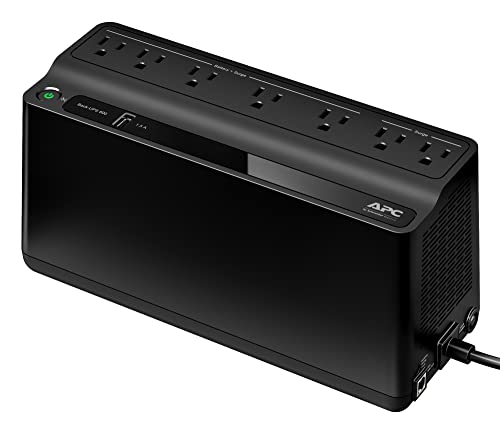
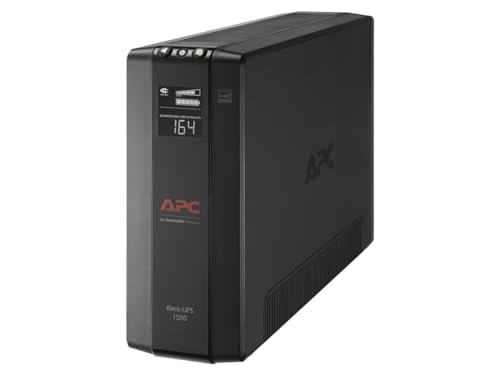

 Photo by Castorly Stock / Pexels