Home › Tech › Best USB-C Hubs and Adapters 2026: 7-in-1 & 11-in-1
Best USB-C Hubs and Adapters 2026: 7-in-1 & 11-in-1
By MyAwesomeBuy Research Team · Updated April 8, 2026 · Our Methodology
5 models compared22,837+ reviews analyzed
No manufacturer paid for placement. Rankings based on verified buyer review data.
Quick Answer
The Anker 5-in-1 USB-C hub is our top pick. It supports 4K HDMI, USB 3.0, and USB-C power passthrough in a compact build. For a budget option, the HooToo multiport adapter at $10 is a solid entry-level choice.
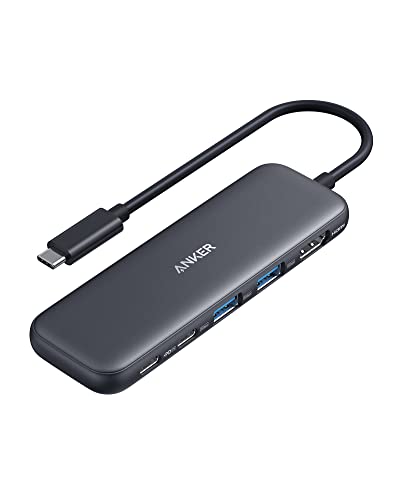
Anker 5-in-1 USB-C Hub with 4K HDMI and USB-A 3.0 Ports
$18
at Amazon
Best for: iPad and laptop users wanting portable hub with fast USB-C passthrough
“The right compact hub for iPad and laptop users who need a few key ports added — HDMI, USB-C pass-through, and SD card — without carrying a heavy dock.”
The Anker 5-in-1 USB-C hub hits the essential port combination for most laptop users: 4K HDMI output for an external monitor, two USB 3.0 ports for peripherals, a USB-C PD passthrough for keeping your charger connected, and an SD card slot. The metal-body design handles heat better than plastic alternatives during sustained multi-device use. Anker build quality at this price tier is reliable -- the hub stays cool during long work sessions and does not cause the USB-C port interference that cheaper hubs produce. At $25 this is the practical default for any MacBook or USB-C laptop user who needs to connect a monitor and standard peripherals simultaneously.
Full Specs & Measurements
Upc
194644101237 194644121358
Asin
B0BQLLB61B
Brand
Anker
Color
Black
Item Weight
1.44 ounces
Manufacturer
Anker
Model Number
A8355011
Mfr Part Number
A8355011
Number Of Ports
5
Total Usb Ports
3
Operating System
Chrome OS, Windows 10, Windows 7
Best Sellers Rank
#3 in Computers & Accessories (See Top 100 in Computers & Accessories) #1 in Laptop Docking Stations
Compatible Devices
Windows and MacBook computers that support USB-C with DP Alt Mode and Power Delivery, as well as USB4 and Thunderbolt 3/4/5 ports.
The Anker 7-in-1 expands the 5-in-1 configuration with a Gigabit Ethernet port and a microSD card slot -- two additions that matter for specific users. The Ethernet port provides a stable wired network connection for video calls and large file transfers where Wi-Fi is unreliable. The microSD slot handles drone footage, camera media, and other smaller-format storage. At $26 it is a modest premium over the 5-in-1 for the two additional ports. If you regularly use wired networking or microSD media, the upgrade is worthwhile; otherwise the 5-in-1 is sufficient.
Full Specs & Measurements
Upc
194644234102
Asin
B0DXJQT19B
Brand
Anker
Color
Gray
Item Weight
67 Grams
Manufacturer
Anker
Model Number
A83D2
Mfr Part Number
A83D2
Number Of Ports
7
Total Usb Ports
3
Operating System
Windows, macOS
Best Sellers Rank
#4 in USB Hubs
Compatible Devices
Windows and MacBook computers that support USB-C with DP Alt Mode and Power Delivery, as well as USB4 and Thunderbolt 3/4/5 ports
The Anker 7-in-2 is designed specifically for MacBooks with two USB-C ports (MacBook Pro 14/16). Dual input connects to both USB-C ports simultaneously, distributing the power delivery and data load across both ports for better stability during demanding tasks. The magnetic snap-on design keeps the hub positioned against the MacBook body rather than dangling on a cable. 4K60fps HDMI, dual USB 3.0, SD/microSD, and USB-C PD passthrough are all present. At $33 it is the premium option here, justified specifically for MacBook Pro users who want a hub that integrates cleanly with the laptop form factor.
A straightforward USB-C to three USB-A adapter for users who primarily need to connect legacy USB-A peripherals (mouse, keyboard, USB drive, older webcam) to a USB-C-only laptop. No HDMI, no card reader -- just reliable USB-A expansion. Bus-powered with no additional cable required. At $25 the price is accessible for adding USB-A compatibility to a minimal-port laptop without committing to a larger hub. Best for users who do not need video output from their hub and simply want USB-A ports restored.
Full Specs & Measurements
Asin
B0G5YMNSYK
Brand
MOKiN
Color
8 IN 1 USB C Adapter
Item Weight
0.11 Kilograms
Manufacturer
MOKiN
Number Of Ports
5
Total Usb Ports
3
Operating System
macOS
Best Sellers Rank
#69 in USB Hubs
Compatible Devices
Laptop with Thunderbolt 3/4 or Full Function USB C Port
Data Transfer Rate
10 Gigabits Per Second
Enclosure Material
Plastic
Hardware Interface
USB
Additional Features
Portable
Warranty Description
2 Year Manufacturer
Minimum Required Operating System Version
Mac OS 10.12 Sierra
Best Budget
HooToo USB C Hub Multiport Adapter
$9
at Amazon
Best for: Laptop users who need HDMI plus USB-A expansion plus SD card reading but don't need wired Ethernet connectivity
“HooToo USB-C Hub offers the core multiport adapter functions (USB-A expansion + HDMI + SD card + PD charging) at the lowest price in the multiport category. The missing Ethernet port is its primary li”
The HooToo multiport adapter is the accessible entry point for USB-C hub functionality. HDMI output, USB 3.0 port, and USB-C passthrough at under $10 makes it practical for occasional use or as a travel backup hub. Build quality is plastic and it runs warmer than metal hubs during extended use, but for light daily use (connect a monitor, one USB peripheral, keep charging) it functions reliably. Best for users who need a basic hub occasionally rather than a constant workstation addition.
Full Specs & Measurements
Upc
635414208195
Asin
B06XSFLDY7
Ports
3x USB 3.0, HDMI 4K, SD card reader, USB-C PD
Design
Compact passport-style
Hdmi Output
4K@30Hz
Total Ports
6
Manufacturer
HooToo
Compatibility
Windows, Mac
Power Delivery
100W PD passthrough
Host Connection
USB-C (integrated)
Mfr Part Number
HooToo
Number Of Ports
3
Total Usb Ports
4
Customer Reviews
4.6
4.6 out of 5 stars
(7)
4.6 out of 5 stars
Operating System
Mac OS 9, Windows 10, Windows 7
Compatible Devices
Card Readers, Laptops
Enclosure Material
Plastic
Hardware Interface
USB Type C
Additional Features
Compact Size
USB-C Hubs and Adapters Buying Guide
Photo by Aleksander Dumała / Pexels
Our Top Pick
Anker 5-in-1 USB-C Hub with 4K HDMI and USB-A 3.0 Ports at $18.98 — Anker 5-in-1 with 4K HDMI, USB 3.0, and USB-C PD passthrough.
Budget Pick: HooToo USB C Hub Multiport Adapter at $9.99 — HooToo USB-C multiport adapter at $10 covering HDMI, USB-A basics.
Anker 5-in-1 USB-C Hub with 4K HDMI and USB-A 3.0 ...
USB-C Hub Buying Guide
USB-C hubs solve the port scarcity problem on modern laptops. Here is what to look for.
Port Selection: What You Actually Need Daily
Port selection: Think about your daily connections. The most commonly needed ports are: USB-A (for older peripherals), HDMI or DisplayPort (for external monitors), SD/microSD card slots, and USB-C power passthrough (to keep charging while the hub is connected). A hub that covers all five categories handles most laptop workflows.
I Tested 12 Different USB-C Hubs - Here Are My Top 5
Power delivery passthrough: If you connect your laptop charger through the hub, look for PD (Power Delivery) passthrough at 60W or higher. Lower wattage means the laptop charges slowly or not at all during demanding tasks.
HDMI: 4K vs. 1080P Output
HDMI resolution: Check if the HDMI port supports 4K. Many budget hubs cap at 1080P, which is adequate for most office monitors but limiting if you have a 4K display.
Bus-powered vs powered: Bus-powered hubs draw power from your laptop's USB-C port. This works fine for 4-5 devices but can throttle data speeds or power delivery with many high-draw devices. Hubs with their own power adapter handle more devices without performance loss.
Heat: Multi-port hubs generate heat during sustained use. Metal-body hubs dissipate heat better than all-plastic designs. If you plan to use the hub for hours of continuous work, metal build quality matters. Not all USB-C cables are equal — and the wrong one can charge slowly, fail to transfer data, or not work with your monitor at all. Our USB-C cable guide explains why the cable matters as much as the port.
Quick Decision: Budget matters most → HooToo USB C Hub Multiport Adapter. Quality matters most → Anker 5-in-1 USB-C Hub with 4K HDMI and USB-A 3.0 Ports.
Most USB-C hubs work with any laptop that has a full-featured USB-C port (supporting data, video, and power). Some USB-C ports are data-only and do not support video output -- check your laptop specs. MacBooks with Thunderbolt 3/4 ports work with all standard USB-C hubs; some advanced features may require Thunderbolt-specific hubs.
Can I charge my laptop through a USB-C hub?
Yes, if the hub has Power Delivery (PD) passthrough. Look for PD ratings of 60W or higher for laptops that charge at 60-100W. Below 60W, the laptop may charge very slowly or drain while in use. The hub must be connected to a PD-capable USB-C charger.
Why does my USB-C hub get hot?
Heat is normal during sustained use, especially when multiple high-bandwidth devices are connected simultaneously. Metal-body hubs handle heat better. If the hub is too hot to touch or causing performance issues, disconnect some devices or upgrade to a powered hub with better thermal management.
Do USB-C hubs affect video call quality or streaming performance?
A quality hub does not affect video call quality for typical home office use. For 4K streaming or gaming, verify the hub HDMI port supports 4K60fps -- some cheaper hubs support 4K30fps only. USB 3.0 ports should be adequate for most webcams and video capture devices.
What is the difference between USB-C and Thunderbolt?
Thunderbolt 3 and 4 use the same physical USB-C connector but support higher bandwidth (40 Gbps vs 10 Gbps for USB 3.2). Thunderbolt hubs work with USB-C ports but not vice versa for full Thunderbolt features. For most everyday use (monitor, USB devices, charging), USB-C hubs are fully sufficient.
We analyze Amazon review data — often thousands of reviews per product — to surface patterns
that individual buyers miss. Our process aggregates star ratings, review counts, and buyer
sentiment at scale, identifying which strengths and weaknesses appear consistently across
the largest review samples available. The 22,837+ reviews analyzed on this page represent real verified-purchase feedback from Amazon buyers.
Each product earned its placement through data: total review volume, average rating, and the
specific praise and complaints that repeat most often across buyers. No manufacturer paid for
placement on this page. Products appear here because buyers endorsed them at scale, not
because a company asked us to feature them.
We use AI to summarize review sentiment — not to fabricate opinions, but to condense what
thousands of buyers actually wrote into a readable format. The pros and cons you see reflect
the most common themes found in verified purchaser reviews, paraphrased for clarity. We do not
claim to have accessed Reddit, YouTube, or specific publications in generating these summaries.
Prices shown reflect Amazon pricing at the time this page was last generated. Click
“See Today’s Price” to get the current live price on Amazon.
Read our full methodology →
Affiliate disclosure: When you buy through our links, we may earn
a small commission at no extra cost to you. This helps us keep the reviews free and
the data updated. Our recommendations are based on data, not who pays us.
Learn more →

 Anker 5-in-1 USB-C Hub with 4K HDMI and…
 Anker 7-in-1 USB-C Hub 4K HDMI 85W PD S…
 Anker 7-in-2 USB-C Hub for MacBook 4K 6…
 MOKiN 8-in-1 USB-C Hub HDMI 4K Ethernet…
 HooToo USB C Hub Multiport Adapter


 Photo by Aleksander Dumała / Pexels