Best USB C Hubs (2026)

The Anker 7-in-1 USB-C Hub ($19.99) is the best all-rounder — 4K@60Hz HDMI, fast USB-A ports, SD card reader, and 87W PD passthrough in a compact package. Upgrade to the Anker 7-in-2 ($32.74) for a MacBook-specific flush-fit design.
See Today’s Price →At a Glance
| # | Product | Award | Price | Works With | Power | Protocol | Our Score | |
|---|---|---|---|---|---|---|---|---|
| 1 |  Anker 7-in-1 USB-C Hub 4K HDMI 85W PD S… Anker 7-in-1 USB-C Hub 4K HDMI 85W PD S… |
Best Overall | $19 | — | — | — | 9.2 | Buy → |
| 2 | 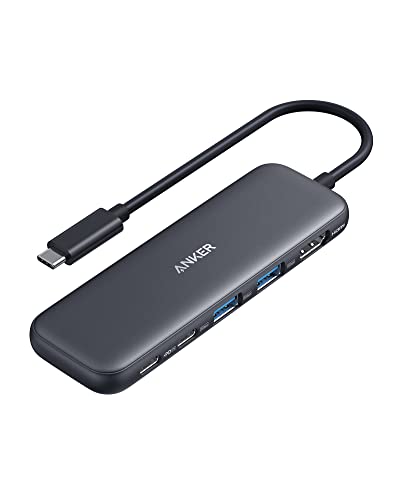 Anker 5-in-1 USB-C Hub with 4K HDMI and… Anker 5-in-1 USB-C Hub with 4K HDMI and… |
Best 5-in-1 | $18 | — | — | — | 8.9 | Buy → |
| 3 |  Anker 7-in-2 USB-C Hub for MacBook 4K 6… Anker 7-in-2 USB-C Hub for MacBook 4K 6… |
Best for MacBook | $32 | — | — | — | 8.5 | Buy → |
| 4 | 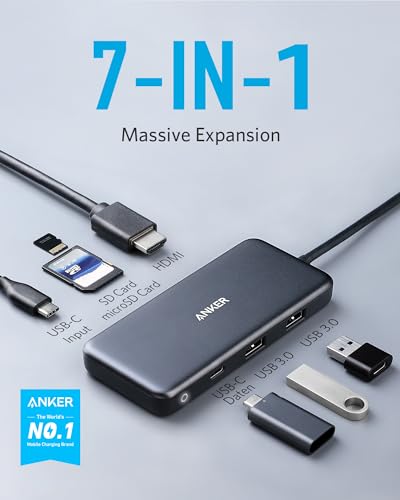 Anker USB-C Hub 7-in-1 with 4K HDMI Anker USB-C Hub 7-in-1 with 4K HDMI |
Proven Pick | $44 | — | — | — | 8.2 | Buy → |
| 5 | 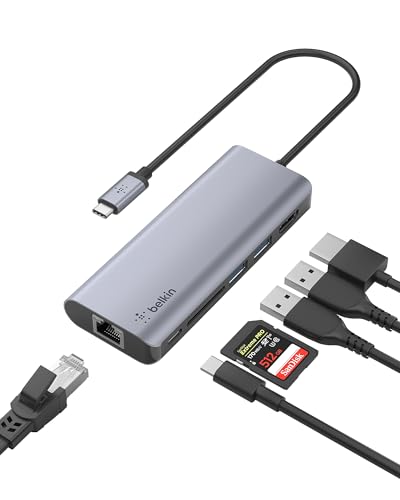 Belkin USB-C Hub 6-in-1 Belkin USB-C Hub 6-in-1 |
Premium Option | $64 | Windows, Mac, Chrome OS | — | — | 7.8 | Buy → |
Showing 5 of 5 products
Anker 7-in-1 USB-C Hub 4K HDMI 85W PD SD/TF Card Reader
“A solid mid-range 7-in-1 hub for MacBook users who want HDMI, card reader, and USB-A ports without the bulk of a full docking station.”
See Today’s Price →What we like
Watch out for
Read Full Analysis
The Anker 7-in-1 at rank 1 and the Anker 5-in-1 at rank 2 ($18.98) are separated by $1.01 and one additional port. Both outcompete the alternatives on a cost-per-port basis — the Belkin 6-in-1 at rank 5 costs $64.49 for fewer ports than either Anker entry. The rank 1 earns top position by providing HDMI, USB-C data, USB-A 3.0 ports, and SD/microSD slots in an aluminum housing for under $20. The 85W Power Delivery pass-through is adequate for most MacBook Air and 14-inch MacBook Pro charging scenarios but falls short of the 100W PD that higher-wattage MacBook Pro models charge at. If your laptop charges at 96W or 140W, this hub tops out at 85W — functional but slower than direct wall charging. The rank 4 Anker 7-in-1 ($25) offers 100W PD for $5 more, which is worth noting if you use a higher-wattage MacBook Pro. Bus-powered operation means no external power brick — the hub draws from the laptop's USB-C port. Under heavy simultaneous load (HDMI active plus SD card writing plus multiple USB-A devices), some laptops show reduced hub performance. This is a general USB-C hub limitation not specific to Anker. Against the rank 4 Anker 7-in-1 ($25, 28,292 reviews at 4.6 stars), this rank 1 product has fewer reviews and slightly lower wattage PD. Both are excellent products; the rank 4's massive review count and 100W PD make it arguably the more validated choice for buyers who prioritize purchase confidence over the lowest possible price.

Anker 5-in-1 USB-C Hub with 4K HDMI and USB-A 3.0 Ports
“The right compact hub for iPad and laptop users who need a few key ports added — HDMI, USB-C pass-through, and SD card — without carrying a heavy dock.”
See Today’s Price →What we like
Watch out for
Read Full Analysis
The Anker 5-in-1 is the most affordable product on this page at $18.98 and the lightest form factor in the roundup. For iPad and lightweight laptop users who prioritize portability, fewer ports means a smaller physical footprint and lower carry weight — for anyone who travels and uses their hub infrequently, the size advantage over the 7-in-1 formats is real. The 100W PD pass-through is the most useful spec surprise at this price. It matches what the rank 4 Anker 7-in-1 ($25) offers and exceeds the rank 1's 85W — at $6 less than the rank 4 product. For MacBook Pro users who want full-wattage charging while connected to a hub, that spec at $18.98 is the best PD value on the page. Port proximity is the main practical limitation: on a compact hub, large USB adapters or flash drives may physically block neighboring slots. Test your specific devices before assuming all ports can be used simultaneously. The 17,041 reviews at 4.4 stars provide strong validation for general reliability and build quality at this price. Against the rank 3 Anker 7-in-2 MacBook hub ($32.74), this unit is $13.76 cheaper and lacks Thunderbolt 4 and SD card slots. For laptops without Thunderbolt 4 ports and users who don't work with SD cards, those savings are free. For MacBook Pro users who have Thunderbolt 4 and regularly handle camera cards, the rank 3 hub unlocks meaningfully better performance for both tasks.

Anker 7-in-2 USB-C Hub for MacBook 4K 60Hz HDMI Thunderbolt 4
“Best for MacBook users who need the fastest Thunderbolt 4 hub for dual 4K displays and maximum data throughput at a dedicated workstation.”
See Today’s Price →What we like
Watch out for
Read Full Analysis
The Anker 7-in-2 MacBook hub includes a Thunderbolt 4 port, which enables fundamentally different performance when used with a compatible host. Thunderbolt 4 at 40Gbps can simultaneously drive two 4K displays and transfer large files at full NVMe speeds — capabilities that USB-C 3.2 hubs at ranks 1, 2, and 4 cannot achieve regardless of how their spec sheets read. The critical caveat: Thunderbolt 4 speeds require a Thunderbolt host port on the laptop. MacBook Pro (2021 and later) has Thunderbolt 4. MacBook Air M2 and later has USB 4 with partial compatibility. Older laptops or non-Apple Windows machines may receive only USB-C speeds from the Thunderbolt port, making the $7.74 premium over the rank 4 Anker 7-in-1 ($25) unjustified for those devices. At $32.74, this is the highest-priced Anker option on the page by a clear margin — nearly double the rank 2 at $18.98. The MacBook-specific port layout and Thunderbolt 4 access are the justification. For MacBook Pro users who want the fastest possible single-hub solution for a stationary desk setup with an external display and high-speed storage, this is the correct product. For users without Thunderbolt 4 host ports, the rank 4 Anker 7-in-1 ($25) provides equivalent real-world data and display performance at lower cost. The distinction between these two products is not about hub quality — it's about whether your laptop can actually use what Thunderbolt 4 enables.

Anker USB-C Hub 7-in-1 with 4K HDMI
“Anker's 7-in-1 USB-C hub connects one cable to a MacBook or Windows laptop and expands to HDMI 4K monitor, USB-A ports for drives and peripherals, and 100W PD charges your laptop simultaneously.”
See Today’s Price →What we like
- 4K HDMI output for monitor
- 100W Power Delivery pass-through
- USB 3.0 + USB-C data ports
- Single USB-C cable to laptop
Watch out for
- USB-C laptops only
- HDMI limited to 60Hz at 4K
Read Full Analysis
The rank 4 Anker 7-in-1 has 28,292 reviews at a 4.6-star average — the highest review count and one of the strongest ratings on this page. For buyers who prioritize purchase confidence over having the absolute lowest price, those numbers represent the most statistically validated choice in the roundup. At $25 with 100W Power Delivery, 4K HDMI output, USB 3.0 ports, and USB-C data, it provides equivalent functional output to the rank 1 Anker 7-in-1 ($19.99) for $5 more — with higher-wattage PD and a dramatically larger review base. For most MacBook and Windows laptop users connecting a monitor, a few USB-A peripherals, and charging simultaneously, this covers all requirements from a single cable. The rank 5 Belkin 6-in-1 ($64.49) costs 2.6x more for fewer ports. The Belkin's specific advantages are Gigabit Ethernet and premium build quality — relevant only for users who need wired network connectivity. This Anker has no Ethernet port, which is its main functional limitation. For office users who require a wired network connection at their desk, verify whether Ethernet is needed before choosing this hub. Against the rank 3 Anker 7-in-2 MacBook hub ($32.74), this unit is $7.74 cheaper and lacks Thunderbolt 4. For laptops without Thunderbolt 4 host ports, those savings are completely free — USB-C performance is identical between the two. For MacBook Pro users with Thunderbolt 4, the rank 3 unlocks dual 4K display support and higher data throughput.

Belkin USB-C Hub 6-in-1
“Belkin USB-C Hub 6-in-1 charges a $20 premium over the UGREEN 9-in-1 for two key advantages: 4K@60Hz HDMI output and Belkin's premium build quality. For users with 4K@60Hz monitors where smooth cursor”
See Today’s Price →What we like
- HDMI 4K@60Hz — the only adapter in this comparison that drives 4K monitors at full 60Hz refresh
- 100W Power Delivery for laptop charging while in use
- Belkin's premium build quality and reputation for durability
- Gigabit Ethernet for wired network connection
- 12-inch cable allows flexible placement on desk
Watch out for
- Only 6 ports — fewer than the UGREEN 9-in-1 at $20 less
- No SD card reader — UGREEN includes both SD and microSD at lower price
Read Full Analysis
The Belkin 6-in-1 costs $64.49 — $39.49 more than the rank 4 Anker 7-in-1 for fewer ports. That premium buys two things the Anker lineup on this page cannot provide: Gigabit Ethernet and Belkin's premium build quality with brand warranty. Gigabit Ethernet is the decisive feature for users with wired network infrastructure. A wired connection to a hub is consistently faster and more reliable than Wi-Fi for video calls, large file transfers, and remote desktop sessions. None of the other four products on this page include Ethernet. If wired networking is a requirement, this is the only option here. Belkin's build quality is observably different from the Anker hubs — heavier construction, more durable cable, and a brand with decades of accessory reputation. The 12-inch cable allows more flexible desk placement than rigid hub designs that must sit directly at the laptop edge. The 855 reviews at a 4.5-star average are a smaller base but consistent with Belkin's general accessory quality. The cons are real: 6 ports for $64.49 delivers fewer ports at a higher cost than any Anker option here. No SD card reader is a meaningful gap for users who work with cameras or memory cards. For users whose primary need is Ethernet in a hub and who are willing to pay for premium construction and brand reliability, this is the correct buy. For users whose workflow does not require wired networking, the Anker 7-in-1 options deliver more ports and reliable performance at a fraction of the price.
USB C Hubs (2026) Buying Guide
 Photo by Anzor Dukaev / Pexels
What to Look for in a Usb C Hubs
Our Top Pick
Anker 7-in-1 USB-C Hub 4K HDMI 85W PD SD/TF Card Reader at $19.99 — Anker 7-in-1 USB-C Hub ($19.99) — 4K@60Hz HDMI, 2x USB-A 3.0, USB-C data, SD/TF card reader, and 85W PD under $20.
Budget Pick: Anker 5-in-1 USB-C Hub with 4K HDMI and USB-A 3.0 Ports at $18.98 — Anker 5-in-1 USB-C Hub ($18.98) — compact and affordable with 4K HDMI splitter, powered USB-A and USB-C ports.
Related Guides

Watch Before You Buy


Frequently Asked Questions
Can I use a USB-C hub with any laptop?
Do USB-C hubs work with iPads?
Why does my hub get hot?
Can a hub power two 4K monitors?
What is PD passthrough charging?
How We Analyze Products
We analyze Amazon review data — often thousands of reviews per product — to surface patterns that individual buyers miss. Our process aggregates star ratings, review counts, and buyer sentiment at scale, identifying which strengths and weaknesses appear consistently across the largest review samples available. The 51,967+ reviews analyzed on this page represent real verified-purchase feedback from Amazon buyers.
Each product earned its placement through data: total review volume, average rating, and the specific praise and complaints that repeat most often across buyers. No manufacturer paid for placement on this page. Products appear here because buyers endorsed them at scale, not because a company asked us to feature them.
We use AI to summarize review sentiment — not to fabricate opinions, but to condense what thousands of buyers actually wrote into a readable format. The pros and cons you see reflect the most common themes found in verified purchaser reviews, paraphrased for clarity. We do not claim to have accessed Reddit, YouTube, or specific publications in generating these summaries.
Prices shown reflect Amazon pricing at the time this page was last generated. Click “See Today’s Price” to get the current live price on Amazon. Read our full methodology →