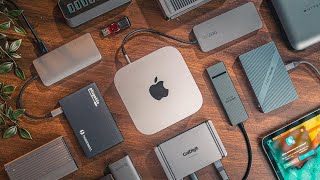
Best USB Hubs for Laptop 2026 — Portable Multiport Adapters
By MyAwesomeBuy Research Team · Updated April 8, 2026 · Our Methodology
5 models compared49,434+ reviews analyzed
No manufacturer paid for placement. Rankings based on verified buyer review data.
Quick Answer
The Anker 7-in-1 USB-C Hub ($25.99) is the best portable hub for most laptops — 4K HDMI, 100W PD passthrough, and three USB-A ports in a package that fits in any bag. For MacBook users who want Satechi's premium build quality, the Satechi Slim V2 is the step up at $79.99.
Best for: Single-cable USB-C hub with HDMI, USB-A, and 100W PD
“Anker's 7-in-1 USB-C hub connects one cable to a MacBook or Windows laptop and expands to HDMI 4K monitor, USB-A ports for drives and peripherals, and 100W PD charges your laptop simultaneously.”
Anker USB-C Hub 7-in-1 with 4K HDMI is the baseline recommendation for any laptop user who needs to expand ports. The 4K@30Hz HDMI output connects to any external monitor. 100W PD passthrough charges MacBook Pro and Dell XPS at full speed via the hub. Three USB-A 3.0 ports handle keyboard, mouse, and USB drives. The built-in cable keeps the hub secure and positioned well on any desk.
Anker USB-C Hub 7-in-2 for MacBook Pro uses a dual USB-C connector to grip both USB-C ports simultaneously — eliminating the wobble of single-port hubs. Delivers 4K@60Hz HDMI output (an upgrade over 30Hz single-port hubs), 100W PD passthrough, USB-A 3.0 ports, and a card reader. The rigid connection doubles as a side-panel hub that stays flush with the MacBook.
Full Specs & Measurements
Upc
194644118723 194644119010
Asin
B0BNZ5V1TF
Brand
Anker
Color
Gray
Item Weight
1.92 ounces
Manufacturer
Anker
Model Number
A8354
Mfr Part Number
A83540A1
Number Of Ports
7
Total Usb Ports
7
Operating System
macOS
Best Sellers Rank
#24 in USB Hubs
Compatible Devices
Laptops
Data Transfer Rate
40 Gigabits Per Second
Enclosure Material
Plastic
Hardware Interface
USB
Additional Features
Fast Charging, HDMI™️
Item Dimensions L X W X H
4.72"L x 1.14"W x 0.39"H
Best Premium
Belkin USB-C Hub 6-in-1
$64
at Amazon
Best for: Users with 4K@60Hz monitors who need clean HDMI output and are willing to pay for Belkin's premium build and brand warranty
“Belkin USB-C Hub 6-in-1 charges a $20 premium over the UGREEN 9-in-1 for two key advantages: 4K@60Hz HDMI output and Belkin's premium build quality. For users with 4K@60Hz monitors where smooth cursor”
Belkin USB-C Hub 6-in-1 targets MacBook and Surface users who want hub build quality that matches their device. The aluminum housing matches MacBook aesthetics and dissipates heat better than plastic designs. VGA and HDMI outputs, 100W PD, two USB-A 3.0 ports, and a card reader. At $64.49, it costs more than Anker but Belkin's track record for long-term reliability justifies the premium for daily office use.
Desktops, Laptops, Monitors, Tablets, USB Flash Drives
Data Transfer Rate
5 Gigabits Per Second
Enclosure Material
Aluminum, ABS Plastic
Hardware Interface
3.5mm Audio, Ethernet, HDMI, USB 3.0 Type A, USB Type C
Additional Features
HUB
Warranty Description
limited lifetime
Item Dimensions L X W X H
4.61"L x 1.85"W x 0.63"H
Global Trade Identification Number
00745883819829
Worth Considering
Satechi USB-C Hub Multiport Adapter with Ethernet
$48
at Amazon
Best for: MacBook and iPad users needing a slim multiport hub with USB-C passthrough
“Best compact hub for MacBook users who need Ethernet on the go. Satechi's aluminum build runs noticeably cooler than plastic competitors, and 4K@60Hz HDMI works reliably.”
Satechi USB-C Hub Multiport Adapter adds Gigabit Ethernet to the hub mix — a meaningful upgrade for video conference reliability and large file transfers over a shared network. The aluminum construction matches MacBook Pro aesthetics and handles heat better than plastic designs. HDMI, USB-A, SD card reader, and 100W PD complete the port selection. A premium choice that earns its $69.99 price for ethernet-dependent workflows.
Full Specs & Measurements
Upc
879961008659
Asin
B083XPXN9D
Brand
Satechi
Color
Black - Slim CLASSIC
Item Weight
63 Grams
Manufacturer
Satechi
Model Number
ST-UCSMA3K
Mfr Part Number
ST-UCSMA3K
Number Of Ports
7
Total Usb Ports
2
Operating System
macOS, Windows, iPadOS
Best Sellers Rank
#298 in USB Hubs
Data Transfer Rate
5 Gigabits Per Second
Enclosure Material
Aluminum
Hardware Interface
Ethernet, HDMI, MicroSD, USB, USB Type C
Additional Features
Fast Data Transfer, Lightweight, Pass Through Charge, Plug and Play, Portable
Warranty Description
2 Year Manufacturer
Item Dimensions L X W X H
5.2"L x 1.3"W x 0.51"H
Global Trade Identification Number
00879961008659
Eu Spare Part Availability Duration
1 Years
Best Budget
Anker 5-in-1 USB-C Hub with 4K HDMI and USB-A 3.0 Ports
$18
at Amazon
Best for: iPad and laptop users wanting portable hub with fast USB-C passthrough
“The right compact hub for iPad and laptop users who need a few key ports added — HDMI, USB-C pass-through, and SD card — without carrying a heavy dock.”
Anker USB-C Hub 5-in-1 is the minimal viable hub: 4K HDMI, two USB-A 3.0 ports, one USB-C data port, and 100W PD passthrough. No card reader, no ethernet, just the core connections most laptop users need daily. The slim form factor fits in a shirt pocket. At $24.99, it is the right choice for users who need one monitor and a couple of USB devices without paying for ports they will never use.
Full Specs & Measurements
Upc
194644101237 194644121358
Asin
B0BQLLB61B
Brand
Anker
Color
Black
Item Weight
1.44 ounces
Manufacturer
Anker
Model Number
A8355011
Mfr Part Number
A8355011
Number Of Ports
5
Total Usb Ports
3
Operating System
Chrome OS, Windows 10, Windows 7
Best Sellers Rank
#3 in Computers & Accessories (See Top 100 in Computers & Accessories) #1 in Laptop Docking Stations
Compatible Devices
Windows and MacBook computers that support USB-C with DP Alt Mode and Power Delivery, as well as USB4 and Thunderbolt 3/4/5 ports.
Data Transfer Rate
5 Gigabits Per Second
Enclosure Material
Aluminum
Hardware Interface
USB Type C
Additional Features
HDMI™️
Warranty Description
18-month
Item Dimensions L X W X H
4.78"L x 1.59"W x 0.45"H
Minimum Required Operating System Version
Windows 7
USB Hubs for Laptop Buying Guide
Photo by Anzor Dukaev / Pexels
Our Top Pick
Anker USB-C Hub 7-in-1 with 4K HDMI at $25 — 4K HDMI output, 100W power delivery passthrough, SD/microSD reader, and three USB-A ports covers every connectivity scenario for a modern thin-and-light laptop.
Budget Pick: Anker 5-in-1 USB-C Hub with 4K HDMI and USB-A 3.0 Ports at $18.98 — Covers the essentials — HDMI, USB-A, USB-C PD — in the most compact form factor at the lowest price.
Great for: MacBook and ultrabook users who need to expand beyond 1–2 USB-C ports, anyone connecting an external monitor, keyboard, and mouse from a single cable
Not ideal if: You primarily work at a fixed desk — a powered docking station gives better performance and more ports for stationary setups
Bus Power vs. Powered Hubs
Portable USB-C hubs draw power from the laptop's USB-C port, which limits the total wattage available for connected devices. If you connect a monitor AND an external hard drive AND charge a phone simultaneously, you may hit the bus power limit and see devices disconnect or charge slowly. For demanding multi-device setups, a powered docking station with its own power supply is more appropriate. Portable hubs are the right choice for travel and desk setups with moderate device counts.
Anker 7-in-2 USB-C Hub for MacBook 4K 60Hz HDMI Th...
I Tested 12 Different USB-C Hubs - Here Are My Top 5
Hubs with 100W PD passthrough let you charge the laptop via the hub using a single USB-C cable — critical for keeping a desk clean with one cable running from hub to laptop. Check whether the hub's PD spec matches or exceeds your laptop's charging requirement. Most MacBook Pros require 61–96W; thin ultrabooks work fine at 45W. A hub with only 60W PD will charge a MacBook Pro slowly or not at all under load.
HDMI vs. DisplayPort and Resolution Limits
Most portable hubs include HDMI output. For 4K@60Hz, ensure the hub specifically states 4K@60Hz — some hubs only do 4K@30Hz, which produces visible input lag on modern monitors. DisplayPort output is rarer on portable hubs but compatible with more professional monitors. The DisplayLink chip technology enables multiple external monitors from a single USB-C connection but requires driver installation and causes slight CPU overhead.
Modern laptops have largely eliminated USB-A ports, but most keyboards, mice, USB drives, and accessories still use USB-A. A hub with three USB-A ports covers the vast majority of legacy device needs. Verify the USB-A ports are USB 3.0 (5Gbps) rather than USB 2.0 (480Mbps) — USB 2.0 ports bottleneck external hard drives and fast flash drives significantly. Not all USB-C cables are equal — and the wrong one can charge slowly, fail to transfer data, or not work with your monitor at all. Our USB-C cable guide explains why the cable matters as much as the port.
Portable bus-powered hubs support simultaneous use of all ports, but total bandwidth is shared. Most portable hubs use a single USB 3.2 Gen 1 (5Gbps) connection, which easily handles a monitor, keyboard, mouse, and USB drive simultaneously. Adding multiple fast storage devices or two monitors may approach the bandwidth limit.
Will a USB-C hub work with my MacBook?
Yes — all USB-C hubs work with MacBook. MacBook-specific hubs are often just marketing. Any hub with USB-C Alt Mode support works for video output. If you have an M-series MacBook, verify the hub supports the video output format for your monitor (HDMI 2.0 for 4K@60Hz).
Does a USB-C hub charge my laptop?
Hubs with Power Delivery passthrough charge your laptop via the hub — you connect the charger to the hub, and the hub passes power to the laptop while powering its own ports. Look for 87W+ PD for MacBook Pro; 45-65W for most other thin-and-light laptops.
Will a USB hub slow down my internet if I use it for ethernet?
No — ethernet via a USB hub runs at full Gigabit speed (1000Mbps / 125MB/s) on USB 3.0 or higher connections. USB 2.0 hubs would bottleneck ethernet, but all modern USB-C hubs use USB 3.x and support full Gigabit throughput.
What is the difference between a USB hub and a docking station?
A USB hub is bus-powered, compact, and travel-friendly — it draws power from the laptop and adds ports portably. A docking station has its own power supply, supports higher wattage charging, can drive dual monitors at full resolution, and is designed to stay on a desk permanently. Hubs are for on-the-go; docks are for desk setups.
We analyze Amazon review data — often thousands of reviews per product — to surface patterns
that individual buyers miss. Our process aggregates star ratings, review counts, and buyer
sentiment at scale, identifying which strengths and weaknesses appear consistently across
the largest review samples available. The 49,434+ reviews analyzed on this page represent real verified-purchase feedback from Amazon buyers.
Each product earned its placement through data: total review volume, average rating, and the
specific praise and complaints that repeat most often across buyers. No manufacturer paid for
placement on this page. Products appear here because buyers endorsed them at scale, not
because a company asked us to feature them.
We use AI to summarize review sentiment — not to fabricate opinions, but to condense what
thousands of buyers actually wrote into a readable format. The pros and cons you see reflect
the most common themes found in verified purchaser reviews, paraphrased for clarity. We do not
claim to have accessed Reddit, YouTube, or specific publications in generating these summaries.
Prices shown reflect Amazon pricing at the time this page was last generated. Click
“See Today’s Price” to get the current live price on Amazon.
Read our full methodology →
Affiliate disclosure: When you buy through our links, we may earn
a small commission at no extra cost to you. This helps us keep the reviews free and
the data updated. Our recommendations are based on data, not who pays us.
Learn more →

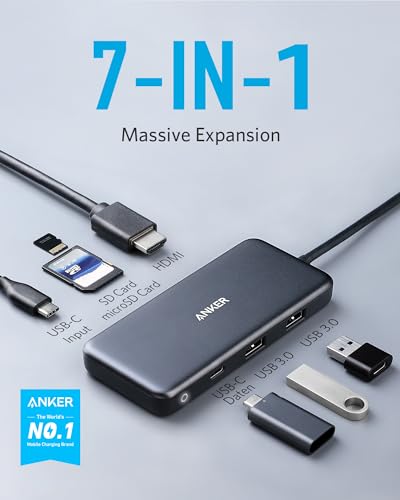 Anker USB-C Hub 7-in-1 with 4K HDMI
 Anker 7-in-2 USB-C Hub for MacBook 4K 6…
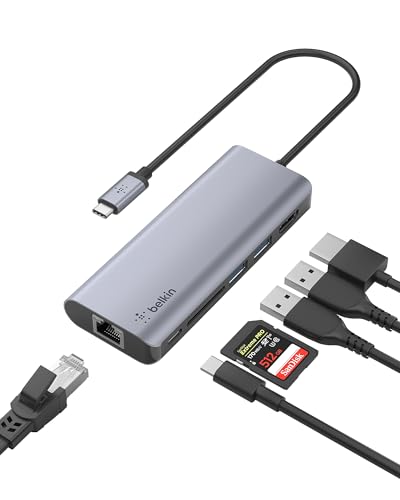 Belkin USB-C Hub 6-in-1
 Satechi USB-C Hub Multiport Adapter wit…
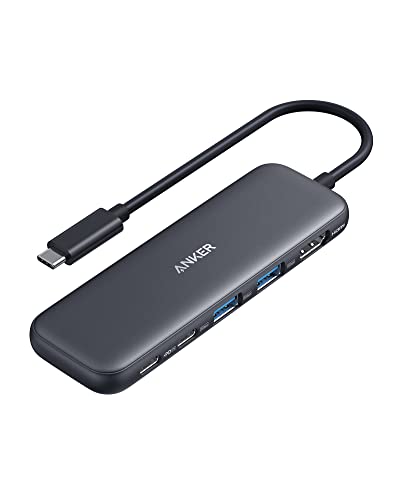 Anker 5-in-1 USB-C Hub with 4K HDMI and…


 Photo by Anzor Dukaev / Pexels