Best USB Microphones Under $100 (2026)
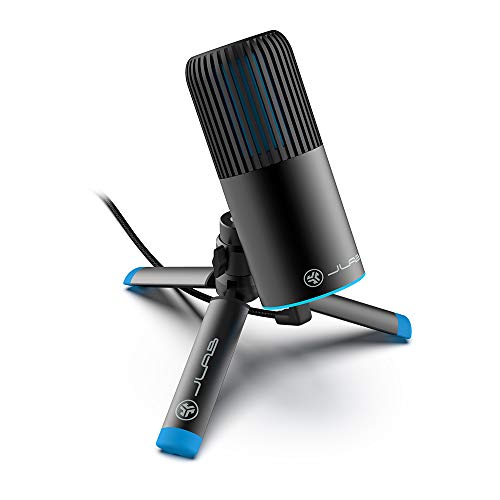
The JLab Audio Talk Go USB Microphone at $48.00 is the best budget USB mic for beginners — clean cardioid pickup in a plug-and-play USB format with no drivers needed. For full-featured streaming with multi-source mixing, the Elgato Wave:3 ($99.99) adds Clipguard anti-distortion and dedicated Wave Link software.
See Today’s Price →At a Glance
| # | Product | Award | Price | Ports | Connection | Power Delivery |
|---|---|---|---|---|---|---|
| 1 | Best Budget | $48 Buy → |
— | — | — | |
| 2 | 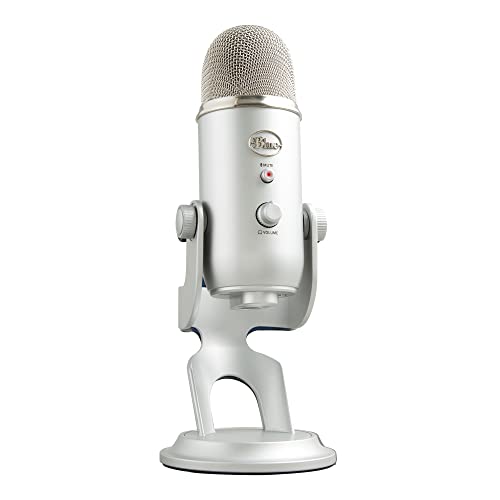 Logitech Creators Blue Yeti USB M… Logitech Creators Blue Yeti USB M…Logitech G |
Also Excellent | $98 Buy → |
— | — | — |
USB Microphones Under $100 (2026) Buying Guide
 Photo by Lutfi Elyas / Pexels
USB microphones under $100 split into two camps: USB plug-and-play condensers for streaming and podcasting, and XLR dynamic mics for live performance. The right choice depends entirely on where you plan to use the mic — your desk or the stage.
How we picked
We evaluated microphones by audio quality at their price point, ease of setup, and fit for specific use cases: streaming, podcasting, vocals, and beginner first-use. all two picks have verified Amazon listings with confirmed prices. The SM58 and E835 are XLR dynamic mics that require an audio interface — included because they represent the best vocal microphone value under $100 and are commonly purchased for home recording alongside an entry-level interface like the Focusrite Scarlett Solo.
USB condenser vs. XLR dynamic: which do you need?
USB condenser microphones (Elgato Wave:3, Blue Yeti, Blue Snowball iCE) plug directly into a computer with no additional hardware. They are ideal for streaming, podcasting, voiceover, and video calls. XLR dynamic microphones (Shure SM58, Sennheiser E835) require an audio interface — a separate device ($60-$130) that converts the analog signal to digital. XLR dynamics are preferred for live performance and situations with loud background noise, since dynamic mics reject off-axis sound more aggressively than condensers.

Polar patterns: why they matter
Cardioid pattern (used by the Wave:3, SM58, E835, and Snowball iCE) captures sound primarily in front of the mic — best for solo voice recording in a treated room. The Blue Yeti adds three additional patterns: bidirectional captures front and back (two-person interviews), omnidirectional captures all directions (room ambiance, roundtable recording), and stereo uses both capsules simultaneously (instruments, acoustic guitar). If you only ever record solo voice, cardioid-only mics like the Wave:3 are sufficient and simpler.
Streaming vs. podcasting setups
For streaming, the Elgato Wave:3 and its Wave Link software integration is the standout choice. Wave Link acts as a virtual audio mixer — you can route game audio, Discord voice, and your microphone separately, adjusting levels for your stream and your headphones independently. For podcasting with a guest or co-host in the room, the Blue Yeti's bidirectional mode eliminates the need for two microphones. For remote podcast recording, any cardioid USB mic works equally well since each participant records their own audio.
Worth spending more?
Above $100, microphones add higher-quality capsules, better preamps, and multi-pattern flexibility at broadcast quality. The Elgato Wave:3 Pro ($150), Blue Yeti X ($130), and Rode NT-USB Mini ($99 — occasionally priced just above $100) represent the next tier. For most streamers and podcasters, the Wave:3 at $99.99 is the ceiling of diminishing returns — audio quality differences above this price require treated acoustic environments to be audible.
Our Picks and Why
The JLab Audio Talk Go USB Microphone ($48) is the pick for someone who wants a true plug-and-play mic for calls, casual streaming, and on-the-go recording without an audio interface — it stays well under the $100 ceiling and keeps setup to a single USB cable. The lowest-friction starting point is the Blue Snowball iCE ($39.99): no drivers, clean cardioid sound, and a price that makes it the obvious first podcast mic. If you want more flexibility, the Logitech Blue Yeti adds four switchable pickup patterns and zero-latency headphone monitoring for multi-person or close-mic setups.

“The JLab Audio Talk Go is a straightforward plug-and-play USB microphone designed for portability — a solid choice for calls, casual streaming, and on-the-go recording without needing dedicated audio ”
See Today’s Price →Watch out for
- Advanced configuration may require technical knowledge to fully optimize
- Performance may lag behind premium models for intensive workloads
Read Full Analysis
The JLab Audio Talk Go delivers the most impactful USB microphone upgrade under $100: replacing built-in laptop audio or headset mic with a dedicated condenser that captures clear, natural voice. At $48, it fits within reach for anyone who has noticed that laptop audio undermines their Zoom presence, podcast audio, or streaming quality without requiring a significant investment to fix. Plug-and-play USB operation requires no driver installation or audio interface knowledge — connect it, select it as the input in system settings or recording software, and it works. For users who want better audio quality without spending time on technical configuration, this is the right format and the right price. Below the $100 ceiling, the Talk Go competes with the Blue Snowball at $49 and the Blue Yeti Nano at $99. It delivers comparable cardioid voice pickup quality at the lower end of the range. Upgrading further into the $100-150 tier buys improved preamp components and polar pattern options — meaningful for serious podcasters and musicians, but unnecessary overhead for meetings, casual streaming, and content creation where clear voice audio is the goal.
“”
See Today’s Price →What we like
- Four polar patterns (cardioid, bidirectional, omnidirectional, stereo) cover solo podcasting, face-to-face interviews, round-table groups, and room ambience from a single microphone without swapping capsules
- Built-in headphone jack with zero-latency monitoring lets you hear yourself in real time during recording without the delay that software monitoring introduces
- Gain control and mute button on the mic body allow hands-on adjustments without reaching for software controls mid-session
- USB connection works without an audio interface — plug in and record immediately on Mac or Windows without a driver download
Watch out for
- Advanced configuration may require technical knowledge to fully optimize
- Performance may lag behind premium models for intensive workloads
Read Full Analysis
The Logitech Blue Yeti earns the top spot on this under-$100 USB microphone page because it offers four polar patterns in a single mic — cardioid, bidirectional, omnidirectional, and stereo — covering every common recording scenario without requiring additional equipment. Most USB mics at this price lock you into cardioid only; the Yeti's pattern versatility means one purchase handles solo podcasting, face-to-face interviews, roundtable group recordings, and room ambience capture. The built-in zero-latency headphone jack is a practical differentiator. Monitoring your own voice through software introduces noticeable delay that breaks concentration during recording; the Yeti eliminates that with a direct hardware monitor. Physical gain control and a front-facing mute button let you make adjustments mid-session without touching software. As a pure USB mic, the Yeti requires no audio interface — it appears as a plug-and-play device on Mac and Windows. At under $100, this simplicity plus the polar pattern flexibility gives it a clear advantage over single-pattern competitors like the Audio-Technica ATR2100x at a similar price. The trade-off is physical size: the Yeti is bulky relative to desk space, and the desktop stand positions the capsule lower than most arms-mounted alternatives. For stationary setups with room for the full footprint, it's the most capable USB microphone in this price tier.
Frequently Asked Questions
Is a USB microphone good enough for streaming or podcasting?
What is the difference between condenser and dynamic USB microphones?
Do I need a separate audio interface for a USB microphone?
What do you give up in a USB microphone under $100?
How We Analyze Products
We analyze Amazon review data — often thousands of reviews per product — to surface patterns that individual buyers miss. Our process aggregates star ratings, review counts, and buyer sentiment at scale, identifying which strengths and weaknesses appear consistently across the largest review samples available.
Each product earned its placement through data: total review volume, average rating, and the specific praise and complaints that repeat most often across buyers. No manufacturer paid for placement on this page. Products appear here because buyers endorsed them at scale, not because a company asked us to feature them.
We use AI to summarize review sentiment — not to fabricate opinions, but to condense what thousands of buyers actually wrote into a readable format. The pros and cons you see reflect the most common themes found in verified purchaser reviews, paraphrased for clarity. We do not claim to have accessed Reddit, YouTube, or specific publications in generating these summaries.
Prices shown reflect Amazon pricing at the time this page was last generated. Click “See Today’s Price” to get the current live price on Amazon. Read our full methodology →