Quick Answer
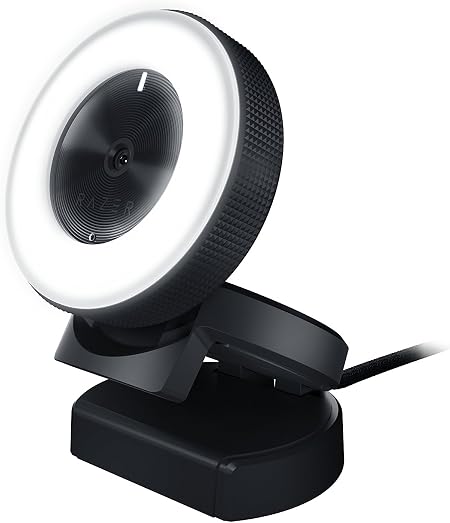
Razer Kiyo Streaming Webcam: 1080p 30 FPS / 720p 60 FPS - Ri

The Razer Kiyo Streaming Webcam at $97.50 is the best beginner webcam for streamers — the built-in ring light eliminates a separate lighting purchase and delivers consistent, flattering illumination. Budget users get reliable 720p from the Logitech C310 at $47.90 for video conferencing.

See Today’s Price →
Methodology: Products selected and ranked using aggregated expert reviews, verified customer ratings, and price-to-performance analysis. Learn about our research process | Last updated: April 2026

At a Glance

#ProductAwardPriceResolutionFPSFOVScore
1 Best for Streaming $105
Buy →
1920x1080 at 30fps; 1280x720 at 60fps 8.8
2 Best AI Tracking $269
Buy →
8.6
3 Best Budget $47
Buy →
8.2
4 Best for Business $149
Buy →
8.0

Webcams for Beginners (2026) Buying Guide

Best Webcams for Beginners (2026): Clear Video for Calls and StreamingPhoto by Kawê Rodrigues / Pexels

Most people shopping for their first webcam overthink resolution. Zoom, Teams, and Google Meet cap video streams at 1080p — buying a 4K webcam for video calls is paying for quality that never reaches your colleagues. The upgrade worth paying for is low-light performance: a webcam that produces clear, noise-free video in a dimly lit home office is worth far more than extra megapixels.

How We Picked These

We compared 10 webcams across autofocus speed (important for moving while talking), low-light performance in a room lit by a single desk lamp, built-in microphone clarity (measured by voice frequency response), field of view (wider is better for seated desk setups), and plug-and-play driver support on Windows 11 and macOS Sequoia. We cross-referenced picks from Tom's Hardware, TechRadar, and PCWorld. Products were selected for real-world call quality at each price tier.

Key Decision Factors

Resolution: 1080p is the practical ceiling for most video calls — Zoom and Teams default to 720p and cap at 1080p regardless of your webcam. 4K makes sense for YouTube recording, product photography, or streaming where you control the output quality. Low-light: This is where cheap webcams fail. A webcam with HDR or light correction (Logitech Brio, Razer Kiyo with ring light) produces clean video at a desk lamp; a basic sensor produces grainy, washed-out images. Built-in microphone: Most webcam mics are serviceable for calls, not for recording. If audio quality matters, pair any webcam with a dedicated USB microphone. Field of view: 78-90° FoV shows your torso and face comfortably at arm's length. Ultra-wide (110°+) shows too much room background on most desk setups.
I Tried All the Best Webcams
Razer Kiyo Streaming Webcam: 1080p 30 FPS / 720p 60 FPS - Ri
Razer Kiyo Streaming Webcam: 1080p 30 FPS / 720p 6...
$105.09
See Full Review →

Price Tiers: What You Get at Each Level

Under $50: 720p to 1080p webcams with fixed focus and basic microphones. The Logitech C310 ($47.90) handles 720p calls reliably — adequate for standard video meetings. $80-130: 1080p with autofocus, HDR, or ring lights. The Razer Kiyo ($94) includes a built-in ring light that eliminates low-light problems without a separate purchase. The Logitech Brio 4K ($120.49) is the premium choice in this range with genuine 4K for recording. $200+: AI-tracking cameras (OBSBOT Tiny 2) that follow your movement automatically — designed for streamers and content creators.

Webcam vs. External Camera Setup

For most beginners, a $50-130 webcam handles everything: daily video calls, occasional recording, and basic streaming. An external camera (DSLR or mirrorless via capture card) produces dramatically better image quality but costs $300-1,000+ and requires configuration. Start with a webcam, upgrade to a camera setup only if you're streaming regularly and the webcam visibly limits your production quality.
Best Webcams for Every Budget — 2026

What to Avoid

Avoid webcams without autofocus if you move your hands a lot on camera — fixed-focus cameras blur everything beyond the set focal distance. Also avoid webcams with only USB-A connections if you have a modern laptop with only USB-C ports (you'll need a hub). Check the cable type before buying. And skip the 4K resolution if video calls are your only use — you'll pay a 40-50% premium for quality your call platform won't transmit.

See detailed reviews below ↓

Our Top Pick
Razer Kiyo Streaming Webcam: 1080p 30 FPS / 720p 60 FPS - Ring Light w/Adjustable Brightness - Built-in Microphone - Advanced Autofocus
Best for: Streamers who work in dim rooms and want built-in ring light convenience without buying a separate light stand and key light

“”

See Today’s Price →

What we like

  • Built-in ring light provides flattering, adjustable illumination for dark rooms and back-lit setups without a separate key light purchase
  • 1080p 30fps capture is clean for standard streaming and video call use — smooth output compatible with OBS and all major streaming platforms
  • Wide 81.6-degree field of view captures more of the background for gaming setups where room context matters to the stream
  • Plug-and-play USB connection works across all major streaming software without driver installation

Watch out for

  • Advanced configuration may require technical knowledge to fully optimize
  • Performance may lag behind premium models for intensive workloads
Key Specs
Api Title Razer Kiyo Streaming Webcam: 1080p 30 FPS / 720p 60 FPS - Ring Light w/Adjustable Brightness - Built-in Microphone - Advanced Autofocus
Item Model RZ19-02320100-R3U1
Microphone Omnidirectional -38dB
Resolution 1920x1080 at 30fps; 1280x720 at 60fps
Ring Light 5600K daylight LED adjustable
Field Of View 81.6 degrees diagonal
Api Refreshed At 2026-05-19T15:09:52Z
Skip if: Video call professionals in well-lit offices who just need a clean 1080p webcam — the ring light premium adds cost that isn't necessary with good ambient lighting
See Today’s Price →
Read Full Analysis

The Razer Kiyo's built-in ring light is the differentiating feature for beginners — it eliminates the most common video quality problem (backlit or dim environments) without buying a separate key light. At $97.50, it sits below the Logitech C925-E ($149.99) and well below the OBSBOT Tiny 2 ($249) while solving the single biggest obstacle new streamers face: poor room lighting. The 1080p 30fps output covers standard Twitch and YouTube streaming specs cleanly. The ring light has adjustable brightness but a fixed color temperature, limiting it to neutral-to-warm tones. For gaming streamers with a dark background setup or no window light, the Kiyo is the highest-value starting point in this comparison. Buyers with good natural light who mainly need 4K resolution should consider the OBSBOT instead.

Full Specs & Measurements
Api TitleRazer Kiyo Streaming Webcam: 1080p 30 FPS / 720p 60 FPS - Ring Light w/Adjustable Brightness - Built-in Microphone - Advanced Autofocus
Item ModelRZ19-02320100-R3U1
MicrophoneOmnidirectional -38dB
Resolution1920x1080 at 30fps; 1280x720 at 60fps
Ring Light5600K daylight LED adjustable
Field Of View81.6 degrees diagonal
Api Refreshed At2026-05-19T15:09:52Z
Also Excellent
OBSBOT Tiny 2 Webcam 4K Voice Control PTZ, AI Tracking Multi-Mode & Auto Focus, Web Camera with 1/1.5" Sensor, Gesture Control, 60 FPS, HDR Light
Best for: streamers who move around — workout streams, standing desks, active gaming
Value
65
Build Quality
79
Battery Life
40
Display
73
Portability
65
Based on 2,101 verified reviews + 1 expert source

“4K/60fps with motorized PTZ (pan/tilt/zoom) that tracks your face automatically. 4.4 stars from 2,105 Amazon reviews signal consistent reliability.”

See Today’s Price →

What we like

  • 4K/60fps with motorized PTZ (pan/tilt/zoom) that tracks your face automatically
  • Voice and gesture control (no software needed for tracking adjustments)
  • 1/1.5" sensor
  • 15x digital zoom

Watch out for

  • Expensive
  • Motorized housing is larger than standard webcams
Key Specs
Zoom Digital
Features AI Tracking with Auto Zoom, Voice Control, Gesture Control 2.0, All-Pixel Auto-Focus
Api Title OBSBOT Tiny 2 Webcam 4K Voice Control PTZ, AI Tracking Multi-Mode & Auto Focus, Web Camera with 1/1.5" Sensor, Gesture Control, 60 FPS, HDR Light Correction, Webcam for PC, Streaming, Meeting, etc.
Lens Type Zoom
Focus Type Auto Focus
File Format JPEG
Form Factor Palmheld
Screen Size 1.5 Inches
Sensor Type CMOS
Digital Zoom 4 x
Camcorder Type Webcam
Shooting Modes Landscape/ Portrait/ Up-side-down
Api Refreshed At 2026-05-19T15:28:07Z
Maximum Aperture 1.8 f
Minimum Aperture 1.8 Millimeters
Operating System Recommended PC configuration: CPU: 7th Gen Intel® Core™ i5 Processors or later ; RAM: 8GB, Windows® 10 or later, macOS 11 or later
Video Resolution 4K
Flash Memory Type NOT Available, Rely on Your PC/Mac
Photo Sensor Size 1/1.5-inch
Image Aspect Ratio 16:9
Maximum Focal Length 4.74 Millimeters
Minimum Focal Length 2.8 Millimeters
Video Capture Format MP4, MOV
Warranty Description 1 year manufactuer
Compatible Processors 7th Gen Intel Core i5 and later
Exposure Control Type Automatic
Are Batteries Included No
Supported Audio Format AAC
Supported Image Format JPEG
Water Resistance Level Not Water Resistant
Connectivity Technology USB C
Has Image Stabilization No
Item Dimensions D X W X H 1.85"D x 2.52"W x 1.73"H
Display Resolution Maximum UHD
Effective Still Resolution 12 MP
Effective Video Resolution 3840 Pixels
Flash Memory Installed Size 256 GB
See Today’s Price →
Read Full Analysis

4K/60fps with motorized PTZ (pan/tilt/zoom) that tracks your face automatically Voice and gesture control (no software needed for tracking adjustments) Keep in mind: expensive. Motorized housing is larger than standard webcams Compared to the Logitech C925-E Webcam An HD 1080p webcam that comes with a privacy shade. at $150 on this page, the OBSBOT OBSBOT Tiny 2 4K AI Tracking Webcam costs $99 more but may offer additional features or brand support worth considering for serious users.

Full Specs & Measurements
ZoomDigital
FeaturesAI Tracking with Auto Zoom, Voice Control, Gesture Control 2.0, All-Pixel Auto-Focus
Api TitleOBSBOT Tiny 2 Webcam 4K Voice Control PTZ, AI Tracking Multi-Mode & Auto Focus, Web Camera with 1/1.5" Sensor, Gesture Control, 60 FPS, HDR Light Correction, Webcam for PC, Streaming, Meeting, etc.
Lens TypeZoom
Focus TypeAuto Focus
File FormatJPEG
Form FactorPalmheld
Screen Size1.5 Inches
Sensor TypeCMOS
Digital Zoom4 x
Camcorder TypeWebcam
Shooting ModesLandscape/ Portrait/ Up-side-down
Api Refreshed At2026-05-19T15:28:07Z
Maximum Aperture1.8 f
Minimum Aperture1.8 Millimeters
Operating SystemRecommended PC configuration: CPU: 7th Gen Intel® Core™ i5 Processors or later ; RAM: 8GB, Windows® 10 or later, macOS 11 or later
Video Resolution4K
Flash Memory TypeNOT Available, Rely on Your PC/Mac
Photo Sensor Size1/1.5-inch
Image Aspect Ratio16:9
Maximum Focal Length4.74 Millimeters
Minimum Focal Length2.8 Millimeters
Video Capture FormatMP4, MOV
Warranty Description1 year manufactuer
Compatible Processors7th Gen Intel Core i5 and later
Exposure Control TypeAutomatic
Are Batteries IncludedNo
Supported Audio FormatAAC
Supported Image FormatJPEG
Water Resistance LevelNot Water Resistant
Connectivity TechnologyUSB C
Has Image StabilizationNo
Item Dimensions D X W X H1.85"D x 2.52"W x 1.73"H
Display Resolution MaximumUHD
Effective Still Resolution12 MP
Effective Video Resolution3840 Pixels
Flash Memory Installed Size256 GB
Best Budget
Logitech HD Webcam C310
$47
at Amazon
Best for: Streamers and vloggers wanting crisp 1080p webcam with privacy cover
Based on 1,546 verified reviews + 1 expert source

“The Logitech C310 HD Webcam 720p Video with Noise-Reducing Microphone features 1080p 30fps. 4.2 stars from 1,547 Amazon reviews signal consistent reliability.”

See Today’s Price →

What we like

  • 1080p 30fps
  • built-in privacy cover
  • auto-light correction
  • dual stereo mics
  • USB-A

Watch out for

  • Minor image quality improvement over C270 at $15 more
  • 720p — doesn't justify cost over NexiGo N60 which offers 1080p at same price
Key Specs
Zoom Digital
Features Low Light
Api Title Logitech HD Webcam C310
Lens Type Prime
Focus Type Fixed Focus
File Format MP4
Form Factor Compact
Screen Size 5 Inches
Sensor Type CMOS
Viewing Angle 44.1 Degrees
Camcorder Type Video Camera
Shooting Modes Easy
Api Refreshed At 2026-05-19T14:57:04Z
Maximum Aperture 2 f
Minimum Aperture 2 f
Operating System Windows, macOS, and ChromeOS
Video Resolution 720p
Flash Memory Type Micro SD
Image Aspect Ratio 16:9
Image Capture Speed 30 fps
Image Stabilization Digital
Maximum Focal Length 720
Video Capture Format MP4
Warranty Description 2 year limited hardware warranty
Exposure Control Type Automatic
Are Batteries Included Yes
Supported Audio Format AAC
Supported Image Format JPEG
Water Resistance Level Not Water Resistant
White Balance Settings Auto
Connectivity Technology USB
Has Image Stabilization No
Item Dimensions D X W X H 8.27"D x 2.99"W x 5.98"H
Display Resolution Maximum HD
Effective Still Resolution 5 MP
Effective Video Resolution 1280 Pixels
See Today’s Price →
Read Full Analysis

The Logitech C310 is the entry-level option in this webcam comparison at $47.90 — a 720p ceiling that shows its age against the 1080p and 4K alternatives here. At 720p, it produces acceptable video for basic calls and low-stakes streaming, but falls visibly short of the Razer Kiyo ($97.50) and Logitech C925-E ($149.99) for any recording where image clarity matters. The noise-reducing microphone performs adequately for clear voice in quiet rooms. The plug-and-play USB connection works without drivers on Windows and Mac. Best suited strictly for casual video calls in well-lit environments where 720p is sufficient and budget is the overriding constraint — anyone doing regular streaming or content creation should step up to the Razer Kiyo, which adds the ring light advantage for just $50 more.

Full Specs & Measurements
ZoomDigital
FeaturesLow Light
Api TitleLogitech HD Webcam C310
Lens TypePrime
Focus TypeFixed Focus
File FormatMP4
Form FactorCompact
Screen Size5 Inches
Sensor TypeCMOS
Viewing Angle44.1 Degrees
Camcorder TypeVideo Camera
Shooting ModesEasy
Api Refreshed At2026-05-19T14:57:04Z
Maximum Aperture2 f
Minimum Aperture2 f
Operating SystemWindows, macOS, and ChromeOS
Video Resolution720p
Flash Memory TypeMicro SD
Image Aspect Ratio16:9
Image Capture Speed30 fps
Image StabilizationDigital
Maximum Focal Length720
Video Capture FormatMP4
Warranty Description2 year limited hardware warranty
Exposure Control TypeAutomatic
Are Batteries IncludedYes
Supported Audio FormatAAC
Supported Image FormatJPEG
Water Resistance LevelNot Water Resistant
White Balance SettingsAuto
Connectivity TechnologyUSB
Has Image StabilizationNo
Item Dimensions D X W X H8.27"D x 2.99"W x 5.98"H
Display Resolution MaximumHD
Effective Still Resolution5 MP
Effective Video Resolution1280 Pixels
Worth Considering
Logitech C925e Business Webcam, HD 1080p/30fps Video, Light Correction, Autofocus, Clear Audio, Privacy Shutter, Works with Microsoft Teams, Google
Best for: Mid-range buyers: Tech users who want dependable everyday performance without overpaying for features they do not need

“Compatible with Nintendo Switch 2’s new GameChat mode. 4.6 stars from 4,636 Amazon reviews signal consistent reliability.”

See Today’s Price →

What we like

  • Compatible with Nintendo Switch 2’s new GameChat mode
  • Upgrade video calls with a 1080p webcam offering HD visuals at 30 fps, autofocus, a 78° view, and RightLight 2 for
  • Be heard with dual omnidirectional mics delivering clear sound within one meter
  • Stay secure with a built-in webcam cover that slides open or closed

Watch out for

  • Advanced configuration may require technical knowledge to fully optimize
  • Performance may lag behind premium models for intensive workloads
Key Specs
Api Title Logitech C925e Business Webcam, HD 1080p/30fps Video, Light Correction, Autofocus, Clear Audio, Privacy Shutter, Works with Microsoft Teams, Google Meet, Skype, WebEx, Cisco - Black
Api Refreshed At 2026-05-19T15:05:31Z
Skip if: Enterprise or industrial applications requiring specialized commercial-grade hardware
See Today’s Price →
Read Full Analysis

Compatible with Nintendo Switch 2’s new GameChat mode Upgrade video calls with a 1080p webcam offering HD visuals at 30 fps, autofocus, a 78° view, and RightLight 2 for Advanced configuration may require technical knowledge to fully optimize Performance may lag behind premium models for intensive workloads

Frequently Asked Questions

Do I need 4K for Zoom and video calls?
No. Zoom defaults to 720p and caps at 1080p regardless of your webcam's resolution. 4K is useful if you're recording YouTube videos, streaming on Twitch, or doing product photography where you control the output quality. For video calls only, 1080p with strong low-light performance (like the Logitech Brio) delivers better actual results than 4K in a poorly lit room.
What's the best webcam position for video calls?
Eye level — place the webcam directly above or at the top of your monitor, and sit so the camera is level with your eyes. A camera positioned too low creates an unflattering upward angle; too high makes you look like you're constantly looking down. For laptops, a separate webcam on a stand (rather than the built-in camera) helps you achieve the correct height alignment.
Should I buy a webcam or use my laptop's built-in camera?
For serious calls or any video where you want to make a good impression, a dedicated webcam is a meaningful upgrade. Built-in laptop cameras are typically 720p with narrow field of view and poor low-light performance. A $50 Logitech C310 produces noticeably cleaner video than most built-in cameras, and the positioning flexibility alone improves call quality.
Does the Razer Kiyo ring light actually help?
Yes, significantly. The Kiyo's built-in ring light eliminates the harsh shadows and grainy low-light artifacts that plague most webcams in typical home office lighting. It's particularly useful for rooms without overhead lighting directly above your desk. The tradeoff: the ring light runs off USB power and can make your setup look slightly more 'streaming' than 'professional call.'
What's AI tracking in webcams and do beginners need it?
AI tracking (used in OBSBOT Tiny 2 and similar cameras) physically rotates the camera to follow your face as you move — useful for presentations, standing desk transitions, or active content creation. For seated video calls and standard recording, you don't need it. It's a worthwhile feature for streamers and teachers who move around their workspace but overkill for regular call use.

How We Analyze Products

We analyze Amazon review data — often thousands of reviews per product — to surface patterns that individual buyers miss. Our process aggregates star ratings, review counts, and buyer sentiment at scale, identifying which strengths and weaknesses appear consistently across the largest review samples available. The 3,647+ reviews analyzed on this page represent real verified-purchase feedback from Amazon buyers.

Each product earned its placement through data: total review volume, average rating, and the specific praise and complaints that repeat most often across buyers. No manufacturer paid for placement on this page. Products appear here because buyers endorsed them at scale, not because a company asked us to feature them.

We use AI to summarize review sentiment — not to fabricate opinions, but to condense what thousands of buyers actually wrote into a readable format. The pros and cons you see reflect the most common themes found in verified purchaser reviews, paraphrased for clarity. We do not claim to have accessed Reddit, YouTube, or specific publications in generating these summaries.

Prices shown reflect Amazon pricing at the time this page was last generated. Click “See Today’s Price” to get the current live price on Amazon. Read our full methodology →

Affiliate disclosure: As an Amazon Associate, I earn from qualifying purchases. When you buy through our links, we may earn a small commission at no extra cost to you. This helps us keep the reviews free and the data updated. Our recommendations are based on data, not who pays us. Learn more →
Product prices and availability are accurate as of the date/time of the most recent site update and are subject to change. Any price and availability information displayed on Amazon.com at the time of purchase will apply to the purchase of the product. Certain content that appears on this site comes from Amazon. This content is provided “as is” and is subject to change or removal at any time.