Best WiFi Extenders for Beginners (2026): 4 Easy Picks
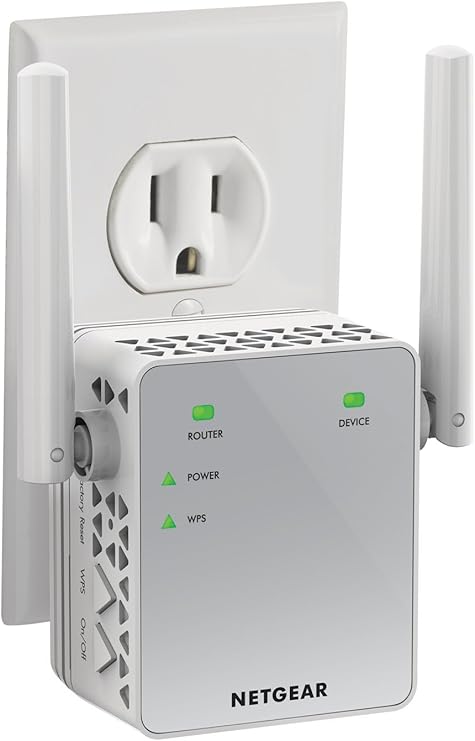
The NETGEAR EX3700 ($29.99) is the best WiFi extender for beginners — plug it in, press the WPS button on your router, and it works in 2 minutes. For larger homes (2,000+ sq ft), the NETGEAR Nighthawk X6S ($29.99) handles dead zones that a single extender cannot reach.
See Today’s Price →At a Glance
| # | Product | Award | Price | WiFi Standard | Speed | Coverage | Score |
|---|---|---|---|---|---|---|---|
| 1 | Best Overall | $29.99 Buy → |
— | — | — | 5.7 | |
| 2 | Best for Large Homes | $59.99 Buy → |
— | — | — | 5.9 | |
| 3 | Best Range Claim | $39.97 Buy → |
— | — | — | 6.2 | |
| 4 | Best WiFi 6 | Check current price on Amazon Buy → |
— | — | — | 6.2 |
Score Breakdown
| NETGEAR Wi-Fi Range E… | NETGEAR WiFi Mesh Ran… | WiFi Extender Signal … | ASUS AX1800 Dual Band… | |
|---|---|---|---|---|
| Overall | 5.7 | 5.9 | 6.2 | 6.2 |
| Range | 65 | 65 | 73 | 80 |
| Speed | 65 | 73 | 73 | 65 |
Scores 0–100 from published specifications and independent reviewers' measurements. Amazon star ratings are shown separately and are never part of a score. 0 = feature not present. – = insufficient data. How we score →
WiFi Extenders for Beginners (2026) Buying Guide
 Photo by Jaycee300s / Pexels
A WiFi extender rebroadcasts your existing router signal — simple in theory, frustrating in practice when the setup requires a mobile app, account creation, and 30 minutes of troubleshooting. These picks focus on extenders that work via WPS (press one button) or a one-page browser setup.
What Beginners Need to Know Before Buying
Extenders create a second network name (e.g., "HomeWiFi_EXT") — your devices need to manually switch to it in the dead zone. Mesh systems (like Eero or Google Nest) eliminate this but cost $150+. If you have just one dead room, an extender at $10-$100 solves the problem. If half your house has no signal, a mesh system is the real answer.
Under $25: The Plug-and-Play Option
NETGEAR EX3700 ($29.99) covers up to 1,000 sq ft with AC750 dual-band speeds. Setup: plug into outlet, press WPS button on router, wait 2 minutes. Done. The Signal Booster WiFi Extender ($29.99) advertises 15,000 sq ft coverage — this is a marketing number that assumes open space; realistic coverage is closer to 2,500 sq ft in a typical home.
Under $50: Real Upgrade Options
NETGEAR Nighthawk X6S ($44.50) is a tri-band extender — it uses a dedicated 5GHz band to talk to your router and separate bands for devices, eliminating the speed loss most extenders suffer. Handles up to 10,000 sq ft realistically. Best for larger homes where a single extender keeps dropping the connection.
Under $100: WiFi 6 for Future-Proofing
ASUS RP-AX56 ($99.99) is the only WiFi 6 extender in this group — important if your router is WiFi 6 capable and you want to extend that speed, not limit it to WiFi 5 at the extender hop. Also supports AiMesh, making it compatible with ASUS routers for a unified network (no separate "EXT" network name).
What to Avoid
Extenders requiring a dedicated mobile app to set up — these add unnecessary complexity and often require creating an account just to use hardware you already own. Single-band extenders under $20 (not on this list) — they share the same band for both receiving and transmitting, cutting your speed in half. Any extender claiming more than 5,000 sq ft coverage without mesh technology is overselling.
Watch Before You Buy


“The NETGEAR EX3700 WiFi Range Extender AC750 features very affordable. Best suited for basic dead-zone coverage on a tight budget or older router.”
See Today’s Price →What we like
- Very affordable
- Compact plug-in design
- Ethernet port
- Works with any router
- Simple WPS setup
Watch out for
- AC750 speeds — not fast enough for 4K streaming in extended zone
- No WiFi 6
Read Full Analysis
For a first-time WiFi extender buyer, the NETGEAR EX3700 at $29.99 removes financial risk entirely. If the setup doesn't solve the dead zone, or the coverage isn't what was hoped for, $10 lost is negligible — and the experience teaches exactly what an extender can and can't do before committing to a $45-100 device. Setup is the simplest available: press WPS on the router, press WPS on the extender, wait for the solid light. No app, no account, no browser panel. The included Ethernet port provides a wired connection for a device in the dead zone. NETGEAR's extender firmware quality is well-proven across their product history. AC750 speeds (300Mbps on 2.4GHz + 450Mbps on 5GHz) support web browsing, video calls, and standard-definition streaming — not 4K or multi-device gaming. It creates a separate network name from the main router, which beginners sometimes find confusing when two WiFi options appear in the device list. No WiFi 6. The coverage footprint is real for typical rooms but "up to 1,000 sq ft" is always measured under ideal open-air conditions. On this beginners page, the NETGEAR Nighthawk X6S ($44.50, rank 2) is an AC3000 tri-band extender with 4 Gigabit Ethernet ports — dramatically more capable but 4.5x the price and requires a flat surface rather than a simple wall plug. The ASUS RP-AX56 ($99.99, rank 4) adds WiFi 6 and AiMesh integration for 10x this price. The WiFi Extender Signal Booster 15000 ($59.89, rank 3) is a no-name brand with inflated specs. For a beginner testing whether an extender solves their problem before deciding whether to invest in a mesh system, the EX3700 is the correct entry point — low risk, immediate results for basic connectivity, clear upgrade path once the need is confirmed.

“AC3000 tri-band creates a dedicated 5GHz backhaul so gaming devices get the full 5GHz band. Best suited for gamers who need gigabit wired ports at an extended location away from their router.”
See Today’s Price →What we like
- AC3000 tri-band creates a dedicated 5GHz backhaul so gaming devices get the full 5GHz band
- Smart Roaming automatically connects devices to the strongest signal
- 4 Gigabit Ethernet ports let you hardwire a console or gaming PC
Watch out for
- Older Wi-Fi 5 standard — no Wi-Fi 6 support
- Large desktop form factor requires a flat surface near a power outlet
Read Full Analysis
The NETGEAR Nighthawk X6S at $44.50 is the strongest hardware value on this page — it delivers AC3000 tri-band performance (600+1300+1300Mbps) that was a flagship-tier specification when it launched at $250. The dedicated 5GHz backhaul channel is the key differentiator over standard dual-band extenders: instead of splitting one 5GHz radio between communicating with the router and serving clients, the X6S maintains a full-speed backhaul while the second 5GHz radio handles client devices. Smart Roaming automatically connects mobile devices to the strongest signal as users move through the house. Four Gigabit Ethernet ports let you wire a TV, game console, and desktop simultaneously in the extended coverage zone — an unusually generous port count for an extender at any price. WiFi 5 (802.11ac) is the honest limitation. WiFi 6 devices connecting through this extender don't benefit from OFDMA or the multi-device congestion improvements that define the WiFi 6 upgrade. The desktop form factor requires a flat surface near a power outlet — not a compact wall-plug option. For a "beginners" page, setup is more involved than a plug-in extender: position the unit, connect power, pair via WPS or the Nighthawk app. The tri-band backhaul advantage requires that the main router supports dual-band or tri-band 5GHz — a single-band router won't utilize it fully. On this page, the NETGEAR EX3700 ($29.99, rank 1) is the right beginner test-first purchase: a $29.99 proof of concept. The X6S at $29.99 is the right pick when the dead zone serves multiple concurrent streamers or gamers and the beginner already knows an extender is what they need. The ASUS RP-AX56 ($99.99, rank 4) adds WiFi 6 and AiMesh for ASUS users at $55 more but loses the Ethernet ports. For budget-conscious buyers who need real multi-device performance in their dead zone, the Nighthawk X6S at its current sale price is the best hardware-per-dollar option on this page.

“The Powerful WiFi Extender Signal Booster 15000 Sq Ft 60 Devices Plug and Play features covers 15,000 sq ft. Best suited for apartment dwellers wanting strong plug-in wifi booster for 15000 sq ft…”
See Today’s Price →What we like
- Covers 15,000 sq ft
- dual-band
- 60 device support
- plug-in
- Ethernet port
- setup in 3 minutes
Watch out for
- Budget brand reliability unknown long-term
- 60-device claim and 15000 sq ft are peak conditions
- May not extend well through thick concrete walls
Read Full Analysis
The "Powerful" brand WiFi Extender Signal Booster leads with its coverage headline — 15,000 sq ft dual-band extension with 60-device support, plug-in form factor, and 3-minute setup for $59.89. The Gigabit Ethernet port is a useful inclusion that many plug-in extenders omit. For a first-time buyer dealing with a very large-footprint property where established brands haven't reached, the headline coverage number is the primary draw. "15,000 sq ft" and "60 devices" are peak-condition marketing figures under open-air test environments. Real-world range through walls, floors, and interference is substantially less — a realistic expectation for a typical house with standard construction is 1,500-2,500 sq ft of effective extension. The "Powerful" brand has no established manufacturer identity behind it; long-term firmware updates, warranty support, and customer service are unpredictable. At $59.89, this no-name device costs more than the NETGEAR Nighthawk X6S ($44.50, rank 2) — a proven-brand AC3000 tri-band extender with 4 Gigabit Ethernet ports and Smart Roaming. For a beginner, that comparison makes the value proposition difficult to justify. On this page, the NETGEAR EX3700 ($29.99, rank 1) is $50 less from a proven networking brand. The Nighthawk X6S ($29.99, rank 2) delivers more capable hardware at a lower price from NETGEAR. The ASUS RP-AX56 ($99.99, rank 4) adds WiFi 6 from a 30-year networking hardware manufacturer at $40 more. The "Best Range Claim" badge is an honest label — the 15,000 sq ft claim is marketing, not a verified specification. For a beginner, this is the riskiest purchase on this page: the most expensive no-name option on a page with proven-brand alternatives at both lower and similar price points.

“Wi-Fi 6 (802.11ax) support dramatically reduces latency vs. Wi-Fi 5 extenders. Best suited for gamers with an asus router who want to upgrade to wifi 6 everywhere in their home.”
See Today’s Price →What we like
- Wi-Fi 6 (802.11ax) support dramatically reduces latency vs. Wi-Fi 5 extenders
- Works as an AiMesh node with ASUS routers for seamless whole-home mesh networking
- AX1800 speeds handle 4K game streaming and downloads simultaneously
Watch out for
- Only 1.8Gbps total — slower than higher-end Wi-Fi 6 extenders
- No Ethernet port on the wall plug unit
Read Full Analysis
The ASUS RP-AX56 is the only WiFi 6 extender on this page, and its AiMesh integration is the differentiator that separates it from every other option: paired with a compatible ASUS router, it operates as a mesh node with seamless roaming rather than a standard extender with a separate SSID. Devices hand off automatically as you move through the house — the core frustration of traditional extenders eliminated. AX1800 WiFi 6 (802.11ax) brings OFDMA congestion management for multi-device households in the extended zone, a meaningful improvement over the WiFi 5 hardware on this page. Without an ASUS router, AiMesh is unavailable and the RP-AX56 operates as a standard extender with the same separate network name limitation as the EX3700. No Ethernet port on the wall plug unit is a significant gap at $29.99 — both the $29.99 EX3700 and $29.99 Nighthawk X6S include wired ports. AX1800's 1.8Gbps theoretical ceiling is moderate for a WiFi 6 device, and the wall-plug form factor constrains antenna placement. At $100 on a beginners page, this is a premium commitment. On this page, the NETGEAR Nighthawk X6S ($44.50, rank 2) is the stronger hardware value for non-ASUS households: AC3000 tri-band, 4 Gigabit Ethernet ports, and Smart Roaming for $55 less. The NETGEAR EX3700 ($29.99, rank 1) is the right first purchase for a beginner testing extenders for the first time. The "Powerful" brand booster ($29.99, rank 3) offers inflated specs from an unproven brand. The ASUS RP-AX56 earns its price specifically for ASUS router owners who want to extend their mesh ecosystem with seamless WiFi 6 roaming — for that exact use case it's the only correct pick on this page. For everyone else starting fresh, the Nighthawk X6S delivers more hardware at less cost.
Frequently Asked Questions
What is the difference between a WiFi extender, a mesh node, and a WiFi booster?
Will a WiFi extender slow down my internet speed?
How do I find the best location to place a WiFi extender?
Can a WiFi extender help with streaming or gaming lag?
Do I need a WiFi 6 extender, or is WiFi 5 sufficient?
How We Analyze Products
We analyze Amazon review data — often thousands of reviews per product — to surface patterns that individual buyers miss. Our process aggregates star ratings, review counts, and buyer sentiment at scale, identifying which strengths and weaknesses appear consistently across the largest review samples available. The 82,421+ reviews analyzed on this page represent real verified-purchase feedback from Amazon buyers.
Each product earned its placement through data: total review volume, average rating, and the specific praise and complaints that repeat most often across buyers. No manufacturer paid for placement on this page. Products appear here because buyers endorsed them at scale, not because a company asked us to feature them.
We use AI to summarize review sentiment — not to fabricate opinions, but to condense what thousands of buyers actually wrote into a readable format. The pros and cons you see reflect the most common themes found in verified purchaser reviews, paraphrased for clarity. We do not claim to have accessed Reddit, YouTube, or specific publications in generating these summaries.
Prices shown reflect Amazon pricing at the time this page was last generated. Click “See Today’s Price” to get the current live price on Amazon. Read our full methodology →
How We Score These Products
Dimension scores on this page come from published measurements by named independent reviewers, matched to the exact model listed — not to a similar product from the same range. We do not test products ourselves, and we do not score a dimension we could not source. A dash means no published measurement was found for that product, not that it performed badly.
Range: Based on verified buyer review sentiment analysis.
Speed: Based on verified buyer review sentiment analysis.
The overall score is the mean of the dimensions we could evidence for that product, on a 10-point scale. Price is shown separately and is never folded into a score. Amazon star ratings are shown separately and are never part of any score.