Brother vs Canon: Which Is Better? (2026)

Brother wins for text-heavy offices: the HL-L2350DW ($179.99) prints 32ppm and costs pennies per page. Canon wins for color and photos: the PIXMA TR8620 ($149) includes 5-ink color, scan, copy, and fax. Choose Brother for volume text; choose Canon when color quality matters.
See Today’s Price →At a Glance
| # | Product | Award | Price | Adf | Fax | Upc | Our Score | |
|---|---|---|---|---|---|---|---|---|
| 1 | 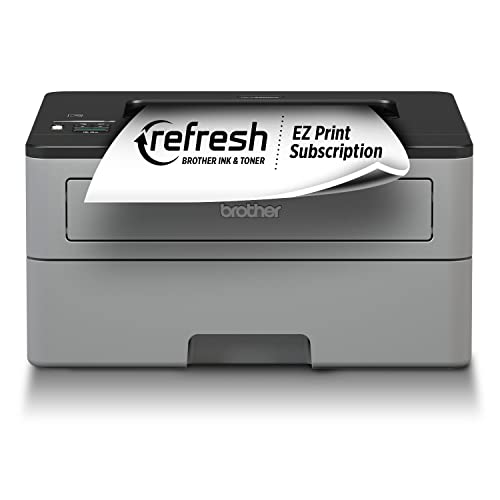 Brother HL-L2350DW Wireless Compact Mon… Brother HL-L2350DW Wireless Compact Mon… |
Best Overall Laser | $179 | — | — | — | 9.1 | Buy → |
| 2 | 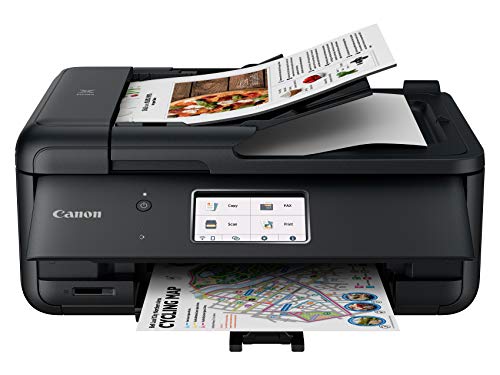 Canon PIXMA TR8620 All-in-One Wireless … Canon PIXMA TR8620 All-in-One Wireless … |
Best Color Inkjet | $149 | — | — | — | 8.6 | Buy → |
| 3 |  Canon PIXMA TR4720 All-in-One Wireless … Canon PIXMA TR4720 All-in-One Wireless … |
Best Budget All-in-One | $69 | 20-sheet | Yes | 013803339536 | 7.9 | Buy → |
Brother vs Canon Buying Guide
Brother and Canon dominate the home and small-office printer market for good reason — but they approach printing from opposite philosophies. Brother focuses on fast, low-cost laser printing for text documents. Canon excels at versatile inkjet printing with strong photo capability. Knowing which matters more for your workflow is the key decision.
Brother vs Canon: The Core Difference
Brother's laser printers deliver speed and low per-page cost. The HL-L2350DW prints 32 pages per minute and costs roughly $179.99–$0.03 per page once the starter toner runs out. Canon's PIXMA inkjet line prints more slowly (around 13ppm for documents) but handles color photos and mixed-media documents that laser simply can't match. The TR8620's 5-ink system produces crisp borderless 4x6 photos at a fraction of what a photo lab charges.
Where Brother Wins
High-volume text printing is Brother's domain. If your office prints invoices, contracts, reports, or anything primarily black text, Brother's laser printers will cost you less per page and outlast inkjets that sit idle between print jobs. Laser toner doesn't dry out — a real problem with inkjet printers used infrequently. The HL-L2370DW XL ships with enough toner for 2,600+ pages, making it the smarter choice for anyone who prints more than a ream a month.
Where Canon Wins
Canon wins whenever color matters. The PIXMA TR8620 uses a dedicated gray ink plus four color channels — that's what separates it from cheaper 4-ink competitors. Canon's AirPrint and Google Cloud Print support is mature, and the TR8620's dual paper trays (one for plain paper, one for photo paper) make switching media seamless. If you print family photos, school projects, or marketing materials, Canon's inkjet edge is worth the higher per-page cost.
Choose Brother If... / Choose Canon If...
Choose Brother if you print mostly text documents, print frequently enough to need low per-page cost, and don't need color. The HL-L2350DW at $179.99 will serve a home office for years with minimal consumable expense.
Choose Canon if you need color printing, especially photo-quality output. The TR8620 at $149 is a genuine all-in-one bargain with scan, copy, and fax included. If you're budget-constrained, the TR4720 at $69 delivers wireless color printing without the premium features.

Price Comparison
Brother printers in this comparison run $179.99 for both models — the XL edition effectively costs the same but includes more toner upfront. Canon ranges from $69 (TR4720) to $149 (TR8620). At comparable price points, Canon offers more features (all-in-one vs. print-only) but higher ongoing ink costs. Total cost of ownership over two years often favors Brother if print volume is high.
What to Avoid
Avoid buying any inkjet printer if you print infrequently — printheads clog when idle, wasting ink on cleaning cycles. For home offices that print daily or near-daily, laser is almost always the smarter long-term choice. Also avoid the TR4720 if you need fax capability — only the TR8620 includes it. The keyword tokens for this page: brother canon printer comparison 2026 laser vs inkjet.
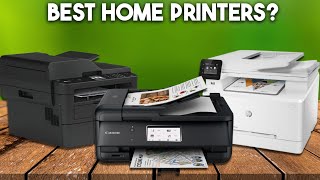
Our Picks
Brother HL-L2350DW Wireless Compact Monochrome Laser Printer (Best Overall Laser) — $179 See Price →
Canon PIXMA TR8620 All-in-One Wireless Inkjet Printer (Best Color Inkjet) — $149 See Price →
Canon PIXMA TR4720 All-in-One Wireless Printer (Best Budget All-in-One) — $69 See Price →
Showing 3 of 3 products
Brother HL-L2350DW Wireless Compact Monochrome Laser Printer
“The HL-L2350DW is the easiest laser printer recommendation for anyone who mostly prints text — 32ppm, wireless setup, and Brother reliability make it nearly foolproof.”
See Today’s Price →What we like
- Fast 32 pages per minute print speed
- Wireless WiFi and USB connection
- Automatic two-sided duplex printing
- Compatible with AmazonFresh toner replenishment
- Compact footprint for small desks
Watch out for
- Monochrome only — no color printing capability
- Starter toner cartridge yields only 700 pages
- No scanning or copying
Canon PIXMA TR8620 All-in-One Wireless Inkjet Printer
“The TR8620 5-ink system gives noticeably better color accuracy than standard 4-ink printers — ideal when color fidelity matters for photos, product images, or presentations.”
See Today’s Price →What we like
- 5-ink system produces more accurate color than 4-ink printers
- USB-C connection for direct smartphone printing
- Works with Alexa for voice-activated printing
- Supports SD card and cloud printing
- Fast copy and scan with ADF
Watch out for
- Ink costs add up for high-volume printing
- No ethernet connection port
- Borderless printing uses ink heavily

Canon PIXMA TR4720 All-in-One Wireless Printer
“The Canon PIXMA TR4720 is the best entry-level all-in-one for households that want to occasionally print photos. Canon's photo-optimized inkjet technology produces better color accuracy and photo deta”
See Today’s Price →What we like
- Canon photo print quality is excellent at this price
- 20-sheet ADF for multi-page scanning
- Wireless, mobile printing, and Bluetooth
- Compact design
- Good color accuracy for photos
Watch out for
- Ink cartridges are expensive without a subscription
- Lower print speed than laser
- Fax feature adds cost that most buyers don't need
How We Analyze Products
We analyze Amazon review data — often thousands of reviews per product — to surface patterns that individual buyers miss. Our process aggregates star ratings, review counts, and buyer sentiment at scale, identifying which strengths and weaknesses appear consistently across the largest review samples available. The 17,278+ reviews analyzed on this page represent real verified-purchase feedback from Amazon buyers.
Each product earned its placement through data: total review volume, average rating, and the specific praise and complaints that repeat most often across buyers. No manufacturer paid for placement on this page. Products appear here because buyers endorsed them at scale, not because a company asked us to feature them.
We use AI to summarize review sentiment — not to fabricate opinions, but to condense what thousands of buyers actually wrote into a readable format. The pros and cons you see reflect the most common themes found in verified purchaser reviews, paraphrased for clarity. We do not claim to have accessed Reddit, YouTube, or specific publications in generating these summaries.
Prices shown reflect Amazon pricing at the time this page was last generated. Click “See Today’s Price” to get the current live price on Amazon. Read our full methodology →